How to Create Parallel Processing Workflows Across Multiple Profiles
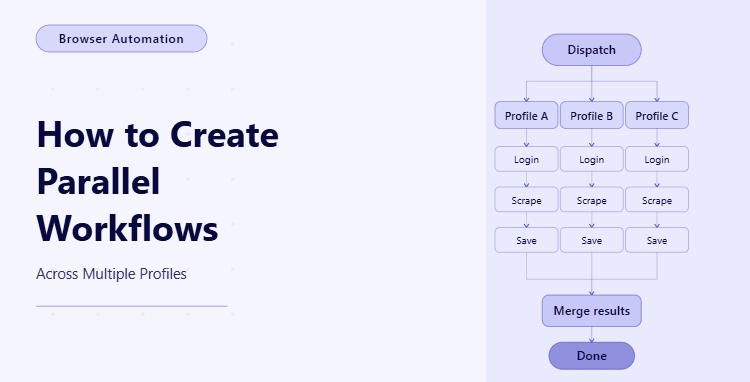
By the end of this tutorial, you will have a working automation structure that can run tasks across multiple profiles at the same time instead of processing them one by one, which is essential when you need to scale beyond a single account or session. A sequential workflow may work for testing or low-volume automation, but once you are dealing with multiple browser profiles, user accounts, regional environments, or client-specific sessions, running everything in order quickly becomes slow and difficult to maintain.
To follow along, you will need Python 3.9 or higher, a basic understanding of asynchronous functions, and some familiarity with browser automation tools such as Playwright. You do not need to be deeply advanced, but you should be comfortable reading structured Python code and understanding how one function can launch multiple tasks at once.
This kind of setup usually takes a couple of hours to build and test properly the first time because parallel processing introduces a different kind of complexity from normal automation. The challenge is no longer just making a task work, but making sure it works safely and predictably when several profiles are active at the same time. For this tutorial, the workflow will run locally, but when you later need to manage many profiles, schedules, and monitoring layers in production, Appilot can serve as the execution layer that helps you scale the same logic without changing the core workflow design.
You will be building a system that reads multiple profile configurations, launches separate tasks for each one, runs them in parallel, collects the results, and keeps each profile isolated so that one failure does not break the entire workflow.
What This Tutorial Builds — And Why This Approach
This tutorial builds a parallel processing workflow where each profile is treated as its own execution unit, which means that every profile can run independently while still being coordinated by one main controller. That controller is responsible for launching each job, collecting results, and deciding how many concurrent tasks should run at once. This is far more efficient than processing profiles sequentially because the total runtime becomes closer to the longest individual task instead of the sum of all tasks combined.
The reason this approach matters is that multi-profile automation is rarely just about speed. It is also about isolation. Each profile may have its own login state, its own cookies, its own proxy, its own timezone, or its own client-specific configuration. If that isolation is not handled carefully, then sessions can leak into each other, failures can become harder to debug, and the whole workflow becomes unreliable. Parallel design forces you to structure the system clearly, which is actually a good thing because it makes the workflow easier to scale later.
At a small scale, you can manage this with local Python code and Playwright. At a larger scale, where you may be running many profiles across different environments and schedules, Appilot becomes useful because it helps manage execution, monitoring, and operational load while your actual multi-profile logic remains the same.
How the System Works — Architecture Overview
At a high level, the workflow starts by loading a set of profile definitions. Each profile contains the data needed to run one isolated session, such as a profile name, credentials, starting URL, or configuration settings. The main controller then creates one task per profile and launches those tasks concurrently using asynchronous execution. Each task runs its own browser session or process logic, performs its assigned work, stores its result, and exits independently.
This structure is useful because it keeps decision-making centralized while keeping execution isolated. The controller decides when and how many tasks to run, but each profile task is responsible only for its own session. That separation makes the system easier to reason about, easier to debug, and much safer than trying to run one giant shared workflow across all profiles at once.
Part 1 — Environment Setup
Step 1 — Install Dependencies
The first step is to install the tools needed for parallel browser automation. Playwright is a good fit for this kind of workflow because it supports asynchronous execution naturally, which makes it easier to manage multiple concurrent browser tasks in one Python application.
pip install playwright
playwright install chromium
Once that is installed, verify that the environment is ready before you start building profile-based logic.
playwright --versionStep 2 — Create the Project Structure
A clean project layout matters more than usual in parallel automation because multiple things are happening at once, and it becomes much easier to keep the system understandable when configuration, execution logic, and result handling are separated from the start.
mkdir parallel-profile-workflow && cd parallel-profile-workflow
mkdir scripts config logs data
touch main.py config/profiles.py scripts/profile_runner.py scripts/storage.py
This structure gives you a dedicated place for profile definitions, execution logic, and stored results, which helps keep the workflow organized as concurrency increases.
Part 2 — Defining Multiple Profiles
Step 3 — Create the Profile Configuration
Before anything can run in parallel, the system needs a clear list of profiles to process. Each profile should contain only the data needed for its own isolated execution so that tasks do not depend on shared session state.
# config/profiles.py
PROFILES = [
    {
        "profile_id": "profile_001",
        "start_url": "https://example.com/dashboard",
        "email": "user1@example.com",
        "timezone": "America/New_York"
    },
    {
        "profile_id": "profile_002",
        "start_url": "https://example.com/dashboard",
        "email": "user2@example.com",
        "timezone": "Europe/London"
    },
    {
        "profile_id": "profile_003",
        "start_url": "https://example.com/dashboard",
        "email": "user3@example.com",
        "timezone": "Asia/Dubai"
    }
]
This kind of configuration gives each profile its own execution context. In a real workflow, you may also include proxies, saved sessions, locale settings, or client-specific paths. The important part is that every profile remains self-contained.
Step 4 — Think in Terms of Isolated Units
A common mistake in multi-profile automation is to treat profiles as small variations of one shared browser session, but that usually creates confusion and cross-profile contamination. A safer pattern is to think of each profile as a separate workflow unit that just happens to be launched by the same controller. That means each one should have its own browser context, its own timing, and its own result record.
This mindset becomes especially important once you begin debugging failures. If a single profile crashes or encounters an unexpected page state, you want that problem to stay local to that profile instead of affecting the rest of the run.
Part 3 — Building the Profile Runner
Step 5 — Create a Function That Runs One Profile
The first execution building block is a function that handles exactly one profile from start to finish. This function should know nothing about the other profiles. Its job is simply to open the session, process the assigned work, return the result, and exit cleanly.
# scripts/profile_runner.py
from playwright.async_api import async_playwright
async def run_profile(profile: dict) -> dict:
    async with async_playwright() as p:
        browser = await p.chromium.launch(headless=False)
        context = await browser.new_context(timezone_id=profile["timezone"])
        page = await context.new_page()
        try:
            await page.goto(profile["start_url"])
            title = await page.title()
            result = {
                "profile_id": profile["profile_id"],
                "status": "success",
                "title": title
            }
        except Exception as e:
            result = {
                "profile_id": profile["profile_id"],
                "status": "failed",
                "error": str(e)
            }
        await context.close()
        await browser.close()
        return result
This function is intentionally simple, but it captures the core idea. One profile goes in, one isolated browser session runs, and one result comes out. That is the right level of abstraction for multi-profile parallel automation.
Step 6 — Keep Session State Independent
In real projects, profile isolation is not just about separate function calls. It also means separating things like cookies, storage state, authentication, and proxies. If two profiles accidentally reuse the same session data, the automation may still run, but the results can become misleading or dangerous.
That is why parallel processing works best when each profile has its own browser context or its own external identity layer. Even if the main code path is shared, the runtime identity of each profile must remain separate. This is one of the most important design principles in multi-profile automation.
Part 4 — Running Profiles in Parallel
Step 7 — Launch Multiple Profile Tasks at Once
Now that you have a runner for one profile, the next step is to launch all of those runners concurrently. Python’s asyncio.gather makes this straightforward because it allows multiple asynchronous tasks to be scheduled and awaited together.
# main.py
import asyncio
from config.profiles import PROFILES
from scripts.profile_runner import run_profile
async def run_all_profiles():
    tasks = [run_profile(profile) for profile in PROFILES]
    results = await asyncio.gather(*tasks, return_exceptions=False)
    return results
async def main():
    results = await run_all_profiles()
    for result in results:
        print(result)
asyncio.run(main())
This is the core of parallel execution. Instead of waiting for profile one to finish before starting profile two, the controller launches all tasks together and then waits for all of them to complete. This can reduce runtime dramatically when the number of profiles grows.
Step 8 — Understand the Difference Between Parallel and Sequential Runs
In a sequential workflow, ten profiles that each take one minute will usually take around ten minutes in total. In a parallel workflow, those same ten profiles may finish much closer to one minute, depending on system limits and how much true concurrency your environment can support. That is why parallel design matters so much when speed and scale become important.
However, faster is not automatically better unless it is controlled. Launching too many profiles at once can overload your machine, saturate network resources, or trigger platform-level suspicion if every session behaves identically at the same moment. So the real goal is not maximum concurrency. The real goal is appropriate concurrency.
Part 5 — Controlling Concurrency Safely
Step 9 — Add a Concurrency Limit
A smarter workflow usually limits how many profiles can run at the same time. This prevents resource spikes and gives you more control over system behavior. A semaphore is a simple way to enforce that limit.
# main.py
import asyncio
from config.profiles import PROFILES
from scripts.profile_runner import run_profile
semaphore = asyncio.Semaphore(2)
async def run_with_limit(profile):
    async with semaphore:
        return await run_profile(profile)
async def run_all_profiles():
    tasks = [run_with_limit(profile) for profile in PROFILES]
    results = await asyncio.gather(*tasks)
    return results
async def main():
    results = await run_all_profiles()
    for result in results:
        print(result)
asyncio.run(main())
With this version, even if you have many profiles configured, only two will run at the same time. This is often a better production starting point because it balances speed with stability.
Step 10 — Decide the Right Concurrency Level
The ideal concurrency level depends on the kind of tasks you are running, the power of your machine, and how sensitive the target platform is to simultaneous automation. A light data collection workflow may handle more concurrency than a heavy browser workflow with screenshots, downloads, and login checks. In other cases, the safest design may intentionally stagger profile starts so that they do not all open at the same second.
The important thing is to treat concurrency as a tuning decision, not a fixed number. You should test it gradually, watch memory and CPU behavior, and make sure the automation remains stable before increasing the number of simultaneous runs.

Part 6 — Collecting Results and Handling Failures
Step 11 — Store Results Per Profile
Parallel execution is much easier to debug when every profile returns a clear structured result. That way, you can see which profiles succeeded, which failed, and why, without mixing everything into one shared log stream.
# scripts/storage.py
import json
from pathlib import Path
def save_results(results: list):
    output = Path("data/results.json")
    output.write_text(json.dumps(results, indent=2))
Then you can call this after the parallel run completes.
# main.py
from scripts.storage import save_results
async def main():
    results = await run_all_profiles()
    save_results(results)
    for result in results:
        print(result)
This makes the run easier to review and gives you a stable record of each profile’s outcome.
Step 12 — Prevent One Failure from Breaking Everything
One of the benefits of profile isolation is that a single failure does not need to collapse the whole workflow. If one profile encounters a timeout or a broken selector, the other profiles should still complete their own runs. That is why each profile runner should catch its own exceptions and return a structured failure result instead of crashing the controller.
This design is especially important in parallel workflows because concurrency naturally makes debugging noisier. The cleaner the result structure is, the easier it becomes to trace individual profile outcomes without losing visibility into the full run.
Part 7 — Scaling Execution with Appilot
Step 13 — When Local Parallelism Stops Being Enough
At a small scale, local parallel execution with Python and Playwright is often enough. But once you need to handle many profiles, recurring schedules, operational monitoring, and larger execution loads, the challenge stops being just code structure and becomes more about orchestration. You need to know which profiles failed, which ones are slow, how often tasks are being retried, and how to manage runs without constantly checking the machine manually.
That is where Appilot fits naturally into this type of workflow. The parallel logic itself can remain the same, but Appilot can act as the execution layer that helps manage profile-based automation more reliably across larger workloads. In practical terms, that means you keep your profile isolation and task design while reducing the operational burden of running and monitoring the workflow at scale.
FAQ
Q1: What is a parallel processing workflow in automation?
It is a workflow where multiple tasks run at the same time instead of one after another, which makes the system faster and more scalable when handling many profiles or sessions.
Q2: Why is profile isolation important in parallel workflows?
Because each profile may have its own session data, identity, and configuration, and without isolation those states can leak into each other and make the workflow unreliable.
Q3: Can I run unlimited profiles in parallel?
Not safely. The right level depends on your machine resources, the type of task, and the target platform. Most workflows need a controlled concurrency limit rather than unrestricted parallelism.
Q4: What happens if one profile fails?
In a well-structured workflow, that failure should stay local to the affected profile while the other profiles continue running and return their own results.
Q5: Do I need Appilot to build this?
No. You can build and test the workflow locally with Python and Playwright. Appilot becomes useful when you want to manage execution and monitoring more reliably at larger scale.
Conclusion
Parallel processing across multiple profiles is one of the most effective ways to make automation faster and more scalable, but the real value comes from doing it in a controlled and isolated way. The goal is not just to launch many tasks at once. The goal is to launch them safely, keep each profile independent, collect clean results, and make sure one failure does not poison the entire workflow.
Start by designing one solid single-profile runner, then add concurrency carefully, and only increase parallelism when you know the system remains stable under load. That sequence matters because strong isolation and predictable execution are what make parallel workflows truly useful in production. Once you get that foundation right, scaling to larger profile sets becomes much more manageable.