How to Create Realistic Session Durations and Dwell Times
By the end of this tutorial, you will understand how to structure session lengths and on-page dwell times so your automation flows feel natural instead of uniform or rushed. Many systems focus on actions but ignore how long users typically stay engaged, which leads to unrealistic interaction patterns over time. To follow along, you only need a basic understanding of how sessions and page interactions work. The focus here is on designing timing behavior rather than writing code. This setup typically takes less than an hour to define, but it significantly improves consistency and realism. If you manage multiple workflows, Appilot can help orchestrate execution while your timing system ensures smooth and believable session behavior. You will build a system that varies session duration, adjusts dwell time based on context, and avoids repetitive patterns.
Why Session Timing Matters
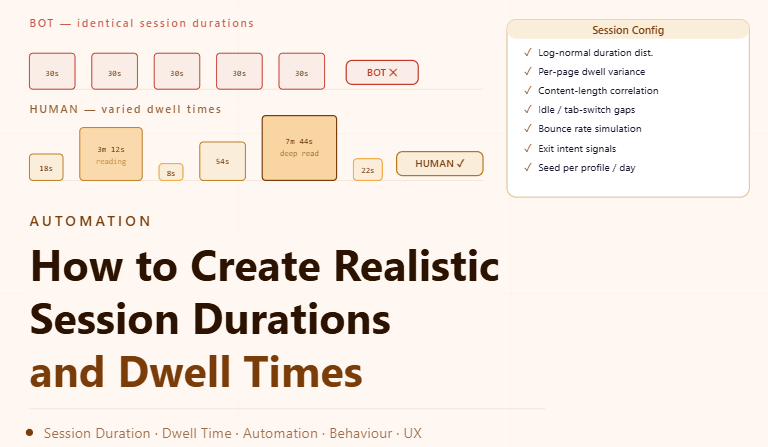
Sessions that start and end at identical intervals can appear mechanical and predictable. Real users have varying levels of engagement depending on content, purpose, and interest. Introducing variation in session duration helps create a more natural flow of activity.
Understanding Dwell Time in Real Behavior
Dwell time refers to how long a user stays on a page before taking another action. This duration depends on factors such as content complexity and user intent. Replicating these differences helps create more believable interaction patterns.
Using Ranges Instead of Fixed Durations
Instead of assigning a single duration for sessions or page visits, it is better to use ranges. Each session can then fall within a defined window, ensuring that timing is never identical across interactions. This approach introduces natural variability.
Varying Session Length Based on Activity
Not all sessions should be the same length. Some may be short and focused, while others may involve extended interaction. Adjusting session duration based on activity type creates a more realistic pattern.
Adjusting Dwell Time Based on Content
Pages with more detailed or complex content should have longer dwell times, while simpler pages may require shorter engagement. Aligning timing with content ensures logical consistency in behavior.
Introducing Breaks Between Sessions
Real users do not operate continuously without pauses. Adding gaps between sessions helps simulate natural usage patterns and prevents continuous, uninterrupted activity.
Avoiding Repetitive Timing Patterns
Even when using ranges, patterns can emerge if durations follow the same sequence repeatedly. Introducing slight randomness in both session length and dwell time placement helps maintain unpredictability.
Aligning Timing with Workflow Context
Session and dwell time should reflect the purpose of the workflow. Quick tasks may involve shorter sessions, while exploratory actions may require longer engagement. This alignment improves consistency.
Testing Session Behavior
After configuring timing patterns, it is important to observe how sessions behave in real scenarios. Testing ensures that durations feel natural and do not disrupt workflow execution.
Monitoring and Refining Over Time
Timing patterns may need adjustment as workflows evolve. Monitoring helps identify whether sessions are too short, too long, or too consistent, allowing for continuous improvement.
Integrating Timing into Automation Systems
Session duration and dwell time should be part of your overall automation design rather than separate elements. Integrating them ensures that all interactions follow consistent timing principles.
Scaling Timing Management with Appilot
At this stage, your timing configuration works locally and improves interaction realism. As the number of workflows increases, maintaining consistent timing manually becomes more complex. This is where Appilot becomes useful because it helps orchestrate workflows while your configuration ensures that all sessions remain natural and well-paced.
FAQ
Q1: What is session duration?
It is the total time a user spends interacting in a single session.
Q2: What is dwell time?
It is the time spent on a specific page before taking another action.
Q3: Why vary session timing?
To avoid predictable and mechanical interaction patterns.
Q4: How do I choose timing ranges?
Based on the type of activity and content complexity.
Q5: Do I need Appilot for this setup?
No, you can configure it locally. Appilot becomes useful when scaling workflows.
Conclusion
Creating realistic session durations and dwell times is essential for building natural and consistent automation behavior. By using ranges, aligning timing with context, and avoiding repetitive patterns, you can design a system that feels more realistic. Start by defining timing rules, test their impact, and refine over time. Once this system is in place, your workflows become smoother and more predictable.