How to Detect and Handle Website Changes That Break Automation
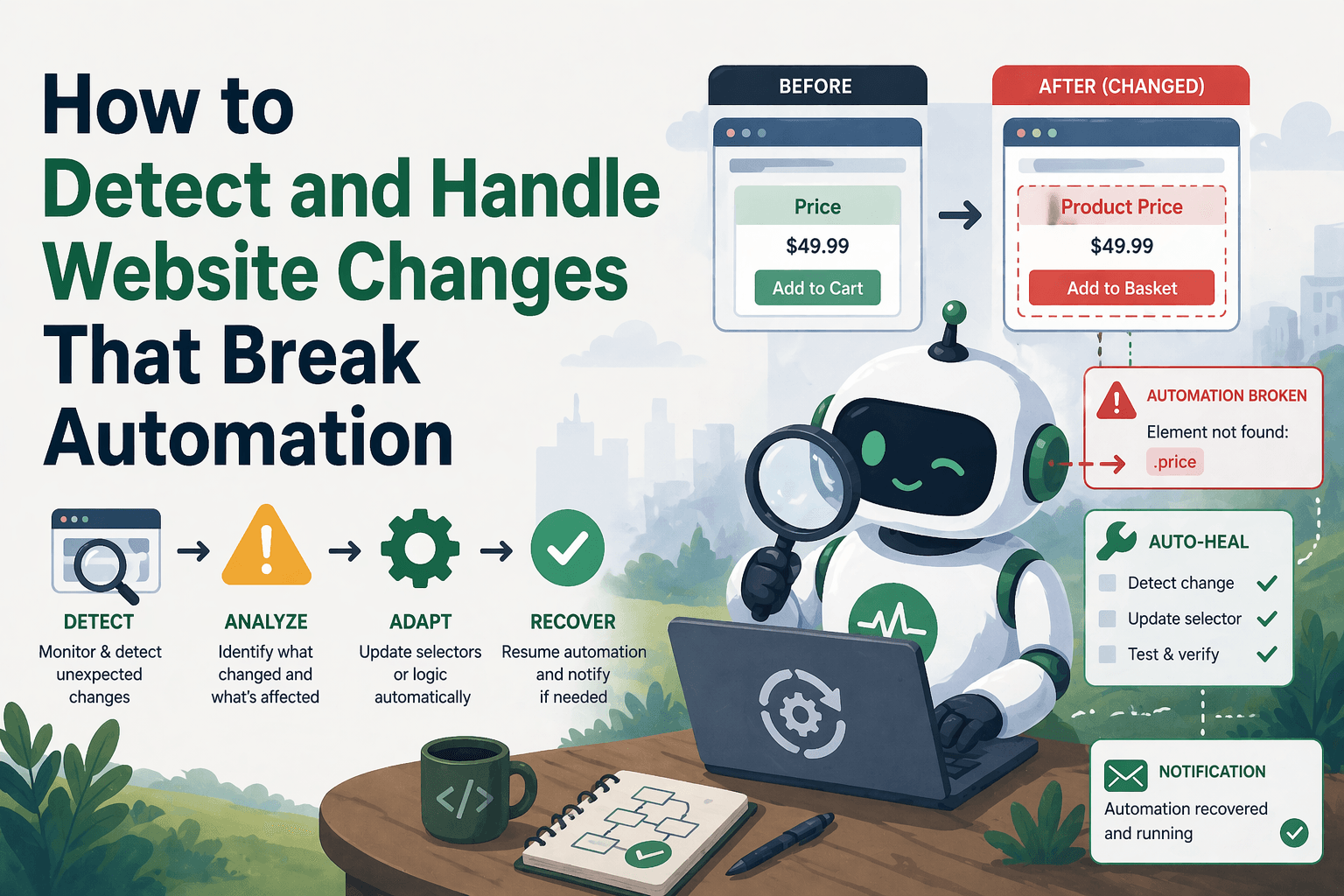
By the end of this tutorial, you will understand how to design automation workflows that can detect when a website has changed and respond intelligently instead of silently failing or breaking completely. This is one of the biggest real-world challenges in browser automation because websites constantly update layouts, selectors, and data structures, which can easily break even well-built scripts.
To follow along, you need a basic understanding of how browser automation interacts with web pages, such as using selectors, extracting data, or performing actions like clicks and navigation. You do not need to write complex code, because the focus here is on building detection and handling strategies that keep your automation stable over time.
This setup typically takes some upfront thinking rather than heavy implementation, but once in place, it reduces maintenance significantly. If you later run multiple automation workflows across different sites or accounts, Appilot can help monitor execution while your change-handling logic continues to work independently.
You will build a system that detects structural changes, identifies what broke, and applies recovery strategies so your automation continues working or fails gracefully with useful insights.

What This Tutorial Builds — And Why This Approach
This tutorial builds a change-aware automation workflow that does not assume the website will remain the same forever. Instead of hardcoding a fixed structure and hoping it never changes, the workflow continuously checks whether expected elements and data are present. If something is missing or different, it triggers detection logic and applies recovery strategies.
This approach is important because most automation failures are caused by small changes such as renamed classes, moved elements, or updated layouts. Without detection, these changes cause silent failures or incorrect outputs. With detection in place, the workflow can identify the issue early and either adapt or stop safely.
At a small scale, this can run locally with browser automation tools. At a larger scale, where multiple workflows need monitoring, Appilot becomes useful because it helps track failures and identify patterns across workflows while your detection logic remains unchanged.
How the System Works — Architecture Overview
At a high level, the workflow runs as usual but includes validation checks after each critical step. These checks confirm that expected elements exist, data is present, and actions produced the intended result. If any of these checks fail, the system flags a potential website change and triggers handling logic.
This structure separates execution from validation. Execution performs tasks, while validation ensures those tasks still make sense in the current page structure. This separation makes the system more robust and easier to debug.
Part 1 — Understanding Website Changes
Step 1 — Identify Common Types of Changes
Websites change in predictable ways. Selectors may be renamed, layouts may shift, elements may move into different containers, and dynamic content may be loaded differently. Sometimes entire workflows change, such as a new login flow or redesigned dashboard.
Recognizing these patterns helps you design detection strategies that catch issues early.
Step 2 — Understand Why Automation Breaks
Automation breaks because it depends on assumptions about the page structure. When those assumptions are no longer true, actions fail or produce incorrect results. The goal is not to prevent change, but to detect when assumptions no longer hold.
Part 2 — Detecting Changes Automatically
Step 3 — Validate Key Elements
After each important step, the workflow should check whether the expected elements are still present. For example, if a table or button is missing, that is a strong signal that the page has changed.
These checks act as guardrails that prevent the workflow from continuing with incorrect assumptions.
Step 4 — Validate Data Output
Even if elements exist, the data they contain may change. The workflow should verify that extracted data matches expected patterns, such as non-empty values or correct formats.
This helps catch subtle changes where the structure exists but the content is different.
Step 5 — Compare Against Known Patterns
A more advanced approach involves comparing current page behavior or structure against a known baseline. If key elements or data patterns differ significantly, the system can flag a potential change.
This adds another layer of detection beyond simple presence checks.
Part 3 — Handling Detected Changes
Step 6 — Retry with Flexible Selectors
Sometimes changes are minor, such as class name updates. Using more flexible selectors or alternative paths can allow the workflow to continue without manual updates.
This is especially useful when multiple selectors can identify the same element.
Step 7 — Use Fallback Paths
If the primary path fails, the workflow can attempt alternate methods, such as navigating to a different page, using another selector, or extracting data from a secondary source.
Fallback paths ensure the workflow can still produce results even when the main structure changes.
Step 8 — Stop Safely When Necessary
Not all changes can be handled automatically. In some cases, it is better to stop the workflow and report the issue clearly instead of continuing with incorrect data.
A safe stop prevents bad data from entering downstream systems.
Part 4 — Building a Change-Resilient Workflow
Step 9 — Add Validation After Each Step
A resilient workflow includes validation checkpoints after every major action. These checkpoints confirm that the workflow is still aligned with the expected structure.
This prevents errors from accumulating and makes debugging easier.
Step 10 — Log and Track Failures
When a change is detected, the workflow should log details such as missing elements, unexpected data, or failed actions. This information helps identify what changed and how to fix it.
Tracking these patterns over time also helps improve the system.
Part 5 — Real-World Considerations
Step 11 — Avoid Overfitting to One Structure
Automation should not rely on extremely specific selectors that are likely to change. Using stable identifiers such as data attributes or meaningful labels reduces the risk of breakage.
Step 12 — Monitor Changes Over Time
Regular monitoring helps detect patterns in website updates. Some sites change frequently, while others remain stable for long periods. Understanding this helps you decide how much detection logic is needed.
Step 13 — Combine with Self-Healing Logic
Detection works best when combined with recovery strategies such as retries, fallbacks, and validation checks. Together, these create a system that can adapt to changes instead of breaking immediately.
Step 14 — Scaling with Appilot
At this stage, the workflow can detect and handle changes locally. As the number of workflows grows, monitoring and managing these changes becomes more complex.
This is where Appilot becomes useful because it helps track failures, identify change patterns, and manage execution across multiple workflows without modifying the core detection logic.
FAQ
Q1: Why do website changes break automation?
Because automation relies on specific page structures, and changes to those structures invalidate those assumptions.
Q2: How can I detect changes early?
By validating elements and data after each step instead of assuming everything worked correctly.
Q3: Can automation adapt to all changes automatically?
No, but it can handle many common changes and reduce the impact of others.
Q4: What is the safest way to handle major changes?
Stop the workflow and report the issue instead of continuing with incorrect data.
Q5: Do I need Appilot for this workflow?
No, you can run it locally. Appilot becomes useful when managing multiple workflows at scale.
Conclusion
Detecting and handling website changes is essential for building reliable automation systems. The key is to stop assuming stability and start designing workflows that verify their environment continuously. By adding validation, detection, and recovery strategies, you can turn fragile scripts into systems that adapt to change.
Start by adding simple validation checks, expand to detection patterns, and then introduce fallback and recovery strategies as needed. Over time, this approach significantly reduces maintenance and improves reliability.