How to Disable WebRTC to Stop IP Leaks
By the end of this tutorial, you will understand how WebRTC can expose your real IP address and how to control or disable it so your setup remains consistent with your proxy configuration. Many users configure proxies correctly but still face unexpected IP exposure due to WebRTC behavior. To follow along, you only need a basic understanding of how browsers handle connections. The focus here is on building a reliable configuration rather than writing code. This setup typically takes less than an hour to review and apply, but it significantly improves stability and consistency. If you manage multiple workflows, Appilot can help orchestrate execution while your configuration ensures that all network signals remain aligned. You will build a system that prevents WebRTC leaks, maintains consistent routing, and avoids hidden exposure points.
Why WebRTC Causes IP Leaks
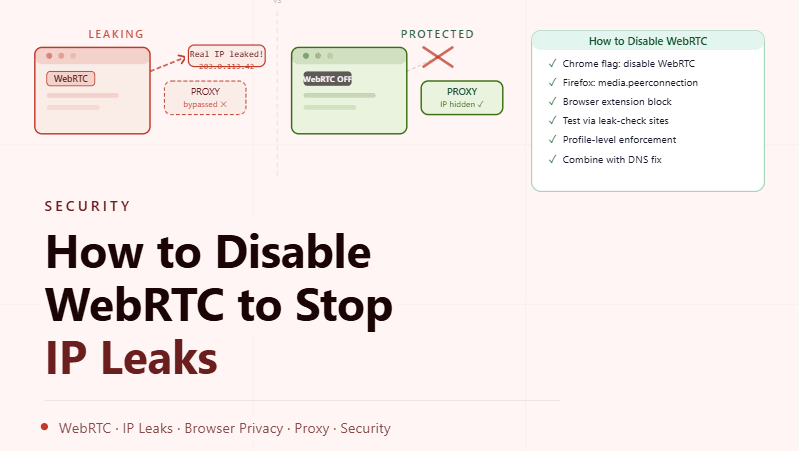
WebRTC is designed to enable real-time communication directly between browsers, which means it can establish peer-to-peer connections outside the usual proxy path. This behavior allows it to bypass proxy routing in some cases, exposing the underlying network address. Even when your main traffic is routed correctly, WebRTC can create a secondary path that reveals inconsistent information.
Understanding How WebRTC Bypasses Proxies
Unlike standard web requests that follow configured proxy routes, WebRTC may use direct connections for efficiency. This can result in multiple network paths being visible at the same time, where one follows the proxy and another exposes the local network. Preventing this requires aligning browser behavior with your intended routing setup.
Disabling WebRTC at the Browser Level
Most browsers provide settings or flags that allow you to limit or disable WebRTC functionality. Adjusting these settings ensures that peer-to-peer connections are restricted or controlled so they do not bypass your proxy configuration. This is one of the most effective ways to prevent unintended exposure.
Using Extensions or Built-In Controls
Some environments allow additional control through extensions or built-in privacy settings that specifically manage WebRTC behavior. These tools provide an extra layer of control, ensuring that the feature does not create alternative network paths. Combining these controls with browser settings improves reliability.
Keeping Network Signals Consistent
The goal of disabling or controlling WebRTC is to ensure that all network activity follows the same route. When different components of your connection use different paths, inconsistencies arise. Aligning all signals ensures predictable and stable behavior.
Testing for WebRTC Leaks
After configuration, it is important to verify that WebRTC is no longer exposing unintended information. Testing allows you to confirm that your setup is working as expected and that no alternative connections are being established. Regular checks help maintain confidence in your configuration.
Avoiding Partial Configuration Issues
Disabling WebRTC in one part of the system while leaving it active elsewhere can still lead to leaks. Ensuring that all relevant settings are aligned prevents partial exposure. A complete configuration is necessary for consistent results.
Monitoring Browser Behavior Over Time
Browser updates or changes in settings can re-enable WebRTC or alter its behavior. Monitoring ensures that your configuration remains effective over time. Staying aware of these changes helps maintain long-term stability.
Integrating WebRTC Control into Profile Management
Each browser profile should include consistent WebRTC settings as part of its configuration. This ensures that all profiles behave predictably and follow the same rules. Integrating these settings into your profile setup reduces the chance of errors.
Scaling Configuration with Appilot
At this stage, your WebRTC configuration works locally and prevents IP leaks effectively. As the number of profiles and workflows increases, maintaining consistent settings manually becomes more complex. This is where Appilot becomes useful because it helps orchestrate workflows while your configuration ensures that all network behavior remains aligned.
FAQ
Q1: What is WebRTC?
It is a browser technology that enables direct peer-to-peer communication.
Q2: Why does WebRTC cause IP leaks?
Because it can bypass proxy routing and establish direct connections.
Q3:Can disabling WebRTC affect functionality?
Yes, some real-time communication features may be limited.
Q4: How do I know if WebRTC is leaking my IP?
By testing whether your real network address is exposed during checks.
Q5: Do I need Appilot for this setup?
No, you can configure it locally. Appilot becomes useful when scaling workflows.
Conclusion
Disabling WebRTC to stop IP leaks is an essential step in maintaining consistent and reliable network behavior. By controlling how your browser establishes connections, you can ensure that all traffic follows your intended routing path. Start by adjusting browser settings, verify your configuration, and monitor changes over time. Once this system is in place, your setup becomes more stable and predictable.