How to Fix "Policy Violation" on Google Ads (When You Didn't Violate)
The Ad Looks Fine But Google Still Rejects It
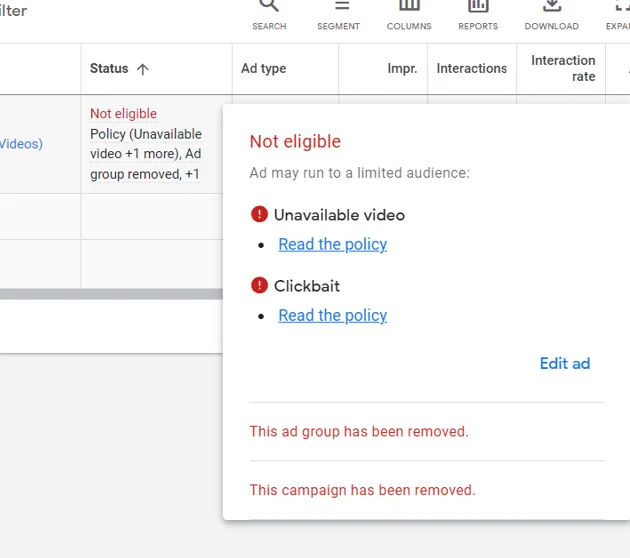
One of the most frustrating things in Google Ads is when you receive a policy violation warning even though the ad looks completely normal from your point of view. The headline is simple, the offer is clear, the landing page works, and there is nothing obviously dangerous or misleading in the campaign. Then suddenly the ad gets rejected for a policy you did not even realize applied.
This becomes especially frustrating because Google’s explanations are often vague. Instead of showing the exact sentence, image, keyword, or landing page section that caused the issue, the platform may simply show a broad policy label and leave you guessing about what triggered it.
The important thing to understand is that not every Google Ads policy violation means you intentionally broke a rule. Sometimes the system flags something automatically because it resembles risky content, sensitive topics, restricted products, or suspicious page behavior.
Why Google Ads Flags “False” Policy Violations
Most false policy violations happen because Google’s automated review system sees something that looks similar to content it normally restricts.
For example, a normal business ad may accidentally sound too aggressive, a pricing claim may look exaggerated, or a landing page may include words that are commonly associated with restricted industries.
Even certain phrases like “guaranteed results,” “make money fast,” “instant approval,” “risk-free,” or “best price” can sometimes trigger policy reviews because those phrases are often abused by low-quality advertisers.
The same thing can happen with images, testimonials, before-and-after language, or headlines that sound too dramatic.
Sometimes the ad itself is fine but the landing page creates the problem.
If the landing page has popups, redirects, hidden pricing, aggressive claims, missing contact details, or unusual scripts, Google may interpret that as suspicious behavior even if the ad copy is completely normal.
The Biggest Mistake: Appealing Without Reviewing The Landing Page
One of the biggest mistakes advertisers make is assuming the ad itself caused the rejection.
In reality, a lot of policy violations come from the landing page.
Google reviews the full experience, not just the ad text.
If the landing page loads slowly, redirects unexpectedly, hides important details, has no privacy policy, lacks contact information, or feels spammy, the ad may be rejected even if the ad copy itself looks clean.
That is why the first step should always be reviewing the full path from the ad to the landing page.
Ask yourself whether the user sees exactly what the ad promised.
Make sure pricing is clear, the offer is transparent, contact details exist, and the page does not feel misleading or incomplete.
Why Restricted Industries Get Flagged More Often
Some industries face much stricter review than others.
For example, finance, health, crypto, supplements, legal services, affiliate marketing, software downloads, lead generation, and business opportunity offers often receive much more scrutiny.
That means even small wording issues can trigger rejections.
For example, a normal statement about improving finances may accidentally look like a “get rich quick” promise. A normal health claim may look like a medical promise. A software offer may look suspicious if it mentions downloads, browser changes, or device performance improvements.
If your industry already sits in a high-risk category, the safest approach is making the language more conservative and more transparent.
How To Write A Strong Appeal
A good Google Ads appeal should be short, professional, and focused on the facts.
Do not complain emotionally, accuse Google of being unfair, or send multiple different appeals at once.
Instead, explain that you reviewed the ad and landing page carefully, made updates where needed, and believe the campaign now follows Google Ads policies.
For example:
We reviewed the ad and landing page carefully and updated the content to ensure it accurately represents the offer. We confirmed that the landing page is transparent, includes the necessary business information, and does not contain misleading claims or restricted content. We believe the ad now follows Google Ads policies and respectfully request another review.
Why Better Systems Reduce Future Rejections
Policy violations become much harder to manage when ad copy, landing pages, keywords, account notes, and campaign history are spread across different systems. You may have one place for creatives, another for landing page edits, another for compliance notes, and another for reporting. That makes it difficult to see which patterns keep causing rejections.
This is one of the reasons Appilot becomes useful when advertising operations start scaling. Instead of keeping browser workflows, Android automations, campaign assets, landing page reviews, policy notes, account history, and task logs spread across different systems, everything can stay visible from one dashboard. That makes it easier to review campaigns before launch, compare rejected ads, monitor risky language, and reduce future policy issues across multiple accounts.
Conclusion: Most “False” Policy Violations Happen Because Something Looks Risky To Google’s System
If Google Ads flagged your campaign for a policy violation even though you feel you did nothing wrong, the issue is usually not that Google randomly rejected the ad. The problem is that the wording, landing page, industry, or account behavior looked similar to something Google normally restricts.
Once you make the messaging more transparent, improve the landing page, reduce risky language, and submit a clean appeal, it becomes much easier to get the ad approved and avoid future violations.