How to Fix "Weekly Invitation Limit Reached" on LinkedIn
You’re building your network on LinkedIn, sending connection requests consistently, and then suddenly you hit a wall—the dreaded “Weekly Invitation Limit Reached” notification appears, blocking you from sending more requests until the next cycle resets. It feels frustrating because just when your outreach momentum is building, LinkedIn forces you to stop, slowing your growth and disrupting your workflow.
For many professionals, especially those relying on LinkedIn for lead generation, recruitment, or partnerships, this limit is more than just an inconvenience because it directly impacts pipeline growth and opportunity flow. You might find yourself carefully selecting who to connect with, trying to maximize every request, or even holding back outreach entirely just to avoid hitting the cap too early.
As your outreach scales, the problem becomes even more restrictive because managing a handful of connection requests manually is manageable, but trying to grow across multiple campaigns or accounts becomes nearly impossible under strict limits. You’re left with three options: accept slow growth, manually optimize every request for higher acceptance rates, or try to bypass limits without triggering restrictions.
There’s a smarter way to approach this problem. Instead of fighting LinkedIn’s limits, you can work with them by improving acceptance rates, structuring outreach workflows, and using automation tools like Appilot to distribute activity intelligently across time and profiles.
In this guide, you’ll learn why LinkedIn enforces weekly invitation limits, how they actually work behind the scenes, and how to fix the issue using proven strategies that increase acceptance rates while staying compliant. You’ll also learn how to build a scalable outreach system that doesn’t break every time you hit a limit.
You’ll understand how to optimize your profile, craft better connection requests, structure automation workflows, and safely scale beyond the limits without risking your account.
Setup time is around 45 minutes, difficulty is intermediate, and the return is significant because improving acceptance rates alone can double your effective outreach without increasing request volume.
Why LinkedIn Invitation Limits Matter in 2026
LinkedIn has evolved into a highly controlled networking platform where user experience and trust take priority over unrestricted growth, which is why invitation limits exist in the first place. Over the years, the platform has introduced stricter controls to prevent spam, fake accounts, and aggressive sales tactics, all of which degrade the quality of the network.
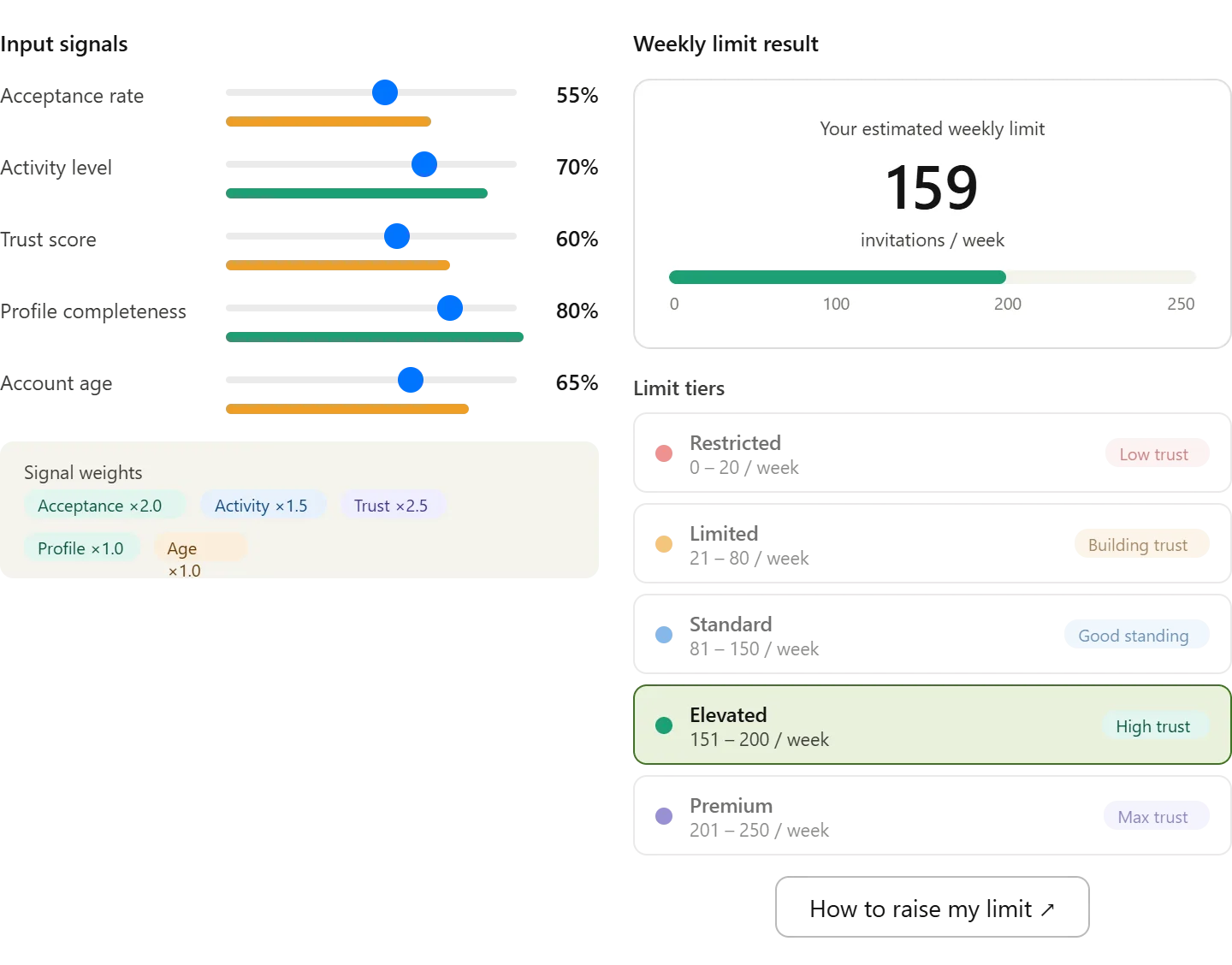
Today, LinkedIn limits the number of connection requests you can send weekly, typically around 100 to 200 invitations depending on account activity, acceptance rate, and trust score. However, this number is not fixed, and it dynamically changes based on how your account behaves.
The platform evaluates signals such as how many people accept your requests, how many ignore or report them, and how frequently you send requests in short bursts. If your acceptance rate is low, LinkedIn reduces your limit because it interprets your behavior as low-value or potentially spammy.
For professionals relying on outreach, this creates a hidden constraint that directly affects growth. A recruiter, marketer, or sales professional managing outreach campaigns can easily spend hours sending connection requests manually, only to hit the limit before achieving meaningful results.
If you break down the math, the inefficiency becomes clear. Sending 150 requests per week at an average acceptance rate of 10 percent results in only 15 new connections. If each request takes 30 seconds to manage, that’s over an hour weekly for minimal return. Increasing acceptance rates to 30 percent, however, triples results without increasing effort.
This is why the focus should not be on increasing volume but on improving efficiency and working within LinkedIn’s system.
What You Need to Get Started
To fix the weekly invitation limit issue effectively, you need a combination of tools and strategy rather than relying solely on increasing request volume.
You need a properly optimized LinkedIn profile, an antidetect browser like GoLogin if managing multiple accounts, and an automation platform such as Appilot to manage workflows efficiently. You also need around 45 minutes for setup and initial testing.
Using residential proxies is recommended for multi-account setups, as they reduce detection risk and help maintain account stability. Additional tools like CRM integrations or tracking systems can improve efficiency but are not mandatory.
The cost of this setup typically ranges between $100 and $300 per month depending on scale. When compared to the time saved and improved results, the investment becomes justifiable, especially for professionals who rely on LinkedIn for revenue generation.
Step-by-Step: Fixing the Weekly Invitation Limit Issue
Step 1: Understand How the Limit Works
LinkedIn’s weekly invitation limit is not just a fixed number but a dynamic threshold influenced by your behavior. If your requests are frequently ignored or declined, the system reduces your limit because it assumes your outreach is not valuable.
Step 2: Improve Your Acceptance Rate
The fastest way to effectively bypass the limitation is by improving how many people accept your requests. A higher acceptance rate signals to LinkedIn that your outreach is relevant, which can lead to increased limits over time.
This involves targeting the right audience, personalizing messages, and ensuring your profile builds trust. Even small improvements in acceptance rate can significantly increase results without increasing volume.
Step 3: Optimize Your Profile
Before sending requests, your profile must clearly communicate value. People often check your profile before accepting, and if it looks incomplete or overly promotional, they will ignore your request.
Focus on your headline, summary, and profile picture so that they align with your target audience and clearly explain what you offer.
Step 4: Structure Your Outreach Workflow
Instead of sending requests randomly, you need a structured workflow that controls timing, volume, and messaging.
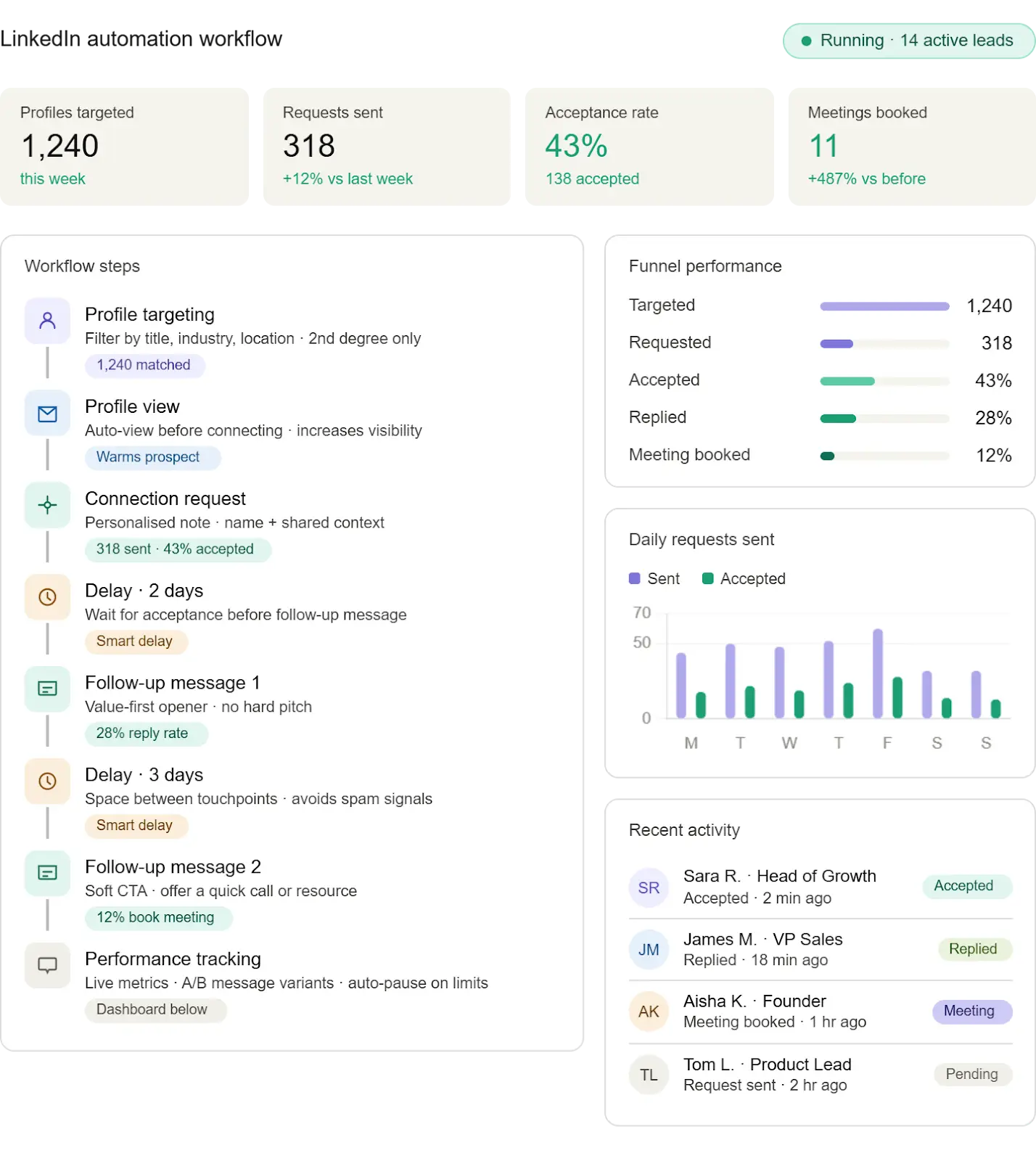
This is where Appilot becomes useful. It allows you to create workflows that automate connection requests while maintaining personalization and safety. You can schedule actions, set limits, and introduce delays to mimic human behavior.
You can achieve similar results with tools like Appium, but Appilot simplifies the process by removing the need for technical setup.
Step 5: Distribute Requests Over Time
Sending too many requests in a short period increases the risk of hitting limits quickly and reduces effectiveness. Distributing requests throughout the week ensures steady activity and better results.
Automation tools allow you to schedule requests across different times and days, making your activity appear natural and reducing the likelihood of restrictions.
Step 6: Test and Scale Gradually
Always test your workflow on a small scale before expanding. Monitor acceptance rates, adjust your messaging, and ensure there are no warnings from LinkedIn.
Once your system is stable, you can gradually increase scale while maintaining performance.
Safety and Best Practices
LinkedIn’s limits are designed to maintain platform quality, so respecting them is essential for long-term success. Sending too many requests too quickly or using identical messages increases the risk of restrictions.
Randomization is key because human behavior is naturally inconsistent. Varying timing, message structure, and daily activity helps avoid detection.
Account warm-up is also important, especially for new profiles. Starting with low activity and gradually increasing volume reduces risk.
Real Results: What to Expect
In the first week, most of your effort will go into setup and testing, with minimal immediate results. By the second to fourth week, you should start seeing improved acceptance rates and more efficient outreach.
After one to two months, your system becomes stable, allowing you to consistently generate connections without hitting limits prematurely.
A typical case shows users increasing acceptance rates from 10 percent to over 30 percent while reducing time spent on outreach by more than 70 percent.
Common Problems and Solutions
One common issue is hitting the limit too quickly. This usually happens when requests are sent in bursts. Spreading them out resolves this problem.
Another issue is low acceptance rates, which can be fixed by improving targeting and messaging.
Users may also experience account warnings, which typically occur when limits are exceeded or behavior appears automated. Reducing activity and increasing randomization helps resolve this.
Choosing the Right Tools
GoLogin is ideal for managing multiple profiles safely, while Appilot provides a streamlined way to automate workflows without technical complexity.
For users who prefer full control, tools like Appium are available but require more setup and maintenance. For most users, a managed solution offers the best balance between simplicity and scalability.
Scaling Beyond the Limit
As you scale outreach, your approach must evolve. Monitoring becomes more important, and you may need to upgrade tools or infrastructure.
At higher scales, team collaboration and advanced tracking systems become essential to maintain performance and avoid issues.
Frequently Asked Questions
Many users ask whether LinkedIn automation violates platform rules. The answer depends on how it is used. Responsible automation that respects limits is generally tolerated, while abusive behavior is not.
Another common question is whether accounts will get banned. While there is always some risk, following best practices significantly reduces it.
Users also want to know how much time automation saves. In most cases, it reduces manual work by over 70 percent while improving results.
Conclusion
The “Weekly Invitation Limit Reached” issue is not a barrier but a signal that your outreach strategy needs improvement. Instead of trying to bypass LinkedIn’s system, the smarter approach is to optimize within it.
By improving acceptance rates, structuring workflows, and using automation tools effectively, you can achieve better results without increasing request volume.
The key is to focus on quality over quantity, test your approach, and scale gradually once you see consistent performance.