How to Randomize Browser Fingerprints Across Profiles
By the end of this tutorial, you will understand how to introduce controlled variation across browser profiles so each one presents a distinct environment instead of repeating identical configurations. When multiple profiles share similar characteristics, patterns can emerge that reduce independence and create instability in behavior. To follow along, you only need a basic understanding of what browser fingerprints represent, such as device settings, environment attributes, and configuration signals. The focus here is on designing structured variation rather than writing code. This setup typically takes less than an hour to plan properly, but it becomes critical as your number of profiles grows. If you manage multiple workflows, Appilot can help orchestrate execution while your configuration ensures each profile remains distinct. You will build a system that introduces variation carefully, maintains consistency, and avoids unrealistic setups.
Why Fingerprint Variation Matters
When profiles are created using the same template without variation, they can appear identical in behavior and configuration. This reduces diversity and makes it harder to maintain independent environments. Introducing variation ensures that each profile operates with its own distinct characteristics.
Understanding What Can Be Varied
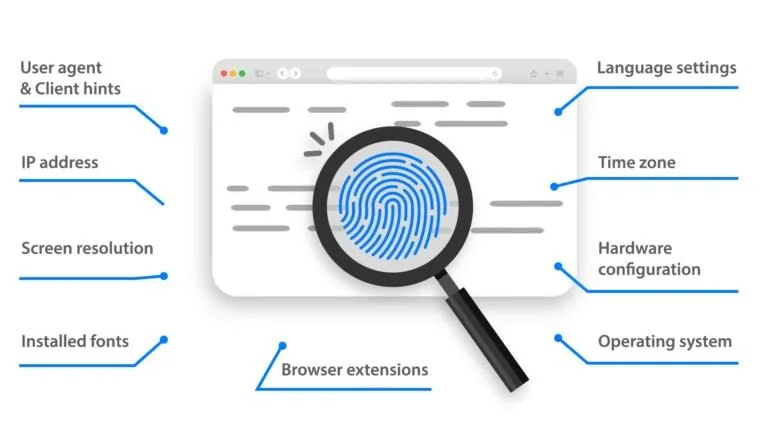
A browser fingerprint consists of multiple attributes that together define how a profile appears. Variation should be applied across these attributes rather than focusing on a single element. Balanced variation creates more natural diversity.
Avoiding Identical Configurations
Using the same configuration repeatedly across profiles creates patterns that are easy to recognize. Ensuring that each profile has differences in key attributes helps maintain independence and prevents overlap.
Introducing Controlled Randomization
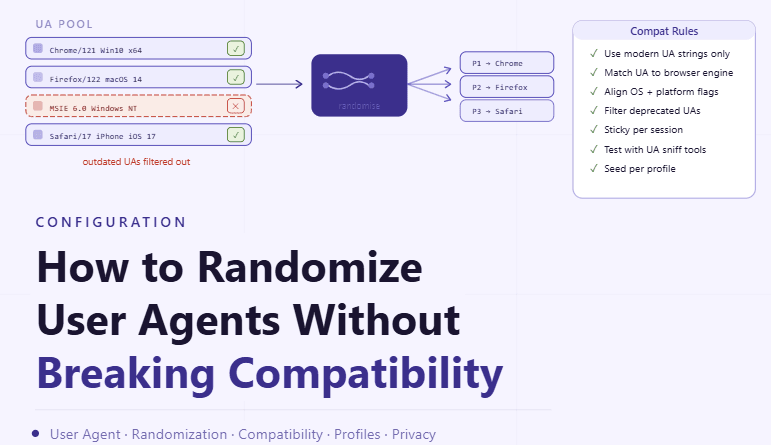
Randomization should not be completely unstructured. Instead, it should follow defined ranges and realistic combinations so that profiles remain stable while still being different. Controlled variation ensures both uniqueness and reliability.
Maintaining Realistic Combinations
Not all combinations of attributes make sense together. Randomization should respect logical groupings so that profiles appear consistent within themselves. This prevents unrealistic setups that may cause instability.
Balancing Consistency and Variation
While variation is important, certain core configurations should remain consistent to ensure that profiles function properly. Balancing these two aspects ensures that profiles are both reliable and distinct.
Distributing Variation Across All Profiles
Variation should be spread evenly across profiles rather than concentrated in a few. This ensures that the entire system maintains diversity and avoids clustering of similar configurations.
Testing Profiles After Variation
After applying variation, it is important to verify that profiles behave as expected. Testing ensures that changes do not introduce instability and that each profile remains functional.
Monitoring for Pattern Formation
Even with variation, patterns can emerge over time if changes are not managed carefully. Monitoring helps identify similarities that may develop and allows for adjustments to maintain diversity.
Integrating Variation into Profile Creation
Fingerprint variation should be part of your profile creation process rather than an afterthought. This ensures that every new profile starts with a unique configuration from the beginning.
Scaling Fingerprint Management with Appilot
At this stage, your variation system works locally and ensures profile diversity. As the number of profiles increases, managing variation manually becomes more complex. This is where Appilot becomes useful because it helps orchestrate workflows while your configuration ensures that all profiles remain distinct.
FAQ
Q1: What is browser fingerprint randomization?
It is the process of introducing variation across profile configurations to maintain uniqueness.
Q2: Why is variation important?
Because identical profiles can create patterns and reduce independence.
Q3: Can randomization be too much?
Yes, unrealistic variation can cause instability, so balance is important.
Q4: How do I test if variation is working?
By verifying that profiles behave correctly and remain distinct.
Q5: Do I need Appilot for this setup?
No, you can manage it locally. Appilot becomes useful when scaling workflows.
Conclusion
Randomizing browser fingerprints across profiles is essential for maintaining diversity and independence in your system. By introducing controlled variation, ensuring realistic combinations, and monitoring patterns over time, you can create a stable and distinct environment. Start by defining variation rules, apply them consistently, and refine your approach as your system grows. Once this process is in place, your profiles become more reliable and easier to manage.