How to Randomize User Agents Without Breaking Compatibility
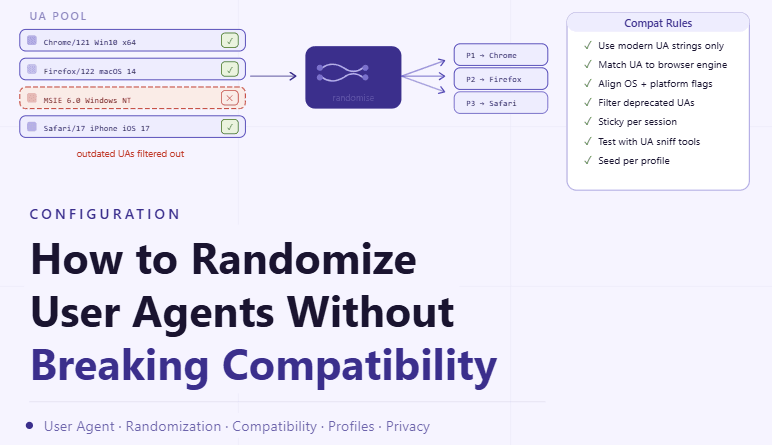
By the end of this tutorial, you will understand how to introduce variation in user agents across browser profiles without causing compatibility issues or breaking functionality. While variation helps maintain diversity, incorrect or unrealistic configurations can lead to rendering problems, failed interactions, or inconsistent behavior. To follow along, you only need a basic understanding of what a user agent represents in a browser environment. The focus here is on designing structured variation rather than writing code. This setup typically takes less than an hour to define, but it plays a key role in maintaining stable and reliable workflows. If you manage multiple profiles, Appilot can help orchestrate execution while your configuration ensures that each profile remains both unique and functional. You will build a system that balances variation with compatibility, avoids mismatches, and maintains consistency.

Why User Agent Variation Needs Care
User agents define how a browser identifies itself, including details about the browser type, version, and operating system. Randomizing these values without structure can create combinations that do not behave correctly. Careful variation ensures that profiles remain functional while still being distinct.
Understanding What a User Agent Represents
A user agent string communicates the environment of the browser to external systems. It includes information that influences how content is delivered and rendered. Maintaining accurate and realistic values ensures that interactions work as expected.
Avoiding Unrealistic Combinations
Combining unrelated attributes, such as mismatched browser versions and operating systems, can lead to inconsistent behavior. Ensuring that user agent values align logically prevents compatibility issues and maintains stability.
Using Controlled Variation Instead of Pure Randomness
Instead of generating completely random user agents, it is better to select from a structured set of valid options. This ensures that all variations are realistic and tested, reducing the risk of errors.
Aligning User Agents with Profile Configuration
User agent settings should match other profile attributes, such as screen size and system characteristics. Keeping these elements aligned ensures that the profile behaves consistently and avoids conflicts.
Maintaining Consistency Within Each Profile
Once a user agent is assigned to a profile, it should remain stable over time. Frequent changes can create inconsistencies in behavior and disrupt workflows. Consistency within a profile is just as important as variation across profiles.
Testing Compatibility Across Environments
After assigning user agents, it is important to verify that profiles function correctly. Testing ensures that content loads properly and that interactions behave as expected. This step helps identify and resolve issues early.
Monitoring for Rendering or Interaction Issues
Some user agents may cause subtle issues that are not immediately obvious. Monitoring helps detect these problems and allows for adjustments to maintain smooth operation.
Avoiding Over-Randomization
Excessive variation can create instability rather than improving diversity. Keeping variation within controlled limits ensures that profiles remain both unique and reliable.
Integrating User Agent Management into Profile Creation
User agent selection should be part of the profile creation process. This ensures that every new profile starts with a valid and consistent configuration, reducing the need for later adjustments.
Scaling Configuration with Appilot
At this stage, your user agent system works locally and ensures both variation and compatibility. As the number of profiles increases, managing configurations manually becomes more complex. This is where Appilot becomes useful because it helps orchestrate workflows while your setup ensures that all profiles remain stable and consistent.
FAQ
Q1: What is a user agent?
It is a string that identifies the browser and its environment.
Q2: Why randomize user agents?
To introduce variation across profiles and avoid identical configurations.
Q3: Can randomization cause issues?
Yes, if combinations are unrealistic or inconsistent.
Q4: How do I keep user agents compatible?
By using structured and validated options instead of pure randomness.
Q5: Do I need Appilot for this setup?
No, you can manage it locally. Appilot becomes useful when scaling workflows.
Conclusion
Randomizing user agents without breaking compatibility requires a balanced approach. By using controlled variation, aligning configurations, and testing thoroughly, you can maintain both diversity and stability. Start by defining valid user agent sets, apply them consistently, and refine your system over time. Once this process is in place, your profiles become more reliable and easier to manage.