How to Rebuild Corrupted Browser Profiles

By the end of this tutorial, you will understand how to recover and rebuild browser profiles that have become corrupted due to crashes, data inconsistencies, or long-term usage. Profile corruption is a common issue in automation, especially when profiles are used heavily or modified frequently.
To follow along, you only need a basic understanding of what browser profiles store, such as cookies, sessions, and configuration data. The focus here is on creating a recovery process that restores functionality while preserving important data.
This setup typically takes about an hour to define properly, but it can save significant time when issues occur. If you manage multiple workflows across profiles, Appilot can help manage execution while your recovery system ensures profiles remain usable.
You will build a system that detects corruption, extracts usable data, and rebuilds profiles in a clean and stable state.
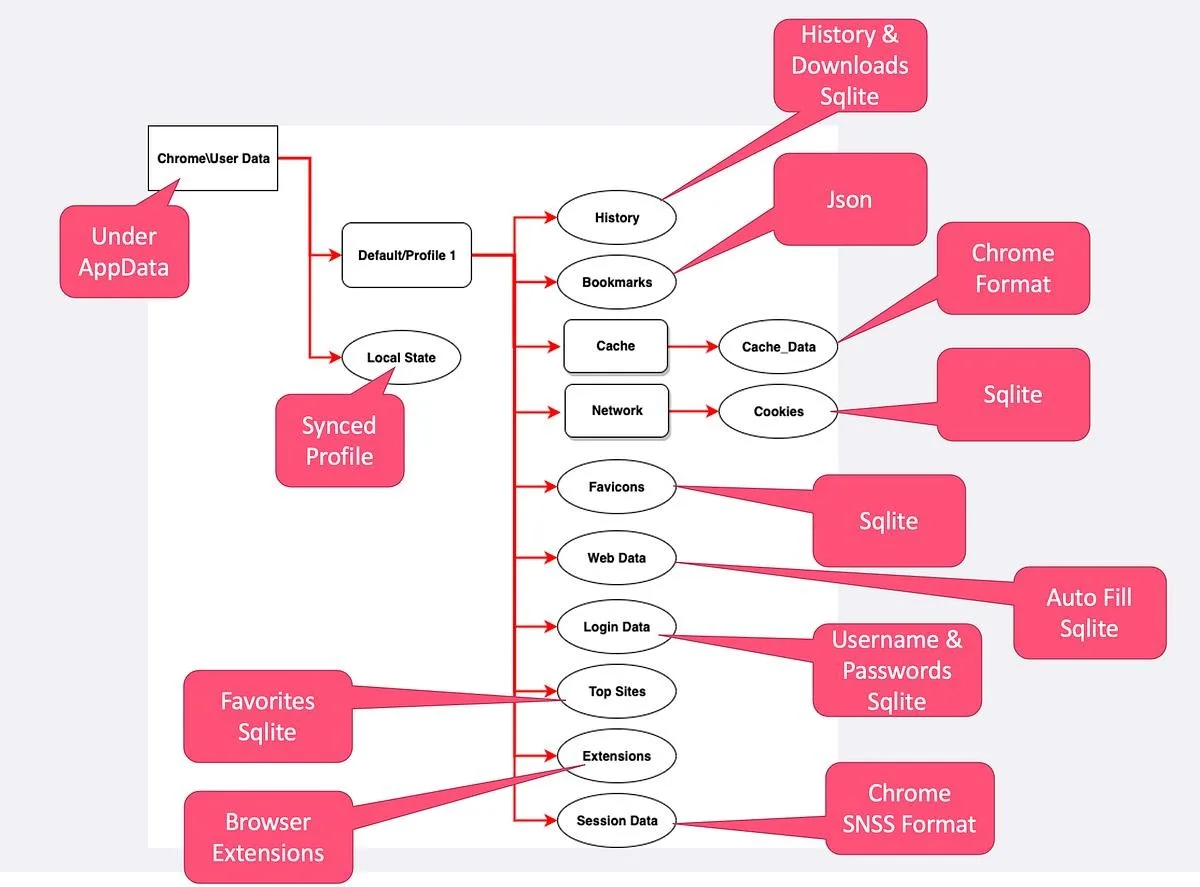
Why Browser Profiles Get Corrupted
Profile corruption can happen for several reasons. Frequent crashes, incomplete writes, storage issues, or improper shutdowns can all damage profile data. Over time, accumulated data and inconsistencies can also lead to instability.
Understanding the causes helps you design a recovery process that addresses the root of the problem instead of just the symptoms.
Recognizing Signs of Corruption
Corrupted profiles often show clear warning signs. These may include failure to load properly, missing data, repeated errors, or unexpected behavior during automation.
In some cases, the profile may still function partially but with reduced reliability. Identifying these signs early helps prevent further damage.
Extracting Critical Data Before Rebuilding
Before rebuilding a profile, it is important to extract any usable data. This includes cookies, session tokens, and essential configuration settings.
Preserving this data allows you to restore functionality without starting from scratch. Skipping this step can result in unnecessary data loss.
Creating a Clean Base Profile
Rebuilding starts with creating a fresh profile that is free from corruption. This new profile acts as a clean foundation where recovered data can be applied.
Starting from a clean base ensures that existing issues are not carried over.
Restoring Essential Components
Once a clean profile is created, the next step is restoring essential components such as session data and configuration settings. Only necessary data should be restored to avoid reintroducing corruption.
Selective restoration helps maintain stability.
Validating the Rebuilt Profile
After restoration, the profile should be tested to ensure that it functions correctly. This includes checking login status, task execution, and overall behavior.
Validation confirms that the rebuilding process was successful.
Handling Partial Recovery
In some cases, not all data can be recovered. When this happens, it may be necessary to re-authenticate or reconfigure certain aspects of the profile.
Planning for partial recovery ensures that workflows can continue even if some data is lost.
Preventing Future Corruption
Rebuilding a profile is only part of the solution. Preventing future corruption is equally important. This includes proper shutdown procedures, regular maintenance, and avoiding excessive data accumulation.
Preventive measures reduce the likelihood of repeated issues.
Maintaining Backup Systems
Regular backups are one of the most effective ways to handle corruption. Having a recent backup allows you to restore profiles quickly without complex rebuilding.
Backup systems provide a safety net for unexpected failures.
Integrating Recovery into Profile Management
Recovery should be part of your overall profile management strategy. Instead of treating corruption as an isolated issue, incorporate rebuilding processes into your workflow.
This ensures that recovery is quick and consistent whenever needed.
Scaling Recovery with Appilot
At this stage, your rebuilding process works locally and allows you to recover profiles effectively. As the number of profiles increases, managing recovery across all of them becomes more complex.
This is where Appilot becomes useful because it helps manage workflows while your recovery system ensures that corrupted profiles are handled efficiently.
FAQ
Q1: What causes browser profile corruption?
Crashes, incomplete writes, storage issues, and long-term data accumulation are common causes.
Q2: Can corrupted profiles be fully recovered?
Sometimes, but partial recovery is common depending on the severity of the issue.
Q3: What should I save before rebuilding?
Cookies, session data, and important configuration settings.
Q4: How do I prevent future corruption?
By maintaining backups, cleaning profiles regularly, and ensuring proper system handling.
Q5: Do I need Appilot for recovery?
No, you can rebuild profiles locally. Appilot becomes useful when managing workflows at scale.
Conclusion
Rebuilding corrupted browser profiles is an essential skill for maintaining stable automation systems. By extracting critical data, creating clean profiles, and restoring only what is necessary, you can recover functionality without carrying over issues.
Start by identifying signs of corruption, build a structured recovery process, and implement preventive measures. Once this system is in place, handling profile issues becomes faster and more reliable.