How to Run Instagram Automation Safely and Reliably
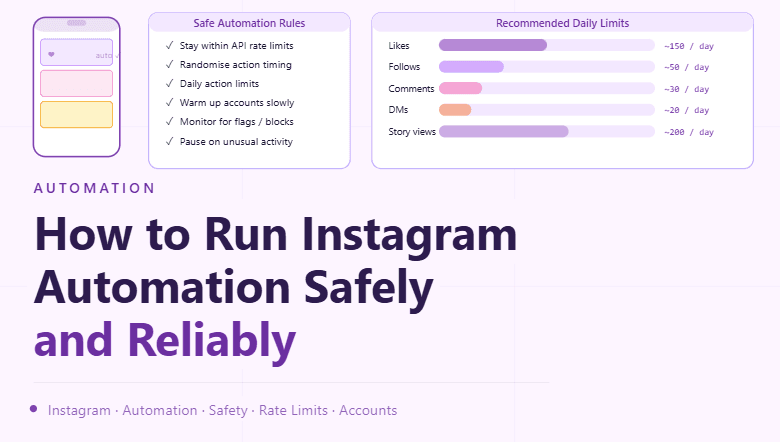
By the end of this tutorial, you will understand how to design Instagram workflows that are stable, predictable, and aligned with platform expectations rather than trying to “outsmart” safeguards. Systems that prioritize consistency, quality interactions, and proper pacing tend to last longer and perform better over time. To follow along, you only need a basic understanding of account workflows and content actions. The focus here is on building a compliant operating model rather than tricks or shortcuts. This setup typically takes less than an hour to outline, but it has a major impact on long-term reliability. If you manage multiple workflows, Appilot can help orchestrate execution while your process ensures steady and responsible usage. You will build a system that emphasizes quality engagement, controlled pacing, and continuous monitoring.
Why “Safety First” Beats Shortcuts
Trying to push aggressive or unnatural activity often leads to instability, limits, or degraded performance. A safety-first approach focuses on steady usage, meaningful interactions, and consistent behavior, which helps maintain account health and reduces disruptions.
Understand Platform Rules and Use Official Tools
Start by reviewing Instagram’s terms and community guidelines and prefer official APIs and integrations for publishing, messaging, and analytics. Official tools are designed to work reliably and keep you within accepted usage patterns.
Build Workflows Around Real Value
Automate the process, not the interaction quality. Plan content, schedule posts, organize assets, and manage approvals with automation, but keep engagement (comments, replies, DMs) thoughtful and relevant to the audience.
Use Gradual, Consistent Activity
Stable systems avoid sudden spikes. Keep posting and engagement at a consistent cadence that reflects how a real account would grow over time. Gradual scaling is more durable than abrupt increases.
Keep Content Quality High
High-quality, relevant content drives organic engagement and reduces the need for aggressive tactics. Use automation to maintain a consistent content calendar, but ensure each post has clear intent and value.
Maintain Clear Separation of Responsibilities
If multiple people work on the same account, define roles and permissions so actions are coordinated and consistent. This reduces conflicting activity and improves accountability.
Monitor Account Health Signals
Track metrics such as reach, engagement rate, posting consistency, and any warnings or feature limitations. Early visibility lets you adjust pacing or content before issues escalate.
Handle Warnings and Limits Carefully
If you encounter restrictions or warnings, reduce activity, review recent changes, and return to a steady cadence. Pushing through limits usually makes problems worse.
Avoid Repetitive or Low-Value Actions
Uniform, repetitive behavior can degrade performance and user experience. Keep interactions meaningful, vary content formats, and focus on genuine audience engagement rather than volume.
Integrate Human Review Checkpoints
Even with automation, include simple checkpoints for content approval, caption review, and messaging tone. This keeps quality high and avoids accidental mistakes.
Use Secure Access and Team Practices
Grant access via official roles and avoid sharing credentials directly. Keep a clear record of who can post or respond, and revoke access when it’s no longer needed.
Scale Safely with Appilot
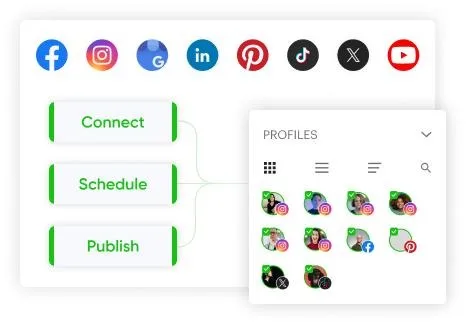
As your workflows grow, coordinating schedules, approvals, and analytics manually becomes complex. Appilot can help orchestrate these processes while your system maintains consistent pacing, quality content, and healthy account practices.
FAQ
Q1: Is automation allowed on Instagram?
Yes, when it follows platform policies and uses approved tools or integrations.
Q2: What’s the safest way to automate?
Automate planning, scheduling, and organization, while keeping interactions meaningful and human-reviewed.
Q3: What should I do if I see restrictions?
Slow down activity, review recent changes, and return to a steady, compliant cadence.
Q4: How do I keep accounts stable long-term?
Focus on consistent posting, quality content, and monitoring key health signals.
Q5: Do I need Appilot for this setup?
No, you can manage it locally. Appilot becomes useful when scaling workflows and coordination.
Conclusion
Sustainable Instagram automation comes from disciplined processes, not shortcuts. By focusing on consistent pacing, valuable content, and clear monitoring, you can build workflows that remain reliable over time. Start with a simple content and scheduling system, add monitoring, and refine gradually. Once this foundation is in place, your automation becomes more stable and easier to scale.