How to Schedule Tasks Based on External Triggers (Webhooks, APIs)
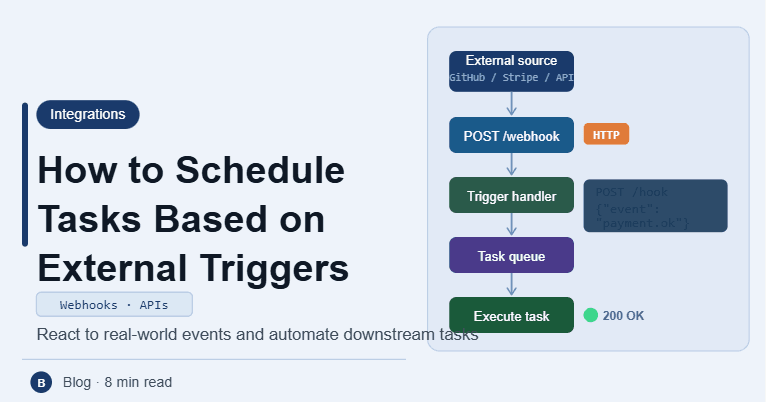
By the end of this tutorial, you will understand how to move from time-based scheduling to event-driven workflows, where tasks run automatically when something happens instead of waiting for a fixed schedule. This approach is more efficient because actions happen exactly when needed. To follow along, you only need a basic understanding of APIs and task execution. The focus here is on designing responsive systems rather than writing heavy code. This setup typically takes less than an hour to plan, but it significantly improves automation efficiency. If you manage multiple workflows, Appilot can help orchestrate execution while your trigger system ensures real-time responsiveness. You will build a system that listens for events, triggers tasks instantly, and maintains reliability.
Why Event-Based Scheduling Is Better Than Time-Based
Traditional scheduling runs tasks at fixed intervals, which can lead to delays or unnecessary executions. Event-based systems trigger tasks only when needed, making workflows faster, more efficient, and more responsive.
Understanding Webhooks
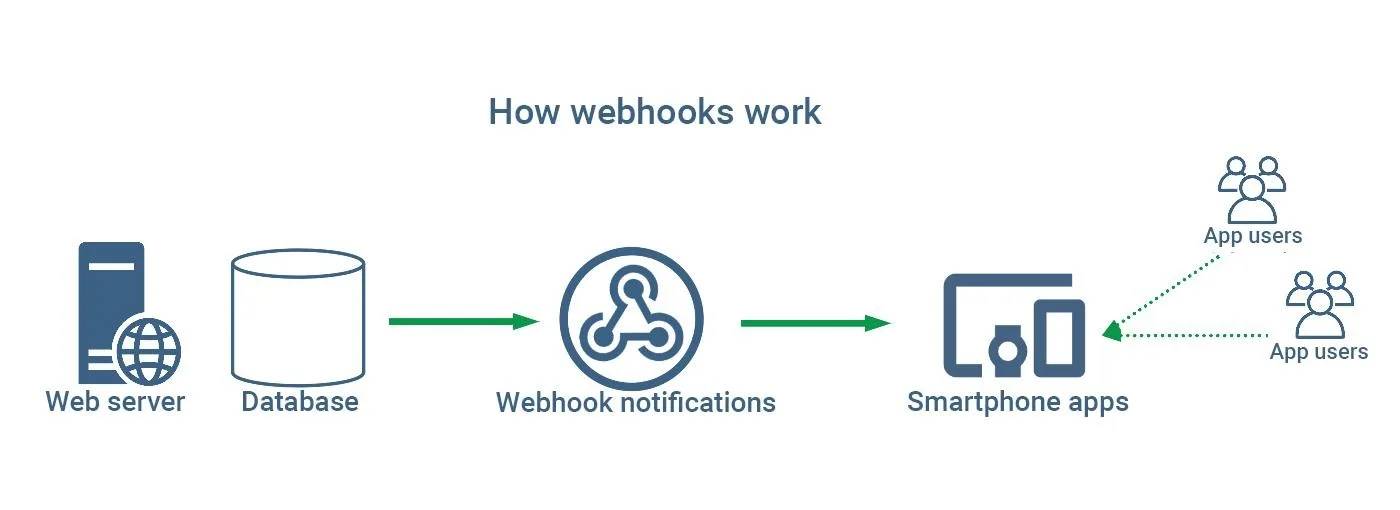
A webhook is a mechanism where one system sends a request to another system when an event occurs. Instead of polling for updates, your system receives data instantly, allowing immediate action.
Understanding API-Based Triggers
APIs can also be used to trigger tasks when specific conditions are met. This may involve checking data, receiving updates, or responding to external inputs. APIs provide flexible ways to control execution.
Designing a Trigger Listener
A trigger listener is a component that waits for incoming events, such as webhook requests or API calls. Once an event is received, it validates the data and decides whether to execute a task.
Validating Incoming Data
Not all incoming events should trigger actions. Validation ensures that only relevant and correctly formatted data is processed. This prevents errors and unnecessary executions.
Mapping Events to Actions
Each type of event should correspond to a specific task. Defining clear mappings ensures that the right action is triggered at the right time, improving system clarity.
Handling Multiple Trigger Sources
Your system may receive triggers from different sources. Organizing these sources and managing them properly ensures that workflows remain structured and predictable.
Adding Retry and Fallback Logic
Sometimes triggers may fail or be missed. Implementing retry mechanisms and fallback strategies ensures that important tasks are not lost and workflows remain reliable.
Preventing Duplicate Executions
Some events may be sent multiple times. A good system detects duplicates and ensures that tasks are not executed more than once unnecessarily.
Monitoring Trigger Activity
Tracking incoming events and triggered tasks helps ensure that the system is functioning correctly. Monitoring allows quick identification of issues and improves reliability.
Integrating Triggers into Workflow Systems
Event-based triggers should be part of your overall automation design. Integrating them ensures that workflows respond dynamically to changes instead of relying only on fixed schedules.
Scaling Event-Driven Workflows with Appilot
At this stage, your trigger-based system works locally and provides real-time execution. As workflows grow, managing multiple triggers manually becomes complex. This is where Appilot becomes useful because it helps orchestrate execution while your system ensures fast and reliable responses.
FAQ
Q1: What is a webhook?
It is a way for one system to send real-time data to another when an event occurs.
Q2: How are APIs used as triggers?
They allow tasks to run when specific conditions or inputs are received.
Q3: Why use event-based scheduling?
Because it is faster and more efficient than fixed schedules.
Q4: How do I prevent duplicate triggers?
By tracking events and ensuring each one is processed only once.
Q5: Do I need Appilot for this setup?
No, you can manage it locally. Appilot becomes useful when scaling workflows.
Conclusion
Scheduling tasks based on external triggers allows you to build fast and responsive automation systems. By using webhooks and APIs, validating events, and ensuring reliable execution, you can create workflows that react instantly to changes. Start by setting up a trigger listener, map events to actions, and refine your system over time. Once this approach is in place, your automation becomes more efficient and scalable.