How to Set Up VPN + Proxy Combo for Maximum Security
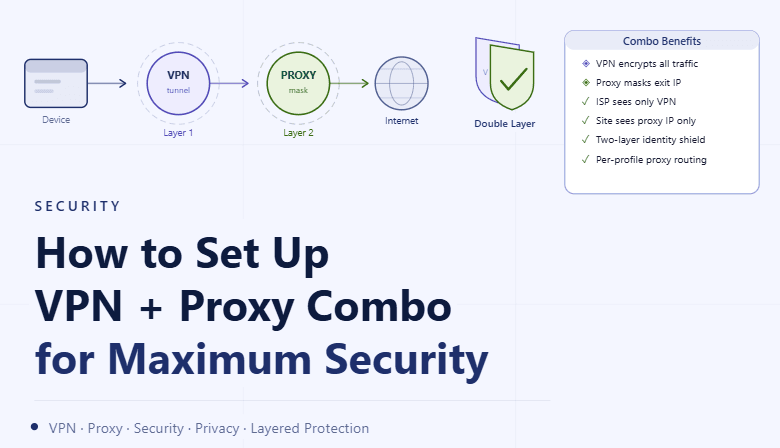
By the end of this tutorial, you will understand how to combine a VPN and proxy in a structured way so your traffic follows a controlled and layered path instead of relying on a single method. Many setups use either a VPN or a proxy, but combining both can improve consistency and reduce single points of failure when configured correctly. To follow along, you only need a basic understanding of how VPNs and proxies route traffic. The focus here is on building a clean architecture rather than writing code. This setup typically takes less than an hour to design properly, but it greatly improves reliability when managing multiple environments. If you run multiple workflows, Appilot can help orchestrate execution while your network setup ensures stable routing. You will build a system that layers connections correctly, maintains consistency, and avoids common configuration mistakes.
Why Combine VPN and Proxy Instead of Using One
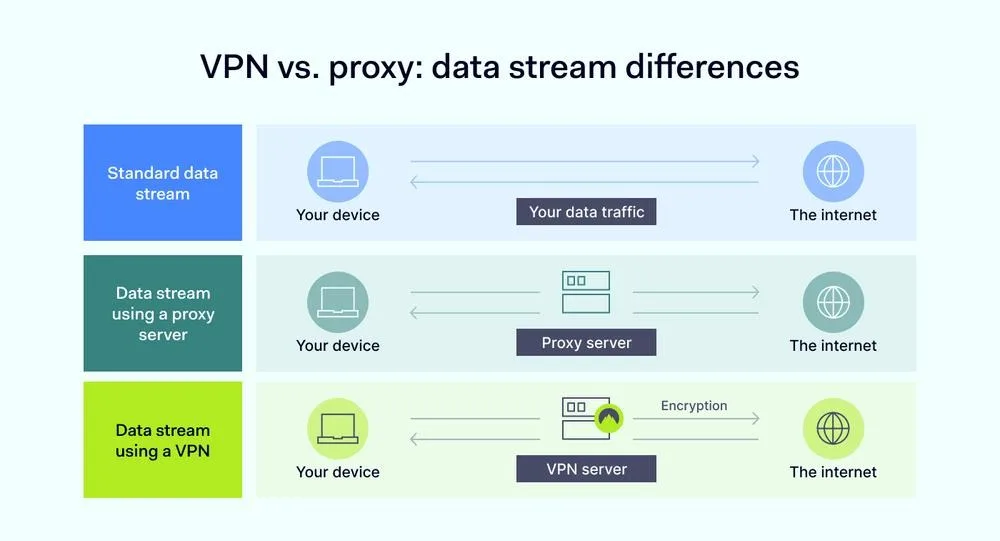
A VPN and a proxy serve different purposes, and combining them allows you to take advantage of both. A VPN typically handles full-system routing, while a proxy provides more granular control at the application or profile level. Using them together creates a layered approach where each component plays a specific role.
Understanding the Traffic Flow Order
The order in which you combine a VPN and proxy determines how traffic is routed. In most structured setups, traffic first passes through the VPN and then through the proxy, creating a consistent outer layer and a controlled inner routing path. This layering ensures that all traffic follows a predictable route.
Maintaining Consistent Routing Paths
When combining multiple network layers, consistency is critical. All requests should follow the same path without switching between different routes. Inconsistent routing can create unpredictable behavior and reduce the effectiveness of your setup.
Avoiding Conflicts Between VPN and Proxy
If both systems are configured independently without coordination, they can conflict with each other. For example, one may override the routing of the other, leading to unexpected results. Ensuring that both layers are aligned prevents these issues.
Assigning Proxies Within a VPN Environment
Once the VPN is active, proxies can be assigned at the profile or application level. This allows you to maintain centralized routing through the VPN while still controlling individual connections through proxies. This combination provides both structure and flexibility.
Preventing Leaks Across Layers
Even with both layers active, leaks can occur if certain requests bypass one of them. Ensuring that DNS, browser features, and network protocols follow the same path is essential. A complete setup ensures that no part of the connection escapes the intended routing.
Testing the Combined Setup
After configuration, testing is necessary to confirm that traffic is flowing through both layers correctly. This involves verifying that the expected network path is being used and that there are no inconsistencies. Regular testing helps maintain reliability.
Monitoring Performance and Stability
Layering multiple systems can affect performance if not managed properly. Monitoring helps ensure that the setup remains stable and does not introduce unnecessary delays or failures. Balanced configuration keeps performance consistent.
Keeping Configurations Simple and Aligned
Overcomplicating the setup with too many layers or inconsistent rules can create instability. Keeping the configuration simple and clearly defined ensures that the system remains predictable and easy to manage.
Integrating Layered Networking into Workflows
The VPN and proxy combination should be part of your overall workflow design. Each profile or application should follow the same structured routing rules. Integration ensures consistency across all operations.
Scaling Network Architecture with Appilot
At this stage, your VPN and proxy setup works locally and provides layered routing. As the number of profiles and workflows increases, maintaining this configuration manually becomes more complex. This is where Appilot becomes useful because it helps orchestrate workflows while your network setup ensures consistent routing behavior.
FAQ
Q1: Why combine a VPN and a proxy?
Because each provides different benefits and together they create a layered routing system.
Q2: Which comes first, VPN or proxy?
Typically, traffic passes through the VPN first and then the proxy.
Q3: Can they conflict with each other?
Yes, if not configured properly, which is why alignment is important.
Q4: Does layering affect performance?
It can, so monitoring and balanced configuration are necessary.
Q5: Do I need Appilot for this setup?
No, you can configure it locally. Appilot becomes useful when scaling workflows.
Conclusion
Setting up a VPN and proxy combination provides a structured way to control how your traffic is routed. By layering connections correctly, maintaining consistency, and testing regularly, you can create a reliable and predictable network setup. Start by defining a clear routing order, align both systems, and monitor performance over time. Once this system is in place, your workflows become more stable and easier to manage.