How to Simulate Natural Scrolling Patterns
By the end of this tutorial, you will understand how to design scrolling behavior that feels natural instead of rigid and uniform. In many automation systems, scrolling is often too fast, perfectly smooth, or happens in fixed steps, which does not reflect how real users interact with content. To follow along, you only need a basic understanding of how automation interacts with pages. The focus here is on building realistic movement patterns rather than writing code. This setup typically takes less than an hour to structure properly, but it significantly improves how interactions behave over time. If you manage multiple workflows, Appilot can help orchestrate execution while your interaction system ensures smooth and consistent behavior. You will build a system that introduces variation in scroll speed, direction, and pauses to mimic natural user behavior.
Why Fixed Scrolling Looks Unnatural
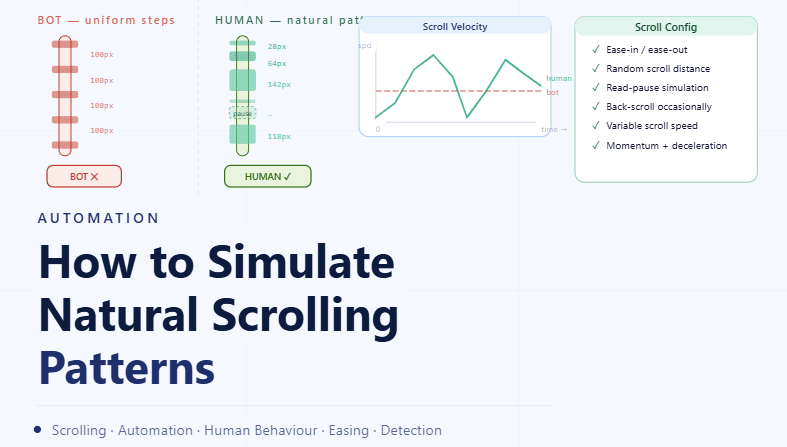
Scrolling at a constant speed or in perfectly equal steps creates a mechanical pattern that does not match real user behavior. Humans scroll inconsistently, adjusting speed and stopping frequently based on what they see. Introducing variation helps remove rigid patterns and creates smoother interaction flow.
Understanding How Humans Scroll
Real users scroll in bursts rather than continuous motion. They often scroll quickly, pause to read, then continue at a different speed. This stop-and-go behavior is a key part of making scrolling feel natural.
Varying Scroll Speed Dynamically
Instead of using a constant scroll speed, it is better to vary speed throughout the interaction. Some scrolls can be faster, while others slow down near areas of interest. This variation creates a more realistic experience.
Adding Pauses Between Scroll Actions
Humans frequently pause while scrolling to read or observe content. Introducing pauses between scroll movements helps simulate this behavior and prevents continuous motion that feels artificial.
Using Uneven Scroll Distances
Scrolling in identical increments creates predictable patterns. Varying the distance of each scroll movement ensures that interactions do not follow a repetitive structure.
Introducing Occasional Reverse Scrolling
Users sometimes scroll slightly upward to revisit content. Adding small reverse movements occasionally helps mimic this natural behavior and improves realism.
Aligning Scrolling with Content Density
Scrolling behavior often depends on the type of content being viewed. Dense or detailed sections may result in slower scrolling, while lighter sections may be passed quickly. Aligning movement with content improves consistency.
Avoiding Continuous Long Scrolls
Long uninterrupted scrolling can appear unnatural. Breaking movement into segments with pauses and variation creates a more believable interaction pattern.
Testing Scrolling Behavior
After configuring scrolling patterns, it is important to observe how they behave in real scenarios. Testing ensures that movements feel natural and do not interfere with workflow execution.
Monitoring and Refining Over Time
Scrolling behavior may need adjustments as workflows evolve. Monitoring helps identify patterns that may become too consistent or unrealistic, allowing for continuous improvement.
Integrating Scrolling into Interaction Systems
Scrolling should be part of your overall interaction design rather than an isolated feature. Integrating it ensures that all actions follow consistent behavioral principles.
Scaling Interaction Behavior with Appilot
At this stage, your scrolling configuration works locally and improves interaction realism. As the number of workflows increases, maintaining consistent behavior manually becomes more complex. This is where Appilot becomes useful because it helps orchestrate workflows while your configuration ensures that all interactions remain smooth and natural.
FAQ
Q1: What are natural scrolling patterns?
They are scrolling behaviors that mimic how real users move through content.
Q2: Why avoid constant scroll speed?
Because it creates predictable and mechanical behavior.
Q3: How do I make scrolling realistic?
By varying speed, adding pauses, and changing scroll distances.
Q4: Should scrolling always move downward?
No, occasional upward movement improves realism.
Q5: Do I need Appilot for this setup?
No, you can configure it locally. Appilot becomes useful when scaling workflows.
Conclusion
Simulating natural scrolling patterns is essential for creating smooth and realistic automation behavior. By introducing variation in speed, pauses, and movement, you can replicate how users interact with content. Start by defining basic scrolling rules, test their impact, and refine over time. Once this system is in place, your automation becomes more consistent and predictable.