How to Stagger Task Execution Across Multiple Profiles
By the end of this tutorial, you will understand how to distribute tasks across multiple profiles so they do not all run at the same time. Running everything simultaneously can create spikes, conflicts, and unstable behavior, while staggered execution creates smoother and more predictable workflows. To follow along, you only need a basic understanding of task scheduling. The focus here is on designing balanced execution rather than writing code. This setup typically takes less than an hour to structure, but it significantly improves system stability. If you manage multiple workflows, Appilot can help orchestrate execution while your system ensures evenly distributed task timing. You will build a system that spreads tasks intelligently, avoids collisions, and maintains consistent performance.
Why Staggering Is Important
When multiple profiles run tasks at the same time, it creates bursts of activity that can overload systems or cause conflicts. Staggering spreads execution over time, reducing pressure and improving stability.
Understanding Task Distribution
Instead of treating all profiles equally at the same moment, tasks should be assigned different start times. This ensures that each profile operates independently without interfering with others.
Using Time Offsets
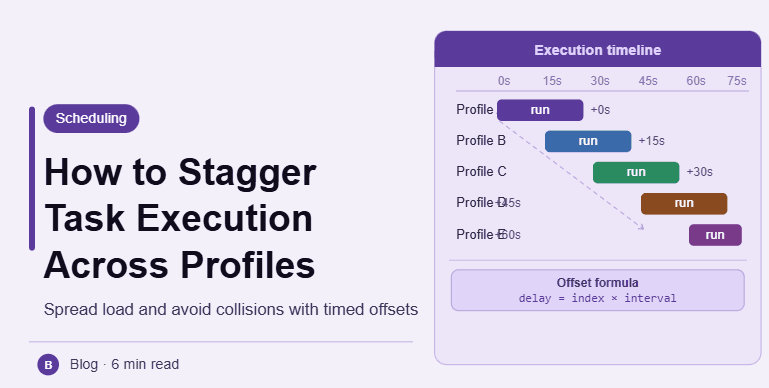
A simple way to stagger tasks is by introducing offsets between profiles. Each profile starts its task slightly later than the previous one, creating a smooth sequence instead of simultaneous execution.
Creating Execution Windows
Tasks can be assigned to specific time windows rather than exact moments. Each profile operates within its own window, ensuring that activity is distributed evenly.
Balancing Load Across Profiles
Staggering should consider the workload of each profile. Heavier tasks may require more spacing, while lighter tasks can be closer together. This balance keeps the system efficient.
Avoiding Overlaps and Collisions
Proper staggering ensures that tasks do not overlap in ways that cause conflicts. This is especially important when profiles share resources or interact with the same systems.
Introducing Controlled Variation
Adding slight variation to offsets prevents rigid patterns and makes execution more natural. This avoids creating predictable timing sequences.
Monitoring Execution Timing
After implementing staggering, observe how tasks are distributed over time. Monitoring helps ensure that the system is working as expected and identifies any overlaps.
Adjusting Based on Performance
If tasks still overlap or create spikes, adjust offsets and spacing. Fine-tuning ensures optimal distribution and smoother performance.
Integrating Staggering into Workflow Design
Staggering should be part of your scheduling logic from the beginning. Integrating it ensures that all tasks follow consistent timing rules automatically.
Scaling Execution Management with Appilot
At this stage, your system staggers tasks effectively across profiles. As workflows grow, managing offsets manually becomes complex. This is where Appilot becomes useful because it helps orchestrate execution while your system ensures balanced and consistent task distribution.
FAQ
Q1: What is staggered execution?
It is spreading tasks over time instead of running them simultaneously.
Q2: Why is staggering important?
To reduce spikes, avoid conflicts, and improve stability.
Q3: How do I stagger tasks?
By using time offsets and execution windows.
Q4: Can staggering be too spread out?
Yes, excessive spacing can slow down workflows, so balance is important.
Q5: Do I need Appilot for this setup?
No, you can manage it locally. Appilot becomes useful when scaling workflows.
Conclusion
Staggering task execution across multiple profiles is essential for creating smooth and reliable workflows. By distributing tasks over time, using offsets, and avoiding overlaps, you can maintain consistent performance. Start by defining spacing rules, test your setup, and refine it over time. Once this system is in place, your workflows become more stable and efficient.