How to Vary Typing Speed to Avoid Bot Detection
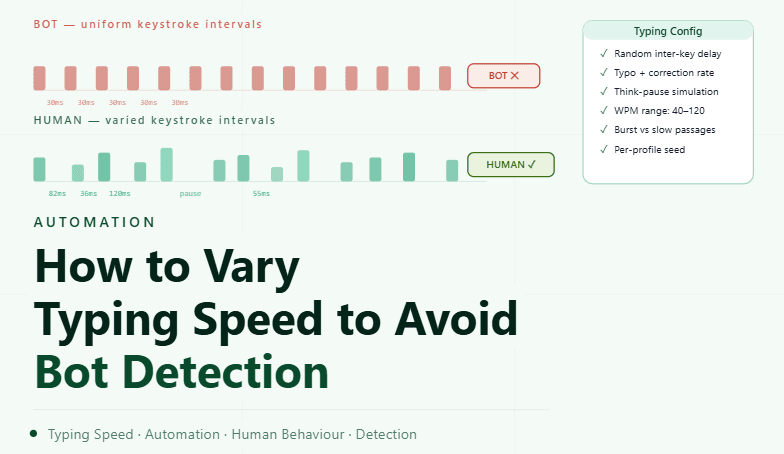
By the end of this tutorial, you will understand how to simulate natural typing behavior by introducing variation in speed, rhythm, and pauses instead of using perfectly consistent input. Uniform typing patterns can feel mechanical, while real users naturally vary their pace depending on context, familiarity, and focus. To follow along, you only need a basic understanding of how text input works in automation. The focus here is on designing realistic behavior rather than writing code. This setup typically takes less than an hour to structure properly, but it significantly improves how interactions behave over time. If you manage multiple workflows, Appilot can help orchestrate execution while your typing system ensures consistent and natural input patterns. You will build a system that adjusts typing speed dynamically, introduces variation, and maintains realistic pacing.
Why Consistent Typing Speed Looks Unnatural
Typing at a perfectly constant speed creates a predictable pattern that does not reflect how humans interact with keyboards. Real users naturally speed up and slow down depending on familiarity with the text and their level of focus. Introducing variation removes rigid timing and creates smoother input behavior.
Understanding Natural Typing Rhythm
Human typing involves bursts of speed followed by brief pauses. Some words are typed quickly, while others take longer due to thinking or correction. Replicating this rhythm helps create more believable interaction patterns.
Using Variable Keystroke Delays
Instead of applying a fixed delay between every keystroke, it is better to use a range of delays. Each character can have a slightly different timing, ensuring that typing is never identical across sequences. This variation creates a more natural flow.
Introducing Pauses Between Words
Humans often pause slightly between words while thinking or reading. Adding small delays at natural breakpoints such as spaces improves realism and prevents continuous, uninterrupted typing.
Varying Speed Based on Text Complexity
Simple and familiar text is usually typed faster, while complex or unfamiliar input takes longer. Adjusting typing speed based on the type of content being entered helps maintain logical consistency.
Adding Occasional Hesitations
Small hesitations or slightly longer pauses can make typing feel more natural. These moments simulate thinking or adjusting, which is common in real typing behavior.
Avoiding Perfectly Even Patterns
Even with variation, repeating the same timing pattern can create predictability. Introducing slight randomness in both speed and pause placement ensures that typing remains dynamic.
Aligning Typing Behavior with Workflow Context
Typing speed should match the overall interaction context. For example, quick actions may involve faster typing, while detailed input may require slower and more deliberate pacing. This alignment improves consistency.
Testing Typing Behavior in Real Scenarios
After configuring typing variation, it is important to observe how it behaves during actual workflows. Testing ensures that the timing feels natural and does not interfere with task completion.
Monitoring and Refining Over Time
Typing patterns may need adjustments as workflows evolve. Monitoring helps identify whether input is too fast, too slow, or too consistent, allowing for continuous improvement.
Integrating Typing Variation into Automation Systems
Typing behavior should be part of your overall interaction design rather than a separate feature. Integrating it ensures that all input actions follow consistent and realistic timing principles.
Scaling Interaction Realism with Appilot
At this stage, your typing configuration works locally and improves input behavior. As the number of workflows increases, maintaining consistent variation manually becomes more complex. This is where Appilot becomes useful because it helps orchestrate workflows while your configuration ensures that all typing patterns remain natural.
FAQ
Q1: Why vary typing speed in automation?
To avoid rigid and predictable input patterns.
Q2: How do I make typing look natural?
By using variable delays, pauses, and changing speed based on context.
Q3: Should typing always be random?
No, it should follow structured variation to remain realistic.
Q4: Can typing be too slow?
Yes, overly slow input can disrupt workflows, so balance is important.
Q5: Do I need Appilot for this setup?
No, you can configure it locally. Appilot becomes useful when scaling workflows.
Conclusion
Varying typing speed is an essential step in creating natural and consistent automation behavior. By introducing controlled variation, aligning speed with context, and avoiding repetitive patterns, you can build a system that feels more realistic. Start by defining delay ranges, test your setup, and refine over time. Once this system is in place, your interactions become smoother and more predictable.