How User-Agent Rotation Keeps Your Bots Undetected
User-Agent rotation is often treated like a magic trick where people assume that changing the User-Agent string is enough to disappear from detection.
When that fails, which it often does, many assume that User-Agent rotation no longer works.
The reality is much less comfortable. User-Agent rotation only works when it aligns with everything else your automation is doing. Used correctly, it lowers risk. Used incorrectly, it increases it.
For this guide, I’ll occasionally refer to Appilot because the same principles apply in both browser and mobile automation. While Appilot focuses more heavily on real-device Android automation, it still benefits from stable identity signals, session continuity, and consistency between declared device attributes and actual behaviour.
This guide explains how User-Agent rotation actually works, why platforms still evaluate it, and how to rotate safely without creating new detection signals.
Understanding User-Agent Rotation
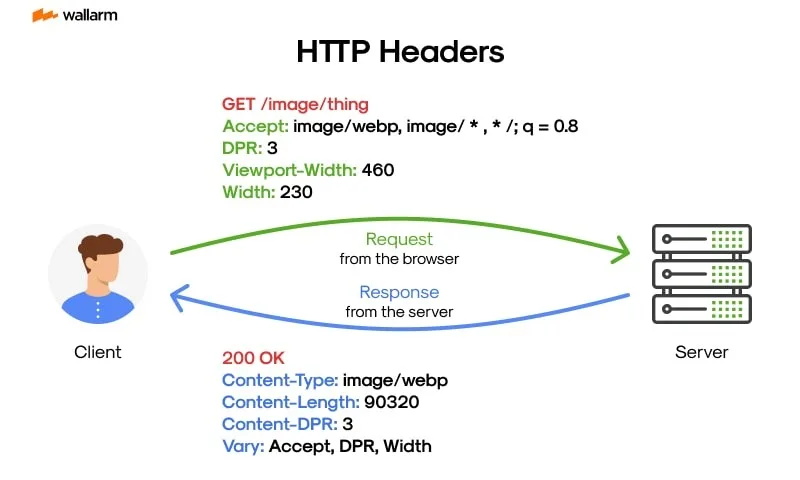
A User-Agent, often shortened to UA, is a string sent with every HTTP request that describes details such as the browser name, browser version, operating system, and device type.
For example, a User-Agent may represent Chrome 122 running on Windows 10.
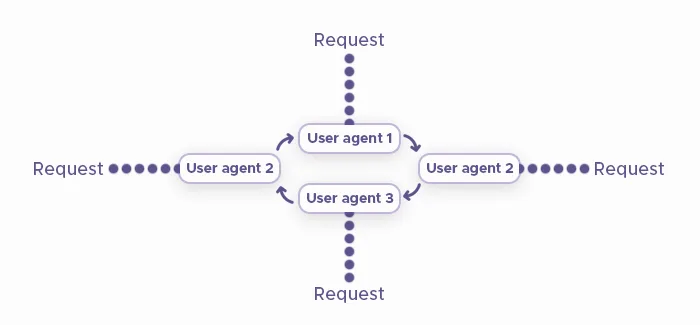
User-Agent rotation means changing that identity across sessions or accounts so that automation does not repeatedly present the exact same browser signature.
However, the most important thing to understand is that a User-Agent is not identity. It is only a claim.
Platforms verify whether that claim matches reality.
The Core Principle Behind UA Detection
Platforms do not trust what the User-Agent says. They trust what the browser actually does.
If a request claims to be Chrome on Windows but the JavaScript APIs behave differently, the rendering engine does not match Chrome, or the exposed feature set contradicts the version being claimed, confidence drops immediately.
When a User-Agent claims one thing but the environment behaves like another, detection systems flag the mismatch.
User-Agent consistency is based on verification rather than simple declaration.
Why User-Agent Rotation Still Matters
Despite advanced fingerprinting techniques, User-Agent data still remains foundational.
1. Baseline Classification
The User-Agent determines whether a site delivers mobile or desktop rendering, what features are enabled, which code paths are used, and sometimes even which security rules apply.
Incorrect User-Agent values can send automation into abnormal execution paths.
2. Correlation at Scale
Running hundreds of sessions with the exact same User-Agent string is statistically abnormal.
Rotation helps reduce obvious clustering patterns.
3. Detection Amplification
User-Agent strings rarely cause bans on their own.
However, mismatches amplify other signals such as canvas fingerprints, WebGL fingerprints, and behavioural anomalies.
It is better to think of User-Agent data as the first filter rather than the final verdict.
How Platforms Validate User-Agents
Modern systems cross-check User-Agent claims against deeper signals.
Layer 1 – Feature Consistency Checks
JavaScript can reveal supported APIs, deprecated features, and engine-specific behaviours.
If a User-Agent claims Chrome 120 but exposes APIs from Chrome 124, the contradiction becomes obvious.
Layer 2 – Rendering & Engine Signals
Different rendering engines behave differently.
If a User-Agent claims to be Chrome but behaves more like Firefox at the rendering level, the mismatch becomes easy to spot.
Layer 3 – Behavioural Expectations
User-Agents also imply certain types of behaviour.
A mobile User-Agent should scroll like a touch device, use a mobile viewport, and behave like a handheld device.
Desktop-style mouse movement combined with a mobile User-Agent immediately looks suspicious.
This is one of the main reasons why random User-Agent rotation often backfires.
Common Myths About User-Agent Rotation
Myth 1: “Rotate Randomly”
Random rotation often creates impossible identities.
Real users do not jump between Android Chrome, Windows Edge, and outdated Safari versions within short timeframes.
Randomness usually looks unrealistic.
Myth 2: “User-Agent Is Obsolete”
This is false.
User-Agent strings are still one of the first signals used for routing, classification, and risk modelling.
Myth 3: “Matching the String Is Enough”
The User-Agent must align with the browser engine, JavaScript environment, rendering behaviour, and input model.
If it does not, the User-Agent becomes a liability.
This is why many people ask why User-Agent rotation increased detection rather than reduced it.
The answer is that the mismatch created stronger fingerprinting signals.
What Proper User-Agent Rotation Looks Like
Effective User-Agent rotation follows a clear structure.
Strategy 1 – Environment-Aligned Rotation
Each User-Agent should match the browser engine, operating system, available features, and rendering behaviour.
A Chrome User-Agent should run on Chromium. A mobile User-Agent should behave like a mobile device.
Alignment is non-negotiable.
Strategy 2 – Temporal Consistency
Real users do not change browsers every hour.
Good User-Agent rotation keeps a User-Agent stable for each session, changes infrequently, and allows browser versions to evolve gradually.
Version upgrades should feel natural.
Stability builds trust.
Strategy 3 – Distribution Over Variety
It is much better to use a small set of common and realistic User-Agent strings than hundreds of rare or exotic combinations.
Blending into common distributions reduces entropy.
Rare combinations usually look suspicious.
User-Agent Rotation in Automation Contexts
Multi-Account Automation
Each account should map to a stable User-Agent.
Accounts should not constantly jump between different browsers.
This helps reduce cross-account linkage.
Long-Running Bots
For long-running automation, the User-Agent should remain constant for extended periods.
Changes should align with natural browser-upgrade cycles.
Mobile vs Browser Automation
Mobile automation depends much less on User-Agent rotation because real devices already provide stable hardware identity and consistent operating-system signals.
This is one reason why platforms like Appilot often rely more on real-device execution than aggressive User-Agent rotation. Because Appilot runs on actual Android devices, User-Agent values naturally align with the underlying environment instead of needing to be artificially fabricated.
The Technical Reality of UA Signals
UA Is a Claim, Not Proof
JavaScript APIs, WebGL, canvas fingerprints, and feature detection all exist to verify the User-Agent claim.
UA Reduction & Freezing
Modern browsers are reducing or freezing User-Agent detail to limit tracking.
This makes consistency even more important than customisation.
Why Custom UA Strings Fail
Hand-crafted or unusual User-Agent strings stand out very quickly.
Common values are generally safer than clever ones.
When User-Agent Rotation Is Most Important
1. Browser Automation at Scale
Repeated use of identical User-Agent strings creates easy clustering patterns.
2. Account-Based Platforms
User-Agent history contributes to account-linkage models.
3. Mixed Automation Stacks
Switching tools without aligning User-Agent values creates contradictions.
This explains why changing the User-Agent alone often does not fix detection.
The User-Agent is only one layer within a much larger identity graph.
Tools That Help With User-Agent Management
There are several ways to manage User-Agent rotation depending on your automation setup.
Puppeteer gives you full control over browser-level User-Agent values and fingerprint alignment.
Playwright offers strong support for session management and multi-browser environments.
Selenium works well when you need broader browser compatibility.
Appilot is useful when you want mobile automation running on real Android devices where User-Agent values naturally match the device environment rather than being artificially injected.
The best approach depends on whether you are automating browsers, mobile apps, or both.
Key Takeaways
User-Agent rotation is not invisibility. It is identity hygiene.
User-Agent strings are still a baseline signal, but they must align with actual browser behaviour.
Temporal consistency matters, common distributions reduce entropy, and randomness often increases detection.
When User-Agent rotation is treated as part of a larger identity strategy, it quietly reduces risk.
When it is treated like a shortcut, it becomes a fingerprint of its own.
If you are running mobile automation at scale, Appilot can simplify identity management by using real-device execution and stable session handling instead of relying heavily on artificial User-Agent changes.
Frequently Asked Questions
Q: Does User-Agent rotation still work in 2026?
Yes, but only when it aligns with real browser behaviour.
Q: Can rotating User-Agent alone prevent detection?
No. It reduces clustering but does not override deeper fingerprint signals.
Q: How often should User-Agents change?
Infrequently. Think in terms of weeks or months rather than every session.
Q: Is mobile User-Agent rotation necessary?
Usually not. Real devices already provide consistent identity signals.
Q: Why do random User-Agent lists cause bans?
Because they create impossible and inconsistent browser identities.