How Websites Track You: Browser Fingerprinting Explained

Most people think websites track them using cookies alone, but that is only part of the story. Even if you clear cookies, use incognito mode, or switch networks, websites can still recognize you with surprising accuracy. This happens through a technique called browser fingerprinting, which operates silently in the background.
Understanding how websites track you is no longer optional because it affects everything from privacy to how online platforms detect fraud and automation. Whether you are browsing casually or building systems that interact with websites, browser fingerprinting plays a critical role in how identity is established online. This guide explains browser fingerprinting, how it works, and why it matters in real-world situations.
What Is Browser Fingerprinting?
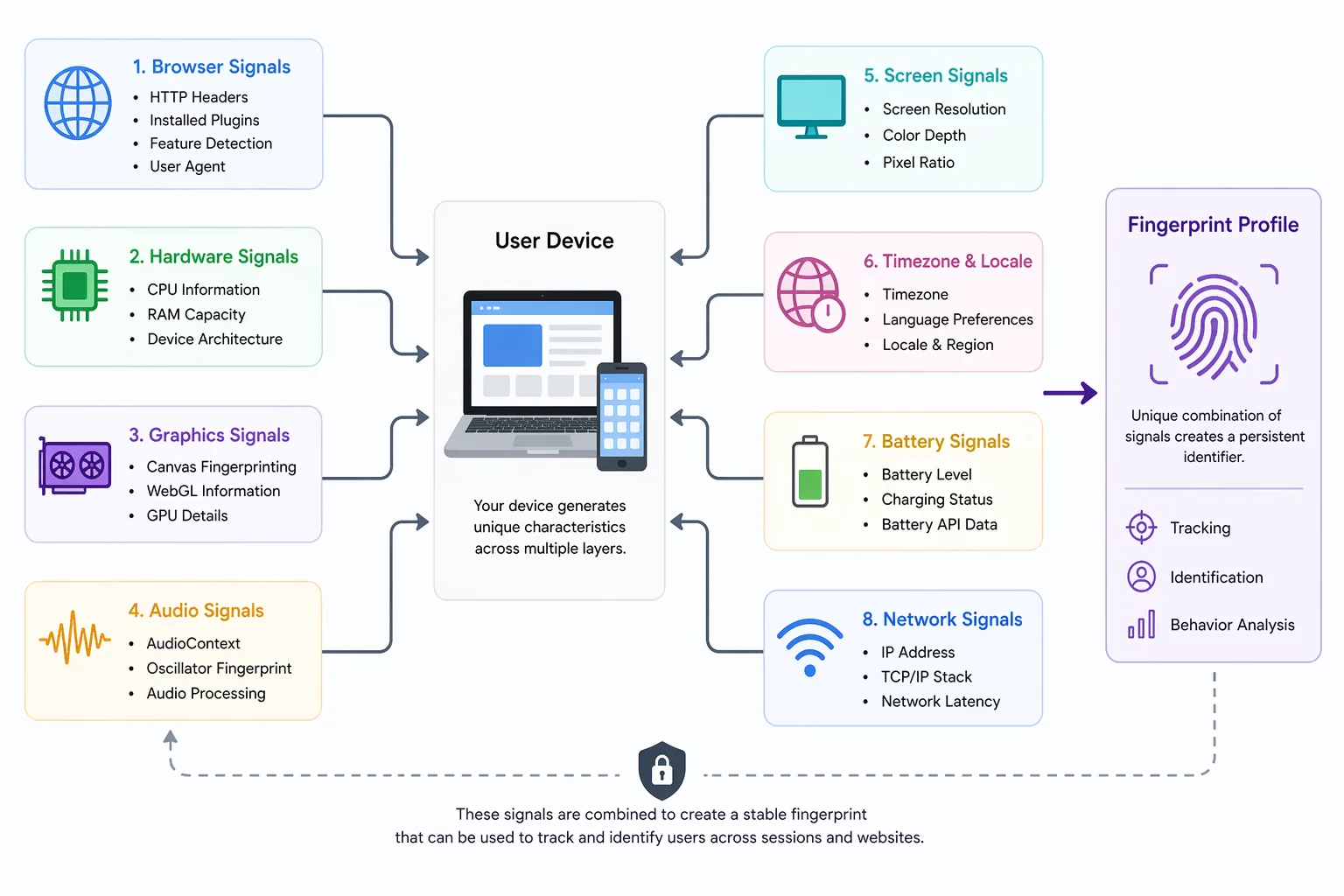
Browser fingerprinting is a tracking method that identifies users based on the unique combination of characteristics from their browser and device environment rather than relying on stored identifiers like cookies. These characteristics include elements such as screen resolution, installed fonts, timezone, browser version, and even how your system renders graphics.
The key idea behind browser fingerprinting is that while each individual signal might be common, the combination of many signals creates a profile that is highly unique. This profile acts as a digital fingerprint that can persist across sessions, even if you clear your browsing data or use private browsing modes.
This technique exists because websites need more reliable ways to identify users, especially in situations where cookies are blocked or frequently deleted. Over time, browser fingerprinting has become a central component of browser detection systems used for both tracking and security purposes.
The Core Principle Behind Browser Fingerprinting
The core principle behind browser fingerprinting is based on combining multiple small pieces of data to create a unique identity. When a website collects dozens of attributes from your browser, the likelihood that another user shares the exact same combination becomes extremely low.
This process does not rely on a single identifier but instead uses statistical uniqueness. Even if some attributes change, such as switching networks or updating your browser, the overall fingerprint can remain recognizable because most of the signals stay consistent. This is why fingerprint detection systems are effective even when users attempt to mask their identity.
How Browser Fingerprinting Differs from Device Fingerprinting
Browser fingerprinting focuses on data that can be collected through the browser, including user agent strings, rendering behavior, and installed plugins. Device fingerprinting extends further by analyzing hardware-level signals such as CPU characteristics, battery status, and sensor data.
A useful way to think about the difference is that browser fingerprinting identifies how your browser behaves, while device fingerprinting identifies the underlying hardware itself. Both methods aim to uniquely identify users, but device fingerprinting generally provides deeper and more stable identification.
Why Browser Fingerprinting Matters
Browser fingerprinting matters because it fundamentally changes how websites track and interact with users. Unlike cookies, which can be deleted or blocked, fingerprinting operates passively and is much harder to control.
In fraud detection, fingerprinting allows platforms to identify suspicious patterns by linking multiple accounts or sessions that share similar fingerprints. This helps detect bots, prevent account abuse, and maintain platform integrity. Even when users rotate IP addresses, fingerprint detection can still reveal connections between activities.
From a privacy perspective, browser fingerprinting raises concerns because it enables tracking without explicit user consent. Since the fingerprint is generated from your device and browser behavior, it cannot be easily reset, making it difficult for users to remain anonymous online.
For developers and engineers, browser fingerprinting directly impacts how systems perform. If an application produces inconsistent or unrealistic fingerprints, it may trigger detection mechanisms and lead to failures. Understanding how fingerprinting works allows developers to design systems that behave more naturally and avoid unnecessary detection.
How Browser Fingerprinting Works in Practice
Browser fingerprinting works through a sequence of steps that involve collecting data, analyzing behavior, and generating a unique identifier that can be compared over time.
Data Collection
When you visit a website, scripts execute in your browser and begin collecting information about your environment. This includes details such as screen size, language settings, timezone, browser version, and installed fonts. These signals are easy to access and provide the foundation for the fingerprint.
Although each of these attributes is relatively common, their combination starts to differentiate users. Even small variations contribute to the uniqueness of the overall profile.
Advanced Signal Extraction
Beyond basic attributes, websites use more advanced fingerprinting techniques that analyze how your system behaves. For example, canvas fingerprinting involves rendering hidden graphics and analyzing the output for subtle differences. WebGL fingerprinting examines how your GPU processes graphics, while audio fingerprinting analyzes how your system handles sound.
These methods are powerful because they depend on real hardware and software interactions, making them difficult to replicate accurately in virtual environments or automated systems. This is why they are widely used in modern browser detection frameworks.
Fingerprint Generation and Matching
After collecting all the data, the system combines it into a single identifier, often using hashing techniques. This identifier represents your fingerprint and can be stored or compared against previous visits.
When you return to the website, a new fingerprint is generated and compared with existing ones to determine whether you are a returning user. This process works even if your IP address changes or if you are browsing in private mode, as it relies on the consistency of your device and browser characteristics.
Common Misconceptions About Browser Fingerprinting
There are several misconceptions about browser fingerprinting that lead to confusion about how effective it is and how it can be avoided.
One common belief is that incognito mode prevents tracking, but in reality, private browsing only disables local storage mechanisms such as cookies and does not affect the ability of websites to collect fingerprinting data. As a result, browser fingerprinting continues to function even in private sessions.
Another misconception is that changing your IP address is enough to avoid tracking. While IP addresses are one signal used in identification, fingerprinting relies on a much broader set of attributes. Even with a new IP, the underlying fingerprint often remains consistent, allowing websites to recognize returning users.
There is also a belief that fingerprinting provides perfect identification, but it is important to understand that it is probabilistic rather than absolute. Fingerprints can change over time due to updates or configuration changes, and different users can occasionally share similar fingerprints. Detection systems account for this by using confidence levels rather than exact matches.
Real-World Examples of Browser Fingerprinting
Browser fingerprinting is widely used across different industries to track users and improve system reliability.
In e-commerce platforms, fingerprinting helps detect fraudulent behavior by identifying patterns across multiple accounts that share similar characteristics. This allows systems to flag suspicious activity and prevent abuse.
In social media environments, fingerprint detection plays a critical role in identifying automated behavior. Platforms analyze how users interact with their systems and compare fingerprints to detect bots or coordinated actions. Tools like Appilot approach this challenge by running automation on real Android devices, which produce authentic hardware-backed signals instead of synthetic browser fingerprints that are easier to detect.
In advertising and analytics, fingerprinting enables tracking across websites even when cookies are cleared. This allows networks to maintain continuity in user tracking, although it also raises concerns about transparency and user privacy.
The Technical Side of Browser Fingerprinting
From a technical standpoint, browser fingerprinting relies on the concept of entropy, which measures how much identifying power a particular signal provides. Some attributes, such as language or timezone, have low entropy because many users share them, while others, such as canvas rendering output, have high entropy due to the variability between devices.
By combining multiple signals with varying levels of entropy, systems can achieve a high degree of uniqueness. The collected data is typically processed and transformed into a hash, allowing for efficient storage and comparison without exposing raw information.
Understanding these technical foundations helps explain why fingerprinting is effective and why it is difficult to bypass using simple methods.
When Browser Fingerprinting Applies
Browser fingerprinting becomes especially important in scenarios where accurate identification is required or where traditional tracking methods are insufficient.
It is particularly relevant when building automation systems, where maintaining consistent and realistic fingerprints is essential to avoid detection. It is also critical in fraud prevention systems, where identifying suspicious behavior can protect platforms from abuse. In privacy-sensitive applications, understanding fingerprinting allows developers to design systems that balance functionality with user privacy.
Frequently Asked Questions
Q: How does browser fingerprinting work?
It works by collecting multiple signals from your browser and device, combining them into a unique identifier, and comparing that identifier across sessions.
Q: What is browser fingerprinting used for?
It is used for tracking users, detecting fraud, identifying bots, and improving security across online platforms.
Q: Can you block browser fingerprinting?
You can reduce its effectiveness using privacy-focused tools, but completely blocking it is very difficult because it relies on fundamental system behavior.
Q: Is browser fingerprinting legal?
Its legality depends on regional privacy laws, with some jurisdictions requiring transparency or consent.
Q: How is browser fingerprinting different from cookies?
Cookies store data on your device, while fingerprinting identifies you based on your browser and device characteristics without storing data locally.
Q: When should you worry about browser fingerprinting?
You should be concerned when privacy matters or when building systems that need to avoid detection, as fingerprinting directly impacts both.
Key Takeaways
Browser fingerprinting is a powerful method used by websites to track users based on their browser and device characteristics, and it has become a central part of modern tracking and detection systems. It works by combining multiple small signals into a unique identity that persists across sessions, making it more resilient than traditional methods like cookies. Its applications span fraud detection, analytics, and automation, and understanding it is essential for navigating the modern web.