Hybrid Browser Workflows: Desktop + Mobile + Antidetect with Appilot
Most people do not rely on just one type of browser environment anymore. A typical workflow may involve desktop browsers for research and account management, mobile browsers for social media actions, and antidetect browsers for account separation and fingerprint protection. When all of these environments are disconnected, operations become harder to manage and much more difficult to scale.
Many users start with a simple setup. They may use Chrome on desktop for emails, Firefox for testing, and an antidetect browser for multi-account management. Later, they add mobile devices for Instagram posting, TikTok engagement, WhatsApp communication, or mobile-only tasks. At that point, the workflow becomes fragmented because different tasks are spread across different devices, different browsers, and different tools.
This is where hybrid browser workflows become valuable. Instead of treating desktop browsers, mobile browsers, and antidetect browsers as separate systems, you can combine them into one larger workflow. Appilot makes this possible by helping you manage all of these environments from one place.
A hybrid workflow allows you to move between desktop automation, mobile actions, and antidetect browser sessions without manually coordinating everything. This creates a more complete setup for agencies, affiliate marketers, e-commerce teams, social media managers, crypto users, and anyone running multiple accounts across different platforms.
Why Hybrid Browser Workflows Matter
Most platforms behave differently on desktop compared to mobile. Some actions are easier to perform on desktop because you have more screen space, better browser extensions, and easier account management. Other actions are easier on mobile because many social media apps prioritize mobile behavior and may offer features that do not exist on desktop.
For example, a social media manager may use a desktop browser to review analytics, upload content, and manage messages, but then use a mobile browser or mobile app for Stories, Reels, or mobile-only posting actions. An e-commerce seller may use a desktop browser to update product listings and manage orders, while using mobile devices to monitor notifications and customer messages.
Antidetect browsers add another layer because they help separate accounts and protect browser fingerprints. This is especially important for users managing multiple stores, multiple ad accounts, multiple social profiles, or multiple crypto wallets.
When these environments are disconnected, you spend too much time switching between tools and devices. A hybrid workflow removes this friction by creating a smoother process between desktop browsers, mobile devices, and antidetect browsers.
The Three Main Parts of a Hybrid Workflow
A hybrid browser workflow usually contains three layers.
The first layer is desktop browsers. This includes Chrome, Firefox, Edge, Safari, Brave, and other traditional browsers used for account management, research, uploads, messaging, testing, and general tasks.
The second layer is mobile workflows. This includes Android browsers, mobile apps, mobile web sessions, and mobile-specific actions. Mobile workflows are important because many platforms give more trust to mobile activity or limit certain features to mobile devices only.
The third layer is antidetect browsers. This includes platforms like GoLogin, AdsPower, Dolphin Anty, Multilogin, Incogniton, and other browsers designed for account separation, fingerprint management, proxy control, and multi-accounting.
Each layer serves a different purpose. Desktop browsers are useful for productivity and management. Mobile browsers are useful for platform trust and mobile-specific actions. Antidetect browsers are useful for account separation and profile control.
When combined together, these three layers create a much stronger automation system than relying on only one browser type.
Why Desktop-Only Workflows Are Limited
Desktop-only workflows can work for basic tasks, but they often become limiting once you start managing more accounts or more platforms.
Many social media platforms behave differently on mobile compared to desktop. Some features are only available inside mobile apps. Other actions may appear more natural when they come from mobile devices rather than desktop browsers.
For example, Instagram Stories, TikTok posting, WhatsApp messaging, and certain forms of engagement are often easier or safer from mobile environments. If you rely only on desktop browsers, you may miss some of these advantages.
Desktop-only workflows also create a pattern problem. If every account always logs in from the same desktop browser, the same device type, and the same environment, your activity becomes predictable over time.
Adding mobile workflows and antidetect browsers creates more variety and helps reduce repeated patterns.
How Appilot Helps Combine Desktop, Mobile, and Antidetect Browsers
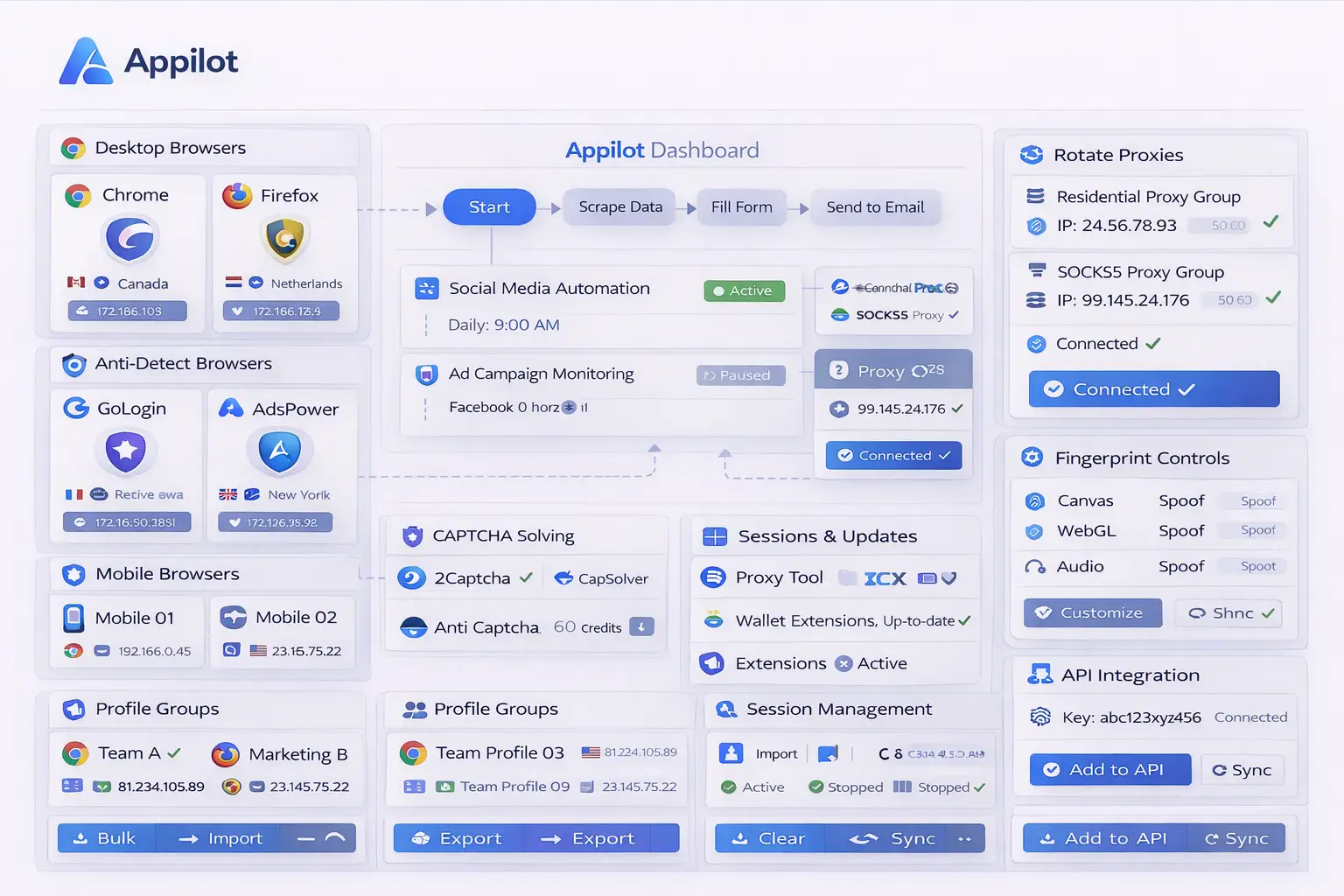
Appilot works well for hybrid workflows because it can act as the central layer between all of your environments.
Instead of opening desktop browsers separately, managing mobile devices manually, and controlling antidetect browsers from their own dashboards, you can bring everything together into one system. This allows you to organize workflows based on task type, platform, campaign, or client.
For example, you may create one workflow where Chrome handles research, GoLogin handles account logins, Android devices handle social posting, and Firefox handles testing. Appilot can keep all of those steps connected together inside one process.
You can also create schedules for different environments. Desktop browsers may launch in the morning, mobile workflows may run in the afternoon, and antidetect browsers may open during specific campaign hours. This creates a more realistic activity pattern and helps spread browser activity across different environments.
Another advantage is profile grouping. You can organize browser profiles, mobile devices, and antidetect sessions by client, geography, platform, or task type. This makes it much easier to manage larger operations without confusion.
Real Examples of Hybrid Browser Workflows
A social media agency may use desktop browsers for content uploads, mobile devices for Stories and Reels, and antidetect browsers for managing client accounts separately. This creates a safer workflow because each client stays separated while still allowing the agency to complete all required tasks.
An affiliate marketer may use Chrome for research, Dolphin Anty for ad accounts, Android devices for mobile testing, and Firefox for landing page reviews. This creates more separation between campaigns and helps reduce account overlap.
An e-commerce seller may use desktop browsers for product management, mobile devices for order notifications, and antidetect browsers for separate stores and supplier accounts. This keeps operations organized while reducing the risk of account connection.
Crypto users often benefit from hybrid workflows because they may need desktop browsers for research, mobile devices for wallet verification, and antidetect browsers for separate wallet profiles and exchange accounts.
These examples show why hybrid workflows are becoming more common. Businesses no longer want to rely on only one browser type because different tasks require different environments.
Best Practices for Hybrid Browser Management
One of the best things you can do is clearly separate tasks by environment. Desktop browsers should be used for tasks that benefit from larger screens and browser extensions. Mobile devices should be used for tasks that look more natural from mobile environments. Antidetect browsers should be used when account separation is important.
You should also keep browser profiles and mobile devices grouped by purpose. Mixing e-commerce accounts, social media accounts, and crypto wallets together can create confusion and increase the risk of overlap.
Another important practice is scheduling different environments carefully. Not every browser and device should launch at the same time. Spreading activity across different hours makes workflows look more natural.
You should also keep proxy groups separated between desktop browsers, mobile devices, and antidetect profiles. Reusing the same proxy pool everywhere can still create overlap even if the browser environments are different.
Finally, it is important to review your workflows regularly. Hybrid setups can become complex over time, so reviewing profile groups, schedules, and browser assignments helps keep everything organized.
Common Mistakes in Hybrid Workflows
One common mistake is using the same browser profile across both desktop and mobile tasks. This creates overlap and makes activity look less natural.
Another mistake is relying too heavily on only one environment. Some users only focus on antidetect browsers and ignore mobile workflows. Others only focus on desktop browsers and ignore the benefits of account separation.
Some users also create workflows that are too complicated. The goal of a hybrid system is not to make things harder. The goal is to create a more organized and scalable workflow.
Another issue is inconsistent profile naming. If your desktop browsers, mobile devices, and antidetect profiles all use different naming systems, it becomes much harder to keep track of everything.
Finally, some users forget to document their hybrid workflow structure. This becomes a major problem once teams grow larger or new employees need to learn the system.
Frequently Asked Questions
Q1: Why should I use both desktop and mobile workflows together?
Using both desktop and mobile workflows gives you more flexibility because some tasks are easier on desktop while others look more natural on mobile devices.
Q2: Do I still need antidetect browsers if I already use mobile devices?
Yes. Mobile devices help with platform trust, but antidetect browsers are still useful for account separation, fingerprint control, and proxy management.
Q3: Can Appilot manage desktop browsers and mobile devices together?
Yes. Appilot can help organize desktop browsers, mobile devices, antidetect browsers, profile groups, schedules, and automation workflows from one place.
Q4: What is the biggest advantage of a hybrid browser workflow?
The biggest advantage is flexibility. You can use the best environment for each task instead of forcing everything into one browser type.
Q5: Are hybrid workflows useful for small teams?
Yes. Even small teams can benefit because hybrid workflows make it easier to stay organized and prepare for future scaling.
Conclusion
Hybrid browser workflows are becoming more important because modern operations rarely rely on only one browser type. Desktop browsers, mobile devices, and antidetect browsers all serve different purposes, and combining them creates a stronger and more flexible workflow.
Appilot helps make these workflows easier to manage by allowing you to organize different browser types, mobile devices, schedules, and automation rules from one place. Instead of treating every environment separately, you can create one connected workflow that scales more effectively over time.
This blog structure follows the user's requested Appilot blog format with one centered image, paragraph-style sections, no service or product page references, and FAQ formatting preferences.