Instagram DM Automation vs Comment Automation: Which Drives More Conversions?
Instagram automation has changed from simple growth hacking into a more serious conversion system. A few years ago, many users focused mostly on likes, follows, and generic engagement. Today, the stronger opportunity is different. Brands, creators, agencies, coaches, ecommerce stores, and growth teams now care more about turning attention into conversations, leads, bookings, purchases, and long-term customer relationships.
Two of the most common automation workflows are Instagram DM automation and Instagram comment automation. Both can help reduce manual work, increase response speed, and keep engagement moving. But they are not the same, and they do not drive conversions in the same way.
Comment automation usually works at the public engagement layer. It helps respond to comments, trigger replies, or move users from a post into a more direct workflow. DM automation works inside the private conversation layer. It helps answer questions, send links, qualify leads, collect information, recommend products, and move people closer to a decision.
So which one drives more conversions?
The short answer is that DM automation usually drives more direct conversions, while comment automation is better for creating the trigger that starts the conversion journey. The strongest Instagram strategy often uses both together: comments create public engagement and intent signals, while DMs turn that intent into a private conversation.
What Is Instagram DM Automation?
Instagram DM automation is the process of automatically sending or managing direct messages based on user behavior, keywords, replies, comments, or account interactions. Instead of manually answering every message, a creator or business can use automation to respond faster and guide users through a structured conversation.
For example, a user might send a message asking for pricing, and the automation can instantly reply with basic details. A follower might comment “link” on a Reel, and the automation can send the product page in a private DM. A new follower might receive a welcome message. A customer might ask about delivery, booking, availability, or product options, and the automation can guide them to the right next step.
This is powerful because DMs feel personal. They happen in a private space where users are more likely to ask questions, share objections, request links, and make decisions. For conversion-focused workflows, this matters a lot.
DM automation is especially useful for ecommerce brands, coaches, agencies, SaaS businesses, course creators, service providers, influencers, and local businesses. Any account that receives repeated questions or wants to turn engagement into leads can benefit from a well-designed DM flow.
What Is Instagram Comment Automation?
Instagram comment automation is the process of automatically responding to comments or using comments as triggers for another action. In many modern workflows, comment automation is used to start a DM conversation.
For example, a creator might publish a Reel and say, “Comment GUIDE and I’ll send it to you.” When someone comments the keyword, the system detects it and sends the resource in a direct message. This creates engagement on the post while also moving the user into a private conversation.
Comment automation can also be used to thank users, answer common public questions, detect keywords, manage repeated replies, or guide users toward the next step. It is useful because comments are visible to other users. When a post gets comments, it can look more active, and other people may be more likely to join the conversation.
However, comment automation by itself usually does not close conversions. A public comment is often too limited for detailed selling, lead qualification, objection handling, or personalized recommendations. That is why comment automation works best as a doorway into DMs rather than as the entire conversion system.
The Main Difference Between DM Automation and Comment Automation
The biggest difference is intent depth.
A comment shows interest, but a DM creates a direct path to action. When someone comments on a post, they may be curious, supportive, or casually interested. When they enter a DM conversation, the interaction becomes more focused. The user can ask questions, receive a link, get a recommendation, book a call, claim a discount, or share details privately.
Comment automation is public and engagement-driven. DM automation is private and conversion-driven.
This does not mean comments are less important. Comments are often the spark. They help identify interested users and create a visible activity signal around content. But DMs are where the relationship usually becomes more actionable.
For example, if an ecommerce brand posts a Reel about a new skincare product, comments can show interest. But the sale is more likely to happen when the user receives a DM with the product link, usage instructions, discount code, FAQ answers, and checkout path.
Which Drives More Conversions?
DM automation usually drives more conversions because it moves users into a private, guided conversation. A DM can include a direct link, personalized reply, product suggestion, booking step, lead form, discount code, or follow-up sequence. It can also handle objections better than a public comment thread.
Comment automation is better at generating conversion opportunities. It creates the first action. It encourages users to comment a keyword, ask a question, request a link, or show interest. This can increase engagement and make the post feel more active.
But the conversion usually happens after the comment, not inside the comment itself.
That is why the best answer is not DM automation vs comment automation. The best answer is comment automation plus DM automation. Comments capture attention and intent. DMs convert that intent into action.
When DM Automation Works Best
DM automation works best when the user already has some level of interest and needs help taking the next step. This includes users asking for a price, product link, demo, guide, discount, consultation, appointment, or recommendation.
It is especially strong for ecommerce products, lead magnets, coaching offers, service businesses, online courses, creator downloads, affiliate links, event signups, and appointment-based businesses. In these cases, the DM can guide the user toward a clear conversion action.
DM automation also works well for frequently asked questions. If many people ask the same things about shipping, pricing, availability, sizing, booking, or services, automation can answer quickly while reducing manual inbox work.
The key is to make the conversation feel helpful, not robotic. A good DM flow should be short, clear, useful, and easy to exit. It should guide the user without overwhelming them.
When Comment Automation Works Best
Comment automation works best when your content is designed to create a public response. This usually happens with Reels, carousels, educational posts, giveaways, product reveals, lead magnets, templates, checklists, recipes, guides, or limited-time offers.
For example, a creator might say, “Comment CHECKLIST and I’ll send you the full guide.” This gives users an easy action to take. It also creates more visible engagement on the post, which can encourage more users to participate.
Comment automation is also useful when you want to reduce manual replies. If many people comment the same keyword or ask the same simple question, automation can help respond quickly and consistently.
However, comment automation should not feel spammy. Repeating the same public reply too often can look unnatural. The better approach is to use comments as a trigger and move the useful response into DMs.
Why Comment-to-DM Automation Converts So Well
The strongest Instagram automation workflow is often comment-to-DM automation. This means a user comments on a post, usually with a keyword, and then receives a direct message with the promised resource, link, offer, or next step.
This works well because it combines two strengths. The comment creates public engagement and signals interest. The DM creates a private conversion path.
For example, a fitness coach could post a Reel about a 7-day workout plan and ask users to comment “PLAN.” Every user who comments receives the workout plan in DMs. From there, the automation can ask whether they want beginner or advanced guidance, offer a consultation, or send them to a paid program.
That flow is stronger than only replying in the comments because the user receives a direct, actionable next step. It is also stronger than cold DM automation because the user raised their hand first.
Why DM Automation Alone Can Feel Too Aggressive
DM automation can drive conversions, but it must be used carefully. If a user receives a message without clear intent, context, or permission, it can feel intrusive. This is especially true when brands send generic promotional DMs to new followers or cold prospects.
The best DM automation is triggered by user behavior. A comment keyword, inbound message, story reply, form submission, or clear request creates a better context for automation. When the user has already shown interest, the DM feels helpful instead of pushy.
This is why DM automation should not be treated like a mass-message tool. It should be treated like a conversation assistant. The goal is to help interested users faster, not to spam everyone who interacts with the account.
Why Comment Automation Alone Usually Has Lower Conversion Power
Comment automation by itself has limits because public comments are not ideal for selling or qualifying leads. A comment thread is visible, short, and not very personal. Users may not want to share details publicly, and brands cannot always provide personalized recommendations in comments.
For example, if someone asks about pricing, sizing, business needs, budget, skin type, location, or appointment availability, the conversation usually belongs in DMs. Public replies can start the interaction, but DMs are better for details.
Comment automation is still valuable because it creates the entry point. But if the workflow stops at the comment, many conversion opportunities are lost.
How Appilot Fits Into Instagram Automation Workflows
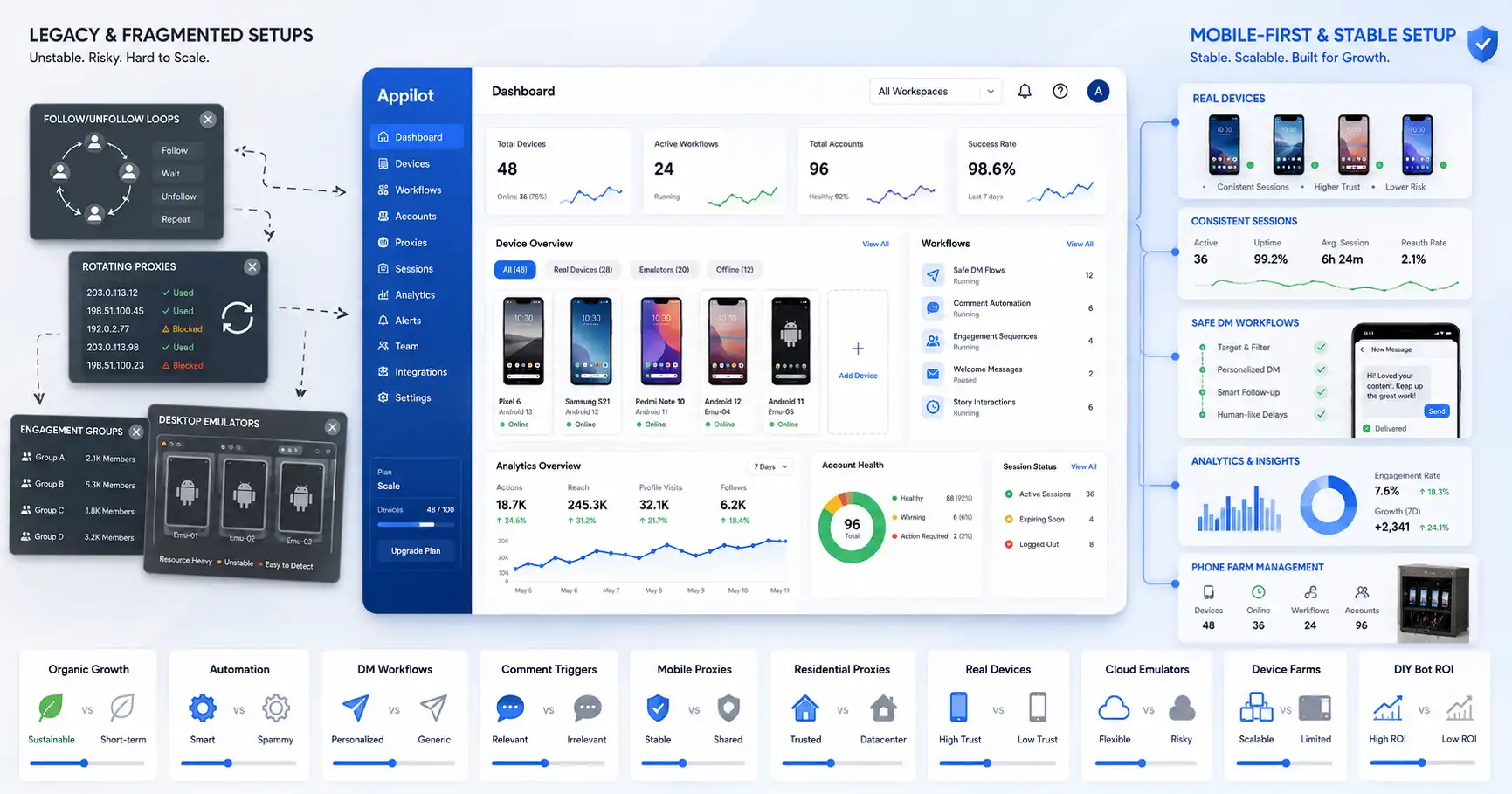
Appilot is useful for teams that need more than simple comment or DM automation. Many Instagram workflows happen inside the mobile app, especially when teams manage multiple accounts, real-device sessions, content checks, DMs, engagement workflows, and app-based operations.
Traditional automation tools often focus only on messages or comments. Appilot focuses on real-device automation through Android devices and emulators, giving teams a stronger mobile-first workflow layer. This matters for agencies, operators, phone farm users, growth teams, and social media managers who need to control Instagram workflows across multiple accounts.
For example, a team might use comment-to-DM automation to capture leads, while using Appilot to manage real-device account workflows, mobile app tasks, account checks, and multi-account operations. This creates a stronger system than relying only on one automation feature.
Appilot does not replace the need for good content, strong offers, or smart conversation design. But it gives teams a better environment for managing mobile-first Instagram operations at scale.
Best Use Cases for DM Automation
DM automation is best when the goal is conversion. This includes sending product links, collecting leads, booking calls, answering sales questions, sending discount codes, delivering lead magnets, recommending services, qualifying prospects, and following up with interested users.
For creators, DM automation can deliver guides, templates, recipes, playlists, workouts, or free resources. For ecommerce brands, it can send product links, size guides, discount codes, and order support. For agencies and consultants, it can qualify leads and move users toward a call.
The key is to keep the flow focused. A good DM automation should have one main goal. If the user asked for a guide, send the guide first. If the user asked for pricing, answer pricing clearly. If the user wants to book, reduce friction and show the next step.
Best Use Cases for Comment Automation
Comment automation is best when the goal is engagement and intent capture. It works well for keyword campaigns, content giveaways, Reels CTAs, educational posts, product launches, waitlists, community prompts, and posts designed to create responses.
For example, a creator can ask users to comment “START” to receive a beginner guide. A brand can ask users to comment “SIZE” to get a sizing chart. A SaaS company can ask users to comment “DEMO” to receive a booking link. A coach can ask users to comment “PLAN” to get a free checklist.
The comment makes participation easy. The DM completes the conversion path.
Which One Should Agencies Use?
Agencies should usually use both. Comment automation helps create visible engagement and capture user intent across client posts. DM automation helps convert that intent into leads, sales, bookings, or customer conversations.
For agency workflows, the real advantage comes from system design. Each campaign should have a clear content hook, a simple comment keyword, a useful DM response, and a measurable conversion goal. Without that structure, automation becomes noise.
Agencies also need account management and workflow control. If they manage multiple Instagram accounts, they need visibility into which workflows are active, which accounts are receiving leads, and which campaigns are converting. This is where tools like Appilot can support mobile-first account operations while DM and comment tools handle conversation flows.
Which One Should Ecommerce Brands Use?
Ecommerce brands should prioritize DM automation, supported by comment automation. A comment can trigger interest, but the DM can send the product link, answer questions, provide a discount, recommend a product, or guide the user to checkout.
For example, a brand can post a Reel showing a product and ask users to comment “SHOP.” The automation can send a DM with the product page, a limited-time discount, and a quick question about what the customer needs. This flow is more conversion-focused than simply replying publicly with a generic comment.
Ecommerce brands should also avoid overcomplicating the flow. The faster users can reach the product or offer, the better.
Which One Should Creators Use?
Creators should use comment automation to generate engagement and DM automation to deliver value. This is especially useful for creators who share recipes, guides, templates, workouts, resources, tutorials, or affiliate products.
A creator can ask users to comment a keyword and then automatically send the resource in DMs. This saves time and gives followers an instant response. It also helps creators move from content views to direct audience relationships.
Creators should be careful not to turn every post into a keyword campaign. If every caption asks users to comment a word, the account can start to feel transactional. The best approach is to use automation for high-value resources and keep normal community engagement human.
Which One Should Service Businesses Use?
Service businesses should use DM automation because services usually require more conversation before conversion. A user may need to ask about pricing, availability, process, results, location, timeline, or fit. DMs are better for that than comments.
Comment automation can still be useful for lead magnets. For example, a consultant can ask users to comment “AUDIT” to receive a free checklist. The DM flow can then ask what kind of business they run and guide them toward a discovery call.
For service businesses, the best automation should qualify leads without sounding robotic. The flow should be conversational, clear, and respectful.
Common Mistakes to Avoid
The biggest mistake is using automation without a clear conversion goal. Sending automatic replies is not enough. Every flow should answer a simple question: what should the user do next?
Another mistake is making the automation too long. Instagram users want fast answers. A DM flow with too many steps can lose attention. Keep it simple and useful.
A third mistake is sending generic messages to users who did not ask for them. Automation works best when triggered by clear intent, such as a comment keyword, inbound message, or story reply.
A fourth mistake is ignoring manual follow-up. Automation can start the conversation, but high-value leads often need a real human response. The best systems use automation to filter and guide, then bring in a human when the conversation becomes serious.
Final Verdict
DM automation drives more direct conversions because it creates private, focused conversations where users can receive links, answers, offers, and next steps. Comment automation is better for creating engagement and capturing intent at the public content layer.
The strongest strategy is to combine both. Use comment automation to get users to raise their hands, then use DM automation to deliver value and guide them toward conversion.
For brands, creators, ecommerce teams, agencies, and service businesses, the best Instagram automation workflow is not just about saving time. It is about building a clear path from content to conversation to conversion.
Appilot fits this bigger picture by supporting the mobile-first workflow layer for teams that manage Instagram accounts across real devices and emulators. When combined with strong DM and comment automation, Appilot helps teams build a more complete Instagram growth and conversion system.
FAQs
Q1: Which converts better, Instagram DM automation or comment automation?
Instagram DM automation usually converts better because it moves users into private conversations where they can receive links, answers, offers, and personalized next steps.
Q2: Is comment automation still useful for conversions?
Yes, comment automation is useful because it captures public intent and engagement. It works best when it triggers a DM flow that delivers the actual offer or next step.
Q3: What is comment-to-DM automation?
Comment-to-DM automation happens when a user comments a keyword on a post and automatically receives a direct message with a link, guide, offer, or resource.
Q4: Should ecommerce brands use DM automation or comment automation?
Ecommerce brands should use both. Comment automation creates the trigger, while DM automation sends product links, discounts, answers, and checkout steps.
Q5: How does Appilot help with Instagram automation?
Appilot helps teams manage real-device Instagram workflows across Android devices and emulators, making it useful for mobile-first account operations and multi-account workflows.