What Is JavaScript Fingerprinting? Code-Based Tracking

As tracking technologies evolve, websites are no longer limited to cookies or simple identifiers. One of the most powerful modern techniques is JavaScript fingerprinting, which allows websites to collect detailed information directly from the browser using code. This approach works because JavaScript can access a wide range of browser and device properties in real time, and by combining these signals, websites can create a unique identifier for each user without relying on stored data. Understanding how JavaScript fingerprinting works is important because it plays a major role in tracking, fraud detection, and bot identification across the web.
What Is JavaScript Fingerprinting?
JavaScript fingerprinting is a method of identifying users by collecting data from their browser using JavaScript code, where instead of storing information on the device, it gathers signals dynamically during each session and builds a unique profile. These signals include browser properties, device characteristics, and system behavior, and because this data is collected in real time, it can be used to track users across sessions even if cookies are disabled or cleared. The key advantage of this approach is that it does not rely on persistent storage, making it harder to block using traditional methods.
The Core Principle Behind JavaScript Fingerprinting
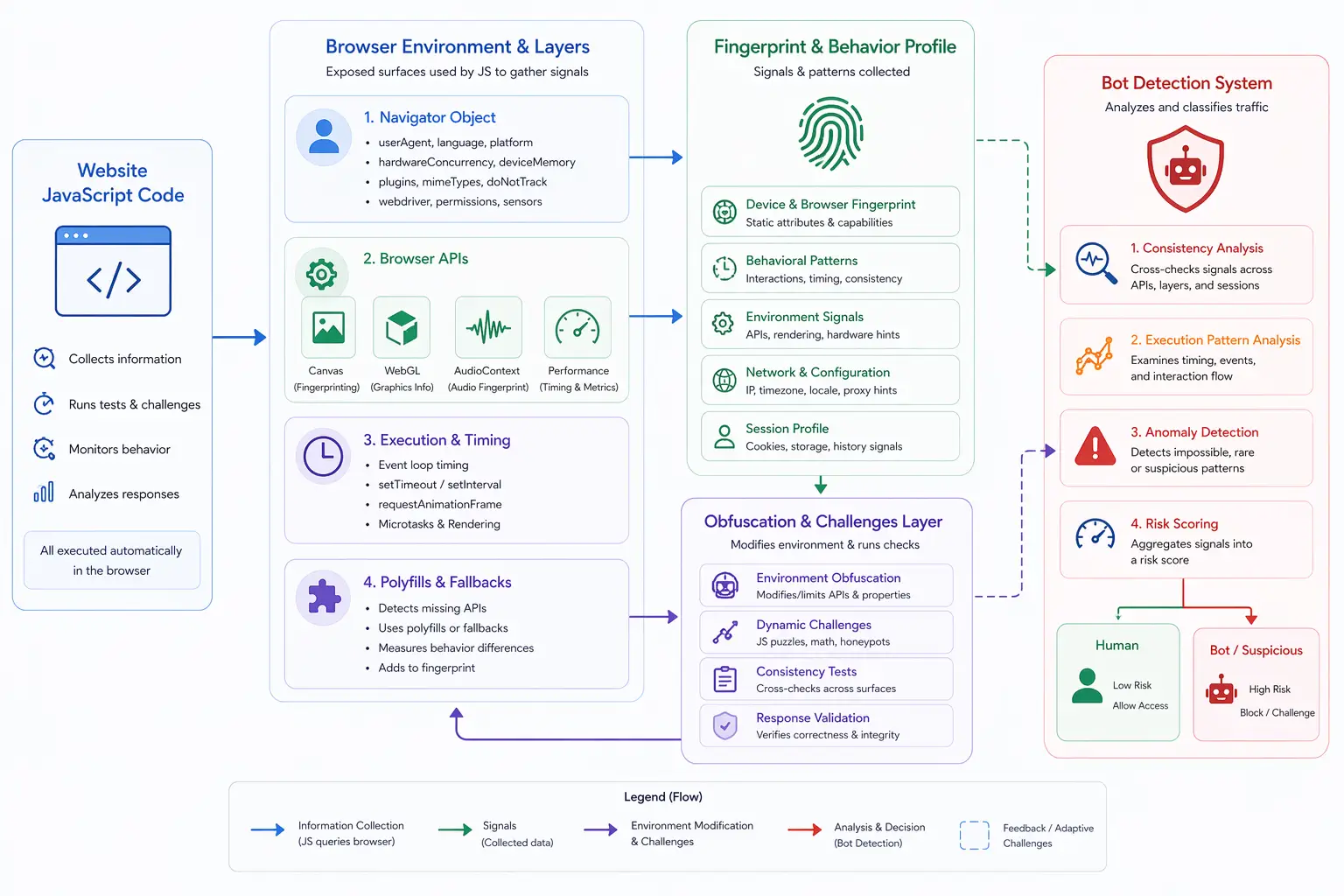
The core principle behind JavaScript fingerprinting is uniqueness through combination, meaning that while individual data points may not uniquely identify a user, combining multiple signals creates a highly distinctive profile. For example, a screen resolution alone may be common, but when combined with fonts, hardware capabilities, browser settings, and API outputs, it becomes much more specific. Detection systems rely on this layered aggregation of data to build fingerprints that are stable enough to recognize returning users while still adapting to environmental changes.
How JavaScript Fingerprinting Works
JavaScript fingerprinting operates by executing scripts within the browser that collect data from multiple sources and combine them into a single profile, where the browser acts as both the data provider and execution environment. These scripts access browser properties such as user agent, language, and timezone, collect device-level data like screen resolution and color depth, and leverage APIs such as Canvas, WebGL, and Audio to extract rendering and processing characteristics. In addition to static properties, JavaScript can also measure execution timing and performance behavior, which adds a dynamic layer to the fingerprint and helps differentiate between environments.
Why JavaScript Fingerprinting Matters
JavaScript fingerprinting matters because it enables tracking without relying on traditional storage mechanisms like cookies, which means users can still be identified even after clearing their browsing data. This makes it particularly valuable for fraud detection systems, analytics platforms, and bot detection engines that need persistent identification. It also reduces dependency on client-side storage, allowing systems to operate more reliably across different sessions and devices while maintaining continuity.
Common Data Points Used in JavaScript Fingerprinting
JavaScript fingerprinting relies on a wide range of data points that are collected through browser APIs and system interfaces, where browser-related data includes user agent strings, installed plugins, and supported features, and device-related data includes screen resolution, color depth, and hardware capabilities. API outputs such as Canvas and WebGL rendering provide unique visual characteristics, while Audio APIs reveal processing differences, and execution timing metrics add behavioral insights. These data points are not useful in isolation but become powerful when combined into a single fingerprint.
JavaScript Fingerprinting vs Cookies
JavaScript fingerprinting differs from cookies in that cookies store data directly on the user’s device, while fingerprinting collects data dynamically without persistent storage. This means cookies can be deleted or blocked, whereas fingerprinting continues to function by recalculating the fingerprint each time a session is initiated. Although fingerprinting is more resilient, it is also more complex and less transparent, and in practice, both methods are often used together to improve tracking accuracy.
Limitations of JavaScript Fingerprinting
Despite its effectiveness, JavaScript fingerprinting has limitations because modern browsers increasingly restrict access to certain APIs or introduce noise into outputs to reduce tracking accuracy. Users can also modify browser settings, use privacy-focused tools, or change environments, which can alter fingerprint data. Additionally, software updates and hardware changes can affect consistency, meaning fingerprints are not always perfectly stable and require continuous recalibration by detection systems.
JavaScript Fingerprinting and Bot Detection
JavaScript fingerprinting plays a major role in bot detection because automated environments often produce signals that differ from real devices, such as missing APIs, inconsistent values, or unnatural execution patterns. Detection systems analyze these discrepancies to identify automation, and when combined with behavioral analysis, fingerprinting becomes even more effective. This layered approach allows systems to distinguish between genuine users and scripted interactions with higher accuracy.
JavaScript Fingerprinting vs Other Fingerprinting Methods
JavaScript fingerprinting is often used alongside other techniques such as network fingerprinting and behavioral analysis, where network fingerprinting focuses on IP and routing data, and behavioral analysis evaluates user interaction patterns. JavaScript fingerprinting specifically targets the browser environment, providing a detailed view of device and execution characteristics. Combining these methods creates a more comprehensive detection system that can identify users across multiple layers.
JavaScript Fingerprinting vs Real-Device Environments
A key distinction in modern detection is the difference between simulated environments and real-device environments, where JavaScript fingerprinting can reveal inconsistencies in setups where signals are artificially modified or partially spoofed. Real-device approaches operate on actual hardware where browser APIs, rendering outputs, and execution behavior naturally align, and tools like Appilot follow this approach by running automation on real Android devices, ensuring that JavaScript outputs reflect real-world conditions. This reduces the likelihood of mismatches that detection systems rely on.
When JavaScript Fingerprinting Is Most Critical
JavaScript fingerprinting is most critical in scenarios where accurate user identification is required, such as fraud prevention, account security, and personalized services, where distinguishing between real users and automated systems is essential. In these contexts, fingerprinting provides a reliable method of identification that does not depend on stored data and can adapt to changing environments.
Frequently Asked Questions
Q: What is JavaScript fingerprinting?
It is a method of identifying users by collecting browser data through JavaScript.
Q: What data does it collect?
Browser properties, device information, API outputs, and execution behavior.
Q: Is it more persistent than cookies?
Yes, because it does not rely on stored data.
Q: Can it be prevented?
It can be reduced but not completely eliminated.
Q: Is it used for bot detection?
Yes, it helps identify inconsistencies in automated environments.
Q: How do real-device solutions compare?
Real-device solutions like Appilot produce consistent JavaScript signals, reducing mismatches detected through fingerprinting.
Key Takeaways
JavaScript fingerprinting is a powerful tracking method that uses browser-executed code to collect data about the user’s environment, combining multiple signals such as browser properties, device characteristics, and API outputs to create a unique profile. It enables persistent identification without relying on cookies, making it valuable for tracking and bot detection, but it also has limitations due to browser restrictions and environmental changes. Understanding how JavaScript fingerprinting works is essential for navigating modern web tracking systems.