LinkedIn Connection Requests Being Ignored? Here's Why
You’re sending connection requests every day on LinkedIn, trying to grow your network, reach potential clients, or build partnerships, but the results are disappointing because most of your requests are either ignored or quietly expire without any response. You tweak your message, try different profiles, maybe even increase your daily volume, yet nothing seems to change, and the worst part is not knowing whether the problem is your approach, your profile, or LinkedIn itself.
As your outreach volume increases, the problem compounds in ways that are both frustrating and costly, because sending ten ignored requests is annoying but manageable, while sending one hundred ignored requests daily quickly becomes a waste of time, energy, and opportunity, especially if you rely on LinkedIn for lead generation or client acquisition. You’re left with limited options, either continuing to send generic requests and hoping for better results, reducing your outreach and slowing growth, or manually customizing every request and burning hours daily on repetitive work.
There is a better approach that combines strategy with automation, allowing you to send highly personalized, well-timed connection requests at scale without sacrificing quality or triggering LinkedIn’s restrictions. Instead of guessing what works, you can build a repeatable system that increases acceptance rates, saves time, and scales with your goals.
In this guide, you’ll learn exactly why your LinkedIn connection requests are being ignored, how LinkedIn evaluates your behavior behind the scenes, and how to fix your outreach using structured workflows and automation tools like Appilot without turning your account into a spam machine.
You’ll also learn how to craft messages that actually get accepted, how to avoid common mistakes that kill response rates, and how to scale your outreach without damaging your account health.
Setup time is around 45 minutes, difficulty is intermediate, and the potential return is significant because even a small improvement in acceptance rate can double or triple your results without increasing effort.
Why LinkedIn Connection Requests Get Ignored in 2026
LinkedIn has changed dramatically over the past few years, and what worked even two years ago no longer produces the same results today, because the platform has become far more aggressive in filtering low-quality outreach and prioritizing meaningful interactions. The increase in automation tools, spam messages, and aggressive sales tactics has forced LinkedIn to tighten its systems, making it harder for generic connection requests to get accepted.
Recent trends show that users are receiving more connection requests than ever before, which means attention has become scarce, and people are far more selective about who they accept into their network. At the same time, LinkedIn’s algorithm evaluates multiple signals before deciding whether to show your request prominently or bury it among dozens of others.
For professionals using LinkedIn for business, this creates a significant bottleneck because outreach is no longer just about sending requests but about standing out in a crowded inbox. A typical outreach campaign might involve sending 100 to 200 requests daily, but if only 10 percent are accepted, the majority of effort is wasted.
When you break it down mathematically, the inefficiency becomes obvious. If you send 100 requests daily and spend around 30 seconds crafting or managing each one, that translates to nearly an hour of work per day. Over a five-day workweek, that becomes five hours, and over a month, it turns into more than twenty hours spent on a process that delivers minimal results.
This is exactly why smart operators are shifting toward structured outreach systems that combine personalization, timing, and automation rather than relying on volume alone.
What You Need to Get Started
To fix ignored connection requests, you need a combination of the right tools and the right strategy rather than relying on guesswork or outdated tactics.
At a minimum, you need a LinkedIn account that is active and properly set up, an antidetect browser such as GoLogin to manage multiple profiles safely, and an automation platform like Appilot to execute workflows at scale. You will also need around 45 minutes for initial setup and testing.
It is highly recommended to use residential proxies if you are managing multiple accounts or operating across different locations, as this reduces detection risk and improves account stability. Additional tools like CRM integrations or spreadsheet tracking systems can further enhance your workflow but are not strictly necessary at the beginning.
The cost of this setup typically ranges between $100 and $300 per month depending on scale, but the return on investment becomes clear when compared to the time saved. If you value your time at even $10 per hour and spend 20 hours monthly on manual outreach, that is already $200 in lost productivity, meaning the automation setup pays for itself quickly.
Step-by-Step: Fixing Your LinkedIn Outreach
Step 1: Understand Why Requests Are Ignored
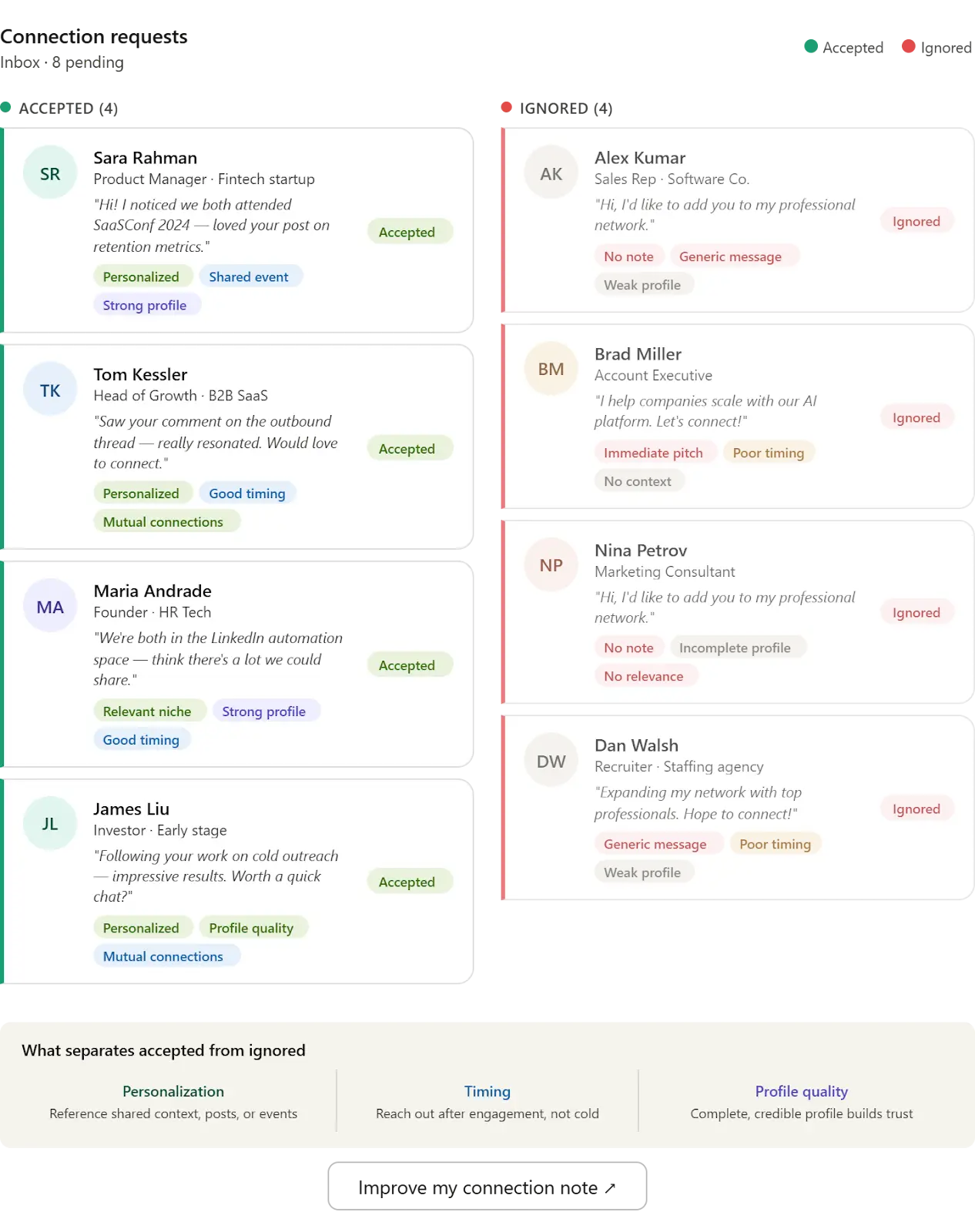
Before fixing the problem, you need to understand the root causes. Most ignored requests fail because they lack personalization, are sent at the wrong time, or come from profiles that do not inspire trust. LinkedIn also deprioritizes accounts that send too many similar requests in a short period.
Step 2: Optimize Your Profile First
Your connection request is only as strong as the profile behind it. If your profile looks incomplete, overly sales-focused, or generic, people will ignore your request regardless of the message.
Focus on improving your headline, profile picture, and summary so that they clearly communicate value. When someone receives your request, they will often click your profile before accepting, and this moment determines whether you gain a connection or lose it.
Step 3: Craft High-Converting Messages
Generic messages are the biggest reason connection requests get ignored. Messages like “I’d like to connect” or “Let’s network” provide no value and feel automated.
Instead, your message should reference something specific about the recipient, such as their role, content, or company, while keeping the tone conversational and non-salesy. The goal is to start a relationship, not close a deal in the first message.
Step 4: Use Automation the Right Way
This is where Appilot becomes useful. Instead of manually sending requests, you can create workflows that automate the process while maintaining personalization.
You can still use tools like Appium or manual scripting, but Appilot simplifies the process by allowing you to manage workflows through a dashboard without handling infrastructure.
A typical workflow includes setting triggers for when requests are sent, defining actions such as visiting profiles and sending requests, and applying conditions like daily limits and delays.
Step 5: Test Before ScalingAlways test your workflow on a small number of profiles before scaling. This allows you to identify issues such as low acceptance rates or platform warnings before they affect your entire operation.
Monitor results over a few days, adjust your messaging or timing, and only then expand to larger volumes.
Safety and Best Practices
LinkedIn has strict limits and detection mechanisms, so respecting these limits is essential for long-term success. Sending too many requests too quickly or using identical messages across all profiles increases the risk of restrictions.
Randomization is critical because human behavior is naturally inconsistent, and your automation should reflect that. Varying timing, message structure, and daily activity levels helps avoid detection.
Account warm-up is also important, especially for new profiles. Starting with low activity and gradually increasing volume mimics natural usage patterns and reduces risk.
Real Results: What to Expect
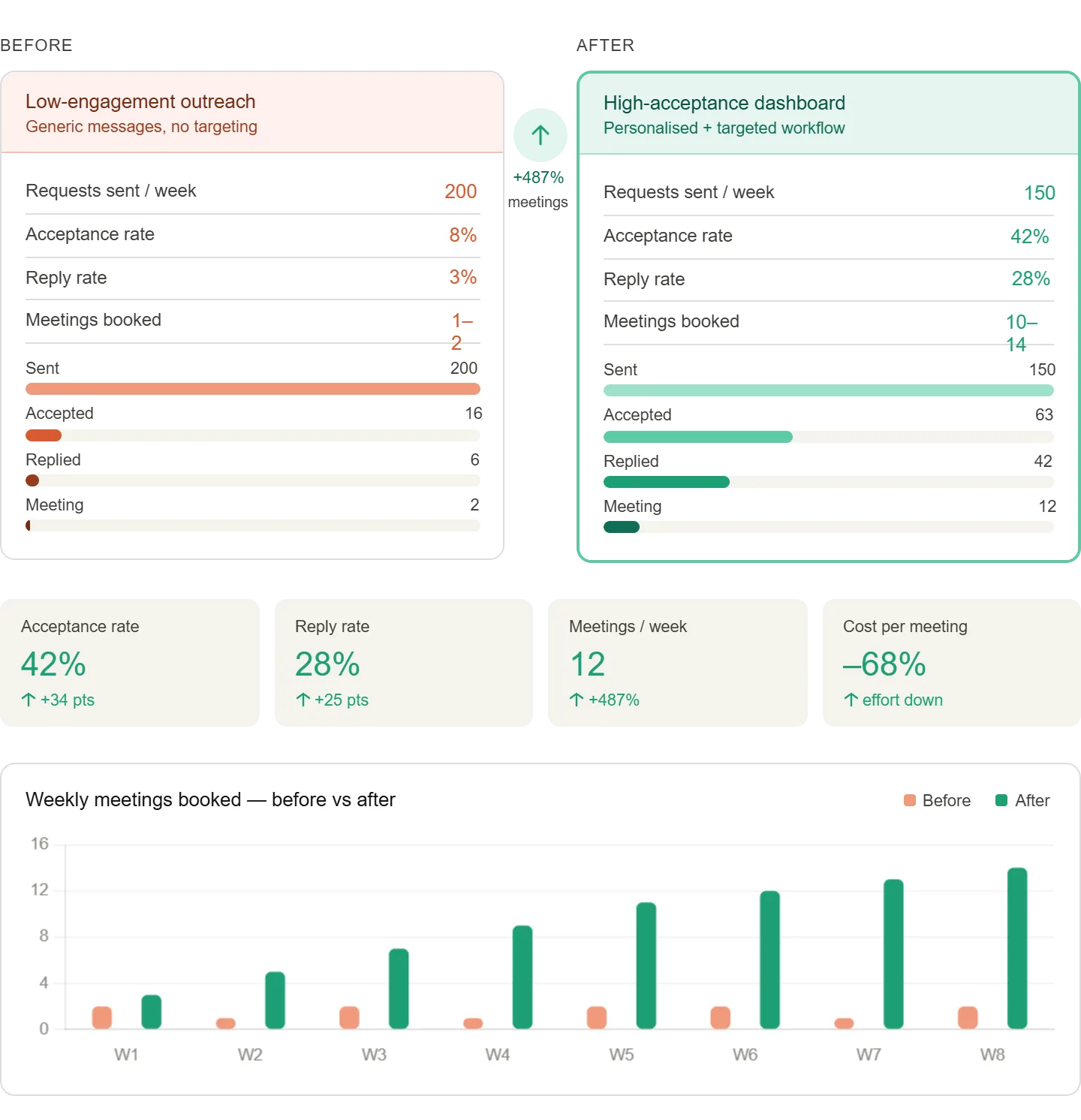
In the first week, most of your time will be spent setting up and testing workflows, with minimal immediate results. By the second to fourth week, as your system stabilizes, you should see noticeable improvements in acceptance rates and time savings.
After one to two months, the system becomes fully optimized, allowing you to manage hundreds of connection requests daily with minimal effort while maintaining consistent results.
A typical case study shows a user increasing their acceptance rate from 10 percent to over 30 percent while reducing weekly workload by more than 80 percent.
Common Problems and Solutions
One common issue is low acceptance rates despite automation. This usually indicates weak messaging or poor targeting. Adjusting your message structure and refining your audience can resolve this quickly.
Another issue is LinkedIn warnings or restrictions, which often occur when limits are exceeded or behavior appears too automated. Reducing activity levels and increasing randomization typically fixes this.
Some users also experience inconsistent results across profiles, which can be caused by differences in profile quality or account age. Standardizing profile optimization helps address this problem.
Choosing the Right Tools
Different tools offer different levels of control and complexity. GoLogin is ideal for managing multiple profiles safely, while Appilot provides a streamlined way to automate workflows without technical overhead.
For users who prefer full control, tools like Appium are an option, but they require more setup and maintenance. For most users, a managed solution like Appilot provides the best balance between simplicity and scalability.
Scaling Your Outreach
As you scale from a few accounts to dozens or hundreds, your approach needs to evolve. Monitoring becomes more important, and you may need to upgrade tools or infrastructure to handle increased volume.
At higher scales, team collaboration and advanced tracking become essential to maintain performance and avoid issues.
Frequently Asked Questions
Many users wonder whether LinkedIn automation violates platform rules. The answer is nuanced because LinkedIn restricts abusive automation but allows tools that enhance productivity when used responsibly.
Another common question is whether accounts will get banned. While there is always some risk, following best practices significantly reduces it.
Users also ask how much time automation saves. In most cases, it reduces manual work by over 70 percent while improving results.
Conclusion
LinkedIn connection requests being ignored is not a random problem but a predictable outcome of poor messaging, weak profiles, and inefficient workflows. Once you understand the underlying causes, you can fix the issue systematically rather than relying on trial and error.
By combining better messaging, optimized profiles, and structured automation, you can transform your outreach from a low-performing activity into a scalable system that consistently delivers results.
The key is to start small, test your approach, and gradually scale once you see positive outcomes.