LogMeOnce Browser Security and Appilot Automation
Browser security has become much more important as people manage larger numbers of accounts, devices, passwords, browser sessions, and online identities. Whether you are running multiple social media accounts, e-commerce stores, affiliate campaigns, crypto wallets, or client dashboards, security problems can quickly create larger operational issues.
Most people focus on automation speed, browser profiles, and workflow scaling, but security is just as important. Weak passwords, reused login details, poor session handling, and unsecured browser environments can lead to account lockouts, compromised sessions, or unauthorized access.
This is where LogMeOnce and Appilot can work together. LogMeOnce focuses on password management, secure login handling, identity protection, and browser security, while Appilot helps automate browser workflows, profile launches, repetitive tasks, and account management.
Together, they create a more secure and organized automation setup where browser sessions, credentials, workflows, and account actions can all be managed more safely.
What Is LogMeOnce?
LogMeOnce is a password manager and identity security platform designed to help users manage login credentials, passwords, browser sessions, and account security across multiple devices.
It is commonly used for password storage, secure login sharing, two-factor authentication, identity monitoring, encrypted notes, and browser extension-based login management.
For people managing many accounts, LogMeOnce can reduce the need to store passwords in spreadsheets, text files, browser autofill tools, or unsecured documents.
This is especially important for teams and agencies where multiple people may need access to the same browser profiles, social media accounts, advertising accounts, client dashboards, or e-commerce platforms.
Instead of sharing passwords manually, LogMeOnce provides a more secure way to manage credentials.
Why Combine LogMeOnce with Appilot?
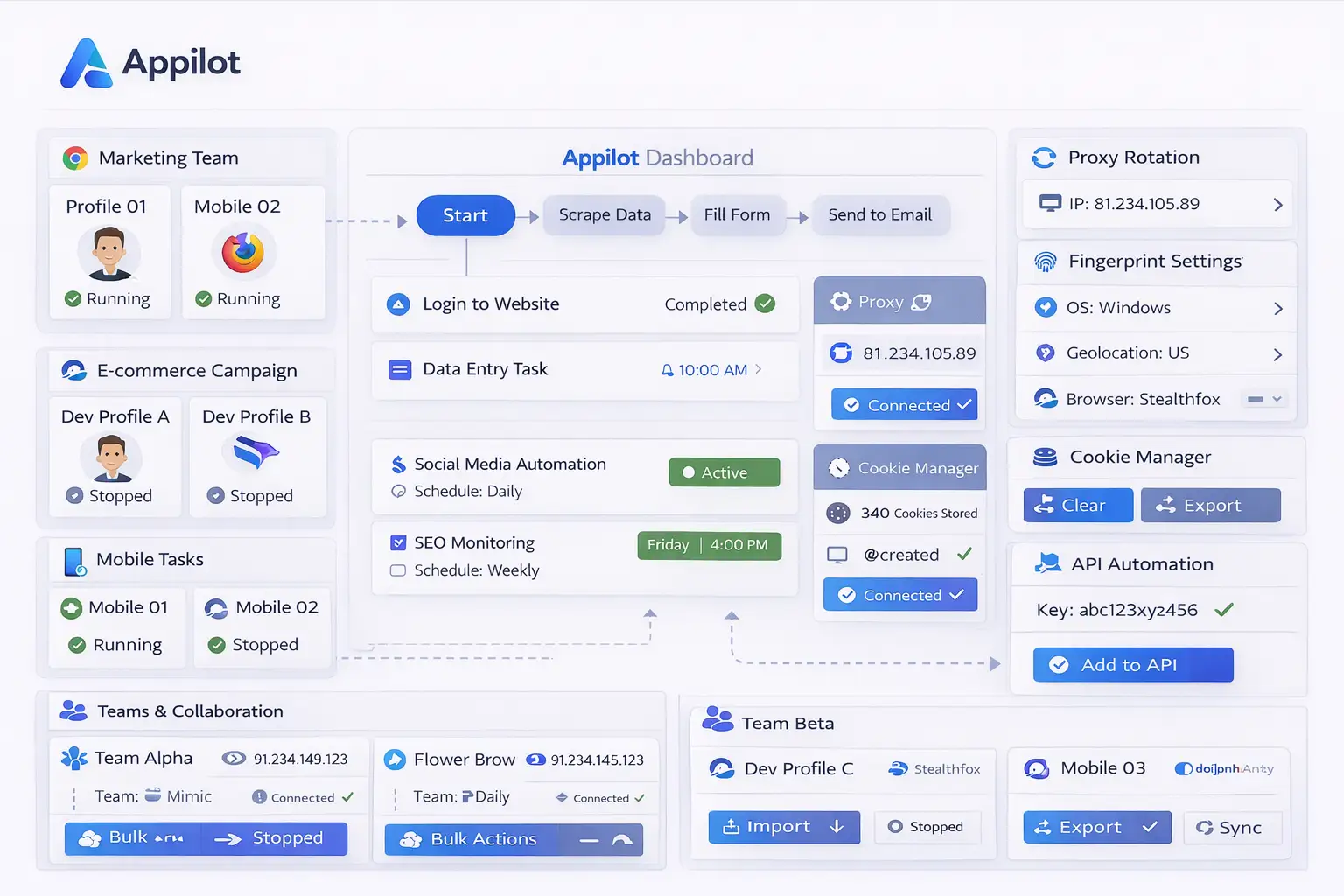
Appilot is useful for automating browser workflows, profile launches, scheduled tasks, and repetitive actions. However, browser automation often still requires account logins, session management, and secure credential handling.
Without a secure password management system, users often end up saving passwords inside notes, spreadsheets, browser bookmarks, or local documents. This creates security risks and makes it harder to manage larger groups of accounts.
By combining LogMeOnce with Appilot, you can create workflows where account credentials are stored more securely while browser tasks continue to run automatically.
For example, a browser workflow may need to log into several advertising accounts every morning, check performance dashboards, export reports, and close the browser sessions afterward. LogMeOnce can help secure the login information while Appilot handles the workflow automation.
This becomes even more useful when multiple team members need access to the same accounts because password management can stay centralized instead of being spread across different files and devices.
Common Use Cases
One common use case is social media management. Agencies often manage many social media accounts across different platforms. LogMeOnce can store login credentials securely while Appilot automates browser launches, content checks, notification reviews, and account workflows.
E-commerce sellers can use LogMeOnce to manage login details for Shopify stores, Amazon accounts, Etsy stores, supplier portals, and payment dashboards. Appilot can then automate repetitive actions such as reviewing orders, checking inventory, and exporting reports.
Affiliate marketers often manage multiple advertising accounts, tracking dashboards, and landing page tools. Secure password management helps reduce confusion while Appilot helps automate browser tasks and account reviews.
Crypto users can also benefit because they often manage exchange accounts, wallets, NFT tools, and research platforms. Since crypto accounts are especially sensitive, using secure credential storage together with browser automation can help reduce risk.
Agencies and teams may find this setup especially useful because it allows multiple people to manage shared browser workflows without exposing passwords through unsecured methods.
How Secure Credential Management Improves Automation
A large part of browser automation involves repeated logins. Social media accounts, e-commerce stores, affiliate dashboards, client portals, and browser profiles often require usernames, passwords, two-factor authentication codes, or recovery details.
If those credentials are not managed properly, it becomes much harder to scale workflows safely.
Using LogMeOnce allows credentials to stay organized in one place instead of being scattered across spreadsheets, browser notes, or unsecured text documents.
This also reduces the chance of using the wrong login information for the wrong account. When you are managing dozens of browser profiles, it becomes easy to mix up passwords, usernames, or client accounts if everything is not organized clearly.
Secure credential storage can also help with team collaboration because access can be managed without exposing sensitive information directly.
Best Practices for Browser Security and Automation
The best approach is to separate accounts into groups based on their purpose. Social media accounts should stay separate from e-commerce accounts, affiliate accounts, crypto accounts, and client projects.
It is also important to use strong passwords for every account instead of reusing the same password across multiple browser profiles.
Two-factor authentication should also be enabled whenever possible because it provides another layer of protection for sensitive accounts.
Using separate browser profiles for separate accounts is another important practice because it reduces the chance of session overlap and account linking.
You should also review browser activity, task logs, and login history regularly. Even if most workflows are automated, there may still be times when login sessions expire, browser profiles fail, or account activity changes unexpectedly.
Keeping security and automation organized together is usually much more effective than treating them as separate systems.
Common Problems and Troubleshooting
One common issue is that browser workflows fail because the login session has expired. If the account requires a password update or two-factor authentication check, the automation may stop working until the login information is updated.
Another issue is password confusion. When users manage many accounts without a proper password management system, they may accidentally use the wrong credentials for the wrong browser profile.
Sometimes teams also share passwords through insecure methods such as spreadsheets, chat messages, or text files. This creates unnecessary risk and makes account management harder.
Users may also forget to update credentials after changing passwords, which can break workflows unexpectedly.
Keeping credentials organized and updated is important for maintaining reliable browser automation.
Frequently Asked Questions
Q1: Why is secure password management important for browser automation?
Secure password management helps reduce login errors, keeps credentials organized, and lowers the risk of account compromise.
Q2: Can LogMeOnce help teams manage shared account access?
Yes. Teams can use LogMeOnce to manage shared account credentials more securely without exposing passwords through spreadsheets or chat messages.
Q3: Is this setup useful for social media account management?
Yes. Social media managers often need secure credential storage for many accounts while still automating browser workflows.
Q4: Should every browser profile use different login credentials?
Yes. Using separate login credentials for separate accounts is usually safer than reusing the same passwords across multiple profiles.
Q5: What happens if an automated workflow fails because of a login problem?
You can review the browser logs, update the stored credentials, check the account session, and restart the workflow.
Conclusion
LogMeOnce helps secure passwords, browser logins, and account credentials, while Appilot helps automate browser workflows, repetitive tasks, and profile management.
Together, they create a more secure system for managing browser automation across multiple accounts, clients, and workflows.
This makes it easier to protect sensitive account information while still saving time through automation.