Lost All Your Account Credentials? Here’s the Recovery Plan (And How to Make Sure It Never Happens Again)
Everything Was Working… Until You Couldn’t Log In Anymore
It usually starts with a single failed login attempt. You try again, assuming it is a typo, then again with a different variation, and then the realization hits that you no longer have access.
You check your notes, your password manager, your team chats, and everything feels incomplete. Some credentials are outdated, some are missing, and others lead to recovery methods tied to emails or devices you no longer control.
What seemed like a small issue quickly escalates into a full operational disruption. Work pauses, accounts become inaccessible, and you are forced into reactive mode, trying to regain control of systems that should never have been out of your reach in the first place.
This is not just frustrating, it is risky. And the worst part is that it is almost always preventable.
Why Account Credentials Get Lost in the First Place
The immediate assumption is that credentials were misplaced or forgotten, but the real issue is almost always structural.
The first cause is fragmented storage. Credentials are spread across multiple places, including chats, documents, personal notes, and different tools, which makes it difficult to maintain a single reliable source of truth.
The second cause is unclear ownership. Accounts are often created quickly without defining who controls them, which leads to situations where access depends on a specific person rather than the organization.
The third cause is inconsistent updates. Passwords get changed without proper tracking, which results in outdated information being stored in different locations.
The fourth cause is dependency on personal access. Recovery emails, phone numbers, and authentication methods are often tied to individuals instead of centralized systems, which creates a major risk when access is lost.
The Hidden Cost of Losing Access
Losing access is not just about inconvenience, it has immediate and long-term consequences.
The most obvious impact is downtime. Work stops because you cannot access the systems required to execute tasks, and even short interruptions can disrupt entire workflows.
There is also a financial cost. Delayed campaigns, missed opportunities, and paused operations can lead to direct revenue loss.
Security risks increase as well. When access is unclear, it becomes difficult to determine who still has control, which creates potential vulnerabilities.
The long-term cost is loss of control over your own operations. You realize that your system is fragile, and that growth without structure introduces risk instead of stability.
The Immediate Recovery Plan (What to Do Right Now)
When access is lost, the priority is to regain control as quickly as possible while minimizing further risk.
The first step is identifying recovery paths. You check which accounts have recovery emails, phone numbers, or backup authentication methods and begin the recovery process through official channels.
The second step is verifying ownership. Many platforms require proof that you control the account, so you gather any available information such as previous activity, billing details, or linked accounts.
The third step is securing recovered accounts immediately. Once access is restored, you update credentials, enable secure authentication methods, and remove any outdated or unknown access points.
The fourth step is documenting access properly. Instead of leaving credentials scattered, you begin organizing them into a structured system to prevent future loss.
The Real Problem: Your Access System Was Never Designed to Scale
The core issue is not that credentials were lost, it is that the system managing them was not structured.
When access depends on memory, scattered storage, or individual ownership, it becomes fragile. As your number of accounts grows, the risk increases, and eventually something breaks.
What you need is not better memory or more careful handling, but a system where access is controlled, centralized, and independent of any single person.
The Complete Solution: Move from Credentials to Controlled Access
The only way to prevent this permanently is to redesign how access works.
The first step is centralizing ownership. Accounts should belong to the organization, not individuals, with recovery methods tied to controlled resources.
The second step is structuring access. Instead of sharing raw credentials, you create a system where team members interact with accounts through controlled environments.
The third step is standardizing execution. When access and workflows are consistent, it becomes easier to maintain control and track activity.
This is where many teams face challenges, because building this system manually requires managing devices, authentication layers, and execution environments.
This is also where tools like Appilot become relevant.
Instead of relying on scattered credentials, Appilot allows workflows to run on real devices through a centralized system, reducing dependency on individual logins and making access more stable.
You could attempt to build similar systems using custom setups or tools like Appium, but maintaining that infrastructure becomes complex. Appilot simplifies this by handling the execution layer, allowing your team to operate without relying on fragile credential management.
The key shift is moving from password-based access to system-based control.
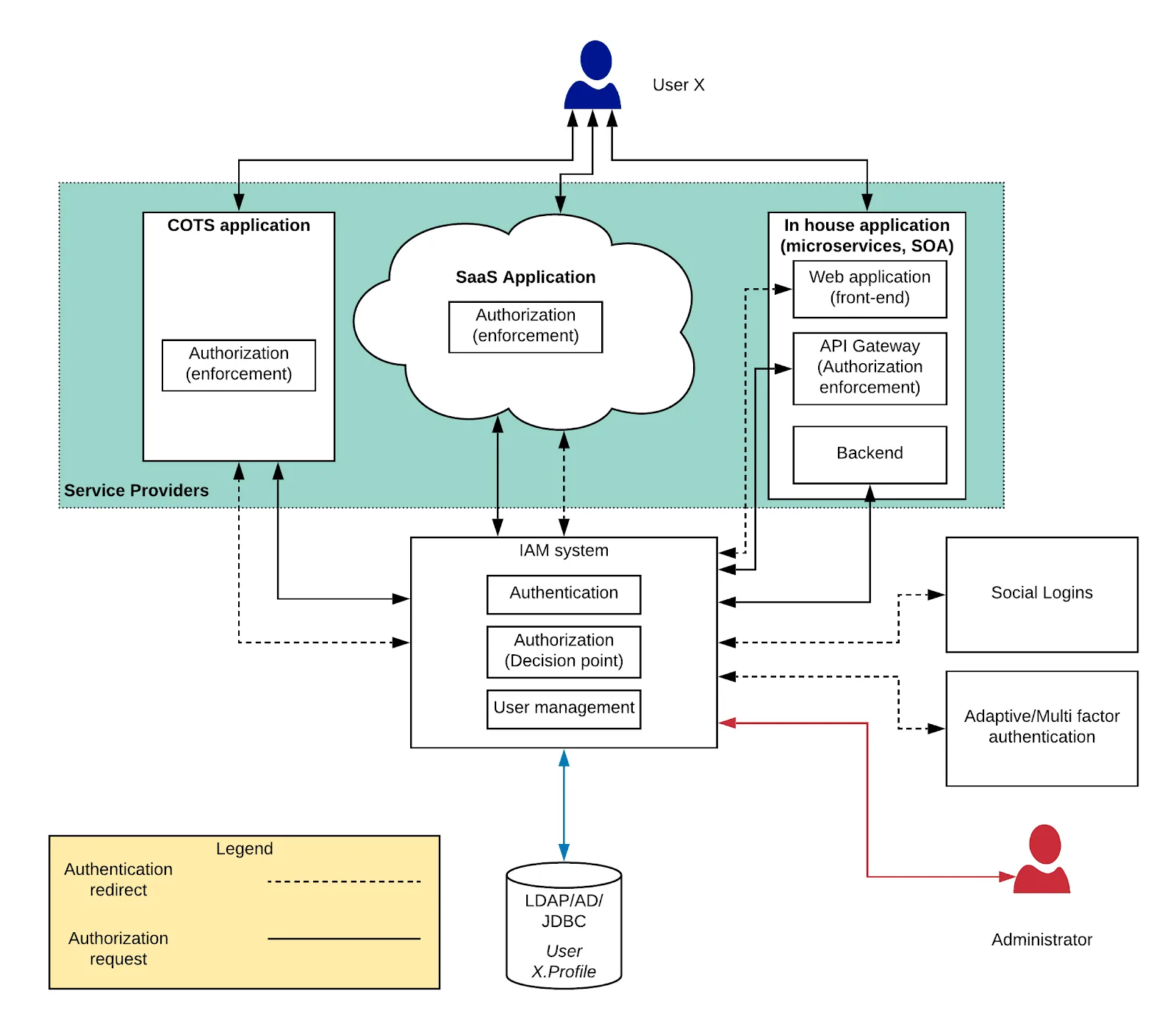
Why System-Based Access Prevents This Completely
Once access is structured, the risk of losing credentials drops significantly.
Accounts are no longer tied to individuals, which means losing one point of access does not affect the entire system.
Recovery becomes easier because ownership is centralized and documented.
Security improves because credentials are not scattered across multiple locations.
Most importantly, your operations become stable, even as your number of accounts grows.
How to Prevent This From Ever Happening Again
Fixing access once is not enough. You need to maintain a system that keeps it stable over time.
You ensure that all accounts are created and managed within a structured framework from the beginning.
You regularly audit access to identify and fix gaps before they become problems.
You standardize how workflows are executed, reducing dependency on individual setups.
Common Mistakes That Make This Worse
One of the most common mistakes is storing credentials in multiple disconnected places, which creates confusion and inconsistency.
Another mistake is allowing accounts to be tied to personal emails or devices, which introduces ownership risks.
Some teams rely on manual tracking without updating it consistently, which leads to outdated information.
The most critical mistake is waiting until access is lost to fix the system, when prevention is far easier than recovery.
Conclusion: Access Should Never Depend on Memory
If you have lost all your account credentials, it is not just an unfortunate event, it is a sign that your system needs to change.
Once you move from scattered credential management to structured access control, the risk disappears because the system no longer depends on fragile points.
You can continue managing this manually, but as your operations grow, the complexity will grow with it.
At some point, you either build a system that ensures stable access or use one that already does.
That is where platforms like Appilot fit in, not as a convenience, but as a way to create a controlled, scalable environment where access is reliable and no longer dependent on memory or scattered credentials.