Managing 10+ Different Browser Types from One Appilot Account
Managing multiple browser types sounds simple in the beginning. You may start with one browser for social media accounts, another for e-commerce work, and another for affiliate campaigns. Over time, you end up with Chrome profiles, Firefox profiles, GoLogin workspaces, Dolphin Anty profiles, AdsPower sessions, Ghost Browser identities, Multilogin environments, and several other browser setups spread across different tools.
The real problem is not having different browsers. The real problem is the amount of manual work required to manage them all. Every browser has its own dashboard, profile structure, proxy settings, cookies, session storage, team permissions, and automation process. When you are switching between ten or more browser types every day, you waste a large amount of time simply keeping everything organized.
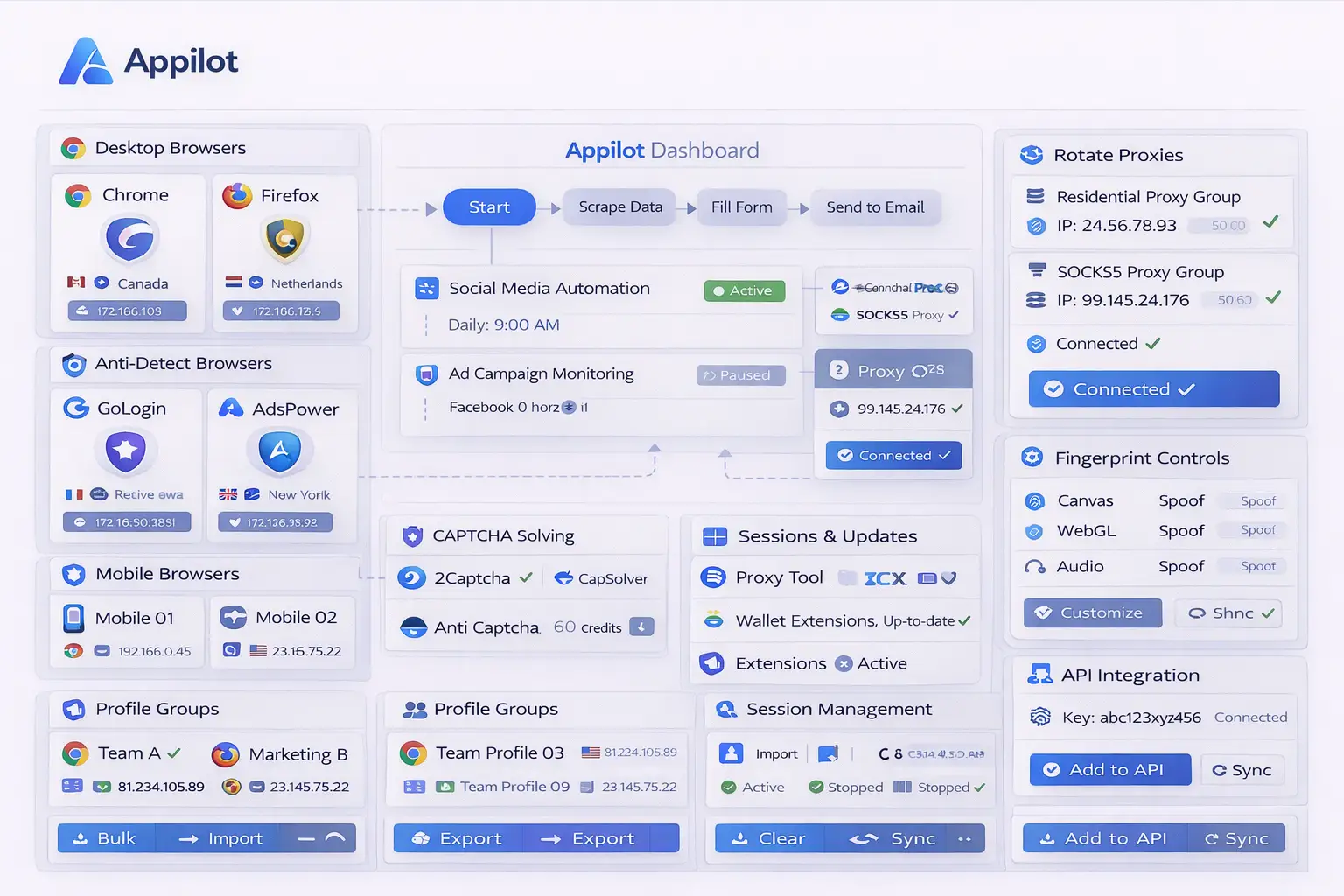
This is where Appilot becomes useful. Instead of treating every browser as a completely separate system, Appilot allows you to connect different browser types into one dashboard. That means you can manage profiles, schedule tasks, launch browser sessions, organize teams, and automate workflows from one account instead of opening ten different tools every day.
This approach is especially useful for agencies, affiliate marketers, e-commerce sellers, social media teams, crypto users, web scrapers, and anyone managing large numbers of browser profiles. Once you centralize everything into one place, your workflows become much easier to scale.
Why Managing Multiple Browser Types Becomes Difficult
The first challenge with managing different browser types is inconsistency. Every browser platform uses a different interface and a different way of organizing profiles. Some browsers focus heavily on proxy settings, some focus on fingerprinting, and others focus on collaboration or multi-session management.
When you work across several browser types, you constantly need to remember where specific profiles are stored, which proxies belong to which browser, which team member has access to which account, and what tasks still need to be completed. Even small things like updating browser versions or changing proxy groups become time-consuming when you repeat them across multiple platforms.
Another issue is that different browser types are often used for different tasks. You may use one browser for Facebook accounts, another for TikTok campaigns, another for Amazon seller profiles, and another for crypto wallets. Without a centralized system, these workflows stay disconnected from each other, which makes it harder to scale operations or keep everything organized.
Appilot solves this problem by acting as the main control center above all browser platforms. Instead of moving between browser dashboards, you can manage everything from one interface.
Why Appilot Works Well for Multi-Browser Operations
Appilot is useful because it removes the need to manually coordinate all your browser platforms. Once your browser accounts are connected, you can import profiles from different browser types and manage them together inside one dashboard.
This means you can keep Chrome profiles, Firefox sessions, GoLogin environments, Dolphin Anty workspaces, AdsPower profiles, and other browser types inside the same account. You no longer need to remember which browser dashboard contains which account because everything is visible in one place.
This becomes especially valuable once you start working with larger numbers of profiles. For example, an agency may have 20 Chrome profiles for client research, 40 GoLogin profiles for social media campaigns, 30 AdsPower profiles for e-commerce stores, and 15 Dolphin Anty profiles for affiliate campaigns. Without a centralized system, managing all of those profiles becomes extremely difficult.
Appilot also helps with team collaboration because you can organize profiles by campaign, client, region, team member, or browser type. Instead of giving employees access to every browser platform separately, you can manage permissions directly inside Appilot.
Another major advantage is task scheduling. Instead of opening browser sessions manually every morning, you can create scheduled workflows that automatically launch specific browser groups at specific times. This saves a large amount of time every week and reduces the amount of repetitive manual work.
How Multi-Browser Management Usually Looks Without Appilot
Without a centralized platform, most people end up with dozens of tabs open every day. One tab contains GoLogin profiles, another contains AdsPower, another contains Dolphin Anty, another contains Multilogin, and several more tabs contain Chrome profiles, spreadsheets, proxy tools, password managers, and scheduling tools.
This setup becomes difficult to maintain because there is no single place where everything is visible. You may forget which profile belongs to which client, which proxy group is assigned to which browser, or which sessions are currently active.
You also spend more time switching between tools than actually completing work. When you multiply this by weeks or months, the amount of lost time becomes very large.
At the same time, errors become more common. Profiles may get mixed up, proxies may be assigned incorrectly, and accounts may accidentally overlap. This creates unnecessary risk, especially for users managing high-value accounts or large numbers of sessions.
How to Set Up Different Browser Types Inside Appilot
The setup process is usually straightforward. The first step is connecting each browser platform to Appilot through its API key or browser integration settings. Most browser platforms already support profile exports or API access, so the connection process usually takes only a few minutes.
Once connected, Appilot can import profiles from different browser types into one dashboard. You can then create groups based on browser type, campaign, geography, client, or account category. This makes it easier to keep everything organized as your operation grows.
After importing your profiles, you can configure schedules for browser launches, session management, automated workflows, and profile monitoring. For example, you may want specific Chrome profiles to launch every morning, certain GoLogin profiles to open before social media posting starts, and certain Dolphin Anty profiles to run only during specific hours.
You can also create profile groups that match your business structure. One group may contain all e-commerce browser profiles, another may contain social media profiles, and another may contain affiliate marketing profiles. This makes it much easier to manage large operations without feeling overwhelmed.
The biggest advantage is that all of this can be controlled from one place. Instead of logging into multiple browser platforms every day, you can simply open Appilot and manage everything from there.
Common Use Cases for Managing Multiple Browser Types
Different industries use multiple browser types for different reasons. E-commerce sellers often separate browser environments for Amazon, eBay, Walmart, Shopify, and supplier accounts. Social media marketers may use different browser types for Facebook, Instagram, TikTok, LinkedIn, YouTube, and Pinterest accounts.
Affiliate marketers often use different browsers to separate campaigns, landing pages, ad accounts, and tracking systems. Crypto users may separate wallets, exchanges, and farming profiles across different browser environments to reduce overlap and improve security.
Agencies usually benefit the most because they often manage dozens or hundreds of profiles across different clients. One client may prefer Chrome profiles, another may use GoLogin, and another may already be working with AdsPower. Instead of forcing everyone into one browser system, Appilot allows all of those browser types to work together inside one dashboard.
This flexibility is one of the main reasons why centralized browser management is becoming more popular. Businesses do not want to be locked into one browser ecosystem. They want the freedom to use different browser types for different tasks while still keeping everything organized.
Best Practices for Managing Large Numbers of Browser Profiles
When you manage ten or more browser types, organization becomes extremely important. One of the best things you can do is create a consistent naming system for all profiles. For example, you can use a naming format based on client, platform, region, and account purpose. This makes it much easier to identify profiles later.
You should also keep browser groups separated by purpose. Mixing social media accounts, e-commerce stores, scraping profiles, and crypto wallets in the same folder can quickly become confusing. Keeping clear profile groups makes it easier to find accounts and reduces the chance of making mistakes.
Another good practice is standardizing proxy usage across all browser types. Different browsers may handle proxies slightly differently, but keeping a consistent proxy structure helps reduce confusion and makes troubleshooting easier later.
It is also important to review inactive profiles regularly. Large browser operations often accumulate old profiles that are no longer needed. Cleaning up unused profiles makes the dashboard easier to manage and reduces clutter.
Finally, you should document your browser structure so your team understands how profiles are organized. This becomes very important when multiple people are working inside the same account.
Common Problems and How to Avoid Them
One common problem is importing too many profiles at once without organizing them first. This can make the dashboard feel cluttered and difficult to manage. It is usually better to import profiles in stages and organize them into groups immediately.
Another common issue is assigning the wrong proxies to the wrong browser groups. This can create unnecessary overlap between accounts and may increase the risk of platform detection. Keeping browser groups separated by proxy type and geography usually helps prevent this.
Some users also make the mistake of giving every team member access to every browser profile. This often creates confusion and increases the risk of accidental changes. It is better to assign permissions based on roles and responsibilities.
Another issue is forgetting to monitor browser health over time. Browser profiles can become outdated, proxies can expire, and sessions can break. Reviewing your browser setup regularly helps keep everything working smoothly.
The most successful multi-browser operations usually follow simple rules, keep browser groups organized, and use Appilot as the main control center for everything.
Frequently Asked Questions
Q1: How many browser profiles can I schedule at once?
The number of browser profiles you can schedule depends on your Appilot setup, hardware resources, proxy capacity, and browser limits. Many users manage dozens or even hundreds of profiles from one dashboard.
Q2: Can I connect both antidetect browsers and regular browsers?
Yes. Appilot can be used with both regular browsers like Chrome and Firefox as well as antidetect browsers like GoLogin, Dolphin Anty, AdsPower, Multilogin, and others.
Q3: Can I organize browser profiles by client or campaign?
Yes. One of the main benefits of Appilot is that it allows you to organize profiles based on your own workflow. You can create profile groups by client, campaign, browser type, geography, account purpose, or team member.
Q4: Is it possible to automate browser launches and scheduled tasks?
Yes. Appilot allows you to create schedules for browser launches, session management, task automation, and recurring workflows.
Q5: Why do some businesses use different browser types instead of one?
Different browser types often have different strengths. Some are better for social media, some are better for e-commerce, some are better for scraping, and some are better for collaboration. Using multiple browser types gives businesses more flexibility.
Conclusion
Managing ten or more browser types manually eventually becomes inefficient because there are too many profiles, dashboards, proxies, schedules, and workflows to manage separately. Once your operation grows, it becomes much harder to keep everything organized without a centralized system.
Appilot solves this problem by giving you one place to manage all your browser profiles, browser types, schedules, and workflows. Instead of wasting time switching between different browser platforms, you can manage everything from one account and scale your operation more efficiently.
This blog structure follows the user's requested Appilot blog format with one centered image, paragraph-style sections, no service or product page references, and FAQ formatting preferences.