Managing AdsPower Sun Browser vs Flower Browser with Appilot
AdsPower provides two main browser environments, Sun Browser and Flower Browser, each designed for different use cases in browser automation and multi-account management. Both environments allow users to create isolated browser profiles with separate fingerprints, cookies, proxies, and sessions.
For teams managing multiple accounts across different platforms, choosing between Sun Browser and Flower Browser is only part of the process. The bigger challenge comes when managing dozens or hundreds of profiles across both environments.
This is where Appilot becomes useful.
Appilot helps organize AdsPower Sun and Flower Browser workflows from one dashboard so you can assign schedules, manage profile groups, and monitor automation more efficiently.
Understanding Sun Browser vs Flower Browser
Sun Browser is typically used for environments that require higher compatibility with modern websites and updated browser engines. It is often preferred for tasks that need better rendering, newer browser features, and smoother interaction with complex web applications.
Flower Browser, on the other hand, is often used for stability-focused workflows where consistency is more important than frequent updates. Some users prefer it for long-running sessions or workflows that depend on predictable browser behavior.
Both browsers allow you to create multiple profiles with unique fingerprints, proxies, cookies, and session data.
However, managing profiles across both environments manually can become difficult as the number of profiles increases.
Why Managing Both Browsers Becomes Complex
When working with both Sun Browser and Flower Browser, you may need to manage different workflows for each environment.
For example, one set of profiles may use Sun Browser for social media automation, while another set may use Flower Browser for scraping or long-session workflows.
Each group may require different schedules, different proxy settings, and different workflow rules.
Without a centralized system, it becomes difficult to keep everything organized.
You may end up manually launching profiles, tracking schedules in spreadsheets, and switching between browser environments constantly.
This creates inefficiency and increases the chances of mistakes.
How Appilot Helps Manage Both Environments
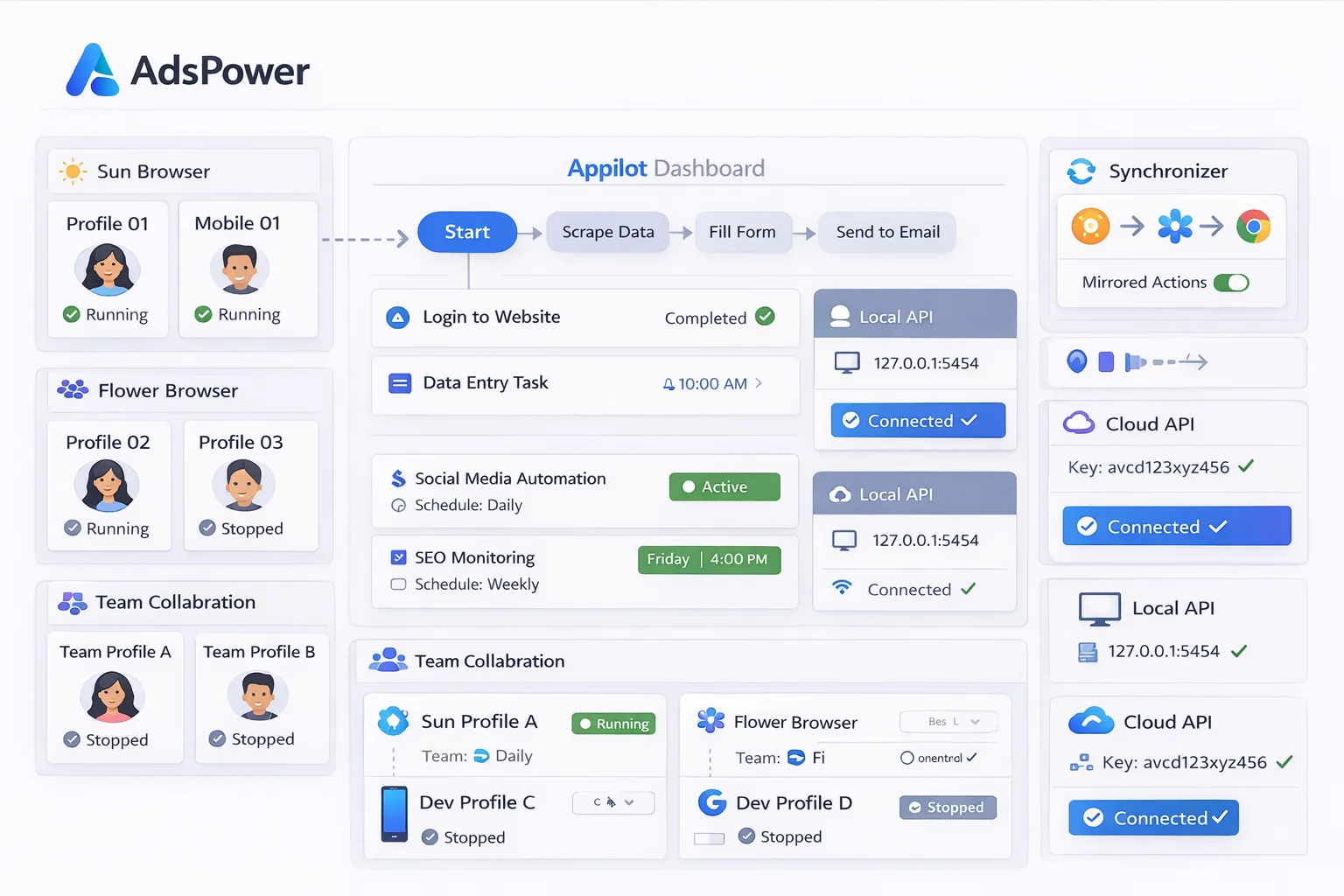
Appilot acts as the central workflow and scheduling layer above AdsPower.
First, you create or import your browser profiles inside AdsPower, whether they are using Sun Browser or Flower Browser. Each profile can have its own fingerprint, cookies, proxy settings, session data, and account information.
Once profiles are ready, Appilot helps organize them into groups based on browser type, platform, workflow, campaign, or region.
Inside Appilot, you can assign workflows, create schedules, and monitor profile activity across both Sun and Flower Browser environments from one dashboard.
For example, one group may use Sun Browser for Facebook automation, another may use Flower Browser for scraping tasks, and another may use a mix of both for different workflows.
Each group can have its own schedules, delays, timing windows, and automation rules.
This makes it much easier to manage large numbers of browser profiles without manually switching between environments.
Benefits of Using Appilot Across Both Browsers
One major benefit is centralized control.
Instead of managing Sun Browser and Flower Browser separately, you can organize everything from one place.
Another major benefit is scheduling.
Appilot allows you to assign different schedules to different browser groups, which helps avoid repetitive patterns and makes workflows more natural.
It also saves time because you do not need to manually launch workflows for each browser environment.
Another advantage is better visibility.
You can monitor workflow performance, track failed tasks, review profile activity, and manage automation across both browser types from a single dashboard.
Appilot also helps improve scalability.
Once workflows are built, they can be applied across multiple profiles in both Sun and Flower Browser environments without rebuilding everything.
Best Practices for Managing Sun and Flower Browser Profiles
One of the most important rules is to clearly separate profile groups based on browser type.
You should know which profiles are using Sun Browser and which are using Flower Browser.
You should also use clear naming conventions so it is easy to understand which profile belongs to which workflow.
For example, a profile named Sun-Facebook-US-01 or Flower-Scraper-UK-01 is much easier to understand than Browser-01.
It is also important to avoid identical schedules across all profiles.
Different browser groups should have different timing windows and delays so activity appears more natural.
You should also match proxy settings, browser fingerprints, and workflows correctly for each profile group.
Finally, test workflows on a small number of profiles before scaling across both browser environments.
Common Mistakes to Avoid
One common mistake is mixing Sun Browser and Flower Browser profiles without clear organization.
Another mistake is assigning identical schedules across both environments, which creates repetitive behavior patterns.
Some users also scale too quickly before properly testing workflows in each browser type.
Using the same proxy across too many profiles is another common issue because it increases overlap and detection risks.
Poor organization is often the biggest problem. Without clear profile groups, schedules, and workflow assignments, managing multiple browser environments becomes much harder.
The best approach is to stay organized, build simple workflows first, and scale gradually.
Frequently Asked Questions
Q1: What is the difference between Sun Browser and Flower Browser in AdsPower?
Sun Browser is typically used for modern compatibility and updated features, while Flower Browser is often preferred for stability and long-running workflows.
Q2: Can Appilot manage both Sun and Flower Browser profiles at once?
Yes. Appilot can organize and manage profiles from both browser environments in one dashboard.
Q3: Should workflows be different for each browser type?
In many cases, yes. Different browser environments may require different workflows depending on the task.
Q4: Why is scheduling important when managing both browsers?
Scheduling helps spread activity across different times and reduces repetitive patterns.
Q5: What is the biggest mistake when managing multiple browser environments?
The biggest mistake is poor organization. Without clear profile groups, schedules, and workflow assignments, management becomes much harder.
Conclusion
AdsPower Sun Browser and Flower Browser both offer powerful environments for managing browser profiles, but handling them manually becomes difficult as the number of profiles grows.
Appilot helps solve this problem by providing one centralized dashboard where you can organize profiles, assign workflows, create schedules, and monitor activity across both environments.
The best approach is to stay organized, separate workflows clearly, and scale gradually as your automation setup becomes more advanced.