Managing FraudFox Profiles Through Appilot Dashboard
FraudFox is designed for users who need strong browser profile isolation while managing multiple accounts across different platforms. It is commonly used by affiliate marketers, media buyers, crypto users, web scrapers, e-commerce sellers, and agencies because it allows each browser profile to operate with its own cookies, fingerprint, proxy, user agent, and local storage.
The challenge is that once the number of browser profiles grows, managing them manually becomes difficult. Opening the correct profile, checking the right proxy, keeping accounts separated, monitoring activity, and staying organized across dozens of browser sessions takes time. This is especially true for teams that manage many accounts every day.
This is where Appilot becomes useful. FraudFox handles the browser profile isolation side, while Appilot helps organize, automate, and monitor those profiles from one dashboard. Instead of manually tracking every profile, you can manage profile groups, assign workflows, schedule tasks, and monitor activity from a centralized system.
Why FraudFox Profile Management Becomes Difficult at Scale
Managing a few FraudFox profiles is usually simple. You know which account belongs to which profile, which proxy is assigned to each one, and what the purpose of every session is.
As the number of profiles increases, it becomes harder to stay organized. You may end up with separate profiles for social media accounts, advertising accounts, affiliate campaigns, e-commerce stores, crypto wallets, scraping tasks, and client projects all running at the same time.
Without a structured system, it becomes easy to accidentally use the wrong profile, assign the wrong proxy, forget which account belongs to which session, or mix browser environments together. This can create operational problems and increase the chance of account linking.
Using Appilot Dashboard with FraudFox helps reduce this confusion because it provides one place where profiles can be grouped, labeled, monitored, and assigned to specific workflows.
How Appilot Helps Organize FraudFox Profiles
Appilot allows you to organize FraudFox profiles into categories based on the type of work they are used for. Instead of keeping all profiles mixed together in one list, you can create separate groups for social media accounts, e-commerce stores, affiliate campaigns, crypto wallets, scraping operations, and client projects.
This makes it easier to launch the correct profiles when needed and reduces the chance of mistakes. For example, if you have one group of profiles for Instagram accounts and another group for Shopify stores, Appilot helps keep those environments separate so that workflows stay more organized.
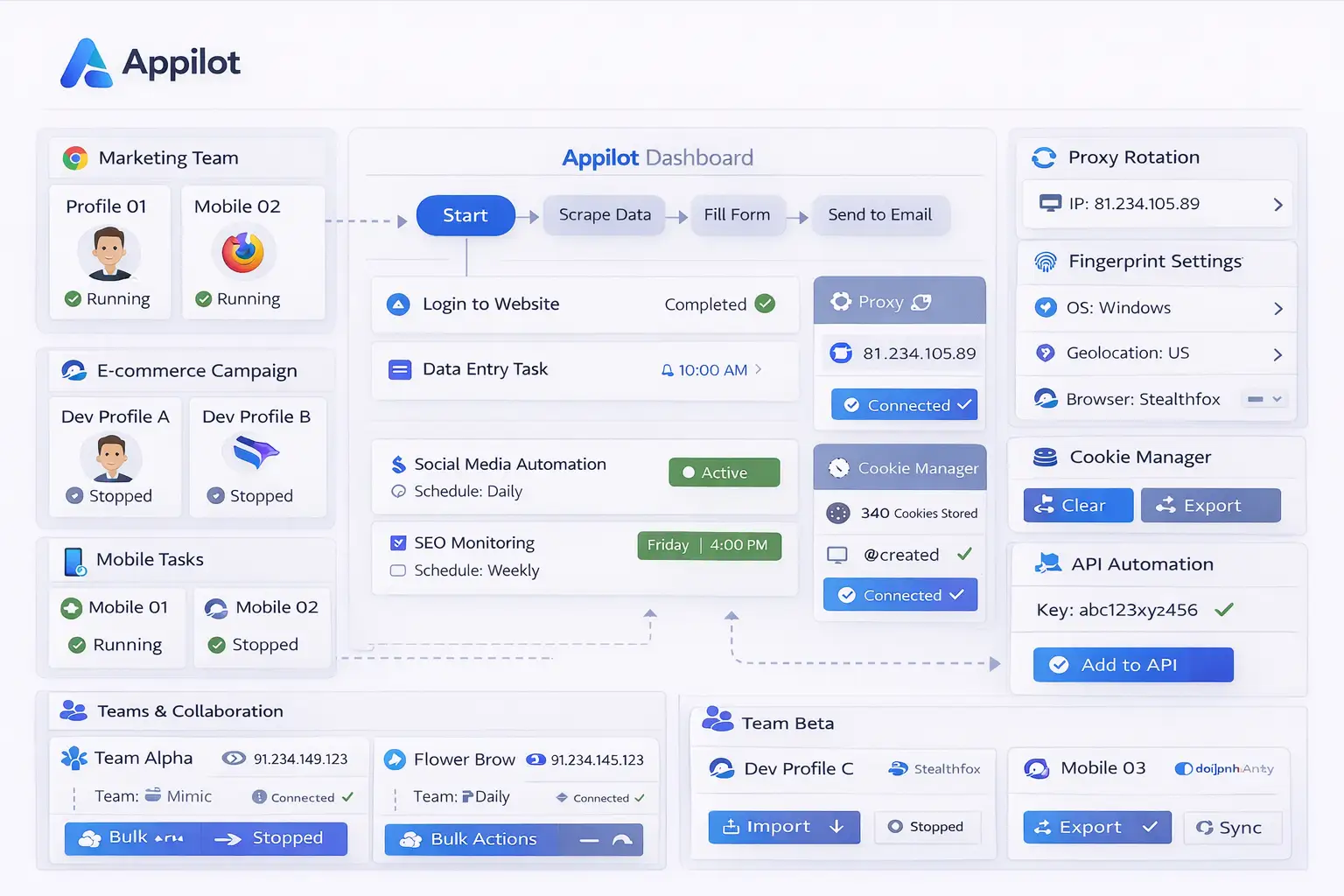
The dashboard also gives you a better overview of profile activity. You can see which profiles are active, which ones are paused, which proxies are assigned, and which workflows are connected to each profile group. This is much easier than opening browser profiles individually and trying to keep track of everything manually.
Another advantage is that Appilot makes it easier to assign recurring tasks to profile groups. Instead of manually repeating the same actions for every profile, you can create workflows that apply to an entire group of profiles at once.
Common FraudFox Profile Groups
Most users organize FraudFox profiles based on the type of platform or account they are managing. Social media managers often keep separate profile groups for Instagram, Facebook, TikTok, Twitter, LinkedIn, and Reddit accounts so that workflows remain organized.
Affiliate marketers often separate profiles based on traffic sources, ad networks, campaign types, or client accounts. This makes it easier to review campaign performance and keep different operations isolated.
E-commerce sellers usually create separate groups for different marketplaces, supplier accounts, storefronts, payment accounts, and customer support platforms. This helps reduce confusion when working across multiple businesses.
Crypto users often organize profiles around exchanges, wallets, NFT activities, airdrop campaigns, and research tasks. Because crypto operations often involve many accounts, keeping profiles grouped is especially important.
Web scraping teams may organize profiles based on target websites, scraping projects, proxy pools, or client requests. This makes it easier to scale operations without mixing sessions together.
Assigning Workflows to FraudFox Profiles
One of the main benefits of Appilot is that it allows workflows to be assigned directly to groups of FraudFox profiles. Instead of manually launching browser sessions every day, you can create tasks that automatically run for selected profile groups.
For example, a social media profile group may automatically open every morning, log into the correct platform, check notifications, monitor messages, and close the session afterward. An e-commerce group may log into storefront dashboards, review orders, and export reports. A scraping group may open browser profiles with different proxies, visit websites, collect information, and save the results.
This approach is much more efficient because you do not need to manually repeat the same actions every day. Once the workflow is created, it can be scheduled and repeated automatically.
Another advantage is that workflows can be customized for each profile group. Social media profiles may need one set of actions, while crypto profiles may require a completely different sequence of tasks. Keeping workflows separate makes them easier to manage.
Monitoring FraudFox Profiles from One Dashboard
A major benefit of using Appilot is that it gives you one place where you can monitor all FraudFox profile activity. Instead of opening browser sessions one by one, you can quickly see which profiles are active, which ones are paused, and which workflows are currently running.
This visibility makes it easier to spot problems early. For example, if a proxy stops working, if a profile fails to launch, or if a workflow does not complete correctly, you can see the issue directly from the dashboard.
Monitoring also becomes easier when you are managing larger operations. A user with ten profiles may still be able to track activity manually, but someone with fifty or one hundred profiles usually needs a centralized view to stay organized.
The Appilot dashboard helps make profile management more scalable because it reduces the amount of manual tracking required.
Best Practices for FraudFox Profile Management
The best way to manage FraudFox profiles is to keep them organized from the beginning. Use clear naming conventions for profiles so that it is easy to understand what each one is used for. For example, include the platform name, account type, or client name inside the profile label.
You should also separate profile groups based on their purpose. Keeping social media profiles separate from e-commerce profiles, affiliate profiles, scraping profiles, and crypto profiles makes workflows easier to manage later.
Using separate proxies for separate profile groups is also important. Reusing the same proxy across too many profiles increases the chance of account linking.
Another good practice is to review logs and profile activity regularly. Even if workflows are mostly automated, there will still be times when a login expires, a proxy stops working, or a website changes its layout. Monitoring profile activity helps you catch these problems early.
You should also avoid creating too many profiles without a clear structure. It is better to have a smaller number of organized profiles than a large number of profiles that become difficult to track.
Common Problems and Troubleshooting
One common issue is that profiles become difficult to identify because they are not named clearly. This often leads to users opening the wrong browser profile or assigning the wrong workflow.
Another problem is using the same proxy across too many profiles. This increases the chance that accounts will be linked together. Assigning dedicated proxies to different profile groups helps reduce this risk.
Sometimes workflows fail because a profile no longer has the correct login session. If an account is logged out or requires additional verification, the automation may stop working until the login is updated.
Users also sometimes create too many workflows for one profile group, which makes it harder to troubleshoot issues later. Keeping workflows simple and well organized usually works better than building large workflows with too many steps.
Frequently Asked Questions
Q1: How should I organize FraudFox profiles inside Appilot?
The best approach is to separate profiles by category such as social media, e-commerce, affiliate marketing, crypto, scraping, or client projects.
Q2: Can I assign different workflows to different FraudFox profile groups?
Yes. Appilot allows different profile groups to run different workflows based on their purpose.
Q3: Is it possible to monitor profile activity from one dashboard?
Yes. Appilot provides a centralized dashboard where you can see active profiles, paused profiles, running workflows, and task status.
Q4: Should each FraudFox profile use a separate proxy?
Using separate proxies for separate profiles is usually the safest approach because it reduces the chance of account linking.
Q5: What happens if a FraudFox profile stops working correctly?
You can review logs, check proxy settings, verify login sessions, and update the workflow if necessary.
Conclusion
FraudFox provides strong browser profile isolation, but profile management becomes harder as the number of accounts increases. Appilot helps solve that problem by giving you a centralized dashboard where profiles can be organized, grouped, monitored, and assigned to specific workflows.
This makes it easier to manage larger numbers of browser profiles without losing track of accounts, proxies, tasks, and workflows.