Managing Multiple Teams: Dolphin Anty and Appilot Integration
Managing multiple teams becomes difficult very quickly when everyone is working across different browser profiles, client accounts, campaigns, and tasks. As teams grow, the amount of manual coordination increases. One team may be handling social media accounts, another may be running e-commerce stores, another may be focused on lead generation, and another may be managing client ad accounts. Without a structured system, it becomes easy for browser profiles to get mixed up, tasks to overlap, and important work to get missed.
This is where combining Dolphin Anty with Appilot becomes useful. Dolphin Anty gives each team its own browser environment, profile groups, cookies, proxies, and fingerprints. Appilot adds the workflow layer that helps teams coordinate schedules, assign tasks, organize browser profiles, and manage larger operations from one place.
Instead of every team member opening profiles manually and trying to remember what needs to happen next, teams can use a more structured setup where browser sessions, tasks, and schedules are already organized.
Why Team Management Gets Difficult at Scale
Small teams can usually manage browser profiles manually without too many problems. Once operations become larger, things change very quickly. One team member may accidentally open the wrong browser profile. Another may log into the wrong client account. Another may forget to complete a scheduled task. These small mistakes become much more common when multiple people are working across dozens of browser profiles every day.
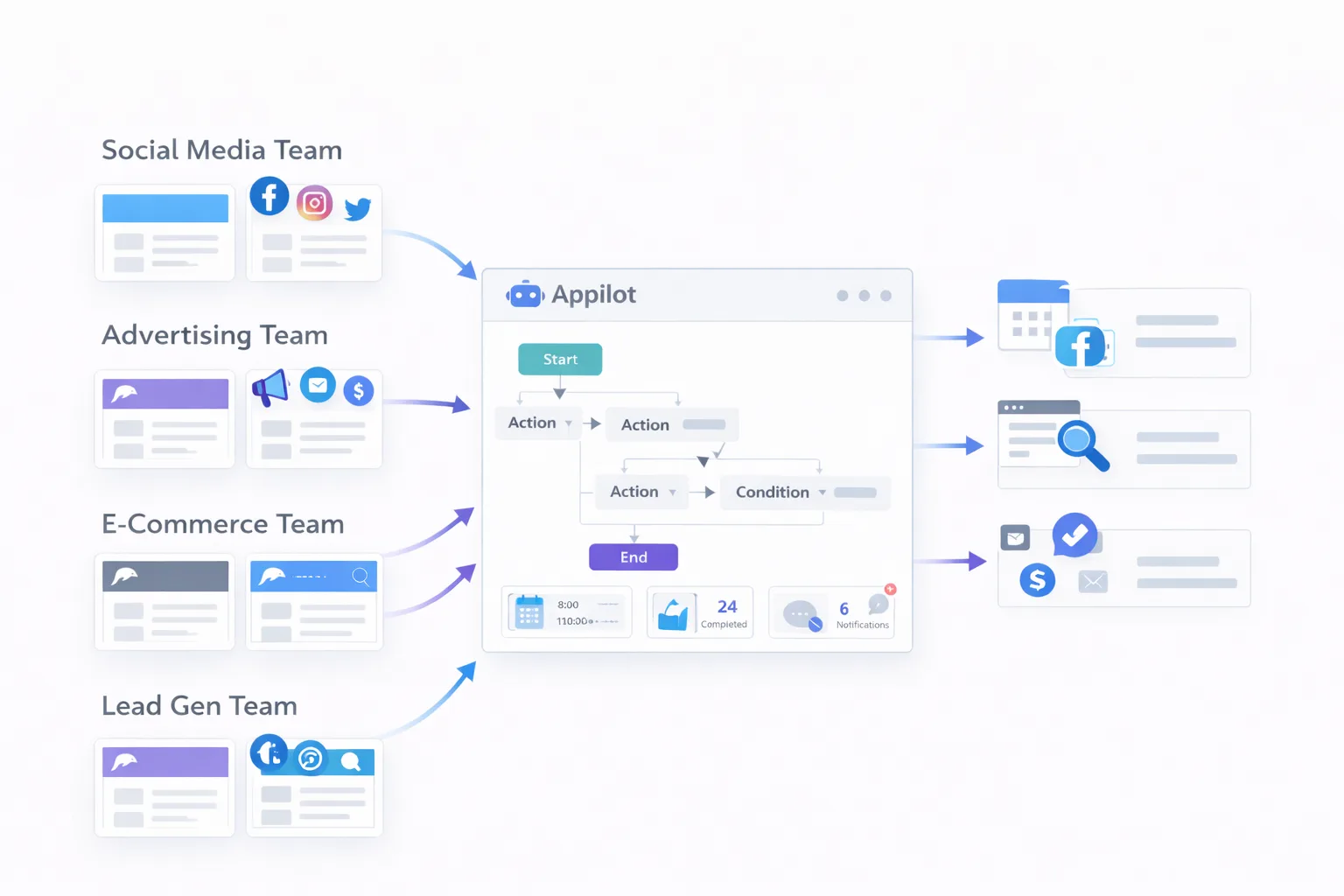
The challenge becomes even bigger when different departments are involved. A social media team may need separate browser profiles for each platform and client. An advertising team may need isolated profiles for Facebook ad accounts, Google Ads accounts, and TikTok business managers. An e-commerce team may need separate browser environments for Shopify stores, Amazon accounts, supplier portals, and competitor monitoring.
Without a structured system, all of these workflows can become difficult to track.
Dolphin Anty helps solve the profile separation problem by giving every team, project, or client its own isolated browser environment. Appilot helps solve the workflow problem by making it easier to coordinate tasks, schedules, and browser activity across different groups.
How Dolphin Anty Helps Team Separation
One of the biggest advantages of Dolphin Anty is that it makes browser profile separation much easier. Each team can have its own group of browser profiles with separate cookies, proxies, browser fingerprints, timezones, and account logins.
For example, a social media team can have one group of browser profiles dedicated to Facebook, Instagram, TikTok, LinkedIn, and X accounts. An e-commerce team can have a separate set of profiles for Shopify, Amazon, AliExpress, and supplier portals. An advertising team can have isolated browser profiles for business managers, ad accounts, and campaign dashboards.
This type of separation reduces confusion because teams are no longer sharing the same browser sessions or trying to keep track of everything in one environment.
It also reduces the risk of accidental account overlap. If every team is using separate browser profiles with their own fingerprints and cookies, there is less chance of one team accidentally logging into the wrong client account or mixing different projects together.
How Appilot Improves Team Coordination
Profile separation alone is not enough once you have multiple teams working at the same time. Teams also need a way to coordinate tasks, assign schedules, organize browser sessions, and make sure important work gets completed on time.
Appilot helps by giving teams a shared workflow system. Instead of relying on spreadsheets, chat messages, and memory, teams can create structured workflows that define which profiles should be opened, what actions need to happen, and when tasks should be completed.
For example, a social media team may have a daily schedule for opening browser profiles, checking notifications, replying to messages, and reviewing account performance. An advertising team may have workflows for opening ad accounts, reviewing spend, checking campaign alerts, and exporting reports. An e-commerce team may use scheduled workflows for checking store dashboards, monitoring suppliers, reviewing orders, and watching competitor pricing.
Because these workflows are scheduled and organized inside Appilot, it becomes much easier for teams to stay aligned.
Organizing Browser Profiles by Team and Client
One of the best ways to use Dolphin Anty and Appilot together is to organize browser profiles based on teams, clients, and project types.
For example, if you are running an agency, you can create separate browser profile groups for each client. Inside those groups, you can separate profiles further based on platform or department. One client may have Facebook ad account profiles, TikTok business profiles, Shopify store profiles, and email marketing accounts all stored in their own dedicated group.
This makes it easier to give the correct team access to the correct profiles without exposing unrelated accounts.
A social media team only needs access to the social profiles. An ad team only needs access to campaign dashboards and business managers. An e-commerce team only needs access to stores and supplier portals.
Keeping these groups separate creates a much cleaner workflow and reduces the chance of accidental mistakes.
Common Use Cases for Multi-Team Management
Many agencies use Dolphin Anty and Appilot to manage multiple clients across different departments. One team may be responsible for social media publishing, another for paid advertising, another for e-commerce operations, and another for lead generation.
Some businesses use this setup internally for managing regional teams. One team may be focused on North America, another on Europe, and another on Asia. Each region can have its own browser profiles, proxy settings, timezones, and workflows.
Affiliate marketing teams often use Dolphin Anty and Appilot to separate campaign profiles, ad accounts, landing page environments, and browser sessions across different team members.
E-commerce businesses can use this setup to separate store management, supplier research, customer service, and competitor monitoring into their own browser groups.
The more teams involved, the more useful this type of structure becomes.
Best Practices for Managing Multiple Teams
The most important habit is keeping browser profile groups clean and organized. Every profile should have a clear purpose, a clear owner, and a clear team assignment.
It is also important to create naming systems that make profiles easier to identify. Instead of using random names, teams should use labels that show the client, platform, team, and purpose of each browser profile.
Another good practice is to keep different teams on separate schedules. If every team launches all of their browser profiles at the same time, it can create unnecessary system load and make workflows harder to manage.
You should also make sure that permissions are clearly defined. Not every team member should have access to every browser profile. Teams should only see the profiles that are relevant to their work.
Starting with simple workflows and expanding gradually is usually much easier than trying to automate every team process at once.
Common Problems and How to Avoid Them
One common problem is poor profile organization. If browser profiles are not grouped properly, teams may accidentally use the wrong profiles or log into the wrong accounts.
Another common issue is workflow overlap. If multiple teams are trying to use the same profiles or run tasks at the same time, it can create confusion and slow down operations.
Some businesses also struggle with inconsistent naming systems. When profiles are not labeled properly, it becomes much harder to understand which browser session belongs to which client or team.
Timezone mismatches can also create problems when teams are working across different regions. If workflows are scheduled incorrectly, important tasks may run too early or too late.
The best way to avoid these problems is to create a clear structure before scaling. Once the browser profiles, teams, and schedules are organized properly, Appilot becomes much easier to manage.
Frequently Asked Questions
Q1: Can Dolphin Anty separate browser profiles for different teams?
Yes. Dolphin Anty allows you to create separate browser profile groups for different teams, clients, projects, and departments.
Q2: Can Appilot help coordinate workflows across multiple teams?
Yes. Appilot can organize schedules, browser sessions, recurring tasks, and workflow assignments for different groups.
Q3: Is this setup useful for agencies?
Yes. Agencies often use Dolphin Anty and Appilot to manage different clients, teams, and browser environments without mixing accounts together.
Q4: Can different teams have different browser profile permissions?
Yes. Teams can be assigned access only to the browser profiles and workflows that are relevant to their role.
Q5: Do I need coding skills to use Dolphin Anty and Appilot for team management?
No. Most teams can organize browser profiles, assign schedules, and create workflows without writing code.
Conclusion
Managing multiple teams becomes much easier when browser profiles, schedules, and workflows are properly organized. Dolphin Anty helps by separating browser environments, while Appilot helps by organizing the work happening inside those environments.
Together, they create a much cleaner setup for agencies, internal teams, affiliate groups, e-commerce operations, and businesses managing multiple departments.
The best approach is to keep your profile groups organized, define clear team structures, and gradually build workflows that fit the way your teams already operate.