Mobile Proxies vs Residential Proxies for Social Media Automation: Which Is Safer?
Social media automation depends on more than scripts, delays, captions, messages, and action limits. The network behind every account also matters. If an account logs in from unstable IPs, jumps between unrelated locations, uses infrastructure with poor reputation, or behaves differently from its usual session history, the automation setup can become fragile.
That is why proxy choice matters so much for agencies, growth teams, phone farm operators, and multi-account managers. Two of the most common options are mobile proxies and residential proxies. Both can look more natural than datacenter proxies, but they are not the same.
Residential proxies use IPs assigned to home broadband connections, while mobile proxies use IPs assigned through mobile carriers and cellular networks. This difference matters because social platforms are heavily mobile-first, especially Instagram, TikTok, Snapchat, Threads, Telegram, and similar apps. Mobile proxies can often align better with app-based workflows, but residential proxies can still be useful for certain web-based tasks and lower-cost operations.
The honest answer is that mobile proxies are usually safer for mobile-first social media automation, especially when paired with real-device workflows. But they are not automatically safe. Poor automation, aggressive actions, shared IP abuse, random rotation, and inconsistent sessions can still create risk. Instagram also warns that accounts may be restricted when activity appears to violate its terms around automated access or scraping.
What Are Residential Proxies?
Residential proxies route traffic through IP addresses associated with home internet connections. These IPs usually come from broadband ISPs, such as cable, fiber, or DSL providers. Because they are tied to residential internet networks, they can appear more natural than datacenter IPs for many web activities.
For social media automation, residential proxies are often used because they are widely available, cheaper than mobile proxies in many cases, and easier to source in large pools. They can work well for web-based tasks, content research, account browsing, location testing, and lighter workflows that do not require a mobile carrier identity.
The main advantage of residential proxies is scale. If a team needs many IPs across different countries or cities, residential proxy networks usually offer broader availability. They can also be useful when the task is not specifically mobile app-based.
But residential proxies can become risky when used poorly. If the proxy pool rotates too frequently, assigns inconsistent locations, or routes too many accounts through weak IPs, the account environment can look unstable. For logged-in social media accounts, consistency often matters more than having constant new IPs.
What Are Mobile Proxies?
Mobile proxies route traffic through mobile carrier networks, usually using 3G, 4G, or 5G infrastructure. These IPs are associated with mobile networks rather than home broadband networks. Mobile proxy providers often describe them as carrier-based IPs, while residential proxies are typically tied to home broadband connections.
For social media automation, mobile proxies are popular because many social platforms are used heavily from phones. Instagram, TikTok, Snapchat, Threads, and Telegram are built around mobile app behavior. A mobile network environment can therefore feel more aligned with how real users access these platforms.
Mobile proxies also have a natural behavior pattern that can fit mobile workflows better. Real mobile users may change towers, reconnect to carrier networks, switch IPs, or move between mobile network states. Platforms already expect some of this from mobile users.
However, mobile proxies are not a free pass. A bad mobile proxy setup can still create problems if IPs rotate randomly, locations change too often, multiple accounts share the same unstable endpoint, or the automation behavior is spammy. Mobile proxies are safer only when they are used as part of a stable account environment.
The Main Difference Between Mobile and Residential Proxies
The main difference is the network source. Residential proxies come from home broadband networks, while mobile proxies come from cellular carrier networks. This affects how platforms interpret the traffic, especially when the account is operating inside a mobile app environment.
Residential proxies can be useful for web-based workflows because they look like normal home internet traffic. Mobile proxies are usually better for mobile-first workflows because they look closer to traffic coming from real smartphones on cellular networks.
For social media automation, this distinction matters because the platform experience is often mobile-first. If the account runs through Android devices, emulators, or mobile app workflows, a mobile proxy usually fits the environment better than a residential proxy.
That said, proxy type is only one signal. Platforms can also evaluate account behavior, device consistency, login history, session continuity, action timing, content quality, and relationship patterns. A mobile proxy will not fix unnatural automation behavior.
Which Is Safer for Social Media Automation?
Mobile proxies are generally safer for mobile-first social media automation because they better match the way people use apps like Instagram and TikTok. When an account operates through a real Android device or emulator, a mobile proxy can make the network layer feel more aligned with the device layer.
Residential proxies can still be safe for certain workflows, especially when they are stable, high quality, and used conservatively. They may be enough for content scheduling, web-based account management, research, light browsing, or non-mobile-specific operations.
The safer choice depends on the workflow. If you are managing logged-in Instagram accounts through mobile apps, mobile proxies are usually the better fit. If you are doing web-based research, light account browsing, or lower-risk publishing workflows, residential proxies may be enough.
The key point is that the safest setup is not just “mobile” or “residential.” It is stable, consistent, and realistic. One account should have a predictable device, network region, timezone, session history, and activity pattern.
Why Mobile Proxies Usually Fit Instagram Better
Instagram is a mobile-first platform. Although it has web access, many of the most important workflows happen inside the app: DMs, Stories, Reels, profile checks, app notifications, account switching, and engagement behavior. A mobile network identity usually fits those workflows better than a generic residential setup.
Mobile proxies are especially useful for phone farms, Android automation, emulator workflows, and agencies managing multiple Instagram accounts. These setups already operate in a mobile environment, so the proxy should support that environment instead of creating a mismatch.
For example, if an account is running inside an Android app session but repeatedly appears from random residential IPs in unrelated locations, the network behavior may not support the mobile story. A stable mobile proxy in a consistent region can create a cleaner environment.
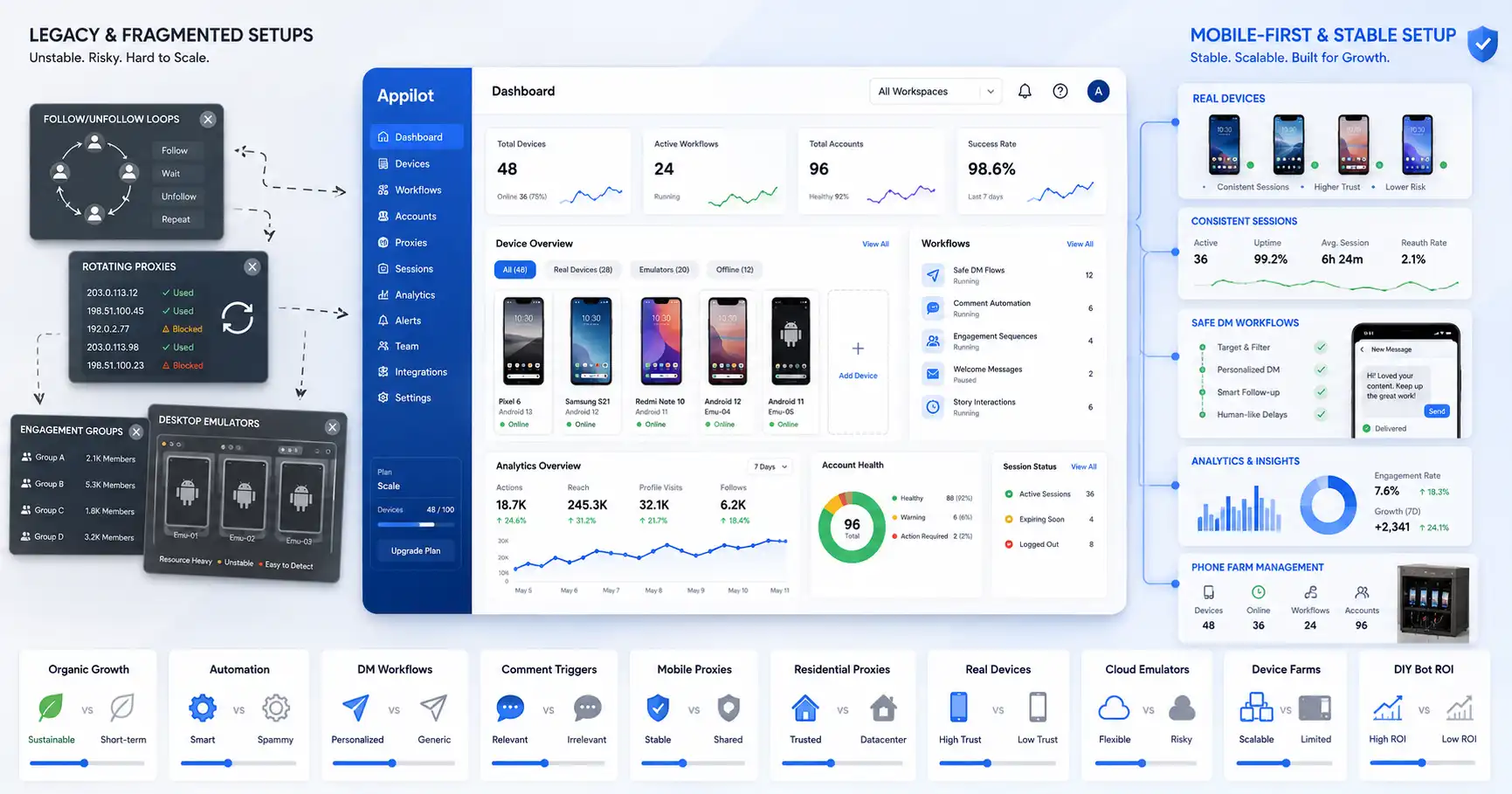
This is where Appilot fits naturally. Appilot helps teams manage Android devices, emulators, and mobile workflows from a web dashboard. When paired with stable mobile proxy infrastructure, it can create a more consistent mobile-first automation environment.
When Residential Proxies Make Sense
Residential proxies still make sense when the workflow does not require mobile carrier behavior. If a team is doing web-based research, social listening, light browsing, competitor checks, content discovery, or non-app-specific workflows, residential proxies may be practical.
They can also be useful when cost matters. Mobile proxies are often more expensive, especially when dedicated or high-quality carrier-based endpoints are needed. Residential proxies can offer larger pools and lower costs for broader tasks.
Residential proxies may also work for platforms or workflows where desktop usage is normal. For example, LinkedIn, X, Reddit, Pinterest, Facebook pages, and some publishing workflows may not always require a mobile-first network setup.
The main rule is simple: use residential proxies when the workflow looks like normal home internet usage, and use mobile proxies when the workflow looks like mobile app usage.
When Mobile Proxies Make Sense
Mobile proxies make the most sense when the workflow is app-based, mobile-first, and account-sensitive. This includes Instagram automation, TikTok workflows, Snapchat operations, Telegram account management, Threads workflows, and phone farm setups.
They are also useful when accounts need long-term session consistency. A stable mobile proxy mapped to one account or one device environment can help reduce contradictions between account behavior and network behavior.
Mobile proxies are especially useful for agencies managing client accounts where reliability matters more than cheap IP volume. A client account should not bounce through random networks or unstable pools. It needs a consistent environment.
Mobile proxies are also a better fit when using real-device automation tools like Appilot, because the device layer and network layer support the same mobile-first workflow.
Why Proxy Quality Matters More Than Proxy Type
A high-quality residential proxy can be safer than a bad mobile proxy. A stable mobile proxy can be safer than a random rotating residential pool. Proxy type matters, but quality and configuration matter more.
A safe proxy setup should have good reputation, stable location, predictable rotation rules, low abuse history, and proper account separation. If a provider overshares IPs, rotates too aggressively, or gives inconsistent locations, the account can still face friction.
For social media automation, the goal should not be to change IPs constantly. The goal should be to create a stable account environment. Too much rotation can make an account look less trustworthy, even if the proxies are technically “real” residential or mobile IPs.
The safest proxy is the one that supports continuity.
Why Random Rotation Is Risky
Many users assume proxy rotation automatically improves safety. That is not always true. For logged-in social media accounts, frequent random rotation can be one of the biggest causes of instability.
A normal user does not usually appear from five cities in one day, switch between network types repeatedly, or change IP identity every few minutes while staying logged in. If a social account does that, the behavior can look suspicious.
Rotation can be useful for some scraping or testing tasks, but logged-in account automation usually needs consistency. If rotation is needed, it should be controlled, slow, and aligned with session behavior.
This applies to both mobile and residential proxies. A mobile proxy that rotates too aggressively can still create problems. A residential proxy with sticky sessions may be safer than a mobile proxy with chaotic rotation.
Mobile Proxies vs Residential Proxies for Instagram Bots
For Instagram bots, mobile proxies are usually safer than residential proxies when the automation happens through the Instagram app, Android devices, or emulators. The reason is alignment. Instagram is mobile-first, and a mobile proxy supports that environment more naturally.
Residential proxies can still work for some Instagram workflows, but they are more likely to feel mismatched if the rest of the setup is mobile-heavy. They may be useful for light browsing or web access, but for mobile app automation, mobile proxies are usually the better fit.
However, the proxy cannot make a risky bot safe. If the account sends too many DMs, follows too many users, comments repetitively, or performs unnatural actions, mobile proxies will not protect it. Instagram can restrict accounts when it detects activity that violates its rules around automated access or scraping.
The safest Instagram setup is usually one account, one consistent device or emulator profile, one stable region, one reliable mobile proxy, and conservative activity limits.
Mobile Proxies vs Residential Proxies for TikTok Automation
TikTok is also heavily mobile-first, so mobile proxies usually make more sense for TikTok automation than residential proxies. TikTok workflows often involve scrolling, watching, posting, commenting, messaging, and app-based behavior. A mobile carrier network can better match that environment.
Residential proxies may still be useful for web-based research, creator discovery, analytics, or content monitoring. But for logged-in TikTok app workflows, mobile proxies are usually stronger.
As with Instagram, the account environment matters more than the proxy label. A stable mobile proxy paired with a consistent device profile is better than a randomly rotating setup.
Mobile Proxies vs Residential Proxies for Agencies
Agencies should think less about IP volume and more about client account health. Client accounts should not be treated like disposable test accounts. If an agency manages social media automation, the priority should be stability, consistency, and clear workflow control.
Mobile proxies are usually better for agencies that run Instagram, TikTok, Snapchat, Telegram, or phone farm workflows. Residential proxies can be useful for research, reporting, content discovery, and web-based tasks.
A good agency stack may use both. Mobile proxies can support app-based account operations, while residential proxies can support lighter web tasks. The key is not mixing everything randomly. Each account and workflow should have a clear environment.
Appilot can help agencies by giving them a mobile workflow layer for Android devices and emulators, while proxies support the network side of the operation.
Mobile Proxies vs Residential Proxies for Phone Farms
Phone farms are naturally mobile-first. Because of that, mobile proxies are usually the better fit. A phone farm built around Android devices or emulators should use infrastructure that supports mobile behavior.
Residential proxies may work for some tasks, but they can create a mismatch if the account is supposed to behave like a mobile app user. A phone farm setup should aim for stable account-device-network mapping.
For example, an agency might assign each Instagram account to a consistent Android device or emulator, a stable mobile proxy, and a clear workflow. That is usually safer than routing many accounts through a large residential rotating pool.
Appilot supports this type of operation by helping teams manage Android devices, emulators, and mobile workflows from a web dashboard.
The Best Setup for Safer Social Media Automation
The safest setup depends on the platform and workflow, but the general principle is consistency. Each account should have a stable identity across device, network, location, timezone, and behavior.
For Instagram and TikTok, mobile proxies are usually the better choice when paired with real-device or emulator workflows. For LinkedIn, Reddit, X, Pinterest, or broader web workflows, residential proxies may be enough depending on how the account is used.
The best setup avoids random rotation, avoids shared unstable IPs, avoids aggressive automation, and avoids mixing too many accounts through the same infrastructure. It also uses realistic pacing and meaningful actions.
Automation should support real workflows, not create artificial behavior at scale.
How Appilot Helps With Safer Proxy-Based Workflows
Appilot helps with the device and workflow side of social media automation. Proxies handle network routing, but Appilot helps teams manage Android devices, emulators, and mobile app workflows from one dashboard.
This matters because proxy safety depends on environment alignment. A mobile proxy is more useful when the account is also operating through a mobile environment. Appilot gives teams that mobile-first execution layer.
For agencies, phone farms, and multi-account operators, Appilot can help keep workflows organized. Instead of manually managing each phone or emulator, teams can control mobile workflows more centrally. When combined with stable mobile proxies and conservative activity limits, this creates a stronger foundation for social media automation.
The goal is not to bypass platform rules. The goal is to reduce operational inconsistency and manage mobile workflows more cleanly.
Final Verdict
Mobile proxies are generally safer than residential proxies for mobile-first social media automation, especially for Instagram, TikTok, Snapchat, Threads, Telegram, and phone farm workflows. They better match mobile app behavior and can support more realistic account environments when used correctly.
Residential proxies are still useful for web-based workflows, research, lighter account activity, and platforms where desktop usage is normal. They are often more affordable and scalable, but they may not match mobile app workflows as naturally.
The safest choice is not only about proxy type. It is about stability. A good setup uses consistent sessions, reliable IP quality, controlled rotation, account separation, realistic pacing, and a device environment that matches the workflow.
For teams running mobile-first automation, Appilot plus stable mobile proxy infrastructure gives a stronger foundation than relying on random residential pools or aggressive proxy rotation.
FAQs
Q1: Are mobile proxies safer than residential proxies for Instagram?
Yes, mobile proxies are usually safer for Instagram automation because Instagram is mobile-first and mobile carrier traffic better matches app-based workflows.
Q2: Are residential proxies bad for social media automation?
No, residential proxies are not bad. They can work well for web-based workflows, research, light browsing, and platforms where desktop usage is normal.
Q3: Can mobile proxies prevent social media account restrictions?
No, mobile proxies cannot guarantee safety. Accounts can still be restricted if the automation is aggressive, repetitive, spammy, or violates platform rules.
Q4: Should agencies use mobile or residential proxies?
Agencies should use mobile proxies for mobile-first workflows like Instagram and TikTok, and residential proxies for lighter web-based research, reporting, or content discovery tasks.
Q5: How does Appilot help with proxy-based automation?
Appilot helps teams manage Android devices, emulators, and mobile workflows, making it easier to align accounts, devices, sessions, and proxy infrastructure in one controlled setup.