Mobile UI Parsing: How Bots “See” and Interact with Apps
A common belief is that bots “look” at mobile apps the same way humans do by analysing the pixels on the screen. Modern mobile automation does not work that way. Bots do not rely on eyesight. Instead, they rely on structured UI data exposed by the operating system.
For this guide, I’ll use Appilot as an example of how modern mobile automation platforms interact with apps. Appilot runs automation on real Android devices and relies heavily on structured UI parsing rather than screen-based image matching. You can build similar workflows with Appium or UI Automator, but managed platforms make it much easier to scale, monitor, and maintain reliable mobile automation.
If you have ever wondered how automation can reliably tap the correct button, fill the right field, or scroll at the right moment, the answer is mobile UI parsing.
This guide explains what mobile UI parsing is, how bots interpret app interfaces, and why this approach powers reliable modern mobile automation.
Understanding Mobile UI Parsing
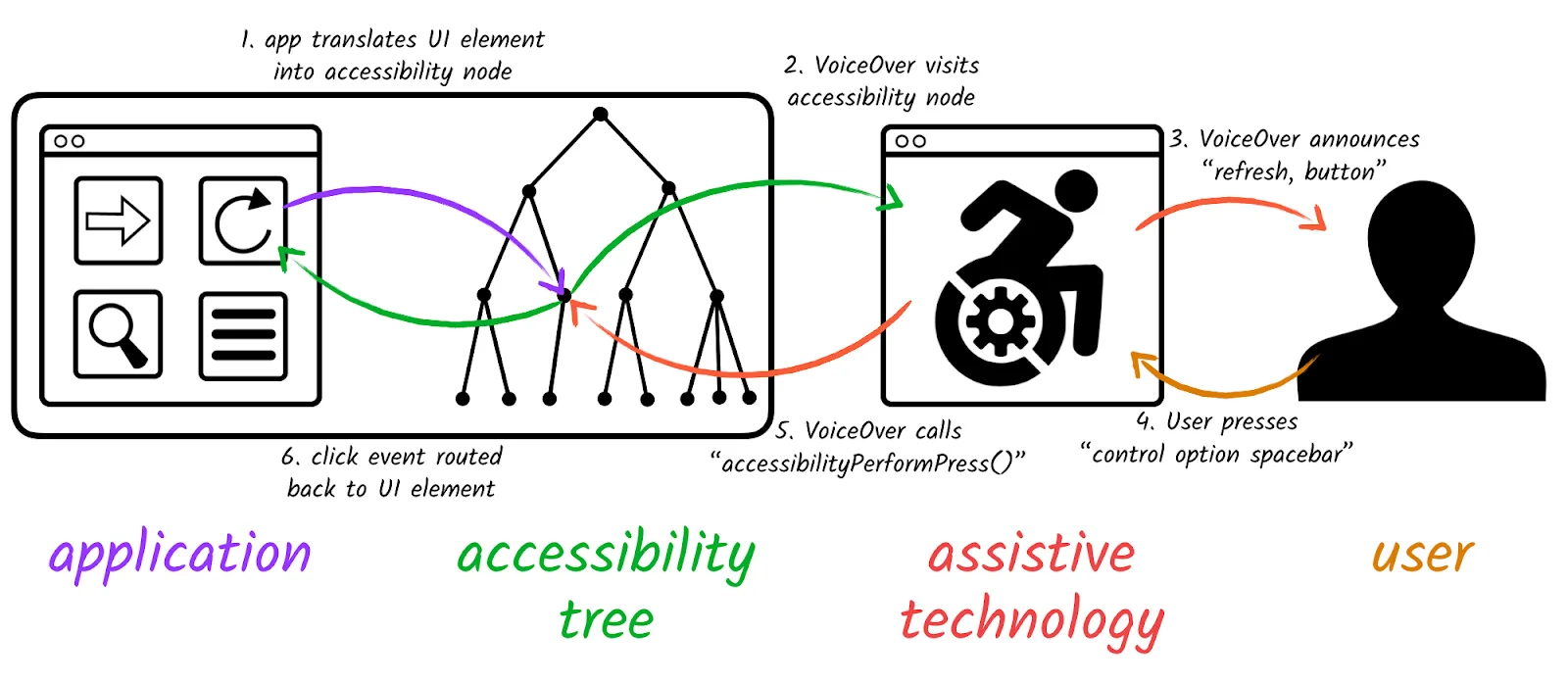
Mobile UI parsing is the process of reading and interpreting an app’s structured UI hierarchy instead of analysing visual pixels. When an app displays a screen, the operating system represents that screen as a tree of elements, including buttons, text fields, images, lists, and containers.
Each element includes metadata such as text labels, content descriptions, clickable state, editable state, and its position in the hierarchy. Automation reads this structured tree rather than the screen image itself. At its core, mobile UI parsing converts visual interfaces into machine-readable structure.
The Core Principle Behind Mobile UI Parsing
When a screen loads, the operating system builds a UI tree, makes that tree accessible, and allows automation logic to parse it. When a screen renders, its structured UI immediately becomes available.
A “Login” button is not just something drawn on the display. It exists as a node with text, a role, and a clickable property. Bots interact with that node directly.
UI Parsing vs Screen Scraping
This distinction is critical. Screen scraping works by analysing pixels, using image matching, and guessing based on colour or shape. UI parsing works by reading semantic structure, targeting elements by meaning, and using system-provided metadata.
You can think of it like reading a webpage’s HTML instead of trying to interpret a screenshot of the page. Structure is far more reliable than visuals.
Why Mobile UI Parsing Matters
1. Stability Across UI Changes
Apps change constantly. Buttons move, layouts shift, and fonts get updated. UI parsing anchors automation to identity, role, and semantic meaning rather than physical position. Because of this, minor layout changes rarely break automation flows, which dramatically reduces maintenance.
2. Human-Like Interaction
Because bots act on real UI elements, they can click buttons, type into fields, and scroll through lists in a way that passes through the operating system’s interaction layer. This mirrors real user behaviour much more closely than simple coordinate-based tapping.
3. Strategic Automation Design
UI parsing enables state-aware automation that can wait for specific elements, react to error messages, detect loading states, and adapt to dynamic content. Instead of hardcoding sleep timers, fixed coordinates, or blind sequences, automation becomes logical rather than mechanical.
How Mobile UI Parsing Works in Practice
UI parsing follows a structured workflow.
Stage 1 – UI Structure Extraction
When a screen loads, the operating system exposes a UI hierarchy that includes every visible element, its attributes, and its relationship to other elements.
For example, a login screen may expose a username field marked as editable, a password field marked as editable, and a submit button marked as clickable. Bots retrieve this structure directly without needing any pixel guessing.
Stage 2 – Element Identification
The bot scans the UI tree and matches nodes based on text, content description, class type, clickable or editable flags, and hierarchical position. Because the process is semantic rather than visual, the bot understands that a specific node is the login button rather than simply assuming that something looks like a button.
Stage 3 – Interaction Execution
Once identified, the bot can perform actions such as tapping, long-pressing, scrolling, or entering text. These actions are executed through the operating system.
Timing becomes deterministic and event-driven. If a button appears late, automation waits for that node instead of relying on a fixed delay.
Common Misconceptions About UI Parsing
Misconception #1: Bots “See” Screens
Bots do not visually recognise interfaces by default. They parse structured operating-system data. Image recognition is optional, but it is not the foundation of modern mobile automation.
Misconception #2: Complex Apps Can’t Be Parsed
As long as apps expose proper accessibility metadata, even complex interfaces remain parsable. Dynamic content does not break the structure because it simply updates the tree.
Misconception #3: UI Parsing Is Easily Detectable
UI parsing relies on official operating-system interfaces, accessibility APIs, and native interaction flows. It is far less obvious than emulator hacks, code injection, or reverse-engineered hooks. Detection is much more nuanced than many people assume.
Real-World Examples
- Automated App Testing
QA frameworks parse UI trees to validate sign-up flows, test purchases, and confirm settings changes. Because elements are targeted semantically, tests remain stable even when interfaces are updated.
- Large-Scale Workflow Automation
Automation systems use parsed UI structures to manage repetitive actions, navigate between screens, and react to dynamic states.
This is where tools like Appilot become especially useful. Instead of manually managing dozens of Android devices and raw UI trees, Appilot provides a web dashboard that allows teams to control automation workflows while still relying on structured UI parsing behind the scenes. This makes automation easier to scale and far more maintainable over time.
- Assistive & Productivity Tools
Screen readers and voice assistants parse the same UI structure to understand what is on screen, identify actionable elements, and respond intelligently. The same mechanism powers both accessibility tools and automation systems.
- The Technical Foundation
UI parsing depends on operating-system-level APIs.
- UI Trees & Nodes
Each node represents a role such as a button or text field, along with text content, state, bounds, and available actions. These nodes form a hierarchical tree, and automation traverses this tree logically.
- Event-Driven Synchronisation
Bots often wait for specific node appearances, state changes, or event types rather than relying on fixed delays. This is one of the main reasons why UI parsing scales so effectively.
When to Use Mobile UI Parsing
Scenario 1 – Cross-App Automation
If automation must work across third-party apps, UI parsing becomes essential.
Scenario 2 – Layout Changes Are Frequent
If apps are updated regularly, structural targeting prevents breakage.
Scenario 3 – Realistic Interaction Required
When automation needs to mimic real user behaviour, parsing the UI tree is the most natural and reliable approach.
Tools That Help With Mobile UI Parsing
There are several different approaches to building mobile automation workflows.
Appium is a strong choice if you want a fully open-source framework and do not mind managing your own infrastructure.
UI Automator works well for Android-native automation when you need direct control over device-level interactions.
Appilot is useful when you want a managed mobile automation platform with a web dashboard, real-device execution, UI parsing support, and easier workflow management without dealing with constant ADB setup.
The right option depends on whether you value flexibility, lower cost, or long-term ease of management.
Key Takeaways
Mobile UI parsing is foundational to modern mobile automation.
The bottom line is that bots read structure rather than pixels, UI trees enable semantic targeting, event-driven logic increases stability, and parsing scales effectively across devices and updates.
Understanding how bots “see” apps through structured UI allows you to build automation that is more robust, maintainable, and aligned with how platforms are designed to work.
If you are managing large-scale mobile workflows, Appilot can make this process much easier by handling device management, session stability, and UI parsing through a single dashboard rather than requiring you to manage every detail manually.
Frequently Asked Questions
Q: What is mobile UI parsing?
It is the process of interpreting an app’s structured UI hierarchy using operating-system metadata rather than visual analysis.
Q: How do bots identify elements?
Bots identify elements by matching attributes such as text, role, content descriptions, and available actions within the UI tree.
Q: Is UI parsing the same as image recognition?
No. Image recognition analyses pixels, while UI parsing reads structured metadata.
Q: Does UI parsing work on all apps?
It works best on apps that properly expose accessibility information, which most modern apps do.
Q: When should I choose UI parsing over visual automation?
You should choose UI parsing when you need better reliability, adaptability, and more human-like interaction across changing layouts.