Understanding Navigator Object Manipulation
The browser environment exposes a wide range of information through JavaScript, and one of the most commonly accessed components is the navigator object. This object contains key details about the browser, device, and system configuration, making it a central source of data for fingerprinting and detection systems. Because of this, modifying or spoofing navigator properties has become a common technique in automation and anti-detection setups.
Understanding navigator object manipulation is important because it sits at the intersection of browser fingerprinting and detection logic. It is often one of the first places where inconsistencies appear when environments are modified. This guide explains how the navigator object works and how manipulation is detected.
What Is the Navigator Object?
The navigator object is a JavaScript interface that provides information about the browser and system environment, where it exposes properties such as user agent, platform, language, and hardware-related details. These properties help websites understand what type of device and browser is being used, and they are commonly accessed during page load or script execution. Because the navigator object is easily accessible through JavaScript, it has become a key source of fingerprinting data.
What Is Navigator Object Manipulation?
Navigator object manipulation refers to the process of modifying or overriding the values returned by navigator properties in order to change how the browser appears to a website, where this is often done to simulate different devices, browsers, or environments. For example, changing the user agent string can make a desktop browser appear as a mobile device, while modifying language or platform values can create a different regional or system profile. These changes are typically implemented through scripts or browser modifications.
Why Navigator Manipulation Is Used
Navigator manipulation is used to control how a browser is identified, particularly in automation, testing, and multi-account management scenarios, where presenting different identities can be necessary. By altering navigator properties, users can attempt to match specific environments or avoid detection systems that rely on static browser signals. However, this approach focuses on surface-level data and does not always account for deeper system behavior.
Common Navigator Properties That Are Modified
Several navigator properties are commonly targeted for manipulation because they are widely used in fingerprinting and detection, where the userAgent property identifies the browser and operating system, platform indicates the device type, language and languages reflect regional settings, and hardwareConcurrency provides information about CPU cores. Other properties such as deviceMemory and webdriver are also important, especially in detecting automation frameworks. These values are often changed to align with a desired profile.
How Navigator Manipulation Works
Navigator manipulation typically works by overriding property values at runtime using JavaScript or by modifying the browser environment itself, where scripts intercept calls to navigator properties and return custom values instead of the original ones. This can be done through injected scripts, browser extensions, or modified browser builds, and in some cases, properties are redefined using getters to ensure consistent outputs. While this approach can change visible values, it does not always affect underlying system behavior.
Why Navigator Manipulation Is Detectable
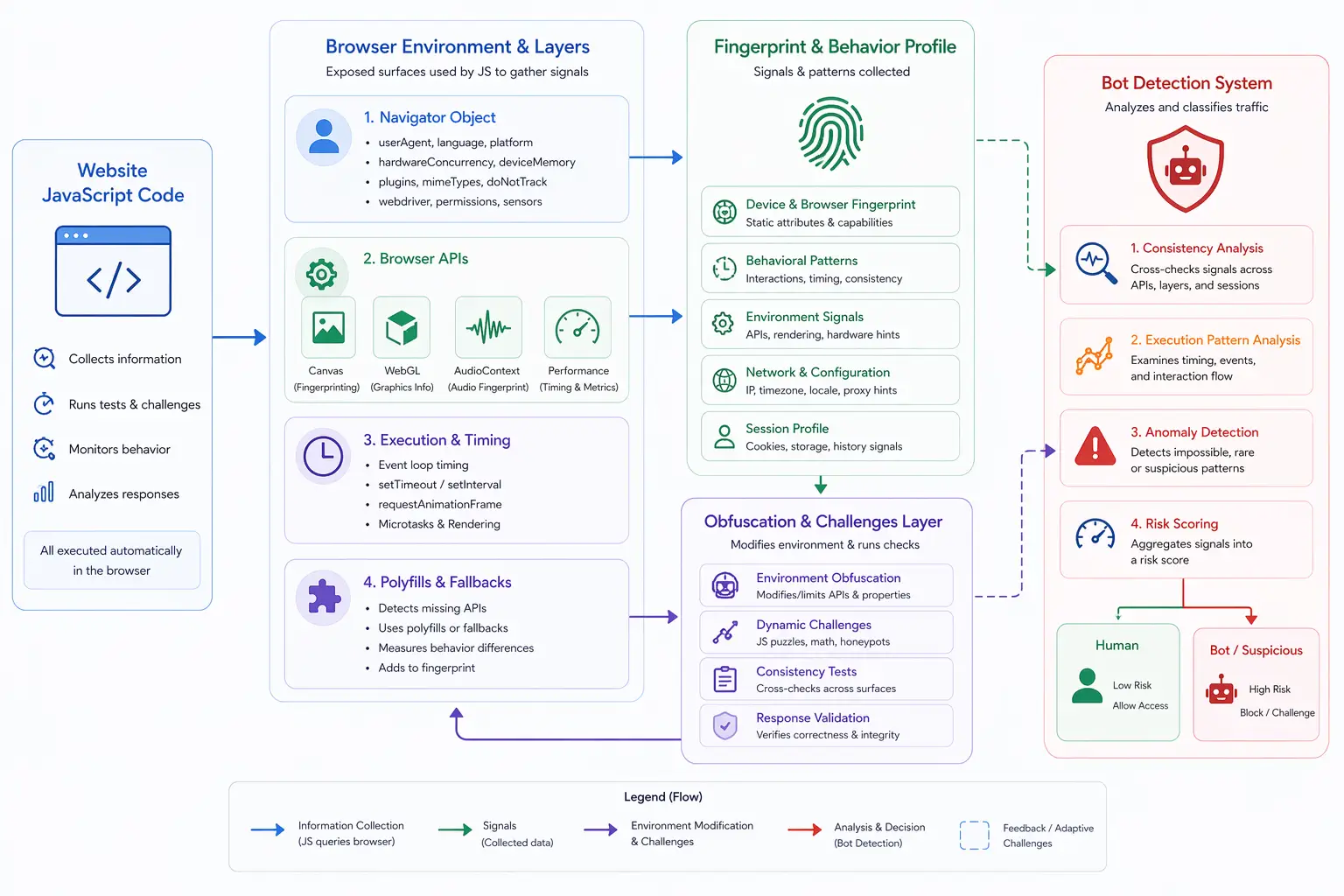
Navigator manipulation is detectable because changing surface-level values often creates inconsistencies with deeper signals, where detection systems compare navigator properties with other data sources such as rendering behavior, network information, and API outputs. For example, a user agent indicating a mobile device may conflict with desktop-level hardware performance or screen characteristics, creating a mismatch. These inconsistencies are strong indicators of manipulation.
Navigator Manipulation and Fingerprinting
Navigator manipulation directly interacts with fingerprinting systems because it alters key inputs used to build fingerprints, but since fingerprinting relies on multiple layers of data, modifying navigator properties alone is not sufficient to create a consistent identity. Detection systems analyze the relationship between different signals, and when navigator values do not align with other characteristics, the fingerprint becomes unreliable.
Navigator Manipulation and Bot Detection
Bot detection systems use navigator properties as part of their analysis, particularly looking for signs of automation such as the presence of navigator.webdriver or unusual property values. When manipulation is detected, it can indicate that the environment has been modified or automated, and this signal is often combined with behavioral analysis and network data to confirm detection. As a result, navigator manipulation is both a tool and a potential detection point.
Limitations of Navigator Manipulation
Navigator manipulation has limitations because it only affects visible JavaScript properties and does not change the underlying system or browser engine behavior, where deeper signals such as Canvas rendering, WebGL output, and performance timing remain unchanged. This creates a gap between what is reported and what is actually happening, which detection systems can exploit. Additionally, maintaining consistency across all properties is complex and error-prone.
Navigator Manipulation vs Real-Device Environments
A key distinction in modern detection is the difference between modified environments and real-device environments, where navigator manipulation attempts to simulate different identities by altering reported values, while real-device environments operate on actual hardware where all signals naturally align. Tools like Appilot follow this approach by running automation on real Android devices, where navigator properties, hardware behavior, and API outputs are consistent with real-world conditions. This reduces mismatches that detection systems rely on.
When Navigator Manipulation Is Most Relevant
Navigator manipulation is most relevant in scenarios where controlling browser identity is important, such as testing, automation, and multi-account workflows, where presenting different configurations can be necessary. However, its effectiveness depends on maintaining consistency across all signals, and understanding its limitations is essential for avoiding detection.
Frequently Asked Questions
Q: What is the navigator object?
It is a JavaScript object that provides information about the browser and system.
Q: What is navigator manipulation?
It is the process of modifying navigator properties to change browser identity.
Q: Why is it used?
It is used to simulate different environments or avoid detection.
Q: Can it be detected?
Yes, inconsistencies with other signals can reveal manipulation.
Q: Is it enough to avoid fingerprinting?
No, because fingerprinting uses multiple layers of data.
Q: How do real-device solutions compare?
Real-device solutions like Appilot maintain consistent signals across all layers, reducing detection risk.
Key Takeaways
Navigator object manipulation involves modifying browser-exposed properties to change how a device is identified, but it only affects surface-level data and can create inconsistencies with deeper signals. Detection systems rely on these inconsistencies to identify modified or automated environments, making manipulation both useful and risky. Understanding how navigator manipulation works is essential for managing browser fingerprinting and detection challenges.