Octo Browser Quick Profiles and Appilot Bulk Task Management
Octo Browser quick profiles are useful for users who need to create and launch browser profiles quickly without spending too much time on detailed setup. These profiles are often used for short-term workflows, temporary account testing, scraping tasks, quick logins, and repetitive browser operations that need to be launched in large numbers.
While quick profiles save time during setup, managing large numbers of them manually becomes difficult very quickly. Once you start handling dozens or hundreds of profiles, it becomes harder to organize workflows, assign schedules, track activity, and monitor profile health.
This is where Appilot becomes useful.
Appilot helps automate Octo Browser quick profile management by giving you one place to organize profile groups, assign workflows, create schedules, and manage bulk tasks more efficiently.
Why Quick Profiles Are Useful
Quick profiles are designed for speed. Instead of spending time manually configuring every browser profile in detail, you can create profiles faster and use them for workflows that do not require long-term browser history or detailed customization.
This is useful for teams that need to launch temporary profiles for scraping, testing, account warmups, campaign checks, or short-term automation tasks.
However, as the number of quick profiles increases, manual management becomes more difficult.
You may need one group of profiles for scraping, another for social media checks, another for e-commerce monitoring, and another for testing workflows.
Without a structured system, it becomes difficult to understand which profiles belong to which tasks.
How Appilot Helps Manage Quick Profiles
Appilot acts as the workflow and scheduling layer above Octo Browser.
First, quick profiles are created inside Octo Browser with their own fingerprints, proxy settings, cookies, and session data.
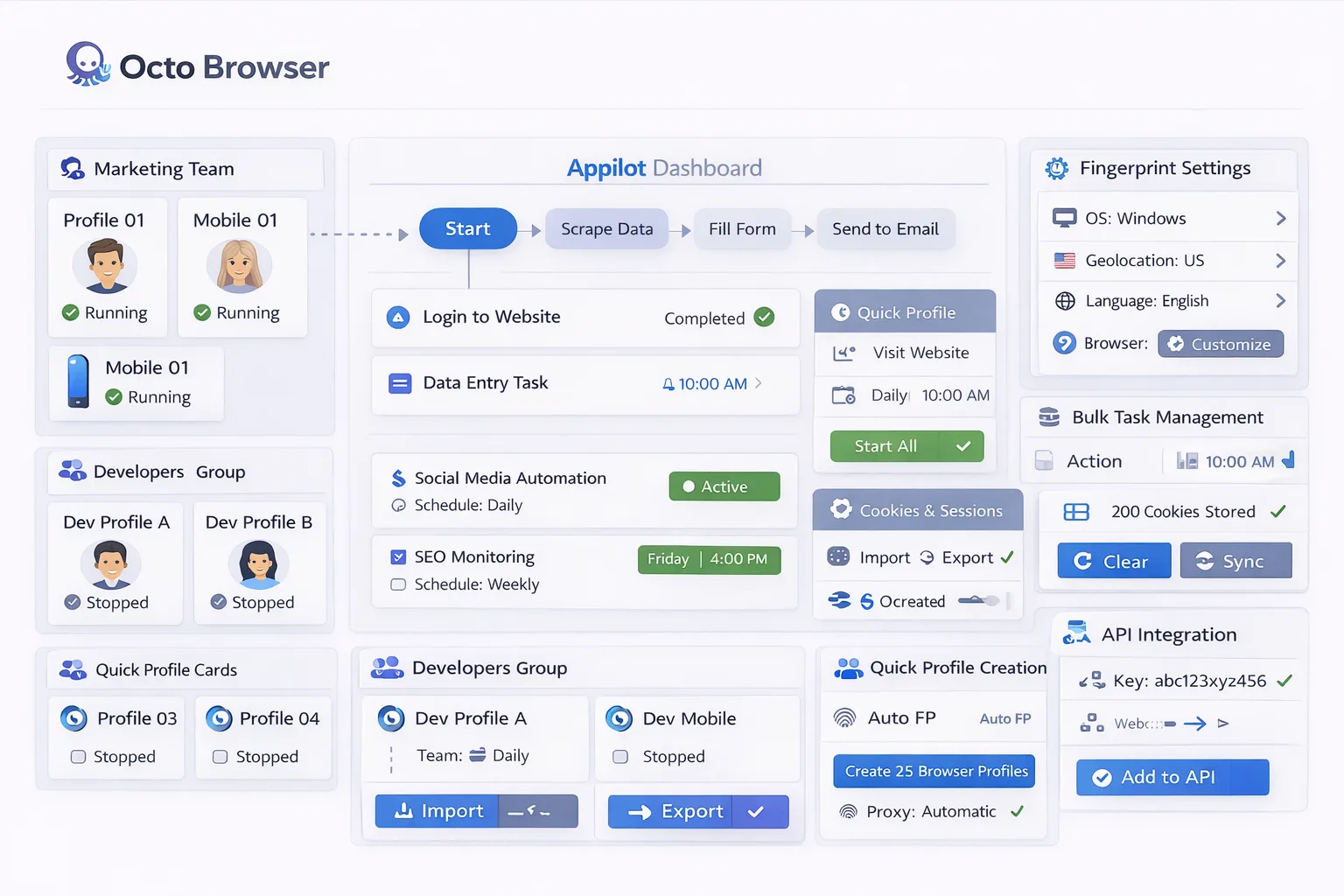
Once profiles are ready, Appilot can organize them into groups based on workflow type, account category, platform, region, or task priority.
For example, one group of quick profiles may be used for scraping, another may handle social media account checks, another may monitor ads, and another may support temporary testing workflows.
Inside Appilot, you can assign schedules, add workflow rules, create timing windows, and monitor browser activity from one dashboard.
This makes it much easier to manage large numbers of quick profiles without manually opening and tracking every browser session.
Common Bulk Task Workflows
Bulk task management becomes important when large numbers of browser profiles need to perform similar actions. Social media teams may need to check account status, review messages, or perform account warmups across many profiles at once. Scraping teams may need to launch temporary profiles that visit websites, collect information, and export data. E-commerce teams may need to monitor listings, pricing, and inventory across multiple accounts. Testing teams may need to review landing pages, advertisements, or browser compatibility using large groups of temporary profiles.
Appilot helps organize these bulk tasks into structured workflow groups so they can be launched, monitored, and scaled more efficiently.
Benefits of Bulk Task Automation
Automating bulk tasks helps reduce the amount of manual work required to manage large numbers of browser profiles. Instead of launching tasks one profile at a time, Appilot allows you to apply workflows across entire groups of quick profiles.
This improves efficiency and saves time.
Automation also helps improve organization because you can clearly see which profile groups belong to which workflows, which tasks are running, and which profiles require attention.
Another important benefit is scalability. Once a workflow is built, it can be reused across additional profile groups without rebuilding the same process repeatedly.
Best Practices for Managing Quick Profiles
One of the most important rules is to keep quick profiles organized by workflow type and task category. Clear naming conventions make it easier to understand which profiles belong to which campaigns or tasks.
You should also avoid launching all profiles at the exact same time because repetitive timing patterns can create suspicious behavior.
It is also important to use stable proxy assignments, review profile health regularly, and test workflows on a small number of profiles before scaling to larger groups.
Keeping profile groups separated based on workflow type helps make automation easier to manage in the long term.
Common Mistakes to Avoid
One common mistake is creating too many quick profiles without any structure or naming convention. This makes it difficult to understand which profiles belong to which tasks.
Another mistake is assigning identical schedules across all profiles, which creates repetitive activity patterns.
Some teams also scale too quickly before properly testing their workflows.
Using the same proxy across too many quick profiles is another common issue because it increases overlap and detection risks.
The best approach is to stay organized, build simple workflows first, and scale gradually.
Frequently Asked Questions
Q1: What are Octo Browser quick profiles used for?
Quick profiles are often used for temporary workflows such as scraping, testing, account checks, and short-term automation tasks.
Q2: Can Appilot manage large numbers of quick profiles?
Yes. Appilot can organize quick profiles into groups, assign workflows, and manage bulk tasks from one dashboard.
Q3: Why is bulk task management important?
Bulk task management saves time and makes it easier to apply workflows across large numbers of browser profiles.
Q4: Should quick profiles use different schedules?
Yes. Different schedules help reduce repetitive behavior patterns and make browser activity appear more natural.
Q5: What is the biggest mistake in quick profile management?
The biggest mistake is poor organization. Without clear profile groups, schedules, and naming conventions, quick profile management becomes difficult.
Conclusion
Octo Browser quick profiles are useful for fast and temporary browser workflows, but managing them manually becomes difficult as the number of profiles grows.
Appilot helps solve this problem by giving you one centralized place to organize profile groups, assign workflows, manage bulk tasks, and monitor browser activity.
The best approach is to stay organized, avoid repetitive timing patterns, and scale gradually as your automation setup becomes more advanced.