Phone Farm vs Cloud-Based Automation: Which Scales Better in 2025?
Scaling automation in 2025 is not just about running more tasks. It is about running the right tasks in the right environment.
Phone farms and cloud-based automation both help users scale social media workflows, but they solve different problems. A phone farm gives users real Android devices, real app sessions, mobile behavior, and stronger alignment with platforms that expect users to interact through mobile apps. Cloud-based automation gives users speed, convenience, server-side execution, and easier scaling for scraping, data extraction, lead generation, and lightweight workflows.
The mistake many users make is assuming one model is always better. Phone farms are not automatically better for every task, and cloud automation is not automatically safer or more scalable for every workflow.
If the goal is scraping public data, enriching leads, or running simple server-side tasks, cloud automation can scale faster. If the goal is Instagram, TikTok, Snapchat, Threads, Telegram, YouTube, Reddit, Discord, or other app-based social automation, phone farms often provide the better foundation because the actions happen in a real mobile environment.
Appilot sits closer to the phone farm side, but with a remote dashboard layer that removes much of the old pain of managing devices manually.
What Is a Phone Farm?
A phone farm is a setup where multiple real Android devices are used to run apps, accounts, and automation workflows. Each phone can act as a separate mobile environment for social media accounts, app testing, engagement workflows, messaging, browsing, posting, or other mobile tasks.
Phone farms became popular because many social platforms are mobile-first. Instagram, TikTok, Snapchat, Threads, Telegram, YouTube, and similar platforms are designed around mobile app behavior. A real user does not usually interact with these platforms through server scripts. They open the app, scroll, tap, watch, type, wait, swipe, and move through the interface.
That is why real devices matter. A phone farm gives each account a more believable mobile environment than a purely server-side workflow.
The trade-off is hardware. Phones cost money, take space, need power, require network planning, and need ongoing maintenance. A phone farm can scale well, but it needs operational discipline.
For serious social media automation, that trade-off is often worth it.
What Is Cloud-Based Automation?
Cloud-based automation means running tasks on remote servers instead of physical devices controlled by the user. These workflows can include web scraping, API tasks, browser automation, lead enrichment, cloud bots, data extraction, scheduled jobs, and server-side automation.
Cloud automation is popular because it is easy to scale from a technical perspective. Users do not need to buy phones, charge devices, manage cables, or maintain physical hardware. They can run tasks on servers and increase capacity by adding more cloud resources.
This works very well for many use cases. If the job is scraping public pages, collecting leads, processing data, monitoring websites, sending backend requests, or running repeatable server tasks, cloud automation can be efficient and cost-effective.
The limitation is behavior realism. A cloud workflow may scale quickly, but it does not automatically look like a real mobile user. For platforms that care about mobile app behavior, device consistency, and natural interaction patterns, cloud automation can be weaker than real-device automation.
Cloud automation scales tasks well. Phone farms scale mobile behavior better.
Phone Farm vs Cloud-Based Automation: The Main Difference
The biggest difference between phone farms and cloud-based automation is the execution environment.
A phone farm runs automation on real Android devices. That means actions can happen inside real mobile apps, with real device behavior and app sessions.
Cloud-based automation runs on servers. That means tasks can scale quickly, but the workflow often sits outside the real mobile device environment.
This difference matters because not every automation task is judged the same way. A data scraping workflow may only need speed, proxies, retries, and good parsing logic. A social media account workflow may need natural timing, device signals, app behavior, proxy consistency, and account warmup.
If the task is data-first, cloud automation usually scales better. If the task is account-first, phone farms usually scale better.
That is the core answer. The better scaling model depends on whether the platform cares more about data access or user-like behavior.
Why Phone Farms Scale Better for Mobile Social Apps
Phone farms scale better for mobile social apps because they start from the environment those apps expect.
Instagram, TikTok, Threads, Snapchat, Telegram, and YouTube are not just websites with mobile versions. Their core experience is built around app behavior. Users scroll feeds, watch videos, open profiles, send messages, reply to comments, view stories, and interact through touch-based interfaces.
A phone farm allows automation to happen inside that environment. That makes it better suited for workflows where the account’s behavior matters.
For example, an Instagram account warming up through a real Android device can browse, scroll, watch, interact, and message in a way that feels closer to normal mobile usage. A purely cloud-based workflow may be able to perform actions, but it may not provide the same device-level realism.
This does not mean phone farms remove all risk. Aggressive automation can still get accounts flagged. Weak proxies can still cause problems. Poor content and repetitive messages can still hurt growth.
But for mobile-first platforms, real-device automation usually starts from a stronger foundation.
Why Cloud Automation Scales Better for Data Tasks
Cloud-based automation scales better when the task is not dependent on mobile app behavior.
If the goal is scraping public profile data, collecting URLs, monitoring search results, enriching leads, checking websites, processing lists, or running backend workflows, cloud automation is often faster and cheaper.
A server can run many jobs in parallel. It can process large lists, store results, retry failed requests, and connect to databases or CRM systems more easily than a device-based setup.
Cloud automation also avoids hardware maintenance. There are no phones to charge, no shelves to organize, no devices to cool, and no physical inventory to manage.
For data workflows, this is a major advantage. A cloud scraper does not need to behave like a real mobile app user if the job is only to collect structured information.
That is why cloud automation is popular for lead generation, prospecting, scraping, monitoring, and internal workflow automation.
The weakness appears when the task becomes account-sensitive or app-behavior-sensitive.
Account Safety and Trust Signals
Account safety is one of the biggest reasons phone farms still matter in 2025.
Social platforms evaluate more than IP addresses. They can look at account age, device consistency, login patterns, app behavior, timing, repeated actions, interaction quality, and network history.
A cloud workflow may change IPs and run tasks quickly, but it may not provide the same kind of device-level consistency as a real Android phone.
Phone farms can help create more stable account environments. Each account can be tied to a device, proxy, app session, and behavior pattern that stays more consistent over time.
That does not guarantee safety. No automation setup can promise that. But for accounts that matter, a real-device environment is usually more believable than a purely cloud-based environment.
This is why agencies, phone farm operators, and growth teams often prefer real devices for live social workflows.
Setup and Maintenance
Cloud automation wins on simple infrastructure setup. Users can usually start with a dashboard, server workflow, API connection, browser automation tool, or scraping platform without buying hardware.
That convenience is real. For many teams, cloud workflows are easier to launch and easier to scale quickly.
Phone farms require more setup. Users need Android devices, power management, network planning, proxy setup, device organization, app installation, and monitoring.
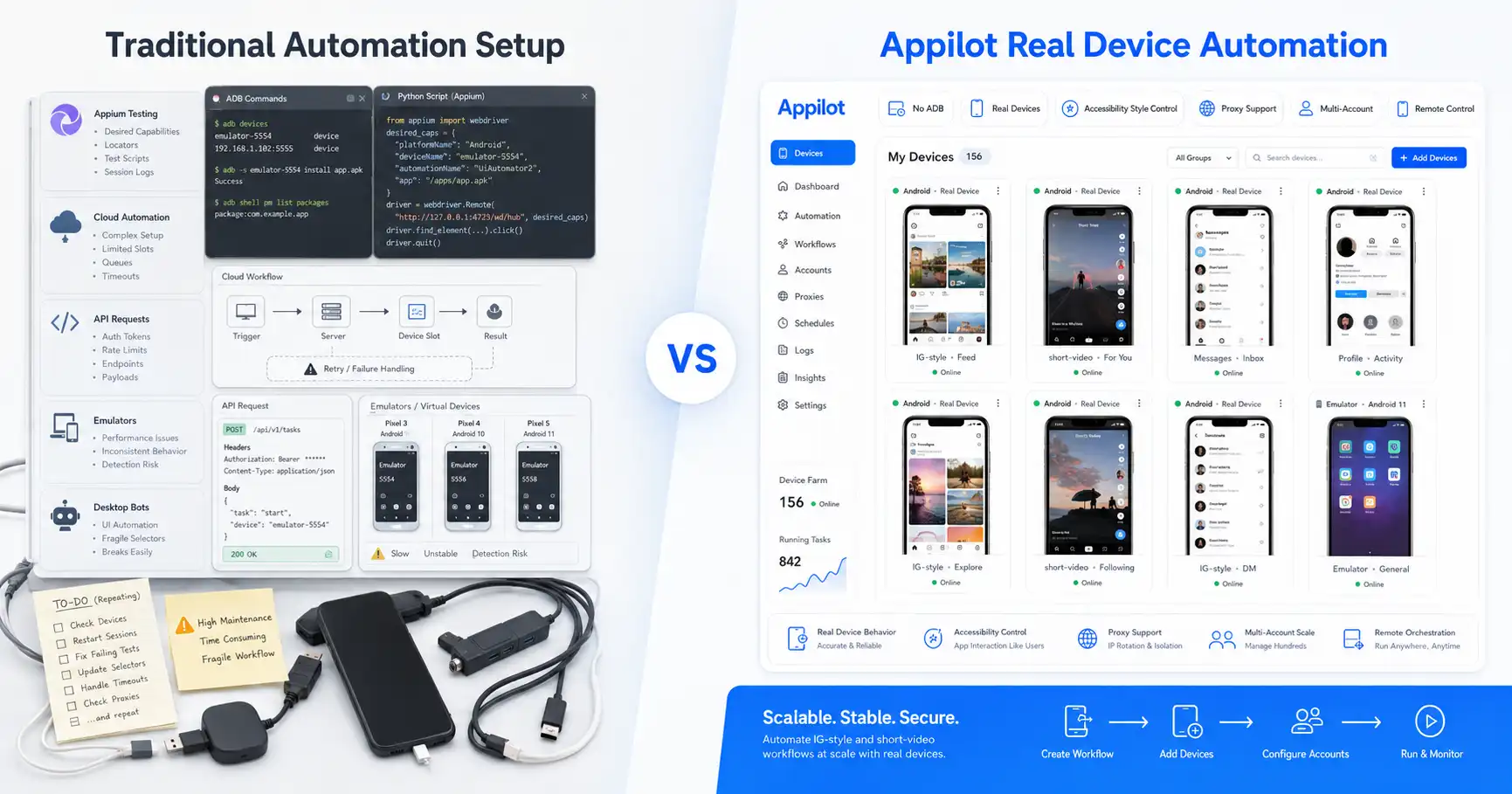
The old version of phone farming was painful because operators often had to rely on cables, local laptops, ADB sessions, USB hubs, and manual device control.
Appilot improves this by giving users a remote dashboard for managing bots on Android devices and emulators without requiring ADB or a laptop connected all day.
This creates a more practical middle ground. Users still get the benefits of real Android execution, but they do not have to manage devices in the old messy way.
Cost and Scaling Economics
Cloud automation often looks cheaper at first because users do not need to buy phones. They pay for servers, tasks, credits, or software access instead.
For short-term scraping and data workflows, cloud automation can be more cost-effective because it can scale up and down quickly.
Phone farms have higher upfront costs because physical devices cost money. There may also be costs for racks, power, cooling, mobile proxies, device management, and maintenance.
But phone farms can make more sense for long-term social media automation. Once devices are set up, they can keep running workflows over time. For valuable accounts, the added realism can be worth more than the hardware cost.
The better choice depends on the value of the accounts and the type of workflow. Low-risk data tasks may not justify real devices. High-value social accounts often do.
Proxy Strategy
Both phone farms and cloud automation need strong proxy strategy, but the way proxies are used can differ.
Cloud automation often uses datacenter, residential, or rotating proxies to access websites, scrape pages, or separate tasks. This works well for many data workflows.
Phone farms often benefit from mobile or residential proxies because the goal is account separation and realistic mobile behavior. When each account has a stable device and proxy pattern, the setup can look more consistent.
A proxy alone does not make automation safe. A phone alone does not make automation safe either. The strongest setup combines good proxies, realistic timing, account warmup, device consistency, and high-quality behavior.
Appilot supports proxy-aware workflows, including mobile and residential proxies, which makes it better suited for multi-account social automation.
The goal is not just to hide traffic. The goal is to create a believable operating environment.
Best Uses for Phone Farms
Phone farms are best when the workflow depends on real mobile app behavior.
They make sense for Instagram automation, TikTok workflows, Threads activity, Snapchat actions, Telegram account workflows, YouTube mobile app behavior, Reddit and Discord operations, and other social platforms where account behavior matters.
They are also useful for phone farm operators, social media agencies, growth teams, and users managing many accounts that need separation and long-term stability.
Phone farms are strongest when accounts are valuable and the user wants a setup that looks closer to normal mobile usage.
The downside is hardware management, but tools like Appilot reduce that pain by allowing users to control bots remotely without ADB or laptop dependency.
Best Uses for Cloud-Based Automation
Cloud-based automation is best when the workflow is data-heavy, server-friendly, and less dependent on mobile app behavior.
It makes sense for web scraping, lead generation, data enrichment, price monitoring, public profile collection, reporting, scheduled checks, and backend workflow automation.
Cloud automation is also useful when speed matters more than realism. A server can process large lists faster than a set of phones.
It is also easier for teams that do not want to manage hardware.
The downside is that cloud workflows are often less suitable for account-sensitive mobile app behavior. If the task needs to look like a real user inside a mobile app, cloud automation may not be enough.
Where Phone Farms Win
Phone farms win when realism matters.
They are better for mobile-first apps, account-based workflows, long-term social automation, and operations where device behavior is part of trust.
They also win when users want each account to have a more consistent environment. A real device paired with a good proxy and careful behavior strategy can be stronger than a generic cloud workflow.
Phone farms are especially useful for agencies and growth teams that manage client accounts and cannot afford reckless automation.
The trade-off is that users need to manage hardware, but modern tools like Appilot make that easier by adding remote dashboard control.
Where Cloud Automation Wins
Cloud automation wins when speed, simplicity, and data processing matter.
It is better for scraping, enrichment, lead generation, monitoring, reporting, and workflows that do not require real mobile app behavior.
Cloud automation also wins when users need to scale temporary workloads quickly. A team can run a large scraping job without buying more physical devices.
It is also easier for technical teams that already operate server-based systems.
The trade-off is that cloud automation may not provide the mobile device realism needed for sensitive social media account operations.
How Appilot Fits Between Both Models
Appilot gives users many of the benefits of phone farms without the old device-management headache.
It lets users run bots on real Android devices and emulators, manage workflows through a web dashboard, avoid ADB, avoid laptop dependency, and support proxy-aware operations.
This makes Appilot especially useful for users who want phone farm realism but cloud-style control.
Instead of choosing between a messy physical setup and a less realistic cloud bot, users can run real-device automation with remote management.
That is the practical reason Appilot fits modern social media automation. It does not replace every cloud scraping tool, and it does not pretend cloud automation is useless. It simply solves the part cloud automation often struggles with: real mobile app behavior.
Final Verdict
Phone farms and cloud-based automation scale differently.
Cloud automation scales better for data tasks, scraping, lead generation, monitoring, enrichment, and server-side workflows. It is fast, flexible, and easy to expand without physical hardware.
Phone farms scale better for mobile-first social media automation, account-sensitive workflows, app behavior, phone farm operations, and long-term multi-account growth. They require more infrastructure, but they provide stronger realism.
The best setup in 2025 depends on the job. Use cloud automation when the output is data. Use phone farms when the output is real mobile app behavior.
For social media bots, phone farm-style automation usually wins, especially when managed through a platform like Appilot. Appilot gives users real Android execution, remote dashboard control, no ADB, no laptop dependency, proxy support, and ready-to-use bots.
You can explore Appilot’s bot store and try it at appilot.app.
FAQ
Q1: What is the biggest difference between phone farms and cloud automation?
Phone farms run automation on real Android devices, while cloud automation runs tasks on servers. Phone farms are better for mobile app behavior, while cloud automation is better for data tasks.
Q2: Which scales better for Instagram automation?
Phone farms usually scale better for Instagram automation because Instagram is mobile-first. Real Android devices provide stronger app behavior than server-side workflows.
Q3: Which is cheaper: phone farms or cloud automation?
Cloud automation is often cheaper to start because it does not require hardware. Phone farms cost more upfront but can be better for long-term account-based social automation.
Q4: Does Appilot replace cloud scraping tools?
No, Appilot is better for mobile app automation, not pure cloud scraping. Cloud tools are still useful for data extraction and lead generation workflows.
Q5: Who should use Appilot for scaling automation?
Appilot is best for phone farm operators, agencies, and growth teams that need real Android automation, remote control, proxy support, and multi-account social workflows.