What Is Profile Isolation in Antidetect Browsers?

Most people assume that opening multiple tabs or even different browsers is enough to separate online identities, but modern tracking systems can still link those sessions together. Cookies, storage, and fingerprinting signals often overlap unless they are properly isolated. This is where profile isolation becomes essential in antidetect browsers.
Understanding profile isolation is important because it forms the foundation of how antidetect browsers manage multiple identities. Without proper isolation, even well-configured fingerprints can become linked. This guide explains what profile isolation is, how it works technically, and why it matters in real-world scenarios.
What Is Profile Isolation?
Profile isolation is the process of separating browsing environments so that each session behaves like an independent user with no shared data or identifiers. In antidetect browsers, each profile acts as a self-contained instance with its own storage, configuration, and fingerprint.
Instead of sharing cookies, cache, or local storage across sessions, isolated profiles ensure that each identity operates independently. This prevents websites from linking multiple sessions based on shared data.
Each profile can be configured with its own fingerprint, proxy, and environment, allowing it to appear as a completely separate user.
The Core Principle Behind Profile Isolation
The core principle behind profile isolation is separation. Tracking systems rely on shared signals to link sessions, so isolation removes those shared points.
If two sessions share cookies or storage data, they can be easily linked. Even without cookies, shared fingerprinting signals can create connections. Profile isolation ensures that these connections are minimized or eliminated.
This makes isolation a critical first step before any fingerprint modification or proxy configuration.
How Profile Isolation Works
Profile isolation works by creating separate environments at both the storage and execution levels.
Separate Storage Containers
Each profile is assigned its own storage container, which includes cookies, local storage, session storage, and cache. This ensures that data generated in one profile is not accessible to another.
From a technical perspective, this is similar to running multiple browser instances with separate user directories. Each directory holds its own data, preventing cross-contamination.
Independent Browser Contexts
In addition to storage, each profile runs in its own browser context. This means that scripts, sessions, and runtime behavior are isolated.
Even if multiple profiles are active at the same time, they do not share execution state. This allows them to operate independently without interference.
Unique Fingerprint Assignment
Profile isolation is often combined with fingerprint customization. Each profile can be assigned a different set of attributes such as user agent, screen resolution, timezone, and language.
This ensures that not only is data isolated, but each profile also appears as a unique device.
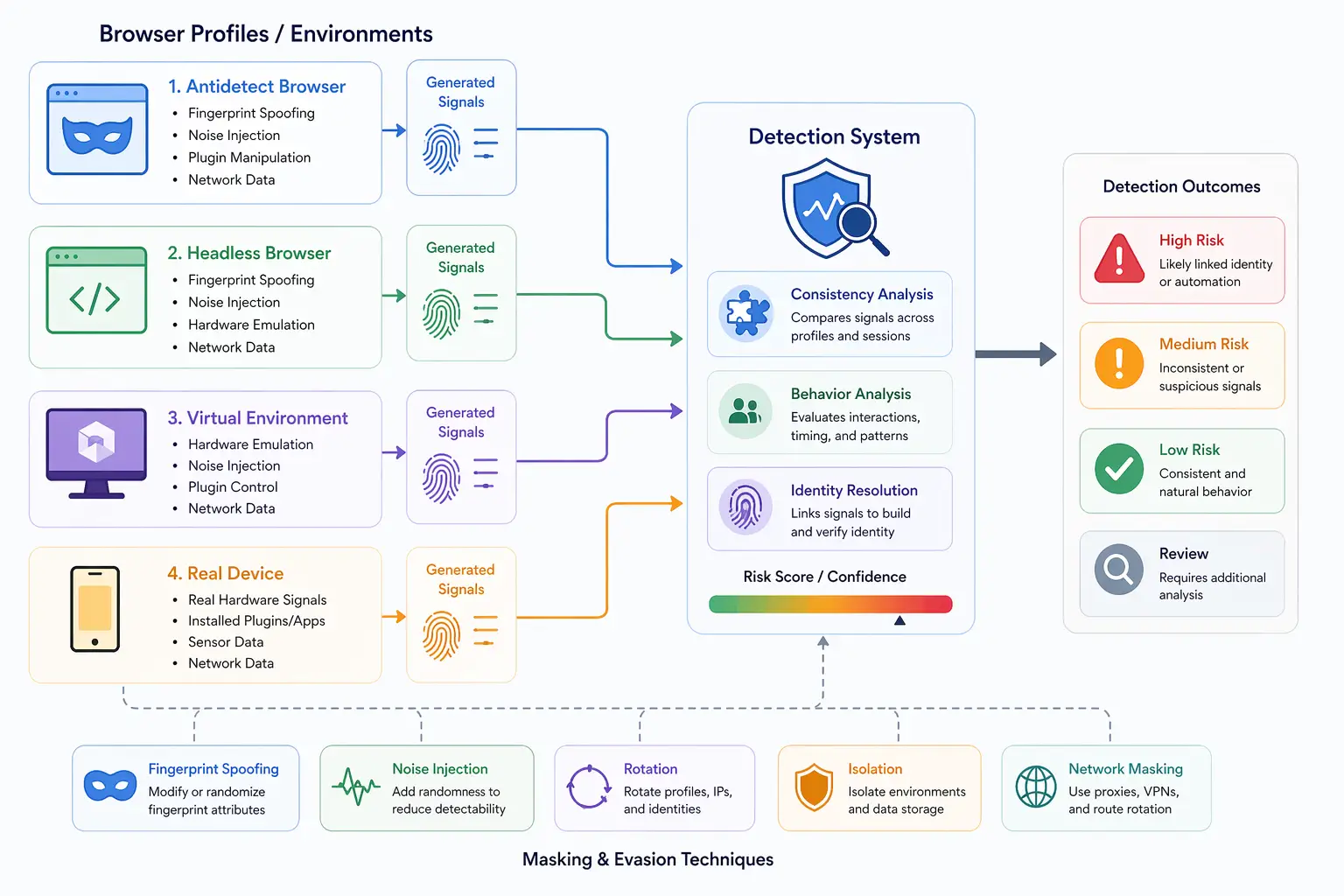
Why Profile Isolation Matters
Profile isolation matters because it prevents direct linkage between sessions. Without it, shared data can easily reveal that multiple accounts belong to the same user.
In account management workflows, isolation ensures that actions in one profile do not affect another. This is critical for maintaining separation and avoiding detection.
From a detection perspective, isolation reduces one of the most obvious signals used for linking sessions. However, it does not address deeper fingerprinting signals, which must be handled separately.
Profile Isolation vs Incognito Mode
Many users assume that incognito mode provides sufficient isolation, but this is not the case.
Incognito mode clears data after the session ends, but it does not create multiple independent environments. All incognito tabs within the same session still share the same context.
Profile isolation, on the other hand, creates fully separate environments that can run simultaneously without sharing data. This makes it far more effective for managing multiple identities.
Limitations of Profile Isolation
While profile isolation is essential, it is not a complete solution on its own.
One limitation is that it only addresses storage-level separation. Fingerprinting signals such as hardware behavior, rendering output, and network characteristics can still link profiles if they remain similar.
Another limitation is consistency. Even with isolated profiles, mismatched configurations can create detectable patterns.
This means that profile isolation must be combined with realistic and consistent environments to be effective.
Profile Isolation vs Real Device Separation
There is an important distinction between logical isolation and physical separation.
Antidetect browsers provide logical isolation by separating profiles within the same device. However, the underlying hardware and system behavior remain the same.
In contrast, real-device approaches provide physical separation, where each session runs on actual hardware. Tools like Appilot use this approach by running automation on real Android devices, ensuring that both storage and system-level signals are naturally isolated.
This difference becomes important in advanced detection systems that analyze deeper layers beyond storage.
When Profile Isolation Is Enough
Profile isolation is sufficient in scenarios where basic separation of sessions is required and detection systems are not highly advanced.
It works well for testing, controlled workflows, and environments where storage-based linkage is the primary concern.
However, in scenarios involving advanced fingerprinting and detection, additional measures may be needed to ensure full separation.
Frequently Asked Questions
Q: What is profile isolation in antidetect browsers?
It is the separation of browsing sessions into independent environments with their own data and configuration.
Q: Why is profile isolation important?
It prevents sessions from being linked through shared data such as cookies and storage.
Q: Is incognito mode the same as profile isolation?
No, incognito mode does not create fully separate environments and still shares context within a session.
Q: Does profile isolation prevent fingerprinting?
No, it only prevents data sharing. Fingerprinting signals must be handled separately.
Q: Can isolated profiles still be detected?
Yes, if fingerprinting signals are similar or inconsistent, detection systems can still link profiles.
Q: How do real-device solutions compare to profile isolation?
Real-device solutions like Appilot provide physical separation, ensuring both storage and system-level signals are naturally isolated.
Key Takeaways
Profile isolation is a fundamental feature of antidetect browsers that ensures each browsing session operates as an independent environment with no shared data or identifiers. It works by separating storage, execution context, and configuration, preventing direct linkage between profiles. While it is essential for managing multiple identities, it only addresses part of the tracking problem and must be combined with consistent fingerprinting signals to be effective. As detection systems evolve to analyze deeper layers, understanding the difference between logical isolation and real device separation becomes increasingly important.