Understanding Proxy Authentication Methods
When using proxies in browser automation, simply routing traffic through a proxy server is not enough. Most proxy providers require authentication to control access and ensure that only authorized users can use their infrastructure. This process is known as proxy authentication.
Understanding proxy authentication methods is important because they affect how proxies are integrated into automation workflows. Choosing the right method can impact security, flexibility, and ease of use. This guide explains the different proxy authentication methods and how they work in practice.
What Is Proxy Authentication?
Proxy authentication is the process of verifying that a user or system is allowed to use a proxy server. Before forwarding requests, the proxy checks whether the request includes valid credentials or originates from an authorized source.
This ensures that proxy resources are not misused and that access is controlled.
In automation setups, authentication determines how browsers and scripts connect to proxy servers.
The Core Principle Behind Proxy Authentication
The core principle behind proxy authentication is access control. Proxy providers need to restrict usage to authorized users while preventing abuse.
Authentication methods are designed to verify identity either through credentials or network-based validation. Each method offers different trade-offs in terms of security and flexibility.
Choosing the right approach depends on how proxies are used in the workflow.
Common Proxy Authentication Methods
There are two primary proxy authentication methods used in browser automation: IP-based authentication and username/password authentication.
IP-Based Authentication
IP-based authentication works by allowing access only from specific IP addresses. The proxy provider whitelists your IP, and any request coming from that IP is automatically authorized.
This method is simple and does not require credentials to be included in requests. Once your IP is approved, the connection is seamless.
However, it requires a stable IP address. If your IP changes frequently, access may be disrupted.
Username and Password Authentication
Username and password authentication requires credentials to be included with each request. These credentials are verified by the proxy server before allowing access.
This method is more flexible because it does not depend on a fixed IP address. It can be used from different locations and environments.
However, it requires proper handling of credentials, especially in automated systems.
How Proxy Authentication Works in Practice
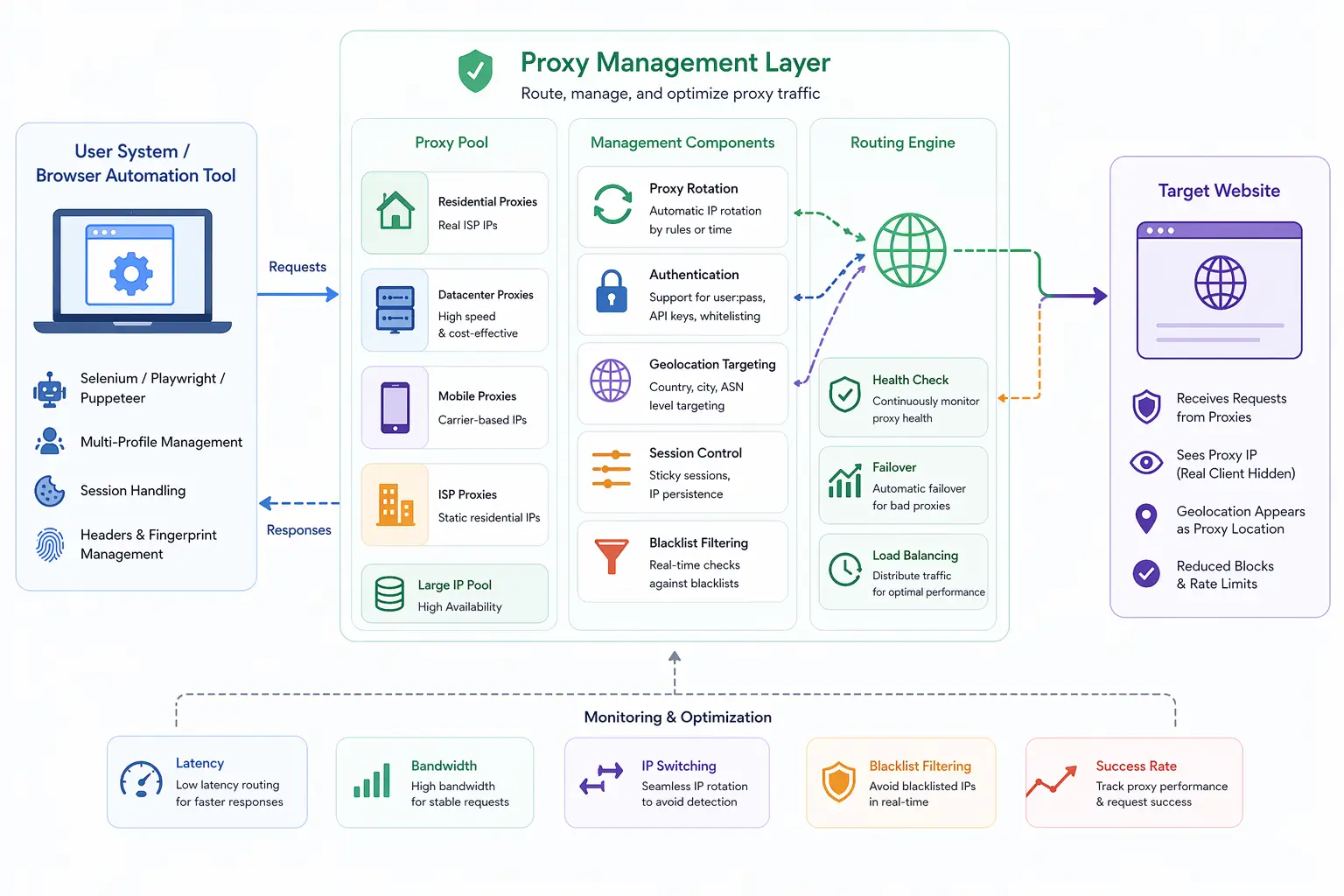
When a browser or script connects to a proxy, it must first pass the authentication check.
In IP-based authentication, the proxy verifies the source IP of the request. If the IP matches the whitelist, the request is allowed.
In username/password authentication, the browser includes credentials in the request headers. The proxy validates these credentials before forwarding the request.
This process happens quickly and is usually invisible to the user once configured correctly.
Why Authentication Method Matters
The choice of authentication method affects how proxies are used in automation.
IP-based authentication is easier to set up and works well in stable environments where the IP does not change. It reduces complexity because no credentials need to be managed.
Username/password authentication is more flexible and works in dynamic environments where IPs may change. It is also better suited for distributed systems.
Understanding these differences helps determine which method is appropriate.
Common Challenges in Proxy Authentication
There are several challenges associated with proxy authentication.
One challenge is handling dynamic IPs. In environments where IPs change frequently, IP-based authentication can become unreliable.
Another challenge is credential management. Storing and using credentials securely is important to prevent unauthorized access.
There is also the issue of compatibility. Some browsers and automation tools require additional configuration to support certain authentication methods.
These challenges highlight the need for proper setup and planning.
Proxy Authentication and Security
Proxy authentication plays a key role in securing proxy usage.
By restricting access, it prevents unauthorized users from consuming resources or abusing the proxy network. This is particularly important in shared environments.
However, security also depends on how credentials are handled. Weak or exposed credentials can compromise the entire setup.
Ensuring secure storage and transmission of authentication data is essential.
Authentication vs Proxy Type
Proxy authentication is independent of proxy type. Residential, datacenter, mobile, and ISP proxies can all use either IP-based or username/password authentication.
The choice of authentication method does not change how the proxy behaves in terms of network identity. It only affects how access is controlled.
This means that authentication should be considered separately from proxy selection.
Proxy Authentication vs Real-Device Environments
A key distinction in modern automation setups is the difference between proxy-based access and real-device environments.
Proxy authentication controls access to network routing, but it does not affect how the browser or device behaves. This can lead to inconsistencies if other signals do not align.
Real-device approaches operate on actual hardware with integrated network configurations. Tools like Appilot follow this approach by running automation on real Android devices, where network access and device behavior are naturally aligned without requiring manual authentication handling.
This simplifies setup and improves consistency.
When to Use Each Authentication Method
IP-based authentication is best used in environments with stable IP addresses, such as dedicated servers or fixed locations.
Username/password authentication is more suitable for dynamic environments, distributed systems, and workflows that require flexibility.
Choosing the right method depends on the specific requirements of the setup.
Frequently Asked Questions
Q: What is proxy authentication?
It is the process of verifying access to a proxy server before allowing requests.
Q: What are the main authentication methods?
IP-based authentication and username/password authentication.
Q: Which method is easier to use?
IP-based authentication is simpler but requires a stable IP address.
Q: Which method is more flexible?
Username/password authentication works across different locations and environments.
Q: Does authentication affect proxy performance?
No, it only controls access, not speed or behavior.
Q: How do real-device solutions compare?
Real-device solutions like Appilot integrate network access naturally, reducing the need for manual proxy authentication management.
Key Takeaways
Proxy authentication is the process of verifying access to proxy servers, ensuring that only authorized users can use them. The two main methods are IP-based authentication, which relies on whitelisted IP addresses, and username/password authentication, which uses credentials for access control. Each method has its own advantages in terms of simplicity and flexibility. Understanding how these methods work and when to use them is essential for building secure and reliable browser automation systems.