Python UIAutomator2 vs Appilot: Which Is Better for Instagram Bots?
Instagram bot automation usually starts with one simple question: should you build the bot yourself or use a platform that already handles the automation layer?
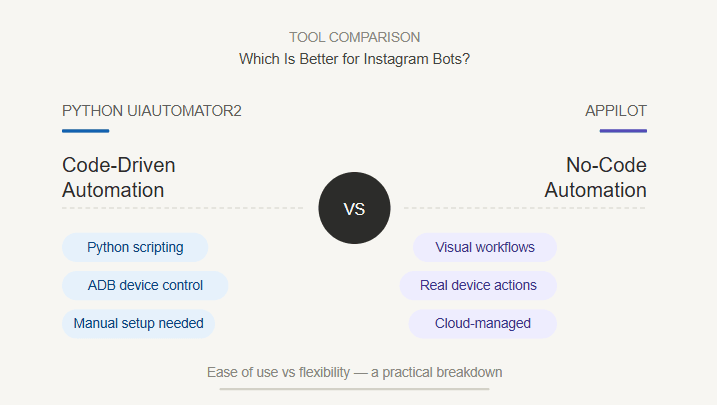
Python UIAutomator2 and Appilot both sit in the Android automation world, but they serve very different users. Python UIAutomator2 is better for developers who want to write custom scripts, control Android UI elements, and build automation logic from scratch. Appilot is better for users who want to run Instagram bots without managing ADB, local scripts, device connections, or laptop-based infrastructure.
That difference matters because Instagram automation is not just about tapping buttons. It involves account safety, device behavior, timing, proxies, session quality, warmup, app navigation, message workflows, and long-term stability.
If you are a developer experimenting with automation, Python UIAutomator2 can be useful. If you are an agency, phone farm operator, growth team, or non-technical user trying to run Instagram workflows reliably, Appilot is usually the better fit.
This guide compares Python UIAutomator2 vs Appilot for Instagram bots and explains when each one makes sense.
What Is Python UIAutomator2?
Python UIAutomator2 is a Python wrapper for Android UI automation. It lets developers control Android devices from Python by communicating with a device-side automation service.
In practical terms, a developer can write Python scripts that open apps, find UI elements, tap buttons, send text, swipe screens, take screenshots, and automate Android app workflows.
That makes it useful for developers who want direct control over Android automation without writing native Java-based UIAutomator tests.
The strength of Python UIAutomator2 is flexibility. A technical user can build exactly the workflow they want, customize logic, test selectors, handle edge cases, and create scripts that match a specific app flow.
The weakness is that the user owns everything. They need to handle setup, device connection, script reliability, exception handling, account safety logic, proxy strategy, scheduling, monitoring, and maintenance.
For Instagram bots, that can become a lot of work.
What Is Appilot?
Appilot is a social media automation platform that runs bots on real Android devices and emulators through a remote web dashboard.
Instead of asking users to write Python scripts, manage device services, and maintain bot logic manually, Appilot gives users a dashboard-based system for running social media bots.
For Instagram, this is useful because Appilot can run automation inside Android app environments where real Instagram behavior happens. Bots can interact with mobile UI flows such as tapping, scrolling, typing, opening profiles, watching stories, sending messages, and moving through the app.
Appilot also works without ADB, so users do not need to keep a laptop connected, manage USB cables, troubleshoot drivers, or constantly fix device disconnects.
The platform includes a bot store with ready-to-use automations for Instagram, TikTok, Twitter/X, LinkedIn, Discord, Reddit, Snapchat, YouTube, Threads, Telegram, Gmail, Chrome, and more.
Python UIAutomator2 vs Appilot: The Main Difference
The biggest difference between Python UIAutomator2 and Appilot is control versus operations.
Python UIAutomator2 gives developers control. It is useful when someone wants to build custom Android automation from scratch, write Python logic, inspect UI elements, and experiment with app workflows.
Appilot gives operators a managed automation system. It is useful when someone wants to run Instagram bots without building the entire automation infrastructure manually.
This distinction matters because building an Instagram bot is not the same as operating one. A developer may be able to write a script that likes posts or sends messages, but running that script safely across multiple accounts is a different problem.
Instagram bot operations need monitoring, proxy-aware workflows, account limits, warmup strategy, remote control, device stability, and workflow reliability.
Python UIAutomator2 can be the foundation for custom development. Appilot is the better fit when the goal is to run bots at an operational level.
When Python UIAutomator2 Makes Sense
Python UIAutomator2 makes sense when the user is technical and wants full control.
If a developer wants to prototype an Instagram bot, test app navigation, inspect UI elements, experiment with Android automation, or build a custom workflow, Python UIAutomator2 can be a strong choice.
It is especially useful when the project needs custom logic that does not exist in a ready-made bot. A developer can decide exactly what the script should do, how it should respond to screen changes, and how it should handle specific app states.
Python UIAutomator2 also makes sense for learning. If someone wants to understand how Android UI automation works, writing scripts manually is a good way to learn the basics.
The trade-off is maintenance. Every UI change, login challenge, popup, app update, or selector issue can break the script. The developer needs to keep fixing and improving the automation.
For experiments and custom development, that is acceptable. For day-to-day Instagram growth operations, it can become inefficient.
When Appilot Makes Sense
Appilot makes sense when the user wants to run Instagram bots instead of building them from scratch.
If the goal is to automate Instagram workflows across one or many accounts, Appilot is easier to manage because it provides a dashboard, ready-to-use bots, real Android execution, and no-ADB operation.
This is especially useful for agencies, growth teams, phone farm operators, and users who do not want to maintain Python scripts.
Appilot also makes sense when automation needs to be managed remotely. A team can start, stop, and monitor bots from a web dashboard without relying on one developer’s laptop or local machine.
For Instagram automation, that is a major advantage. Instagram workflows often need long-running sessions, realistic timing, account separation, and consistent device behavior.
Appilot is designed around those operational needs.
Building Bots vs Running Bots
The cleanest way to compare Python UIAutomator2 and Appilot is this: UIAutomator2 is better for building bots, while Appilot is better for running bots.
Building a bot means writing the logic yourself. You decide what to click, how to detect screens, how to handle errors, how to pause, how to retry, and how to move through the app.
Running a bot means keeping the workflow stable over time. You need monitoring, account separation, proxy support, remote control, scheduling, and a system that does not fall apart when one device disconnects or one script fails.
Python UIAutomator2 gives you the raw power to build. Appilot gives you the operating layer to run.
For developers, raw power can be attractive. For agencies and phone farm operators, the operating layer is usually more valuable.
Instagram Bot Safety
Instagram bot safety depends on more than the automation library.
A Python UIAutomator2 script can perform realistic-looking actions if it is written carefully. It can tap, scroll, type, and move through the app. But the script itself does not automatically solve account safety.
The user still needs to manage action limits, proxy quality, account age, warmup, delays, message quality, device consistency, and error handling.
Appilot does not make Instagram automation risk-free either. No tool can honestly guarantee that. But Appilot gives users a more complete environment for bot operations because it combines Android execution, remote control, proxy-aware workflows, and ready-to-use automation.
For serious Instagram bots, the platform around the automation matters as much as the automation method itself.
ADB, Device Setup, and Laptop Dependency
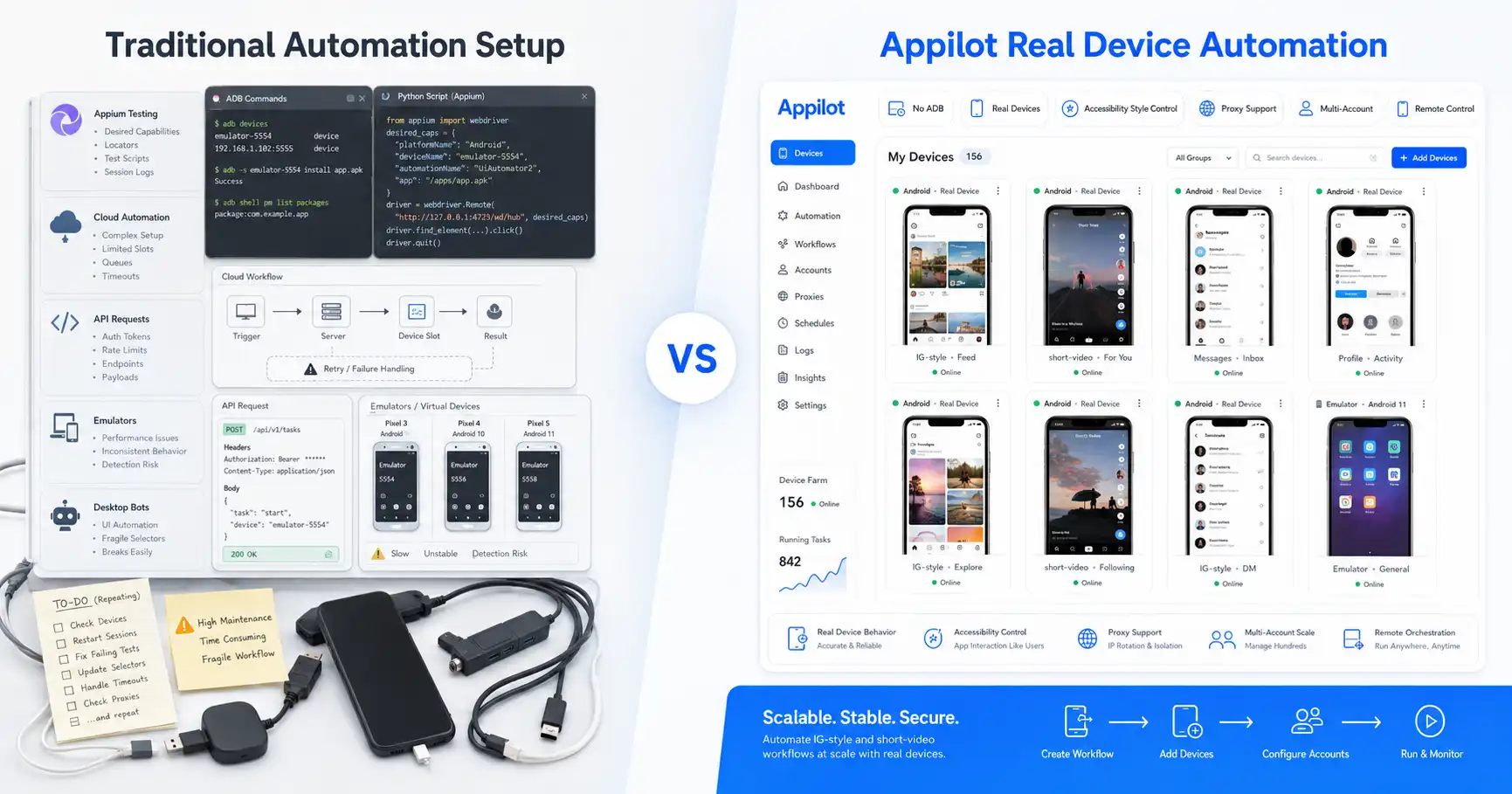
Python UIAutomator2 usually requires technical setup. Developers may need to connect devices, initialize the automation service, configure the environment, handle USB or network connectivity, and make sure the script can communicate with the device.
That is fine for a developer testing one or two devices. It becomes less practical for a team managing many Instagram accounts.
Appilot avoids this problem by working without ADB and without requiring users to keep a laptop connected all day.
This is one of Appilot’s strongest advantages. A phone farm operator or agency should not need to manage low-level device connections just to run Instagram automation.
With Appilot, the user manages workflows through the dashboard, while the automation runs on Android devices or emulators.
Multi-Account Instagram Growth
Multi-account Instagram growth is where Python UIAutomator2 becomes more difficult to manage.
A single script can work for one account. But once users manage many accounts, they need a full operating system around the automation. They need separate device environments, proxy support, account-specific limits, monitoring, retry logic, scheduling, and safe workflow design.
Python UIAutomator2 can be used to build that system, but the user has to create and maintain it.
Appilot is better suited for this use case because it is already designed around multi-account automation workflows. Users can manage bots through a remote dashboard and run automations on real Android devices or emulators.
That makes Appilot more practical for agencies, phone farm operators, and teams running Instagram growth across many accounts.
Proxy Support and Account Separation
Proxy support is critical for Instagram bots.
If several accounts share poor network signals or suspicious IP patterns, Instagram may connect them or restrict activity. This is true whether the automation is built with Python UIAutomator2 or managed through a platform like Appilot.
With Python UIAutomator2, the user must design the proxy and network strategy themselves. That may involve configuring devices, emulators, VPNs, mobile proxies, residential proxies, or account-specific routing.
Appilot supports proxy-aware workflows, including mobile and residential proxies. This makes it easier for users to manage account separation as part of the automation setup.
Good proxies alone do not make automation safe. The account behavior still needs to be realistic. But combining proxy support with real Android automation and controlled bot workflows gives users a stronger foundation.
Maintenance and Long-Term Reliability
Maintenance is one of the biggest hidden costs of Python UIAutomator2.
Instagram changes its UI. Popups appear. Login challenges happen. Buttons move. Text changes. Stories behave differently. Direct message flows change. App updates break selectors. Network issues interrupt sessions.
A developer can handle these issues, but they require time.
For one experimental bot, that is manageable. For an agency or phone farm operator, it becomes expensive.
Appilot reduces that burden by giving users a managed bot environment. Users still need to configure workflows carefully, but they do not need to maintain every low-level script themselves.
This makes Appilot more reliable for long-term Instagram operations, especially for non-technical teams.
Where Python UIAutomator2 Wins
Python UIAutomator2 wins when the user wants full developer control.
It is better for custom experiments, bot prototyping, Android UI research, low-level workflow testing, and highly specific automation logic.
It also wins when the user has a developer who wants to own the whole automation stack. For technical teams, this control can be valuable.
Python UIAutomator2 can also be useful when a workflow is too custom for any ready-made bot and the user is willing to write and maintain code.
The trade-off is that it is not plug-and-play. The user must handle the setup, reliability, scaling, and maintenance.
Where Appilot Wins
Appilot wins when the user wants to operate Instagram bots without building the entire system manually.
It is better for agencies, phone farm operators, growth teams, outreach teams, and non-technical users who need ready-to-use workflows.
Appilot also wins on no-ADB operation. Users do not need to keep a laptop connected, manage cables, or troubleshoot device connections.
The dashboard is another major advantage. Users can manage bots remotely, which is much better for teams and multi-account operations.
Appilot also supports more than Instagram. Users can automate workflows across TikTok, Twitter/X, LinkedIn, Discord, Reddit, Snapchat, YouTube, Threads, Telegram, Gmail, Chrome, and more.
Who Should Use Python UIAutomator2?
Python UIAutomator2 is best for developers who want to build Android automation scripts themselves.
It makes sense for technical users who want custom control, script-level flexibility, and direct interaction with Android UI elements.
It is also useful for prototyping Instagram bots, testing app flows, or building custom internal automation tools.
But users should only choose it if they are ready to maintain the scripts and handle the operational complexity.
Who Should Use Appilot?
Appilot is best for users who want Instagram bot automation without building everything from scratch.
It is especially useful for agencies, phone farm operators, growth teams, outreach teams, and multi-account users who want real Android automation, remote dashboard control, no ADB, proxy-aware workflows, and ready-to-use bots.
Appilot is also better for non-technical users who care about running workflows, not maintaining Python code.
If the goal is to operate Instagram bots reliably at scale, Appilot is the better fit.
Final Verdict
Python UIAutomator2 and Appilot are both useful, but they solve different problems.
Python UIAutomator2 is better for developers who want to build custom Android automation with Python. It gives technical users flexibility and control, but it also requires setup, scripting, maintenance, and operational ownership.
Appilot is better for Instagram bot operators who want to run automation without managing ADB, scripts, laptops, device connections, or low-level infrastructure. It gives users real Android automation, remote dashboard control, proxy-aware workflows, and ready-to-use bots.
If you want to build your own bot, use Python UIAutomator2. If you want to run Instagram bots as an operation, Appilot is the better choice.
You can explore Appilot’s bot store and try it at appilot.app.
FAQ
Q1: What is the biggest difference between Python UIAutomator2 and Appilot?
Python UIAutomator2 is a code-first Android automation library, while Appilot is a managed social media automation platform. Appilot is easier for running Instagram bots.
Q2: Is Python UIAutomator2 good for Instagram bots?
Yes, it can be useful for developers building custom Instagram bots. But it requires coding, setup, maintenance, and strong operational planning.
Q3: Is Appilot better than Python UIAutomator2 for non-technical users?
Yes, Appilot is better for non-technical users because it offers ready-to-use bots, remote dashboard control, no ADB, and no laptop dependency.
Q4: Does Appilot require ADB?
No, Appilot works without ADB. Users can manage bots remotely through a web dashboard while automation runs on Android devices or emulators.
Q5: Who should choose Appilot over Python UIAutomator2?
Agencies, phone farm operators, growth teams, and users managing multiple Instagram accounts should choose Appilot for easier and more scalable bot operations.