Quality Decreased After Automation? Here's the Real Cause
Automation Made Everything Faster But Somehow Worse
At first, automation feels like a major improvement because it helps you publish faster, manage more accounts, run more workflows, and remove a lot of repetitive manual work.
Then eventually something starts to feel wrong.
The content is going out on time, the workflows are running, the browser profiles are launching, and the system looks more organized than before.
But the quality is lower.
The content feels generic. The accounts feel repetitive. The engagement is weaker. Mistakes are happening more often. Things that used to feel thoughtful now feel rushed.
That is one of the most common problems with automation because speed is easy to improve.
Quality is much harder.
The issue is usually not that automation itself is bad.
The problem is that people often automate too much, too early, or in the wrong places.
Why Quality Often Drops After Automation
Most quality problems appear when automation becomes too rigid.
People start relying on the same templates, the same hooks, the same posting schedule, the same workflows, and the same process for every account.
At first, that feels efficient.
Eventually, everything starts looking the same.
The same content structure gets repeated. The same style of image gets reused. The same tone appears across every account. That is when quality starts to fall because the system is optimized for speed instead of relevance.
Another common issue is that people stop reviewing things manually.
Once automation is running, they trust the process too much.
They stop checking whether the content still sounds natural, whether the browser workflow still works correctly, whether the posting schedule still makes sense, or whether the audience is still responding well.
That creates slow quality decline because the system keeps moving even when the results are getting worse.

The Biggest Mistake: Automating Things That Still Need Human Judgment
One of the biggest reasons quality drops is because people automate parts of the process that still need human input.
For example, scheduling content is easy to automate.
Publishing workflows is easy to automate.
Browser launches, warm-up tasks, scraping jobs, and report generation are all easy to automate.
But audience understanding, content quality, creative decisions, tone, and strategic thinking still require human judgment.
When people automate those parts too aggressively, the output starts feeling generic.
That is why some automated systems look efficient but still perform badly.
The workflows are technically working, but the quality is no longer there.
Automation should handle the repetitive work.
Humans should still control the parts that require context, taste, and decision-making.
Why Repetition Slowly Damages Quality
One of the biggest hidden dangers in automation is repetition.
The same templates get reused. The same hooks appear again and again. The same account structures repeat across different platforms.
Over time, the audience notices.
Even if they cannot explain why the content feels weaker, they can tell when it starts sounding robotic.
The easiest way to prevent this is by adding more variation back into the system.
Use different content formats. Rotate between tutorials, opinions, mistakes, comparisons, myths, stories, case studies, and quick observations.
Change the structure of the content.
Sometimes make the content shorter. Sometimes make it longer. Sometimes make it more emotional, more direct, more technical, or more casual.
The more variation you create, the easier it becomes to keep quality high even when automation is handling the repetitive parts.
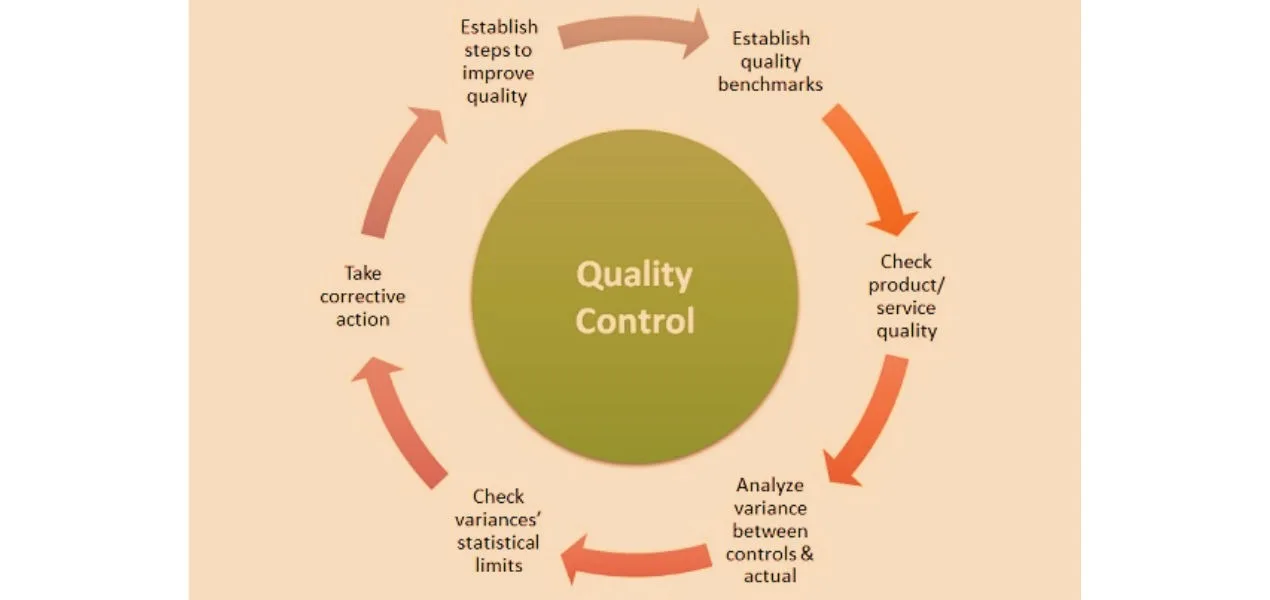
The System That Protects Quality
The easiest way to maintain quality after automation is to keep regular review cycles.
You should not just look at whether the workflow completed.
You should also look at whether the output is still good.
Review which content performs best, which workflows are creating mistakes, which accounts are becoming repetitive, and which browser setups are becoming unstable.
Another important step is only automating proven systems.
If something is still weak manually, automating it will usually make the problem worse.
You should first build a strong manual process, then automate the parts that are repetitive.
That is what allows you to save time without sacrificing quality.
Why Centralization Makes This Easier
Quality problems become much harder to notice when content, schedules, browser profiles, Android workflows, and account notes are spread across different systems.
You may have one platform for scheduling, another for content drafts, another for browser workflows, and another for analytics.
That makes it difficult to see which workflows are producing good results and which ones are starting to decline.
This is one of the reasons Appilot becomes useful when automation starts scaling.
Instead of keeping browser profiles, Android workflows, schedules, content tasks, and account assignments spread across multiple systems, everything can stay visible from one dashboard. That makes it easier to compare performance, spot repetitive patterns, identify weak workflows, and protect quality across multiple accounts.
Conclusion: Automation Should Increase Speed Without Destroying Quality
If quality dropped after automation, the issue is usually not the automation itself.
The problem is that the system became too repetitive, too rigid, and too disconnected from human judgment.
Once you start automating only the repetitive parts, keep manual review in place, and add more variation back into the process, quality becomes much easier to protect.
That is what allows you to scale faster without making everything feel generic, repetitive, or lower quality.