Real Android Device Automation vs Emulator Automation: Pros, Cons & Best Uses
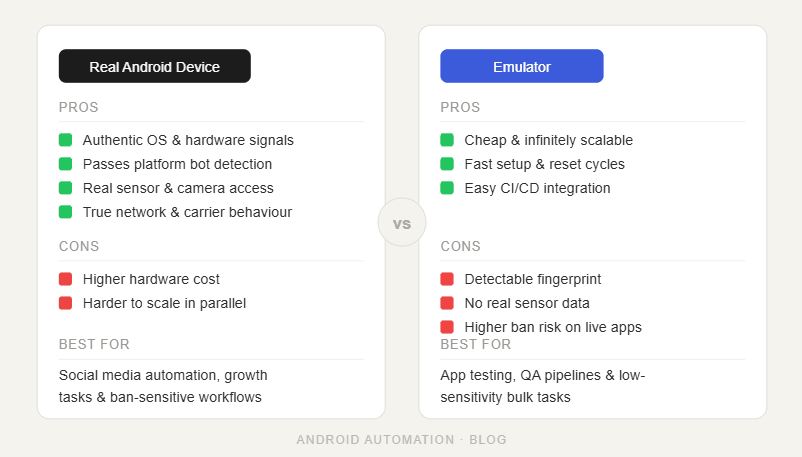
Android automation can run in two main environments: real physical Android devices or Android emulators.
Both can be useful. Both can run apps. Both can support automation workflows. But they are not equal in every situation.
Real Android devices are usually better when the workflow needs natural app behavior, stronger device signals, and a setup that looks closer to how real users interact with mobile apps. Emulators are usually better when the workflow needs fast testing, lower hardware cost, easier resets, and flexible development environments.
The problem is that many users choose one side too quickly. Some assume real phones are always better. Others assume emulators are easier and good enough for everything. The smarter approach is to understand when each one makes sense.
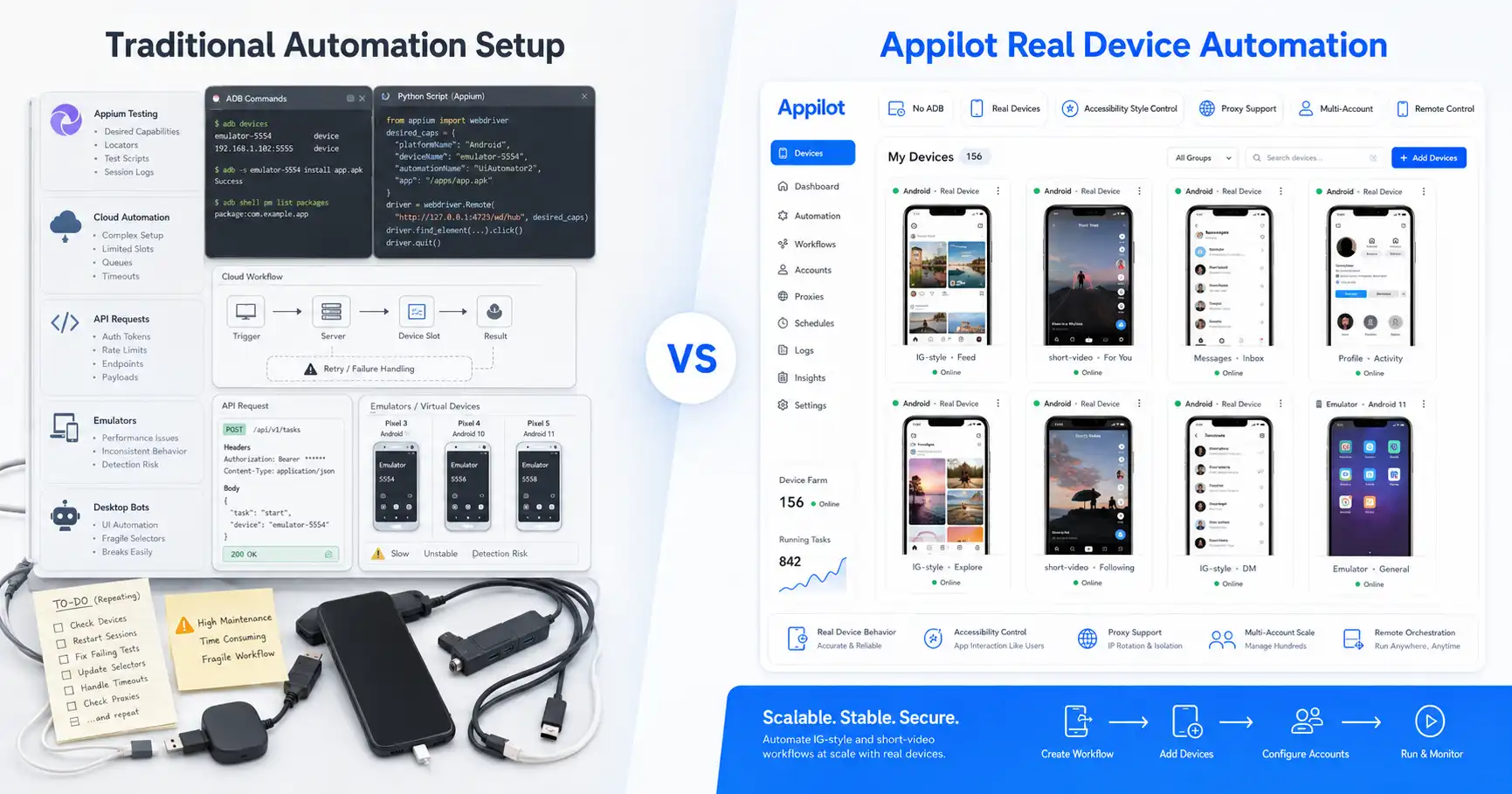
Appilot supports automation on real Android devices and emulators, which gives users flexibility. A team can test workflows on emulators, run serious account operations on real devices, and manage both from a web dashboard without needing ADB or a laptop connected all day.
This guide breaks down real Android device automation vs emulator automation, including the pros, cons, and best uses for social media bots, phone farm operators, agencies, testers, and growth teams.
What Is Real Android Device Automation?
Real Android device automation means running bots or workflows on physical Android phones or tablets. The automation interacts with real apps installed on real hardware.
This is the closest environment to how normal users interact with mobile apps. A real Android phone has actual hardware, physical sensors, device identifiers, battery behavior, network conditions, app storage, and system-level characteristics that are harder to fully replicate in an emulator.
For social media automation, this matters because platforms like Instagram, TikTok, Threads, Snapchat, Telegram, YouTube, Reddit, Discord, and LinkedIn care about more than the action itself. They can evaluate behavior patterns, device consistency, login history, network quality, app sessions, timing, and whether the account appears to behave naturally.
Real devices are especially useful when account safety, long-term operation, and behavior realism matter. If the workflow involves real accounts, repeated app sessions, proxy separation, and mobile-first behavior, physical devices often provide the stronger foundation.
The trade-off is that real devices require hardware management. They cost more, take up space, need power, may overheat, and can be harder to reset or clone compared with emulators.
What Is Emulator Automation?
Emulator automation means running bots or workflows on virtual Android devices instead of physical phones. An emulator simulates an Android environment on a computer or server.
This makes emulators useful for testing, development, QA, bot debugging, and workflows where speed and repeatability matter more than physical device realism.
Emulators are easier to create, reset, clone, and replace. A user can spin up several environments faster than buying and configuring physical phones. This makes them useful when testing new automation logic, checking UI flows, experimenting with app versions, or running lightweight workflows.
For developers and automation builders, emulators are often the fastest way to test whether a bot works. They reduce hardware dependency and make iteration easier.
The limitation is realism. An emulator may not behave exactly like a physical device. Some apps can detect emulator environments, and some platform signals may look different from a real phone. That does not mean emulators are useless, but it does mean they should be used carefully for sensitive account operations.
How Appilot Handles Both Environments
Appilot is designed to support automation on real Android devices and emulators. This gives users flexibility instead of forcing them into one environment.
A user can run workflows on real phones when they want stronger realism and better alignment with normal app behavior. The same user can use emulators for testing, experimentation, and lower-cost scaling when physical device realism is less important.
This is useful because automation teams often need both. A bot may be tested first on an emulator, adjusted until it works reliably, and then moved to real Android devices for live account operations.
Appilot also removes one of the most painful parts of Android automation: ADB dependency. Users do not need to keep a laptop connected, manage USB cables, fight driver issues, or constantly troubleshoot device disconnects. Bots are managed through a web dashboard, while the automation runs in Android environments.
That makes Appilot practical for both technical and non-technical users. Developers can test workflows more easily, while agencies and phone farm operators can manage real automation remotely.
Real Android Device Automation: Pros
Real Android devices give automation the most natural mobile environment.
The biggest advantage is realism. A physical phone behaves like a normal phone because it is one. It has real hardware, real battery behavior, real system conditions, real app storage, real device characteristics, and real mobile usage patterns.
This matters most for social media automation. Instagram, TikTok, Threads, Snapchat, Telegram, YouTube, and similar platforms are built around mobile app behavior. Running automation inside real app sessions on real devices helps reduce the gap between automation and normal usage.
Real devices are also better for long-term account operations. If an account is valuable, the environment should be as believable as possible. Physical devices make that easier than emulators because they avoid some of the obvious signals that virtual environments can expose.
Another advantage is compatibility. Some apps behave differently on emulators or may restrict certain features. A real Android phone usually gives the most accurate version of the user experience.
For phone farm operators, real devices are often the stronger choice for live workflows because they provide a more trustworthy execution layer.
Real Android Device Automation: Cons
Real devices are powerful, but they come with practical problems.
The first issue is cost. Physical phones require money upfront, and if an operation needs many devices, hardware costs can grow quickly.
The second issue is maintenance. Phones need charging, cooling, storage management, app updates, network setup, and occasional troubleshooting. Devices can freeze, slow down, overheat, lose connectivity, or require manual attention.
The third issue is space and organization. A serious phone farm needs physical space, power management, cable organization, device labeling, and monitoring.
The fourth issue is slower scaling. Adding ten emulators can be faster than buying, configuring, and placing ten physical phones.
This is why real devices are not always the best choice for every workflow. They are excellent for realism and live operations, but they require more operational discipline.
Emulator Automation: Pros
Emulators are useful because they are flexible, cheap to scale, and easy to reset.
For testing, emulators are often the fastest choice. A developer can create an emulator, install an app, test a bot, reset the environment, change settings, and repeat the process quickly.
This makes emulators great for bot development. Before running a workflow on real accounts or real devices, teams can use emulators to catch UI issues, fix logic problems, and test basic flows.
Emulators also reduce hardware costs. A team does not need to buy a physical phone for every test environment.
Another advantage is repeatability. Emulators can be cloned, restored, and recreated more easily than physical devices. This helps when testing different app versions, device settings, or automation paths.
For early-stage automation, QA, and experimentation, emulators are extremely practical.
Emulator Automation: Cons
The biggest weakness of emulators is that they are not real phones.
Some apps can detect emulator environments or behave differently inside them. Device signals, hardware characteristics, sensors, graphics behavior, and system properties may not fully match a physical Android phone.
For sensitive social media automation, this can matter. If the platform expects normal mobile behavior but sees signals that suggest a virtual environment, account risk may increase.
Emulators can also be resource-heavy. Running several emulators on one machine can consume a lot of CPU, memory, and storage. If the host machine is overloaded, automation can slow down or become unstable.
Another limitation is that some mobile app features may not work exactly the same as they do on real devices. Camera, GPS, push notifications, media handling, and certain app permissions can behave differently.
This does not mean emulators should be avoided. It means they should be used for the right jobs.
Best Uses for Real Android Devices
Real Android devices are best when the workflow involves valuable accounts, long-term growth, sensitive actions, or mobile-first platforms.
If a user is running Instagram automation, TikTok workflows, Telegram activity, Snapchat workflows, YouTube app actions, or multi-account social automation, real devices usually make more sense for live operations.
They are also better for phone farm operators who care about device realism. A physical phone gives stronger app behavior alignment and avoids many emulator-specific concerns.
Real devices are also useful for testing final production workflows. Even if a bot is built on an emulator, it should be tested on a real phone before being trusted with important accounts.
The simplest rule is this: use real devices when realism matters more than convenience.
Best Uses for Emulators
Emulators are best for testing, development, debugging, training, and lower-risk workflows.
If a team is building a new bot, the first version can often be tested on an emulator. This makes it easier to catch UI changes, adjust screen flows, test different app states, and repeat failed scenarios.
Emulators are also useful for workflows where account value is low or where the task does not depend heavily on trust signals. They can help teams validate ideas before investing in physical devices.
For agencies and automation teams, emulators can work well as a staging environment. The team can test on emulators first, then move stable workflows to real devices.
The simplest rule is this: use emulators when speed, flexibility, and testing matter more than device realism.
Which Is Better for Instagram Automation?
For Instagram automation, real Android devices usually have the advantage.
Instagram is a mobile-first platform, and much of the user experience happens inside the mobile app. Real devices give a more natural environment for actions like scrolling, viewing stories, opening profiles, watching Reels, sending messages, replying to comments, and tapping through the app.
Emulators can still be useful for testing Instagram bots. They help developers check whether a workflow works before running it on real accounts.
But for serious Instagram operations, especially with valuable accounts, real devices are generally the safer and more realistic choice.
Appilot supports both environments, so users can test on emulators and run production workflows on real Android devices.
Which Is Better for Phone Farm Operators?
Phone farm operators usually get the most value from real Android devices.
A phone farm is built around device-level operations, account separation, proxies, app behavior, and long-running workflows. Real phones provide a more believable environment for live social media automation.
That said, emulators can still be useful inside a phone farm strategy. Operators can use emulators to test new bots, experiment with workflows, or run low-risk tasks before deploying to real devices.
The best setup is often hybrid. Real devices handle important accounts and production workflows, while emulators handle development, testing, and lower-risk operations.
Appilot fits this hybrid model because it can support both real Android devices and emulators through the same dashboard-driven approach.
Which Is Better for Agencies?
Agencies should choose based on client risk and workflow complexity.
If an agency is managing client Instagram, TikTok, LinkedIn, YouTube, Telegram, or Reddit workflows, real devices are usually better for production because client accounts are valuable and need stronger realism.
If the agency is testing new workflows, onboarding internal processes, or experimenting with bot logic, emulators can be useful because they are faster and cheaper to reset.
For agencies, the best approach is not choosing one forever. The best approach is having a flexible system.
Appilot gives agencies that flexibility because they can manage real devices and emulators remotely without ADB, without laptop dependency, and without constantly rebuilding local automation setups.
Device Realism vs Operational Convenience
The real decision comes down to realism versus convenience.
Real devices win on realism. They are better for app behavior, account trust, production workflows, and long-term operations.
Emulators win on convenience. They are easier to clone, reset, test, and scale quickly for development.
A serious automation operation should not treat these as enemies. They should be used together.
Testing on emulators saves time. Running important workflows on real devices improves realism. Managing both through Appilot gives users a cleaner operational layer.
That is the practical answer. Real devices are not always necessary for every test, and emulators are not always safe enough for every live workflow.
The best setup uses each environment where it performs best.
Why Appilot’s Hybrid Support Matters
Appilot’s biggest advantage is that it lets users think beyond the old debate of real device versus emulator.
Instead of forcing users to manually manage devices, ADB, cables, scripts, local machines, and disconnected tools, Appilot gives them a dashboard for running automation across Android environments.
This matters because real-world automation is not static. A team may need to test a bot today, run it on real accounts tomorrow, scale it across devices next week, and adjust workflows when the app UI changes.
A flexible system makes that easier.
Appilot supports real Android automation, emulator workflows, remote dashboard control, no ADB setup, proxy-aware operations, and ready-to-use bots. That makes it more practical than trying to manage real devices and emulators separately through manual setups.
For serious social media automation, flexibility is the real advantage.
Where Real Devices Win
Real devices win when the goal is trust, realism, and production-quality automation.
They are better for valuable accounts, mobile-first platforms, long-running workflows, account safety, and behavior that needs to look closer to normal app usage.
They also make sense when apps behave differently on emulators or when a workflow depends on hardware-level realism.
For Instagram, TikTok, Snapchat, Telegram, YouTube, and similar platforms, real devices are usually the better choice for live operations.
The downside is that real devices require more hardware management.
Where Emulators Win
Emulators win when the goal is speed, testing, and flexibility.
They are better for development, QA, workflow debugging, bot testing, app version checks, and lower-risk experiments.
They are also useful when a team wants to create, reset, and clone environments quickly without buying more physical phones.
The downside is that emulators may expose virtual environment signals and may not behave exactly like real devices.
For serious account operations, emulators should be used carefully.
Final Verdict
Real Android devices and emulators both have a place in automation.
Real devices are better for production workflows, valuable accounts, social media automation, and situations where mobile realism matters. Emulators are better for testing, development, quick iteration, and lower-risk experiments.
The best setup is often not one or the other. It is a hybrid workflow where emulators are used to test and refine bots, while real Android devices are used for serious live operations.
Appilot makes that approach easier because it supports Android device and emulator automation through a remote web dashboard, without ADB, laptop dependency, or manual device-control headaches.
If your goal is fast testing, emulators are useful. If your goal is reliable social media automation, real devices are stronger. If your goal is to manage both cleanly, Appilot is the better operating layer.
You can explore Appilot’s bot store and try it at appilot.app.
FAQ
Q1: What is the biggest difference between real device automation and emulator automation?
Real device automation runs on physical Android phones, while emulator automation runs on virtual Android environments. Real devices offer better realism, while emulators are easier to test and scale.
Q2: Are emulators safe for Instagram automation?
Emulators can be useful for testing Instagram workflows, but real devices are usually better for serious account operations. Instagram is mobile-first, so device realism matters.
Q3: When should I use real Android devices?
Use real Android devices for valuable accounts, production workflows, phone farm operations, and mobile-first platforms where natural app behavior matters.
Q4: When should I use emulators?
Use emulators for bot testing, QA, development, workflow debugging, and lower-risk experiments. They are easier to reset, clone, and iterate on quickly.
Q5: Does Appilot support both real devices and emulators?
Yes, Appilot supports automation on real Android devices and emulators. Users can manage workflows remotely through a web dashboard without ADB or laptop dependency.