Real Devices vs Emulators: Which Should You Use for Automation?
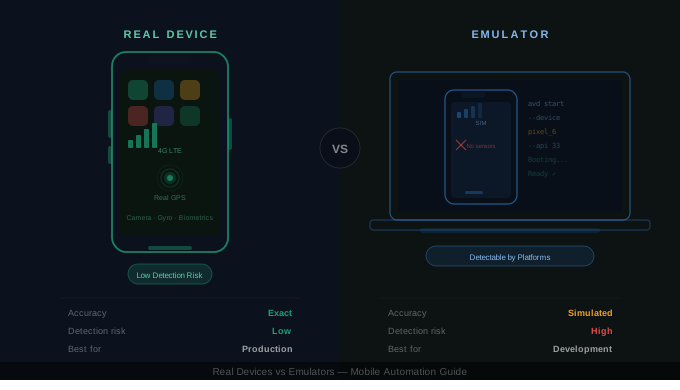
Real Devices vs Emulators: Which Should You Use for Automation?
When setting up mobile automation, one of the first decisions you'll face is whether to run your workflows on real devices or emulators. Emulators are convenient, inexpensive, and easy to spin up. Real devices require physical hardware and ongoing management. So why do so many teams still choose real devices? Because the difference isn't about convenience — it's about accuracy, reliability, and detection risk. The right choice depends entirely on what you're automating and how critical precision is to your workflow.
What Are Emulators and Real Devices?
An emulator is software that simulates a mobile device on your computer, mimicking Android or iOS hardware and OS behavior without any physical hardware. A real device is an actual smartphone or tablet running your automation directly.
The architectural difference looks like this:
Emulator: Laptop → Software Layer → Virtual Device
Real Device: Dashboard or Computer → USB or Cloud → Actual Hardware
That structural gap impacts everything downstream — performance, hardware access, network behavior, and detection risk.
Why Real Devices Matter
Real devices offer five critical advantages that emulators simply cannot replicate.
True hardware. Camera, GPS, biometrics, sensors, and chipset behavior are real — not simulated. If your workflow depends on any of these, an emulator will give you inaccurate results.
Real performance. A budget Android phone behaves very differently from a high-end laptop running a virtual device. Real devices reflect the actual user experience your audience has, which matters when performance testing is part of your goal.
Actual network conditions. The variability of real 3G, 4G, and Wi-Fi connections cannot be perfectly replicated in a software environment. Emulators use artificial network simulation that often masks real-world latency and failure modes.
OS fragmentation. Manufacturers like Samsung, Xiaomi, and OnePlus modify Android in ways that affect UI behavior, permissions, and system interactions. Emulators run stock Android and miss these customizations entirely.
Lower detection risk. Social platforms and anti-bot systems are sophisticated enough to detect emulator signatures with high accuracy. Real devices appear human because they are running on human hardware — and that distinction is increasingly difficult to fake.
If you're automating social media accounts, managing multi-account workflows, or operating in any environment where detection matters, real devices are not optional — they are mandatory.
When Emulators Make More Sense
Emulators are not inferior tools — they are optimized for different goals. Calling them "bad" misses the point entirely.
Emulators are the right choice when you need fast development iteration, low upfront cost, easy CI/CD integration, parallel test execution at scale, or the ability to reset device state instantly. For functional testing during active development, emulators are highly efficient. You can spin up ten virtual devices in seconds, run your test suite, and get results without touching a single piece of hardware.
The limitation is that emulators are incomplete for production validation. When you need to know how your automation behaves in the real world — on real hardware, on real networks, on real OS builds — emulators will mislead you.
Direct Comparison
| Criteria | Real Devices | Emulators |
|---|---|---|
| Hardware accuracy | Exact | Simulated |
| Performance testing | Accurate | Often misleading |
| Network realism | Real | Artificial |
| Sensor support | Full | Limited |
| Detection risk | Low | High |
| Cost | Higher | Lower |
| Scalability | Physical limit | High |
Neither wins universally. The correct choice is always contextual.
Use Case Decisions
App development and QA. Use emulators during development for speed and convenience. Validate on real devices before every release to catch hardware-specific and OS-specific issues.
Social media automation. Use real devices exclusively. Emulators are detected easily and reliably by modern platform anti-bot systems. Running social workflows on an emulator is a short path to account restrictions.
Performance testing. Use real devices that match your actual user base. Emulator performance data is not representative of real-world behavior and should not be used to make production decisions.
CI/CD pipelines. Run emulators for speed during continuous integration. Schedule real device validation nightly or as part of pre-release gates to catch issues emulators miss.
Mobile web testing on iOS. Safari behavior differs meaningfully between the iOS Simulator and a real iPhone. For anything involving payments, camera access, or native browser APIs, real hardware is required.
Cloud Device Farms: The Middle Ground
You don't need to own physical hardware to access real devices. Cloud providers offer remote access to large libraries of real smartphones and tablets, including BrowserStack, Sauce Labs, and AWS Device Farm.
The advantages are significant: no hardware maintenance, access to hundreds of device configurations, and straightforward CI/CD integration. The limitations are equally real: monthly costs scale quickly, network latency can affect timing-sensitive automation, and customization options are restricted.
For standard QA testing, cloud device farms are a practical and cost-effective option. For persistent automation — particularly social media workflows that run continuously and require stable, long-term sessions — local or managed real-device platforms tend to be more reliable.
Real Device Automation with Appium
If you choose real devices and want code-level control, Appium is the industry-standard framework. The basic Android setup involves installing Appium, connecting your device via USB, enabling USB debugging, configuring desired capabilities, and running your scripts. iOS automation is more restrictive and requires macOS, Xcode, and developer certificates.
Appium is powerful and flexible, but it requires technical knowledge to set up and maintain. For teams without dedicated automation engineers, the overhead can be significant.
How Appilot Approaches This
Appilot runs automation exclusively on real Android devices — no emulators, no simulator signatures, no USB dependency. Devices connect remotely through a web dashboard, workflows are built visually without coding, and execution happens directly on real hardware at scale.
For social media and workflow automation where detection is a genuine risk, emulator-based setups fail over the long term. Appilot was built specifically to solve that problem by combining real-device execution with remote management and detection-aware operation.
Decision Framework
Choose real devices when hardware behavior matters, detection risk is a concern, you need accurate performance data, you're automating at scale, or you need manufacturer-specific validation.
Choose emulators when you're actively developing, you need speed and parallelization, budget is limited, or large-scale test runs are required.
Use both when you want the speed of emulators during development combined with the accuracy of real devices for validation — which is the approach most mature teams take.
Final Thoughts
Emulators are fast and convenient. Real devices are accurate and reliable. The difference becomes critical when real-world performance matters, when hardware behavior affects outcomes, or when detection risk is part of the equation.
If you're automating workflows that need to behave like real users, emulators are insufficient. If you're developing and iterating rapidly, emulators are the right tool. The correct choice is contextual, not ideological — and the most effective teams use both strategically rather than committing to one approach for everything.