Residential Proxies vs Datacenter Proxies: Key Differences

When setting up browser automation or managing multiple sessions, choosing the right type of proxy is critical. Not all proxies behave the same, and the choice between residential and datacenter proxies can significantly impact performance, reliability, and detection risk.
Understanding the differences between residential and datacenter proxies is important because each type has its own strengths and limitations. This guide explains how they work, how they differ, and when to use each.
What Are Residential Proxies?
Residential proxies use IP addresses assigned by internet service providers to real devices such as home computers and mobile phones. These IPs are associated with actual users, which makes them appear more legitimate to websites.
When traffic is routed through a residential proxy, it looks like it is coming from a real user browsing from a normal location. This makes residential proxies harder to detect compared to other types.
Because they are tied to real networks, residential proxies are often used in scenarios where trust and authenticity are important.
Key Characteristics of Residential Proxies
Residential proxies are associated with real-world locations and devices, which gives them a higher level of credibility. They are typically slower than datacenter proxies due to network variability but offer better resistance to detection.
They also tend to be more expensive because they rely on real IP allocations rather than cloud infrastructure.
What Are Datacenter Proxies?
Datacenter proxies are IP addresses generated by cloud providers or hosting companies. They are not associated with real devices or internet service providers.
These proxies operate from servers in data centers, which allows them to deliver high speed and performance. However, because they are not tied to real users, they are easier for websites to identify.
Datacenter proxies are commonly used in scenarios where speed and scalability are more important than stealth.
Key Characteristics of Datacenter Proxies
Datacenter proxies are fast, reliable, and cost-effective. They can handle large volumes of requests and are easy to scale.
However, they are often flagged by detection systems because they originate from known data center ranges rather than residential networks.
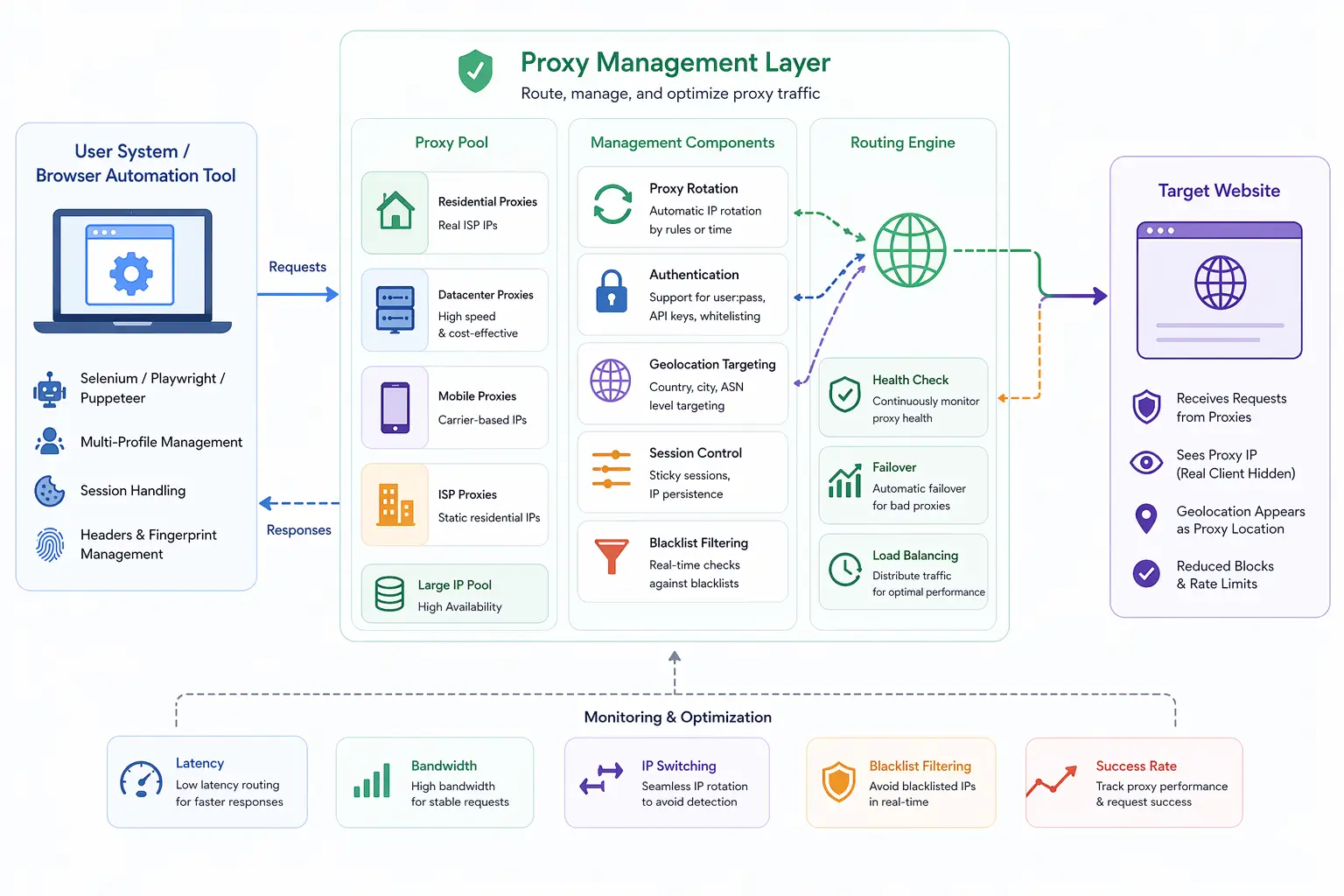
Key Differences Between Residential and Datacenter Proxies
The main difference between residential and datacenter proxies lies in how their IP addresses are sourced. Residential proxies come from real devices and networks, while datacenter proxies come from cloud infrastructure.
This difference affects how websites perceive them. Residential proxies appear more natural and are less likely to be flagged, while datacenter proxies are faster but more easily detected.
Another key difference is performance. Datacenter proxies offer higher speed and lower latency, making them suitable for high-volume tasks. Residential proxies are slower but provide better reliability in environments where detection is a concern.
Cost is also an important factor. Residential proxies are generally more expensive due to their authenticity, while datacenter proxies are more affordable and scalable.
Why This Difference Matters in Automation
In browser automation, the choice between residential and datacenter proxies directly impacts success rates.
Using datacenter proxies in sensitive environments can lead to quick detection and blocking. On the other hand, residential proxies provide a higher level of trust, reducing the likelihood of being flagged.
However, residential proxies may not be necessary for all use cases. For tasks that do not involve strict detection systems, datacenter proxies can be more efficient and cost-effective.
Understanding the requirements of your workflow helps determine which type is appropriate.
Detection Perspective: How Websites See Them
From a detection standpoint, websites analyze IP reputation, network type, and behavior patterns.
Residential proxies blend in with normal user traffic because they originate from ISP networks. Datacenter proxies, however, often belong to known hosting providers, making them easier to identify.
Detection systems also consider consistency. If multiple sessions use datacenter IPs with similar patterns, they can be grouped together.
This is why proxy type plays a critical role in avoiding detection.
Residential vs Datacenter in Fingerprinting Context
While proxies change network identity, they do not affect browser fingerprinting signals.
Even with residential proxies, if multiple sessions share the same fingerprint, they can still be linked. Similarly, datacenter proxies combined with realistic fingerprints can sometimes perform better than poorly configured residential setups.
This highlights the importance of aligning network identity with browser and device-level signals.
Limitations of Both Proxy Types
Both residential and datacenter proxies have limitations.
Residential proxies can be slower, more expensive, and less stable due to reliance on real networks. Datacenter proxies, while fast and scalable, are more likely to be detected and blocked.
Neither type addresses deeper fingerprinting signals such as hardware behavior or rendering output. This means proxies alone are not enough for complete anonymity.
Residential vs Datacenter vs Real-Device Environments
A key distinction in modern detection systems is the difference between proxy-based identity and full environment realism.
Both residential and datacenter proxies only affect the IP layer. They do not change how the browser or device behaves.
Real-device approaches operate on actual hardware, where network, browser, and system signals naturally align. Tools like Appilot follow this approach by running automation on real Android devices, combining realistic network behavior with consistent device signals.
This reduces reliance on proxy type alone.
When to Use Residential Proxies
Residential proxies are best used in scenarios where detection risk is high and maintaining a realistic identity is critical.
They are commonly used in account management, sensitive automation tasks, and environments with strict detection systems.
Their higher cost is justified when reliability and stealth are priorities.
When to Use Datacenter Proxies
Datacenter proxies are suitable for high-volume tasks where speed and cost efficiency are more important than stealth.
They are commonly used in testing, scraping non-sensitive data, and large-scale automation workflows where detection is less strict.
Their performance advantages make them ideal for scalable operations.
Frequently Asked Questions
Q: What is the main difference between residential and datacenter proxies?
Residential proxies use real ISP-assigned IPs, while datacenter proxies use cloud-based IPs.
Q: Which proxy type is harder to detect?
Residential proxies are generally harder to detect because they appear as real users.
Q: Are datacenter proxies faster than residential proxies?
Yes, datacenter proxies typically offer higher speed and lower latency.
Q: Which proxy type is more expensive?
Residential proxies are usually more expensive due to their authenticity.
Q: Do proxies prevent fingerprinting?
No, they only change IP addresses. Fingerprinting must be handled separately.
Q: How do real-device solutions compare?
Real-device solutions like Appilot align network, browser, and hardware signals naturally, while proxies only handle the network layer.
Key Takeaways
Residential and datacenter proxies differ primarily in how their IP addresses are sourced and how they are perceived by websites. Residential proxies provide higher trust and lower detection risk because they originate from real devices, while datacenter proxies offer speed, scalability, and cost efficiency but are easier to detect. Choosing the right type depends on the specific use case, balancing performance, cost, and detection risk. Understanding these differences is essential for building effective and reliable browser automation setups.