Running Scheduled Automation in Che Browser with Appilot
Che Browser is useful for managing multiple browser profiles with separate fingerprints, cookies, proxies, and sessions. This makes it a good choice for social media management, affiliate marketing, scraping, e-commerce operations, and multi-account workflows.
But managing Che Browser profiles manually becomes difficult as the number of accounts grows.
You may need one group of profiles to run in the morning, another in the afternoon, and another late at night. You may also need different workflows for different profile groups. Without a scheduling system, this quickly becomes difficult to manage.
This is where Appilot becomes useful.
Appilot helps you run scheduled automation across Che Browser profiles without needing to manually open sessions and launch tasks throughout the day.
Why Scheduling Matters for Che Browser Automation
Running a few browser tasks manually is manageable. Running dozens of profiles without a schedule is much harder.
Without scheduling, you may forget to launch important workflows, miss account activity windows, repeat actions by mistake, or create repetitive behavior patterns.
For example, if every Che Browser profile runs at exactly 9:00 AM every day, the behavior becomes very easy to detect.
Scheduling helps avoid these problems by spreading browser activity across different times.
Instead of launching every workflow manually, you can schedule profile groups to run at different times with different delays and timing rules.
This makes browser activity look more natural and also saves a large amount of time.
How Appilot Works with Scheduled Browser Automation
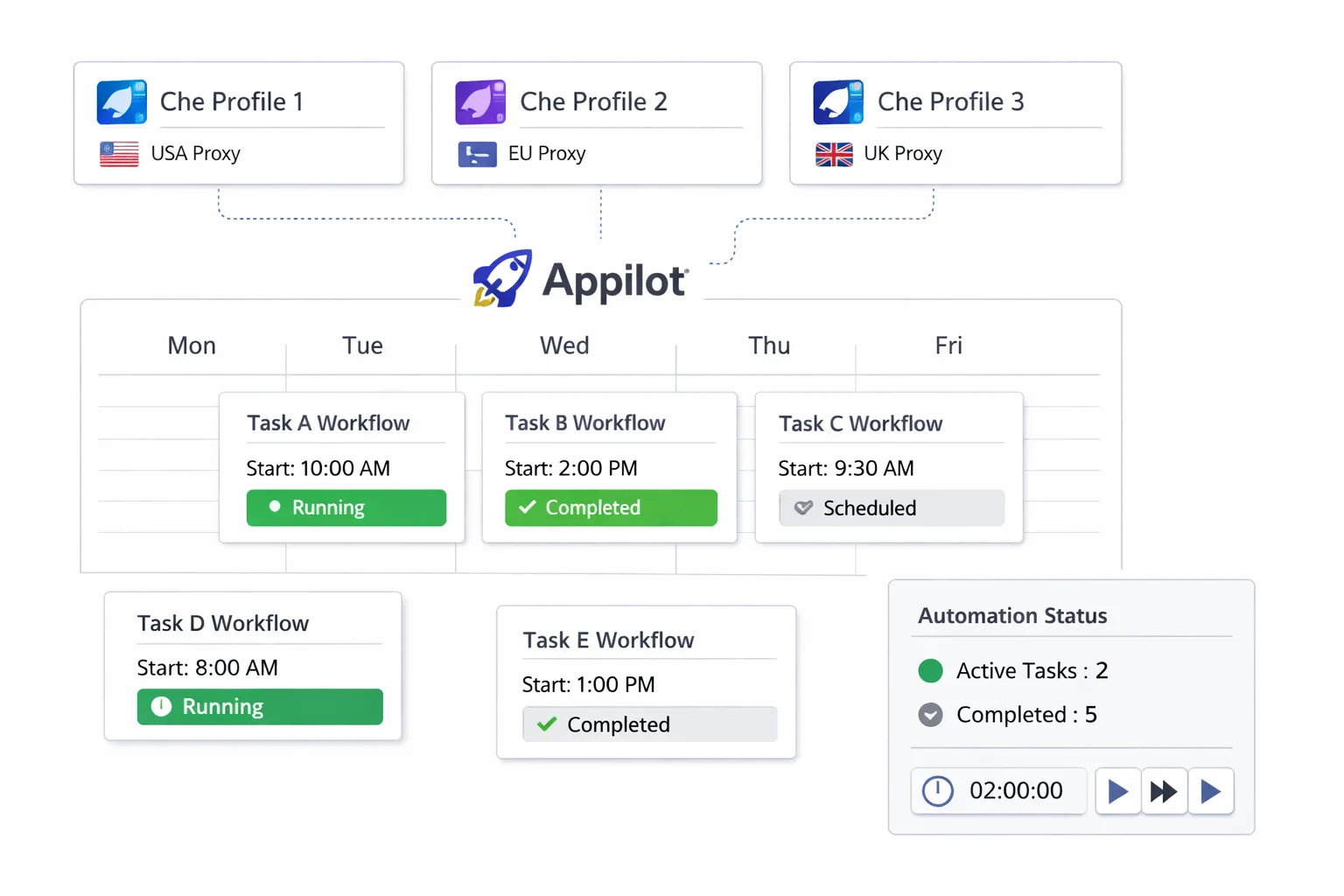
Appilot acts as the scheduling and workflow layer above Che Browser.
Instead of manually opening browser profiles and launching actions one by one, you can create reusable workflows and assign them to different profile groups.
For example, you may have one workflow for social media engagement, another for account warmups, another for scraping, and another for e-commerce monitoring.
Each workflow can have different schedules, delays, retry rules, and timing patterns.
This allows you to run large numbers of Che Browser profiles without needing to manage every action manually.
You can also organize profiles into groups based on platform, account type, region, campaign, or workflow.
This makes it much easier to assign the correct schedules to the correct profiles.
Common Types of Scheduled Workflows
Different browser profiles often need different schedules.
For example, social media profiles may need to run short activity sessions every day. E-commerce monitoring profiles may need to check product pages several times per day. Scraping profiles may only need to run during specific hours.
Affiliate marketing accounts may need to monitor campaigns in the morning and evening, while account warmup profiles may need small activity sessions spread throughout the day.
Appilot makes it easier to separate these workflow types and assign different schedules to each group.
This prevents every profile from behaving in the same way.
It also makes it easier to scale because you can add new profiles to existing workflow groups without rebuilding everything from scratch.
Benefits of Scheduled Automation
One major benefit is time savings.
Instead of manually launching workflows every day, Appilot can run them automatically according to your schedule.
Another benefit is better organization.
You can see which profiles are scheduled to run, which workflows are active, and which tasks failed without opening every browser profile manually.
Scheduling also helps make browser activity look more natural.
For example, instead of having fifty profiles all run at exactly the same time, you can spread them across different windows throughout the day.
This helps reduce repetitive behavior patterns.
Scheduled automation also makes it easier to scale.
Once a workflow is built, you can apply it to additional Che Browser profiles without needing to recreate the schedule every time.
Best Practices for Scheduled Automation
One of the most important rules is to avoid identical schedules across all profiles.
Different profiles should have different start times, delays, and activity windows.
You should also organize profiles into logical groups before assigning workflows. For example, social media profiles, scraping profiles, and e-commerce profiles should usually have different schedules.
It is also important to review workflow performance regularly. Profiles may fail because of expired sessions, broken proxies, or platform changes.
You should also keep proxy locations stable. Constantly changing IP addresses or regions can create login issues and suspicious behavior.
Finally, start small before scaling. Test your scheduled workflows with a few profiles first, then expand gradually once you know everything is stable.
Common Mistakes to Avoid
One common mistake is assigning the exact same schedule to every profile.
Another mistake is running too many workflows at once before testing properly.
Some people also forget to organize profiles into groups before scheduling tasks, which makes browser management more confusing later.
Using vague profile names is another issue. Names like Profile-01 or Browser-02 become difficult to understand when you are managing large numbers of accounts.
Poor proxy management can also create problems. If too many profiles share the same IP address, the accounts may become easier to detect.
The best approach is to stay organized, build simple workflows first, and scale gradually.
Frequently Asked Questions
Q1: Why is scheduling important for Che Browser automation?
Scheduling is important because it helps organize browser activity, save time, reduce missed tasks, and avoid repetitive behavior patterns.
Q2: Can Appilot schedule workflows across multiple Che Browser profiles?
Yes. Appilot can schedule workflows across different Che Browser profile groups automatically.
Q3: What types of workflows can be scheduled?
Social media activity, scraping, account warmups, affiliate monitoring, e-commerce checks, and many other browser workflows can be scheduled.
Q4: Why should profiles have different schedules?
Different schedules help make browser activity appear more natural and reduce repetitive timing patterns.
Q5: What is the biggest mistake in scheduled browser automation?
The biggest mistake is giving every browser profile the exact same schedule and workflow timing.
Conclusion
Che Browser is useful for profile management, but running automation manually becomes difficult as the number of accounts grows.
Appilot helps solve this problem by allowing you to schedule workflows, organize profile groups, and manage browser activity from one dashboard.
The best results come from using different schedules, clear profile organization, and gradual scaling.
When scheduled automation is set up correctly, Che Browser workflows become much easier to manage over time.