Scheduling GoLogin Profile Automation with Appilot Dashboard
Scheduling GoLogin Profile Automation with Appilot Dashboard
Meta Description: Learn how to schedule GoLogin profile automation with Appilot dashboard, reduce repetitive browser tasks, and manage multiple browser profiles more efficiently.
Why Scheduling Matters for Browser Automation
Browser automation becomes much harder to manage when you rely on memory, spreadsheets, sticky notes, or repeated manual routines. If you are running multiple browser profiles every day, there is a good chance that you are repeating the same tasks over and over again. You might be opening the same websites, checking the same dashboards, reviewing the same account notifications, and monitoring the same campaigns every morning.
Scheduling removes that repetitive work. Instead of launching every browser profile manually and trying to remember which tasks need attention, you can automate those actions to run at specific times. That means browser tasks happen consistently, even when you are busy with other work.
The Problem with Managing GoLogin Profiles Manually
GoLogin is excellent for creating isolated browser profiles with different fingerprints, cookies, proxies, and browsing environments. However, once you start managing more than a few profiles, the process becomes difficult to handle manually.
If you are running ten profiles, it may still be manageable. If you are running fifty or one hundred profiles, opening each browser one by one quickly becomes a major time drain. It also increases the risk of missing important actions, forgetting logins, delaying account checks, or creating suspicious patterns by running every account in the same order every day.
How GoLogin and Appilot Work Together
GoLogin gives you browser profile isolation, fingerprint protection, proxy support, timezone settings, WebRTC protection, and browser session management. Appilot adds the automation layer on top of that.
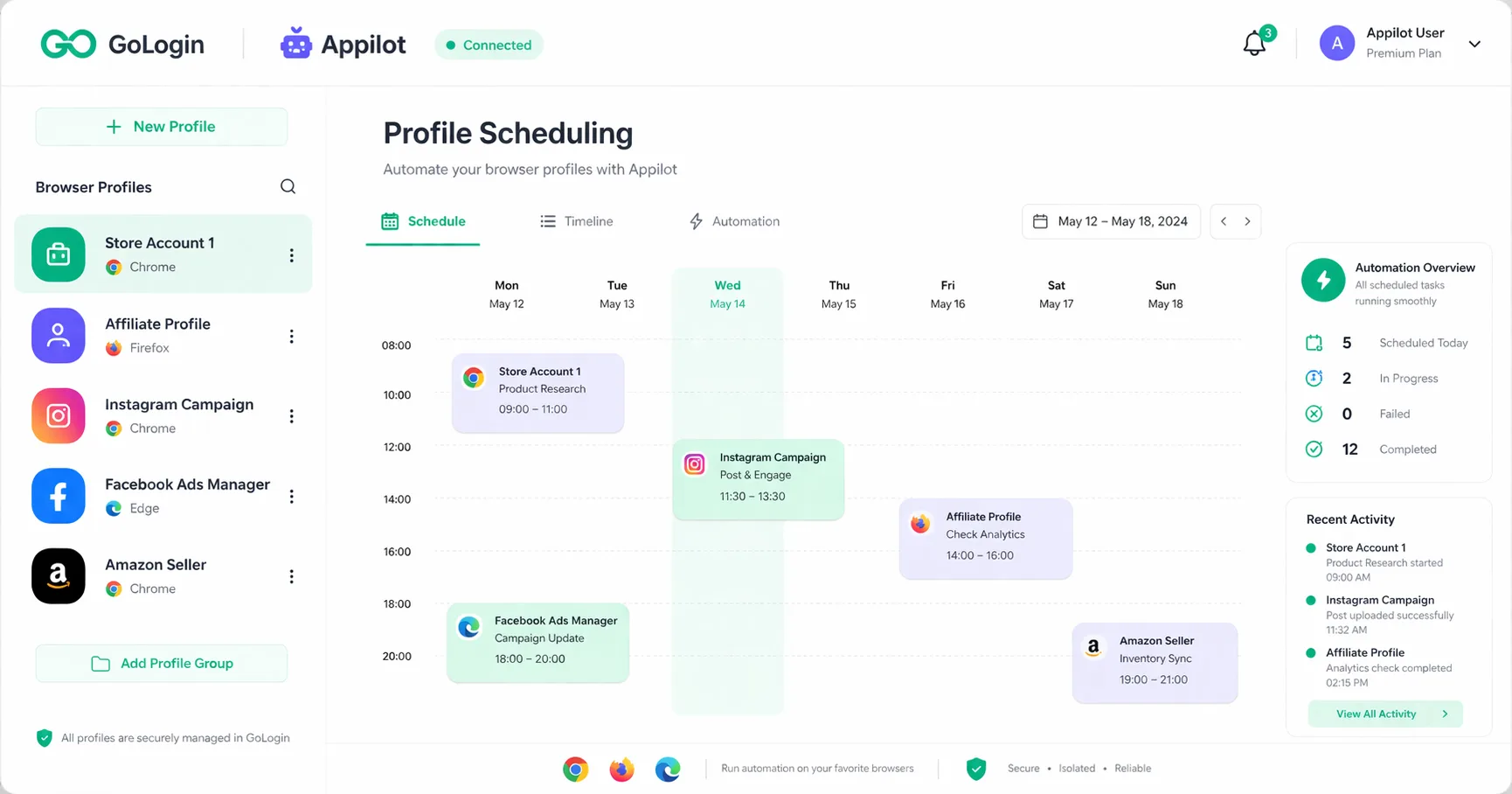
Instead of manually opening browser profiles and repeating the same actions every day, Appilot lets you schedule workflows from one dashboard. You can decide which profiles should launch, when they should launch, what websites they should open, what tasks they should complete, and how often those tasks should run.
This makes the combination much more powerful because GoLogin handles the browser environment while Appilot handles the execution and scheduling.
Why GoLogin Alone Is Not Enough for Larger Operations
GoLogin solves the browser fingerprinting problem, but it does not solve the workflow management problem. If you are operating dozens of social media accounts, e-commerce stores, affiliate campaigns, or scraping profiles, you still need a way to organize your browser sessions and automate repetitive actions.
Without automation, you are still spending hours every week launching profiles manually, checking dashboards, reviewing campaigns, and repeating the same work. As your operation grows, that manual work becomes harder to manage.
Appilot helps solve this issue by centralizing everything into one place. Instead of manually working through every browser profile every day, you can schedule tasks once and let the system run them automatically.
The Main Benefits of Scheduling Browser Profiles
One of the biggest benefits of scheduling browser profiles is consistency. When tasks are scheduled, they happen on time without relying on memory. This is useful for campaign monitoring, account checks, daily login sessions, website scraping, reporting, and profile warm-up routines.
Another benefit is scalability. Once you can schedule workflows, it becomes much easier to handle larger numbers of profiles. Instead of manually launching twenty profiles every morning, you can have them launch automatically in the background.
Scheduling also improves organization because you can see which tasks are active, which tasks completed successfully, and which tasks need attention. That makes it easier to manage larger operations without losing control.
How Scheduled Automation Saves Time Every Day
Imagine you manage twenty affiliate marketing accounts. Every morning you need to check ad approvals, review campaign spending, monitor traffic quality, and make sure nothing stopped overnight.
Doing that manually might take one or two hours every morning. With scheduled browser automation, Appilot can launch those GoLogin profiles automatically, load the required websites, collect the data, and prepare the information for you before you even start your workday.
The same concept applies to social media account monitoring, seller account checks, website scraping, and profile warm-up tasks. Instead of spending your time on repetitive work, you can focus on tasks that actually require human input.
How Scheduling Helps Reduce Detection Risk
One common mistake in browser automation is creating patterns that look unnatural. Launching every profile at exactly the same time every day makes automation easier to detect.
Appilot helps reduce this risk by allowing you to stagger task timing, rotate profile order, and add delays between browser actions. Instead of launching twenty profiles at 9:00 AM exactly, you can spread the activity across different time windows.
This makes behavior appear more natural because humans do not perform every action in the exact same order every day. They log in at different times, interact with different pages, and behave inconsistently.
Real Examples of Scheduled Browser Automation
Scheduled browser automation can be used in many different industries. Affiliate marketers can use it to monitor campaigns, social media managers can use it to check account health, and e-commerce operators can use it to monitor seller accounts.
A web scraping business could schedule browser profiles to collect product pricing every few hours throughout the day. A social media agency could schedule daily login sessions for account warm-up and profile activity. An affiliate marketer could use browser scheduling to monitor landing pages, ad approvals, and conversion rates.
- Using Scheduled Browser Tasks for E-commerce Accounts
If you are running multiple Shopify, Amazon, Etsy, or eBay accounts, browser scheduling can save a huge amount of time. You can use Appilot to automatically launch GoLogin profiles in the morning, review inventory levels, check order status, monitor account warnings, and review competitor pricing.
Instead of manually checking every account one by one, you can automate those reviews and focus only on accounts that need attention.
- Using Scheduled Browser Tasks for Social Media Profiles
Social media profile management often involves repetitive actions like checking notifications, reviewing messages, logging into accounts, monitoring content performance, or warming up new profiles.
Scheduling these tasks helps you avoid repeating the same work every day. It also helps spread activity naturally across different times, which can reduce detection risk and create more realistic behavior patterns.
- Using Scheduled Browser Tasks for Web Scraping and Data Collection
Web scraping projects often require repeated browser sessions across multiple websites. You may need to monitor product prices, job listings, real estate updates, competitor content, or market research data.
Using GoLogin with Appilot allows you to distribute those scraping tasks across different browser profiles, proxies, and schedules. This makes scraping more organized and reduces the chance of every task happening at the same time.
Organizing GoLogin Profiles Inside the Appilot Dashboard
One of the biggest advantages of Appilot is that it keeps everything organized in one dashboard. Instead of relying on spreadsheets or reminders, you can see all of your browser profiles, active schedules, completed tasks, and automation settings in one place.
This makes it much easier to manage larger operations because you can quickly identify which profiles are active, which tasks are running, and which workflows need attention.
How to Group Profiles for Better Workflow Management
Grouping profiles makes browser automation much easier to manage. You can create profile groups based on use case, client name, platform type, or campaign category.
For example, you might have groups for affiliate campaigns, social media profiles, e-commerce stores, client accounts, and scraping tasks. Once those groups exist, you can apply different schedules to each one.
This saves time because you do not need to configure every profile individually.
Best Practices for Scheduling Browser Tasks
It is always better to start small. Instead of launching fifty profiles at once, start with five or ten and verify that your workflow behaves correctly.
You should also randomize launch times, rotate profile order, and avoid creating identical schedules across every account. The more natural the timing looks, the safer the automation will be.
Regular monitoring is also important. Even if tasks are automated, you still need to review results and check for failures.
Why Proxy Quality Still Matters
Good browser automation still depends on good proxy quality. Even if your browser fingerprints are configured correctly, poor proxies can still create suspicious behavior.
Residential and mobile proxies usually perform better because they look more like real users. Using the same proxy across too many accounts can increase the risk of restrictions, so it is important to separate profiles properly.
Why Profile Maintenance Is Important
Browser profiles need maintenance over time. Cookies expire, browser sessions break, proxies fail, and browser versions become outdated.
If you never review your profiles, your scheduled tasks may eventually stop working correctly. Periodic profile health checks can help you catch these issues before they become bigger problems.
Common Mistakes to Avoid When Scheduling Browser Profiles
One major mistake is scheduling every profile to run at the exact same time every day. Another common problem is trying to scale too quickly before testing smaller workflows first.
Using poor-quality proxies, ignoring failed tasks, and forgetting to review profile health can also create problems over time. Good browser automation is not just about setting up tasks once. It is about maintaining those tasks and adjusting them when needed.
Troubleshooting Common Scheduling Problems
If browser profiles are not launching correctly, the first thing to check is whether the proxy is still active. If tasks are not completing, review whether the website changed its layout or login process.
If automation is running too slowly, reduce the number of profiles launching at the same time. If accounts are getting flagged, add more variation into your schedules and reduce the frequency of actions.
Most scheduling problems come from trying to scale too quickly or using workflows that are too aggressive.
Frequently Asked Questions
Q1: Can I schedule multiple GoLogin profiles at the same time?
Yes, Appilot allows you to schedule multiple GoLogin profiles to run at the same time. However, it is usually better to stagger profile launches across different time windows instead of launching everything at once. This creates more natural behavior and reduces the risk of obvious automation patterns.
Q2: How many browser profiles can I manage with Appilot?
The number of profiles you can manage depends on your GoLogin plan, your available system resources, and the complexity of your workflows. Some users may manage ten to twenty profiles, while larger teams may manage hundreds of profiles across different campaigns, clients, and use cases.
Q3: Can I use different proxies for each GoLogin profile?
Yes, each GoLogin profile can use its own proxy configuration. This is one of the most important parts of multi-account browser automation because separate proxies help keep browser profiles isolated from each other.
Q4: Can I automate social media accounts with scheduled browser tasks?
Yes, scheduled browser tasks can be useful for social media account monitoring, login sessions, notification checks, profile warm-up, content reviews, and account management workflows. It is important to use realistic schedules and avoid running every account with identical timing.
Q5: Is it possible to schedule scraping tasks with GoLogin and Appilot?
Yes, many web scraping projects can benefit from scheduled browser automation. You can run scraping sessions at different times, spread activity across multiple browser profiles, and use different proxies to reduce repetitive patterns.
Conclusion
Scheduling GoLogin profile automation with Appilot dashboard makes browser management much more efficient. Instead of spending hours every day launching profiles manually, checking dashboards, and repeating the same routines, you can automate those workflows and keep everything organized in one place.
GoLogin gives you the browser fingerprinting and profile isolation needed for safer multi-account management, while Appilot gives you the scheduling and automation layer needed to make those profiles useful at scale.
The result is a workflow that saves time, reduces repetitive work, improves consistency, and makes it easier to manage larger browser operations without losing control.