Scheduling Lalicat Profile Tasks with Appilot
Managing browser profiles manually becomes difficult once you start working across multiple accounts, campaigns, clients, and platforms. Opening browser profiles one by one, logging into dashboards, checking notifications, and repeating the same actions every day quickly becomes time consuming.
Lalicat Browser already helps by giving every browser profile its own fingerprint, cookies, proxy settings, timezone, browser version, and browsing environment. This makes it easier to separate accounts and reduce the chance of profiles becoming linked together.
The next challenge is workflow scheduling. Once browser profiles are created, users still need a way to schedule repeated browser actions, automate profile launches, and organize larger profile groups more efficiently.
That is where Appilot becomes useful. Appilot helps run scheduled browser tasks inside Lalicat Browser so browser sessions can launch automatically, complete repeated actions, and close after workflows are finished.
Instead of manually opening browser profiles every day, you can create a cleaner workflow that saves time and makes browser profile management much easier to scale.
Why Scheduled Browser Tasks Matter
Most browser-based work involves repeated actions. Users may need to launch profiles, visit websites, review dashboards, check notifications, monitor campaigns, and log into different accounts every day.
Doing this manually for a few profiles is manageable. Doing it for dozens of profiles becomes difficult and time consuming.
Scheduled tasks allow users to assign repeated browser actions to profile groups instead of handling everything manually.
For example, you may want a workflow that opens Facebook account profiles every morning, checks notifications, reviews messages, and closes the session. You may want another workflow that opens Shopify store profiles in the afternoon to review inventory and orders.
Appilot makes this possible by allowing users to group Lalicat Browser profiles and assign schedules that run automatically.
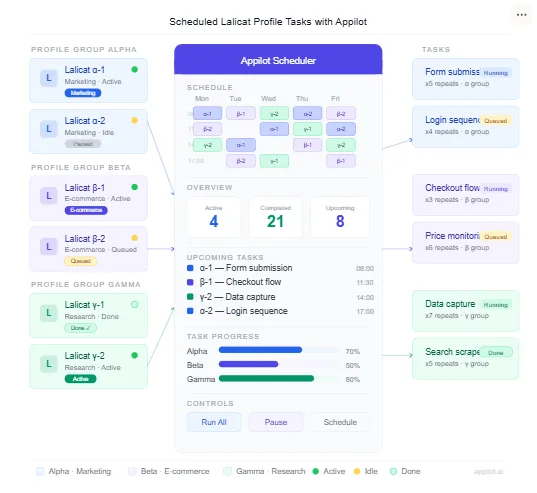
How Scheduling Works with Lalicat Browser and Appilot
The first step is organizing your Lalicat Browser profiles into clear groups.
For example, you may want one profile group for Facebook accounts, another for TikTok profiles, another for e-commerce stores, and another for affiliate campaigns.
Once the profile groups are organized, Appilot can assign different workflows to each group.
For example, one workflow may open social media profiles every morning, another may launch e-commerce profiles every afternoon, and another may open ad account profiles in the evening.
This makes it much easier to manage larger numbers of browser profiles because the same actions do not need to be repeated manually every day.
Common Browser Tasks You Can Schedule
One common use case is social media management. Teams often need to launch browser profiles, review notifications, check inboxes, monitor comments, and visit reporting dashboards.
Another common use case is e-commerce monitoring. Sellers may need to open store dashboards, review inventory levels, monitor pricing, and manage supplier portals.
Affiliate marketers often use browser scheduling to review traffic sources, landing page builders, trackers, and ad accounts.
Agencies can use Appilot to manage browser profiles for multiple clients. Instead of opening every client account manually, they can create schedules that launch profiles automatically and perform routine tasks.
Web scraping teams may use scheduled workflows to launch browser sessions, visit websites, and collect data more efficiently.
Crypto users may also schedule browser tasks for wallet dashboards, exchange logins, and repeated platform activity.
Benefits of Scheduled Browser Tasks
One of the biggest benefits is time savings. Instead of repeating the same browser actions every day, Appilot can automate those actions across multiple browser profiles.
Another major benefit is consistency. Manual work often leads to forgotten tasks, missed accounts, or inconsistent timing. Scheduled workflows make the process more reliable because tasks run automatically at the same time every day.
Scheduling also makes it easier to scale. Once you have a workflow that works for ten profiles, it can usually be expanded to twenty, fifty, or even one hundred profiles.
It also improves organization because browser profiles can be grouped by team, platform, client, campaign, or geography.
Best Practices for Scheduled Browser Tasks
The most important habit is keeping browser profile groups organized. If profiles are not grouped properly, workflows can become confusing and difficult to manage.
You should also avoid launching too many browser profiles at the exact same time. Staggered launches with small delays usually create a more stable workflow and reduce system load.
Another good practice is to use different schedules for different profile groups. Social media profiles often need different timing compared to e-commerce stores, ad accounts, or scraping sessions.
It is also important to monitor browser profile health. Expired proxies, outdated browser settings, and broken cookies can all create workflow failures.
Starting with smaller workflows and gradually expanding is much safer than trying to automate everything immediately.
Common Problems and How to Avoid Them
One common problem is profile overload. If too many browser profiles launch at once, the system can slow down and workflows may fail.
Another common issue is poor browser profile organization. If profile groups are not labeled clearly, it becomes difficult to understand which workflows belong to which accounts.
Some users also create workflows that are too aggressive. Launching too many profiles too frequently can create suspicious behavior patterns and increase the chance of account problems.
Timezone mismatches can also cause issues if schedules are not aligned correctly with browser profiles and proxies.
The safest approach is to keep workflows simple, keep profile groups organized, and scale gradually over time.
Frequently Asked Questions
Q1: Can Appilot schedule tasks for multiple Lalicat Browser profiles at the same time?
Yes. Appilot can assign one workflow to multiple Lalicat Browser profiles at once, making it easier to manage larger browser profile groups.
Q2: Can I create different schedules for different profile groups?
Yes. You can create separate workflows for social media accounts, ad accounts, e-commerce stores, affiliate campaigns, and other browser profile groups.
Q3: Do I need coding skills to schedule Lalicat Browser tasks?
No. Most users can create workflows and schedules directly from the dashboard without writing code.
Q4: Is it safe to launch many browser profiles at once?
It is usually better to stagger profile launches rather than opening everything at the same time. This reduces system load and creates more natural behavior patterns.
Q5: Can agencies use Appilot scheduling for client accounts?
Yes. Agencies often use Appilot scheduling to manage multiple client accounts, browser profiles, and recurring workflows more efficiently.
Conclusion
Running scheduled tasks in Lalicat Browser becomes much easier when Appilot is added on top of browser profile management. Lalicat Browser keeps profiles separated, while Appilot helps organize and automate the workflows running inside those profiles.
This creates a cleaner setup for social media management, e-commerce operations, affiliate marketing, web scraping, and client account management.
The best approach is to start with smaller profile groups, create simple workflows, and expand gradually over time.