What Is Screen Resolution Fingerprinting?

Most users think their screen size is just a display setting, but it is also a key signal used by websites to identify and track browsers. Even something as simple as your screen resolution can contribute to a unique digital identity when combined with other signals. This technique is known as screen resolution fingerprinting.
Understanding screen resolution fingerprinting is important because it highlights how even basic device attributes are used in tracking systems. It also explains why small details can have a large impact on privacy and detection. This guide explains screen resolution fingerprinting, how it works, and why it matters in practical scenarios.
What Is Screen Resolution Fingerprinting?
Screen resolution fingerprinting is a technique used to identify users based on the size and characteristics of their display. Websites collect information such as screen width, height, pixel density, and available viewport size to help build a unique profile.
While many users may share common resolutions, such as standard laptop or mobile screen sizes, variations still exist across devices. Differences in monitor setups, scaling settings, browser window sizes, and device orientation all contribute to the uniqueness of this signal.
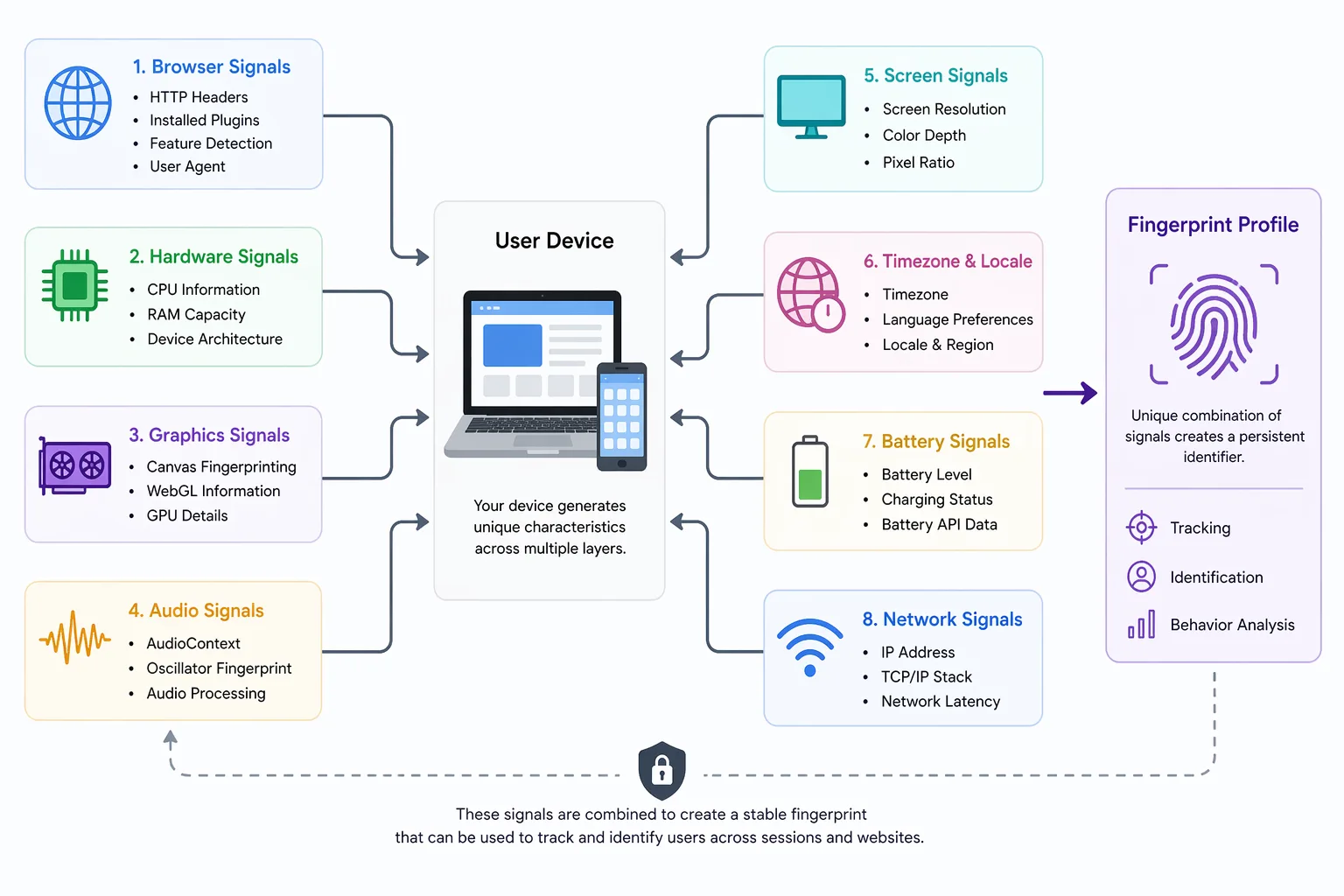
This information is typically collected through browser APIs and becomes part of a broader browser fingerprint that combines multiple signals for more accurate identification.
The Core Principle Behind Screen Resolution Fingerprinting
The core principle behind screen resolution fingerprinting is that display configurations vary across users. Even if two devices have the same resolution, factors such as browser zoom level, operating system scaling, and multi-monitor setups can create differences in reported values.
These variations increase the uniqueness of the signal, especially when combined with other attributes. While screen resolution alone may not uniquely identify a user, it contributes valuable entropy to fingerprint detection systems.
Because display settings tend to remain stable over time, this signal can persist across sessions, making it useful for tracking returning users.
How Screen Resolution Fingerprinting Differs from Other Methods
Screen resolution fingerprinting focuses specifically on display-related attributes, while other fingerprinting methods analyze different aspects of the system.
For example, canvas fingerprinting examines rendering differences, WebGL fingerprinting analyzes GPU behavior, audio fingerprinting focuses on sound processing, and font fingerprinting looks at installed fonts. Screen resolution fingerprinting complements these methods by adding information about the visual layout of the device.
A useful way to think about this is that screen resolution fingerprinting captures how much visual space a device has, while other methods capture how that space is used or rendered.
Why Screen Resolution Fingerprinting Matters
Screen resolution fingerprinting matters because it provides an additional layer of identification that strengthens overall tracking systems. Even though it is a relatively simple signal, it becomes powerful when combined with other attributes.
In fraud detection systems, screen resolution helps identify patterns across accounts and sessions. If multiple activities share identical or highly similar display characteristics along with other signals, it can indicate coordinated behavior or automation.
From a privacy perspective, screen resolution fingerprinting is significant because it operates passively and does not require storing data on the user’s device. Users cannot easily change or reset their screen configuration frequently, which makes the signal relatively persistent.
For developers building automation systems, screen resolution consistency is important. If the reported resolution appears unrealistic or mismatched with other signals, detection systems can flag the activity. This is why maintaining a coherent and natural environment is critical.
How Screen Resolution Fingerprinting Works in Practice
Screen resolution fingerprinting works by collecting display-related data, analyzing it, and incorporating it into a broader fingerprint.
Collecting Screen Data
When a user visits a website, scripts query the browser for information about the screen. This includes values such as screen width, screen height, available display area, and pixel ratio.
These values are obtained instantly and provide insight into the user’s device and display setup. Even small differences in these values can contribute to uniqueness.
Analyzing Display Characteristics
Beyond basic resolution, websites analyze additional characteristics such as browser window size, zoom level, and device orientation. These factors can change how content is displayed and provide further differentiation between users.
For example, a user with a high-resolution monitor using scaling will report different values compared to someone using the same monitor without scaling. These subtle differences increase the entropy of the signal.
Building and Matching the Fingerprint
The collected display data is combined with other signals to form a fingerprint. This fingerprint is then stored or compared across sessions to identify returning users.
Because screen resolution does not change frequently, it helps maintain consistency in the fingerprint over time.
Common Misconceptions About Screen Resolution Fingerprinting
There are several misconceptions about screen resolution fingerprinting that can lead to confusion about its effectiveness.
One common belief is that screen resolution is too common to be useful for tracking, but while many users share similar resolutions, the addition of scaling, viewport size, and other factors increases uniqueness.
Another misconception is that resizing the browser window prevents tracking. While this changes the viewport size, the underlying screen resolution and other attributes remain consistent, allowing systems to maintain identification.
There is also a belief that screen resolution fingerprinting alone can uniquely identify users, but it is typically used in combination with other signals. Its strength lies in contributing to a larger fingerprint rather than acting as a standalone identifier.
Real-World Examples of Screen Resolution Fingerprinting
Screen resolution fingerprinting is used in various systems where identifying users accurately is important.
In financial platforms, it helps detect fraudulent behavior by linking activities that share similar display characteristics. This allows systems to identify suspicious patterns even when other signals change.
In social media environments, screen resolution contributes to detecting automated behavior. Platforms analyze display data alongside other signals to identify bots or coordinated actions. Tools like Appilot help address this challenge by running automation on real Android devices, which naturally maintain consistent and realistic display characteristics instead of synthetic setups.
In analytics and advertising, screen resolution fingerprinting helps track users across sessions. Even when cookies are cleared, display data contributes to identifying returning users.
The Technical Side of Screen Resolution Fingerprinting
From a technical perspective, screen resolution fingerprinting relies on entropy, which measures how much identifying power a signal provides. While resolution itself has moderate entropy, combining it with related attributes such as pixel ratio and viewport size increases its effectiveness.
The process involves collecting display data, normalizing it, and integrating it into a broader fingerprint. This allows systems to store and compare identities efficiently.
Understanding these technical details helps explain why even simple signals like screen resolution play a role in modern tracking systems.
When Screen Resolution Fingerprinting Applies
Screen resolution fingerprinting becomes especially relevant in scenarios where accurate identification is required or where other signals are insufficient.
It is important when building automation systems, where maintaining consistent display characteristics is necessary to avoid detection. It is also critical in fraud prevention systems, where identifying suspicious activity can protect platforms from abuse. In privacy-sensitive applications, understanding screen resolution fingerprinting helps developers design systems that better account for tracking risks.
Frequently Asked Questions
Q: How does screen resolution fingerprinting work?
It works by collecting information about your screen size, pixel ratio, and display settings, which are then used as part of a larger fingerprint.
Q: What is screen resolution fingerprinting used for?
It is used for tracking users, detecting fraud, and identifying automated behavior across sessions.
Q: Can you block screen resolution fingerprinting?
You can reduce its effectiveness by using privacy tools or changing display settings, but it is difficult to fully block.
Q: Is screen resolution fingerprinting accurate?
It is moderately effective on its own but becomes more powerful when combined with other fingerprinting methods.
Q: Does resizing the browser stop fingerprinting?
No, resizing changes the viewport but not the underlying screen resolution or related attributes.
Q: How does screen resolution fingerprinting affect automation tools?
It can expose automation systems if their display characteristics appear unrealistic. Tools that use real-device environments, such as Appilot, tend to produce more reliable results because they maintain consistent and natural system configurations.
Key Takeaways
Screen resolution fingerprinting is a technique that identifies users based on their display characteristics, and it plays a supporting role in modern browser fingerprinting systems. It works by collecting screen-related data such as resolution, pixel ratio, and viewport size, which contribute to a broader fingerprint used for tracking and detection. While it may not uniquely identify users on its own, it becomes powerful when combined with other signals, making it an essential part of how websites track users and detect behavior.