Selenium Grid Not Scaling? Here’s the Alternative That Actually Works

You started with a simple setup using Selenium, maybe a few nodes running smoothly, tests executing in parallel, everything looking clean and efficient. Then you tried to scale. You added more nodes, introduced containers, maybe even moved to Kubernetes, expecting linear performance gains.
Instead, everything got worse.
Tests started failing randomly. Nodes became unresponsive. Sessions dropped mid-execution. You began seeing timeouts that made no sense, and debugging turned into a nightmare because the same test would pass one run and fail the next without any code changes.
What makes it more frustrating is that your infrastructure looks correct on paper. You followed best practices, distributed the load, and still the system feels unstable. You’re now spending more time managing Selenium Grid than actually running automation.
You’re not alone in this. Scaling Selenium Grid is one of the most common breaking points for teams moving from small automation setups to production-level workloads, and the root causes are not obvious until you’ve already hit them.
The good news is that this problem is not only fixable, but avoidable entirely if you approach scaling differently. In this guide, you’ll understand why Selenium Grid fails at scale, why common fixes don’t work, and what alternative architecture actually holds up under real-world conditions.
Why Selenium Grid Keeps Breaking at Scale
Most teams assume Selenium Grid fails because of infrastructure limitations, but the real issue is deeper. The architecture itself introduces complexity that compounds as you scale.
Session orchestration becomes a bottleneck
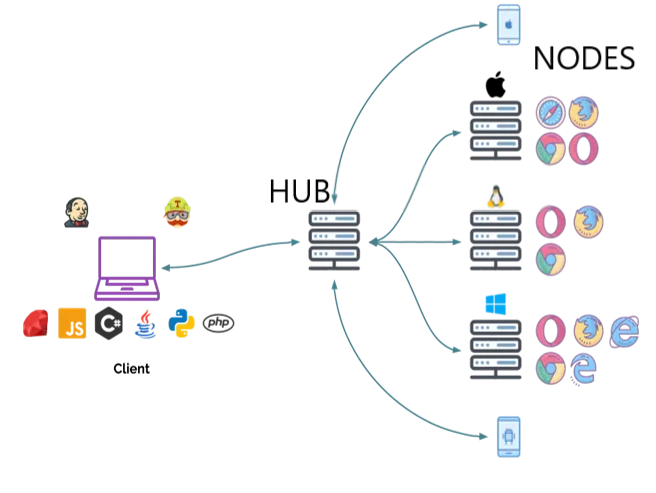
Selenium Grid relies on a hub-and-node architecture where the hub manages session distribution across nodes. At small scale, this works fine. But as you increase concurrency, the hub becomes a coordination bottleneck.
Every session request, every status update, and every failure flows through this central layer. Under heavy load, even minor delays can cascade into timeouts and failed sessions.
Browser instances are resource-heavy
Each browser instance consumes significant CPU and memory. When you run dozens or hundreds of sessions in parallel, resource contention becomes unavoidable. Containers don’t magically solve this problem; they just make it easier to deploy more instances without addressing underlying limits.
This leads to inconsistent performance where some sessions run smoothly while others lag or crash.
State inconsistency across nodes
In a distributed setup, maintaining consistency is extremely difficult. Differences in browser versions, driver compatibility, network latency, and even OS-level configurations can introduce subtle bugs.
You might think all nodes are identical, but small inconsistencies create unpredictable behavior, which is why tests fail randomly.
Network overhead and latency
Every command in Selenium travels over the network between client, hub, and node. At scale, this introduces latency that compounds across thousands of commands.
Even a few milliseconds per request adds up, especially for complex workflows, resulting in slower execution and higher failure rates.
The Hidden Cost of Trying to Scale Selenium Grid
At first, scaling Selenium Grid feels like a technical challenge you can solve with better infrastructure. But over time, the cost becomes much larger than expected.
You start investing in more powerful servers, better orchestration tools, and monitoring systems, yet stability does not improve proportionally. Instead, complexity increases. Every new layer you add introduces more points of failure.
Your team ends up spending hours debugging issues that are not directly related to your application. Instead of focusing on product development or automation logic, you are managing infrastructure, chasing flaky tests, and trying to maintain consistency across environments.
There is also a scalability ceiling. Beyond a certain point, adding more nodes does not improve performance. It actually makes the system harder to manage and less reliable.
The most significant cost, however, is lost momentum. When your automation system becomes unreliable, you stop trusting it. This slows down development cycles and limits your ability to scale testing or automation workflows.
The Complete Fix: Why Patching Selenium Grid Doesn’t Work
Many teams try to fix scaling issues by optimizing their existing setup. They introduce better load balancing, improve container orchestration, or upgrade hardware.
These changes can help temporarily, but they do not address the core issue: Selenium Grid was not designed for large-scale, highly dynamic workloads.
Even if you manage to stabilize your setup, you are still dealing with a system that requires constant maintenance. Every update, every new browser version, and every infrastructure change introduces new variables.
At some point, the effort required to maintain the system outweighs the benefits it provides.
The Alternative: Rethinking Automation Architecture
Instead of forcing Selenium Grid to scale, the more effective approach is to rethink how automation is executed.
The fundamental problem with Selenium Grid is that it relies on browser-based automation running in simulated environments. These environments are inherently fragile and require continuous tuning to avoid detection, instability, and performance issues.
A more stable approach is to move away from heavy browser orchestration and towards environments that naturally behave like real users.
This is where mobile-first automation comes in.
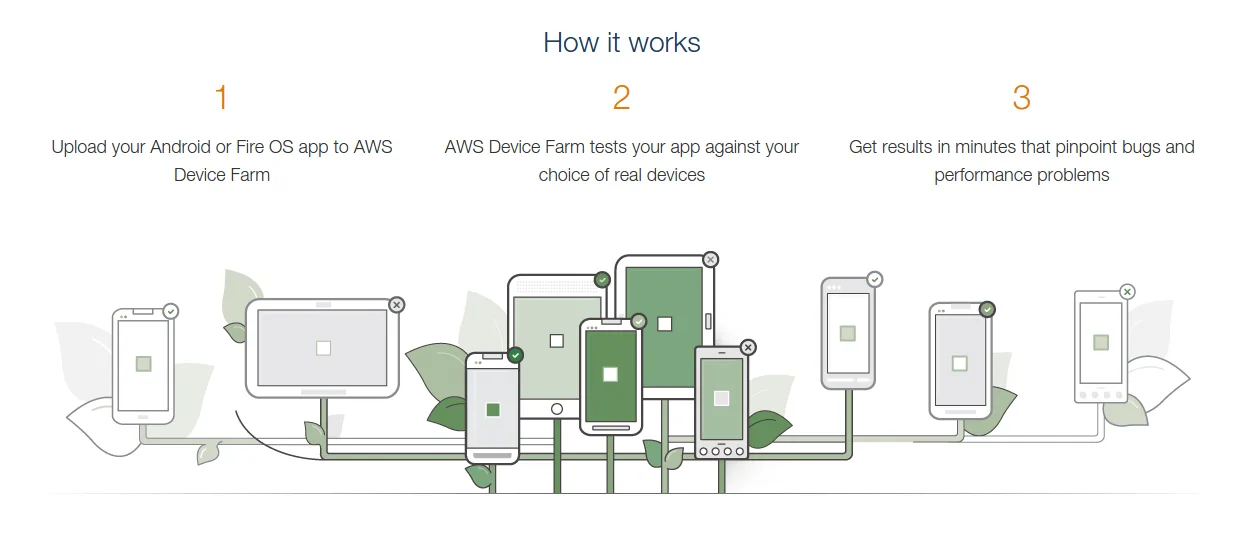
Rather than running hundreds of browser instances, you run automation directly on real Android environments. This eliminates many of the issues associated with browser-based scaling, including fingerprint inconsistencies, resource contention, and network overhead.
In practical terms, this means your automation workflows operate within real app environments instead of simulated browser contexts, which significantly improves stability and reduces detection risk.
This is the exact shift that led to the development of Appilot. Instead of managing a complex grid of browser instances, you run workflows on real Android devices through a centralized dashboard, without needing to maintain infrastructure or deal with driver compatibility issues.
The difference is not incremental—it is architectural.
Why This Alternative Scales Better
The reason this approach works is because it removes the layers that cause instability in Selenium Grid.
There is no central hub acting as a bottleneck. Each automation instance operates independently, reducing coordination overhead. Resource usage is more predictable because you are not running multiple heavy browser instances on shared infrastructure.
Most importantly, the environment itself is consistent. Instead of trying to simulate real user behavior, you are operating within actual user environments, which eliminates many detection and compatibility issues.
Scaling becomes a matter of adding more devices or environments, not increasing the complexity of orchestration.
Common Mistakes Teams Make When Scaling Automation
One of the biggest mistakes is assuming that more infrastructure will solve architectural problems. Teams often invest in better servers, more containers, or advanced orchestration tools without addressing the fundamental limitations of their setup.
Another common mistake is over-engineering solutions. Adding layers of abstraction, custom schedulers, or complex retry mechanisms can make the system harder to debug without improving reliability.
There is also a tendency to ignore environment consistency. Even small differences between nodes can lead to unpredictable failures, which are difficult to trace in distributed systems.
Real Outcomes After Switching Approaches
Teams that move away from Selenium Grid-based scaling typically see immediate improvements in stability. Test flakiness drops significantly, execution becomes more predictable, and infrastructure overhead decreases.
More importantly, they regain control over their automation workflows. Instead of constantly reacting to failures, they can focus on optimizing performance and expanding use cases.
This shift also makes it easier to scale. Instead of managing a fragile distributed system, you are working with a model that naturally supports growth without introducing instability.
Conclusion: Stop Forcing Selenium Grid to Scale
Selenium Grid is a powerful tool, but it has limitations that become clear at scale. If you are constantly dealing with instability, random failures, and increasing complexity, the issue is not your implementation—it is the architecture.
Trying to patch these issues will only take you so far.
The more sustainable solution is to adopt an approach that aligns with how modern systems operate, where stability, consistency, and scalability are built into the foundation rather than added as an afterthought.
If your goal is to scale automation without constantly fighting your infrastructure, it may be time to move beyond Selenium Grid and adopt a model that actually supports growth.