Selenium Grid vs Cloud Browser Services: Scaling Your Automation
As automation grows, running tests or scripts on a single machine quickly becomes a bottleneck.
To scale, teams usually compare Selenium Grid and cloud browser services, which are managed browser platforms.
Both approaches support parallel execution, multi-browser coverage, and faster automation cycles.
However, they differ significantly in setup complexity, infrastructure control, pricing model, and maintenance effort.
This guide explains when to use each option in a clear and practical way.
Architecture Overview
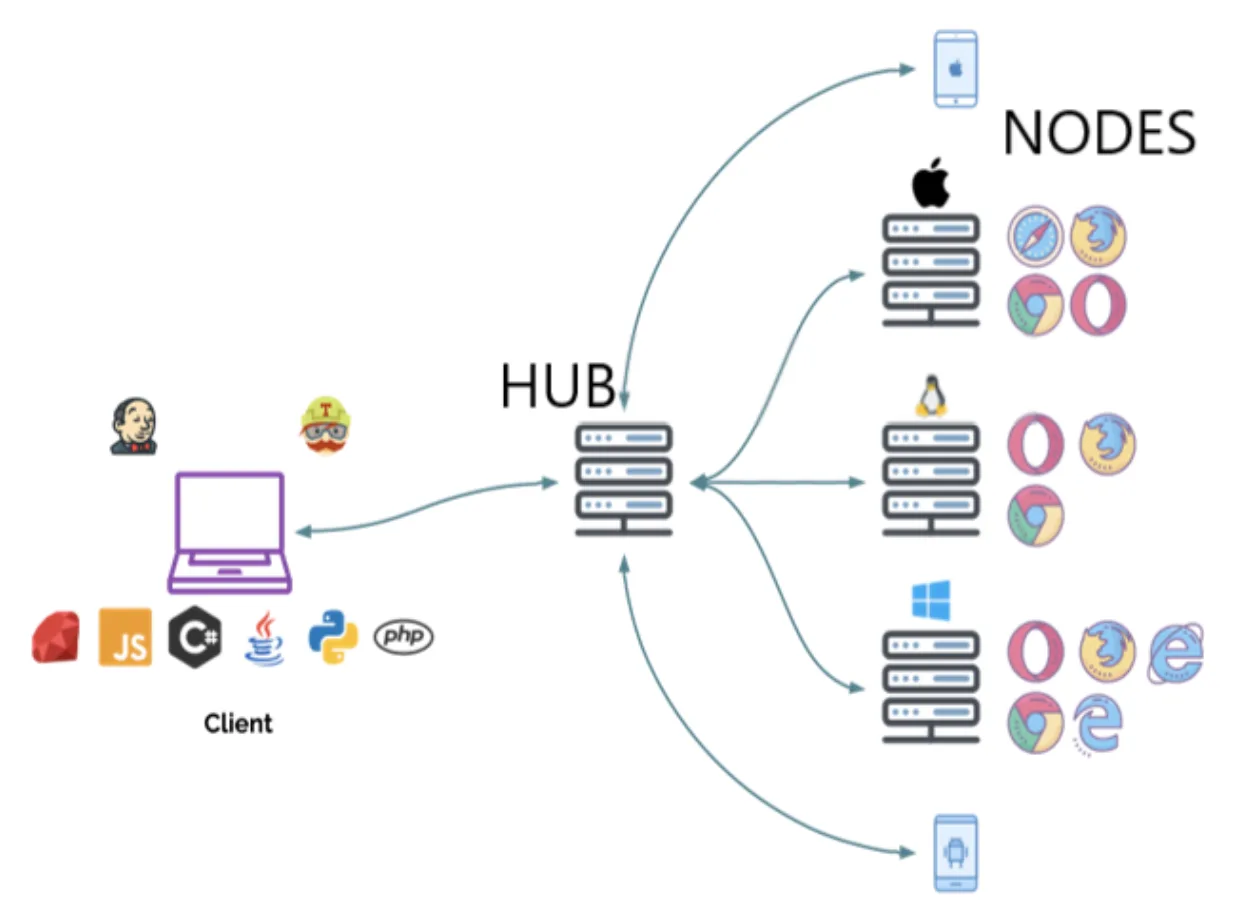
Selenium Grid uses a hub-and-node architecture where you host and manage all the machines yourself and distribute tests internally.
Cloud browser services work differently because you connect to a WebDriver endpoint while the provider automatically provisions browsers and manages the infrastructure for you.
The main difference is ownership versus outsourcing.
What Is Selenium Grid?
Overview
Selenium Grid is part of the Selenium ecosystem that allows multiple browser sessions to run in parallel across machines.
It integrates naturally with Selenium WebDriver, CI/CD pipelines, Docker, and Kubernetes.
Key Features
Selenium Grid supports parallel execution, multi-browser testing, full operating-system and network control, and self-hosted deployment.
Advantages
One of the biggest advantages of Selenium Grid is that there is no licensing cost.
It gives complete control over the environment, allows custom browser versions, and is especially useful for compliance-sensitive projects where data must stay inside internal infrastructure.
Limitations
Selenium Grid also comes with trade-offs.
It requires a more complex setup, ongoing infrastructure maintenance, manual scaling, and additional effort when debugging distributed issues.
Selenium Grid is powerful, but it is also engineering-heavy.
What Are Cloud Browser Services?
Overview
Cloud browser services provide ready-to-use browsers in the cloud.
You connect your automation scripts to the provider endpoint and they handle provisioning, maintenance, and scaling.
Well-known examples include entity["company","BrowserStack","Cloud browser testing platform"], entity["company","Sauce Labs","Cloud testing platform"], and entity["company","LambdaTest","Cloud browser testing platform"].
Key Features
These services provide instant browser access, parallel sessions, cross-browser testing, managed infrastructure, and visual dashboards with logs.
Advantages
The main advantage is speed.
Setup is very fast, there is no need to maintain servers, scaling is easy, and the overall experience is much more beginner-friendly.
Limitations
The trade-off is recurring subscription cost, limited operating-system level control, and the fact that data flows through third-party infrastructure.
Cloud browser services prioritise convenience over control.
Feature-by-Feature Comparison
Setup & Maintenance
Selenium Grid requires manual setup, updates, monitoring, and infrastructure management.
Cloud browser services are fully managed.
Scalability
With Selenium Grid, you add more servers manually.
With cloud browser services, you can increase the number of parallel sessions almost instantly.
Cost Model
Selenium Grid usually involves hardware costs and DevOps overhead.
Cloud browser services usually use per-minute or per-session billing.
Control & Customization
Selenium Grid provides full control over operating systems, browser flags, network settings, and environment configuration.
Cloud browser services offer less deep customisation.
Reliability
Selenium Grid reliability depends on the quality of your own infrastructure.
Cloud browser services often come with uptime guarantees and provider-managed reliability.
Scenario-Based Recommendations
Scenario 1: Full Infrastructure Control Required
The best choice is Selenium Grid.
This is because it provides full control over browser versions, network configuration, and compliance requirements.
Cloud services are more limited when it comes to system-level flexibility.
Scenario 2: Quick Scaling Without DevOps
The best choice is cloud browser services.
They require no infrastructure setup and provide instant scaling.
Selenium Grid requires setup expertise and monitoring.
Scenario 3: Small Team Without Infrastructure Engineers
The best choice is cloud browser services.
They provide simple dashboards, minimal setup, and no maintenance overhead.
Scenario 4: Mobile Automation on Real Devices
An alternative here is Appilot.
Appilot is useful because it runs automation on real Android devices and is designed for mobile workflows.
However, it is important to understand that Appilot is not a browser infrastructure replacement.
Instead, it is better suited for Android automation tasks where real-device execution matters more than browser scaling.
Scenario 5: Hybrid Model
For many teams, the best option is a hybrid model that combines Selenium Grid and cloud browser services.
Internal workloads can stay on Grid while peak traffic is handled in the cloud.
The trade-off is increased operational complexity.
Infrastructure Scaling Visual
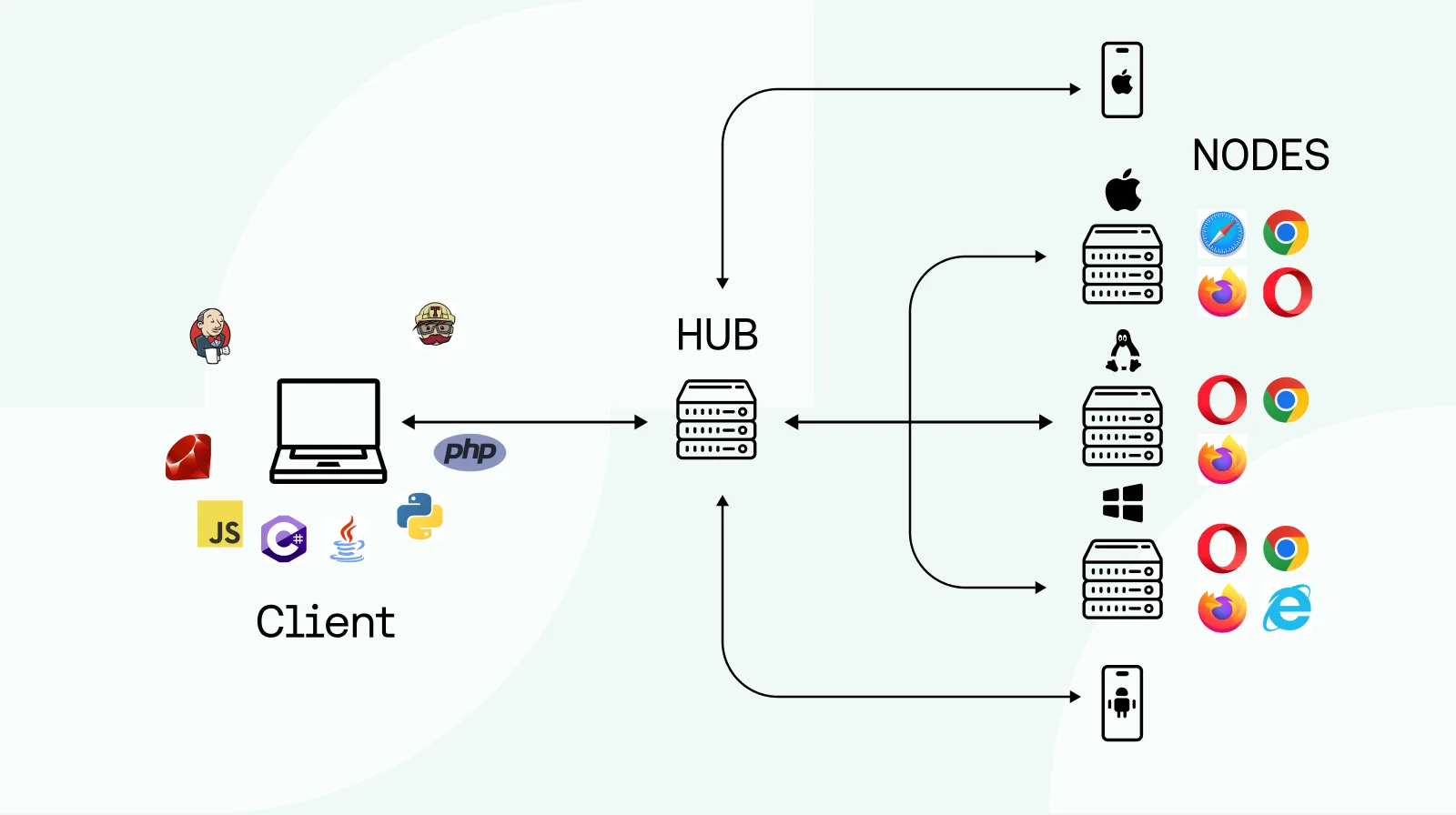
Selenium Grid scaling often involves Docker containers, Kubernetes clusters, and load balancing.
Cloud scaling is usually much simpler because it mainly involves adjusting session limits or upgrading subscriptions.
Head-to-Head Pros & Cons
Selenium Grid
Advantages
Selenium Grid offers full control, no licensing cost, high customisability, and better support for enterprise compliance requirements.
Limitations
It also creates a heavier infrastructure burden, requires DevOps knowledge, and becomes more difficult to scale over time.
Cloud Browser Services
Advantages
Cloud services are fast to deploy, easy to scale, require no infrastructure management, and are much easier for beginners.
Limitations
They come with ongoing subscription costs, reduced system-level control, and some dependency on external vendors.
Appilot (Use-Case Specific)
Advantages
Appilot is useful for real mobile-device execution, mobile-first automation, and Android-based workflows.
Limitations
It is not a browser scaling tool and is mainly focused on Android automation.
Final Verdict
There is no universal winner.
Selenium Grid is best when control and customisation matter most.
Cloud browser services are best when speed and convenience matter most.
A hybrid model offers more flexibility at scale.
The best choice depends on team size, DevOps capability, budget, compliance requirements, and the scale of automation.
FAQs
Is Selenium Grid free?
Yes, the software itself is free, but infrastructure and maintenance still cost money.
Are cloud browser services better for beginners?
Yes, they are significantly easier to set up and use.
Can Selenium Grid run in Docker or Kubernetes?
Yes, that is one of the most common deployment approaches.
Are cloud services secure?
Most providers offer enterprise-grade security, but your data still passes through third-party systems.
Can both be combined?
Yes, many teams use Selenium Grid internally and cloud browser services for peak traffic or overflow workloads.