Selenium Undetected: Bypassing Automation Detection

Selenium is one of the most widely used tools for browser automation, but it is also one of the easiest to detect. Modern websites actively look for signals that indicate Selenium is controlling a browser, which can lead to blocked sessions or restricted access. To address this, variations of “undetected Selenium” have emerged to reduce these signals.
Understanding how undetected Selenium works is important because it reveals both the strengths and the limitations of automation-based approaches. While it can reduce basic detection, advanced systems analyze multiple layers, making complete invisibility difficult. This guide explains how Selenium detection works and how undetected setups attempt to bypass it.
What Is Undetected Selenium?
Undetected Selenium refers to modified configurations or tools built on top of Selenium that aim to hide or reduce automation signals. These setups attempt to make Selenium-controlled browsers behave more like regular user-driven browsers.
Standard Selenium exposes several indicators, such as automation flags and modified browser properties, which can be easily detected. Undetected setups attempt to remove or alter these indicators.
The goal is not to eliminate detection entirely but to reduce the most obvious signals that reveal automation.
The Core Principle Behind Undetected Selenium
The core principle behind undetected Selenium is masking known detection points. Websites often rely on specific checks to identify Selenium-driven browsers.
By modifying how these checks behave, undetected Selenium attempts to pass as a normal browser environment. This includes adjusting properties, enabling missing features, and aligning behavior with real browsers.
However, detection systems are constantly evolving, which means these methods must be continuously updated.
How Selenium Detection Works
To understand undetected Selenium, it is important to first understand how Selenium is detected.
Automation Flags and Properties
One of the most common detection methods is checking for properties that indicate automation. Selenium-controlled browsers often expose flags or values that differ from standard browsers.
Detection scripts can query these properties and identify known patterns associated with Selenium.
Browser Behavior Differences
Automated browsers often behave differently from real user environments. This can include differences in interaction timing, event handling, and feature availability.
These behavioral differences can be used to detect automation.
Rendering and Fingerprinting Signals
Selenium environments may produce different rendering outputs compared to real browsers. This includes differences in canvas and WebGL fingerprinting.
Detection systems analyze these outputs to identify inconsistencies.
Network and Header Analysis
Selenium setups may send network requests with headers or patterns that differ from real browsers. Detection systems can analyze these patterns to identify automation.
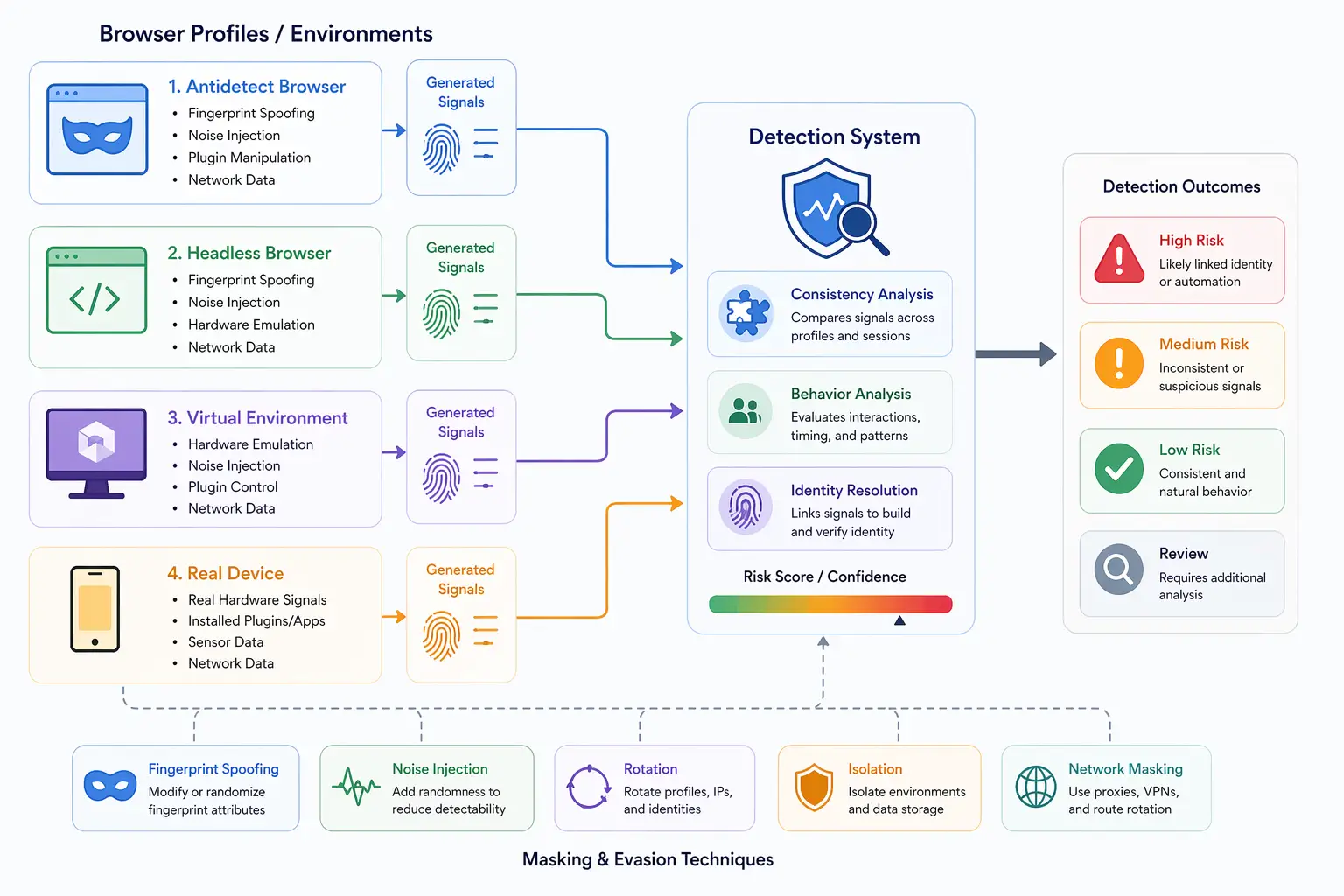
How Undetected Selenium Works
Undetected Selenium works by modifying or masking the signals used in detection.
Removing Automation Indicators
Undetected setups remove or override properties that reveal Selenium usage. This includes modifying navigator properties and other exposed values.
These changes help pass basic detection checks.
Running in Headful Mode
Running browsers in headful mode can reduce some detection signals compared to headless mode. This aligns behavior more closely with real user environments.
However, it does not eliminate all differences.
Aligning Browser Features
Undetected Selenium attempts to ensure that browser features and APIs behave consistently with standard browsers. This reduces mismatches that detection systems look for.
Using Proxies and Network Alignment
Network identity is often managed through proxies. This allows requests to appear as if they originate from different locations.
However, network-level changes must align with other signals to avoid detection.
Why Undetected Selenium Matters
Undetected Selenium matters because it improves the reliability of automation workflows. Without it, Selenium-driven browsers can be easily identified and blocked.
It is widely used in testing, data collection, and automation scenarios where detection is a concern.
However, it is important to understand that undetected Selenium is not a permanent solution. Detection systems continue to evolve, and new methods can expose previously hidden signals.
Limitations of Undetected Selenium
Undetected Selenium has several limitations.
One limitation is that it focuses on known detection methods. As new detection techniques emerge, existing setups may become ineffective.
Another limitation is that it operates at the browser level. It does not address deeper signals such as hardware behavior or system-level interactions.
There is also the challenge of maintaining consistency. Modifying multiple aspects of the browser can introduce subtle inconsistencies.
These limitations mean that undetected Selenium must be used carefully.
Undetected Selenium vs Puppeteer Stealth
Undetected Selenium and Puppeteer Stealth share similar goals but differ in implementation.
Both aim to reduce automation detection by masking signals, but they are designed for different frameworks. Puppeteer Stealth is tailored for Puppeteer, while undetected Selenium focuses on Selenium-based setups.
Each has its own strengths and limitations depending on the environment.
Undetected Selenium vs Antidetect Browsers
Undetected Selenium and antidetect browsers serve different purposes.
Undetected Selenium focuses on hiding automation signals within a single browser instance, while antidetect browsers manage multiple identities and fingerprints.
In some workflows, these approaches are combined, but they address different aspects of detection.
Undetected Selenium vs Real-Device Environments
A key distinction in modern detection systems is the difference between masking automation and using real environments.
Undetected Selenium attempts to hide automation artifacts, but it does not change the underlying system behavior. This can lead to detectable inconsistencies.
Real-device approaches operate on actual hardware, where automation signals are naturally minimized. Tools like Appilot follow this approach by running automation on real Android devices, ensuring that browser behavior aligns with genuine user environments without relying heavily on masking.
This approach reduces reliance on patching techniques.
When Undetected Selenium Is Effective
Undetected Selenium is most effective in scenarios where detection systems rely on known automation signals and where deep analysis is limited.
It is useful for improving automation reliability and reducing obvious detection triggers.
However, in environments with advanced detection systems, additional strategies may be required.
Understanding when to use undetected Selenium helps determine its role in a broader setup.
Frequently Asked Questions
Q: What is undetected Selenium?
It is a modified Selenium setup designed to reduce automation detection signals.
Q: How does Selenium get detected?
Through automation flags, behavioral differences, rendering inconsistencies, and network patterns.
Q: Can undetected Selenium avoid detection completely?
No, it reduces detection risk but cannot eliminate it entirely.
Q: Is headful mode better than headless for Selenium?
Headful mode can reduce some detection signals but does not guarantee invisibility.
Q: What are the limitations of undetected Selenium?
It focuses on known signals and does not address deeper system-level behavior.
Q: How do real-device solutions compare?
Real-device solutions like Appilot use actual hardware, reducing reliance on masking automation signals.
Key Takeaways
Undetected Selenium is an approach to reducing automation detection by masking signals that reveal Selenium usage. It works by removing automation indicators, aligning browser behavior, and managing network identity. While it improves the reliability of automation workflows, it has limitations in handling deeper signals such as hardware behavior and system-level consistency. As detection systems continue to evolve, relying solely on masking techniques becomes less effective, making it important to understand where undetected Selenium fits within the broader landscape of automation and detection.