Single Device Automation vs Multi-Device Phone Farm: When to Scale Up
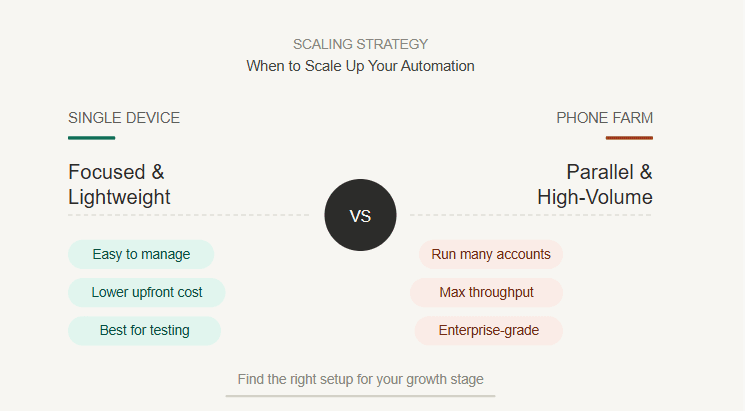
Starting social media automation with one Android device is usually the smartest move. It keeps the setup simple, the cost low, and the risk easier to control. You can test bots, understand limits, watch account behavior, and fix workflow problems before turning automation into a bigger operation.
But one device has limits. It can only run so many accounts, handle so many workflows, and stay active for so many hours before it becomes the bottleneck. At some point, users who manage multiple Instagram, TikTok, Telegram, YouTube, Reddit, Discord, or LinkedIn workflows start asking whether they should scale into a multi-device phone farm.
The answer depends on the workload. Scaling too early creates hardware cost, proxy complexity, account management problems, and operational noise. Scaling too late creates slow execution, account overlap, missed tasks, and too much pressure on one device.
Appilot helps users manage both stages. You can start with a single Android device or emulator, then grow into a larger device setup through a remote web dashboard without depending on ADB, cables, or an always-on laptop.
What Is Single Device Automation?
Single device automation means running bots or social media workflows on one Android phone, tablet, or emulator. This is the simplest way to start because there is only one environment to manage.
For beginners, one device is enough to test whether an automation workflow actually works. You can install the app, connect the account, run a bot, observe the behavior, adjust limits, and learn what breaks before adding more complexity.
A single device also makes account safety easier to watch. If something goes wrong, you know exactly where the problem happened. You do not need to check ten devices, twenty accounts, several proxies, and multiple workflows at once.
This setup is best for early testing, low account volume, simple Instagram workflows, basic TikTok actions, small outreach tasks, or learning how real Android automation behaves.
The limitation is capacity. One device can only do so much before it becomes too slow for serious multi-account operations.
What Is a Multi-Device Phone Farm?
A multi-device phone farm is a setup where several Android devices or emulators are used to run automation across multiple accounts and workflows.
Instead of putting all accounts on one device, users spread activity across different devices. This can improve capacity, reduce workload per device, and create better separation between accounts.
Phone farms are commonly used by agencies, growth teams, phone farm operators, social media marketers, and outreach teams that manage many accounts across platforms like Instagram, TikTok, Telegram, YouTube, Reddit, Discord, Snapchat, Threads, Gmail, Chrome, and LinkedIn.
The advantage is scale. More devices allow more parallel workflows, more account separation, and better coverage across time windows.
The downside is operational complexity. More devices mean more proxies, more monitoring, more updates, more account assignments, more failures to track, and more infrastructure to manage.
A phone farm is powerful, but it should be built when the workflow is already proven.
Single Device vs Phone Farm: The Main Difference
The biggest difference is operational capacity.
A single device is easier to manage, but it limits how many accounts and workflows you can run. A phone farm is harder to manage, but it gives you more room to scale.
One device is best when you are still testing. A phone farm is best when the workflow already works and the main problem is volume.
This is an important distinction. Many users scale too early because they think more devices will automatically create better results. In reality, more devices only amplify the system you already have. If the workflow is weak on one device, it will become more chaotic across ten devices.
Before scaling, users should prove that the bot works, the account limits are safe, the proxy setup is clean, the workflow is repeatable, and the output is worth the added cost.
Scaling should solve a bottleneck, not hide a broken process.
When a Single Device Is Enough
A single device is enough when the workload is small, the account count is low, or the user is still learning the workflow.
If you are running one or two Instagram accounts, testing a TikTok bot, experimenting with Telegram workflows, or warming up a small number of accounts, one device can be enough.
It is also enough when the workflow needs close manual supervision. Early automation should be watched carefully because bots can hit popups, app updates, login prompts, rate limits, or unexpected screen changes.
One device lets you learn those patterns without creating a messy operation.
Single device automation is also better when the goal is quality over volume. If you are managing one valuable account, it may be safer to keep the setup simple and controlled instead of spreading attention across many devices.
The best time to stay on one device is when you are still validating the strategy.
When One Device Becomes the Bottleneck
One device becomes the bottleneck when it cannot complete the required workflows within a reasonable time.
This often happens when users add more accounts, more platforms, more daily actions, more monitoring tasks, or more client work. The device becomes busy all day, workflows start waiting in line, and accounts do not get enough activity windows.
Another warning sign is account overlap. If too many accounts depend on the same device environment, proxy pattern, or timing schedule, the setup may become less clean.
One device also becomes a bottleneck when downtime affects too many workflows. If that one device crashes, freezes, disconnects, or needs maintenance, everything stops.
At that point, scaling starts to make sense.
The goal is not to scale because a phone farm sounds impressive. The goal is to scale because one device is limiting execution, reliability, or account separation.
When to Scale to a Phone Farm
You should scale to a phone farm when the workflow is proven, account volume is growing, and the single device is no longer enough.
A good sign is that your bot performs reliably on one device for a meaningful period of time. It handles app screens correctly, respects action limits, avoids obvious spam behavior, and produces useful results.
Another sign is that you have enough accounts to justify separation. If you are managing multiple Instagram accounts, TikTok profiles, Telegram accounts, or client workflows, spreading activity across several devices may be safer and more practical.
Scaling also makes sense when revenue justifies the cost. If the automation supports agency clients, outreach campaigns, lead generation, or account operations that create value, additional devices can be a reasonable investment.
The best time to scale is when the process is already working and the only problem is capacity.
The Risks of Scaling Too Early
Scaling too early creates problems instead of solving them.
If the workflow is not stable on one device, adding more devices multiplies the failure points. A popup that breaks one bot will break ten bots. A bad proxy strategy will hurt more accounts. A weak targeting strategy will create more low-quality activity.
Early scaling also increases cost. Devices, proxies, power, workspace, monitoring, and time all become part of the operation.
Another risk is losing visibility. With one device, you can watch what happens. With many devices, it becomes easier to miss problems until accounts start failing.
This is why users should not build a phone farm before they understand their automation workflow.
Start with one device. Fix the problems. Prove the results. Then scale.
The Risks of Staying Too Small
Staying too small can also hurt growth.
If one device is overloaded, accounts may not get enough activity. Workflows may run late. Bots may compete for device time. Important tasks may be skipped. One failure may pause the entire operation.
For agencies, staying too small can create client delivery problems. If multiple client accounts depend on one device, the operation becomes fragile.
For phone farm operators, staying too small can limit testing. You may not be able to compare workflows, separate accounts properly, or run parallel experiments.
The key is to scale when the bottleneck is real. If the device is constantly busy, if account separation is poor, or if downtime affects too many workflows, it is probably time to add more devices.
Device Separation and Account Safety
One reason users scale to phone farms is account separation.
When multiple accounts share the same device environment, same proxy pattern, same timing, and same behavior style, they can start looking connected. That may increase risk if the accounts are performing similar actions.
A multi-device phone farm lets users separate accounts across devices and proxies. This can create cleaner operating patterns when done correctly.
But more devices do not automatically mean safer accounts. If every device runs the same workflow at the same speed with the same messages and weak proxies, the setup is still risky.
Account safety depends on the full system. Device separation helps, but users still need good proxies, realistic timing, account warmup, high-quality content, and human oversight.
Appilot supports proxy-aware workflows and remote device management, which makes this easier to organize as the setup grows.
Cost Comparison
Single device automation is cheaper to start. You only need one device or emulator, one account setup, one workflow, and a simpler proxy strategy.
This makes it ideal for beginners, testers, and users who are still validating the value of automation.
A phone farm costs more because each additional device adds hardware, power, proxy, monitoring, and management overhead. Even if devices are inexpensive, the total system becomes more complex.
But a phone farm can become more cost-effective when the workload is large enough. If one device limits client delivery, account growth, or campaign output, the cost of adding devices may be justified.
The best way to think about cost is simple: do not scale based on excitement. Scale based on utilization.
If one device is underused, adding more devices is wasteful. If one device is overloaded and producing value, scaling may be smart.
Operational Complexity
Operational complexity grows quickly with every new device.
A single device has simple monitoring. A phone farm needs device naming, account assignment, proxy assignment, workflow tracking, error handling, update management, and performance checks.
Without structure, a phone farm becomes messy. Users may forget which account belongs to which device, which proxy is assigned, which bot is running, or which workflow failed.
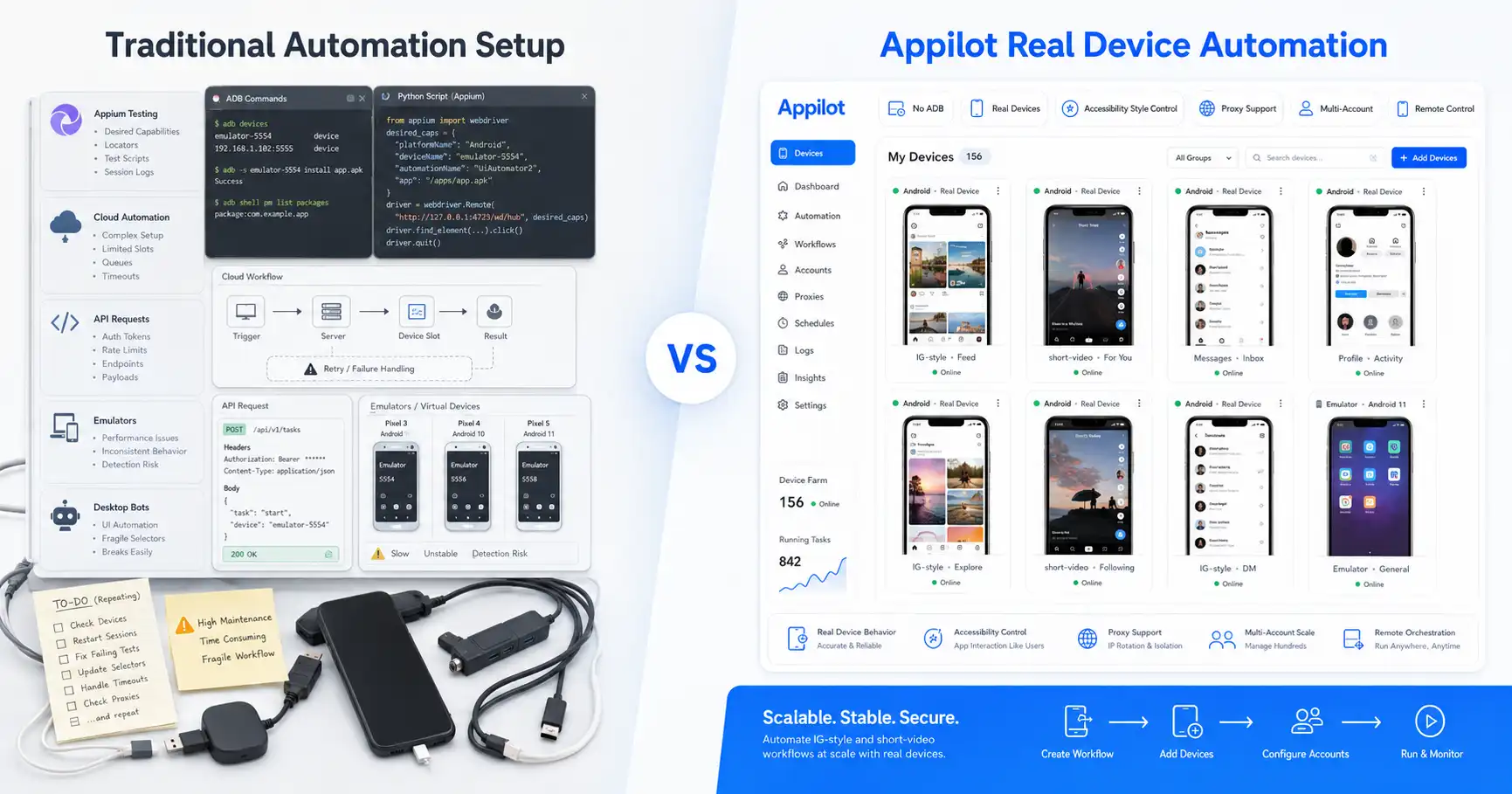
Appilot helps reduce this complexity by giving users a remote dashboard for managing bots and Android environments without ADB or laptop dependency.
This matters because the old way of running phone farms often involved cables, USB hubs, local machines, manual checks, and constant troubleshooting.
A phone farm is easier to scale when the control layer is centralized.
Best Uses for Single Device Automation
Single device automation is best for testing, learning, early-stage workflows, low account volume, and high-touch monitoring.
It makes sense when the user wants to validate a bot before trusting it with more accounts. It also makes sense when account quality matters more than speed.
A single device is also useful for creators, small teams, and solo operators who only need a few workflows.
If you are still asking basic questions about limits, proxies, targeting, or app behavior, one device is enough.
The goal at this stage should be learning and reliability, not scale.
Best Uses for Multi-Device Phone Farms
Multi-device phone farms are best for serious multi-account operations.
They make sense for agencies managing client accounts, phone farm operators running many social workflows, growth teams testing several strategies, and outreach teams that need parallel execution.
Phone farms are also better when accounts need stronger separation. Different devices, proxies, and schedules can help reduce overlap when managed properly.
They are especially useful for platforms where mobile app behavior matters, such as Instagram, TikTok, Threads, Snapchat, Telegram, YouTube, Reddit, Discord, Gmail, Chrome, and LinkedIn.
The key is that the phone farm should be organized. More devices without process will create more problems.
How Appilot Helps You Scale
Appilot helps users start small and scale gradually.
A user can begin with one Android device or emulator, test a bot, monitor the results, and refine the workflow. When the process becomes reliable, they can add more devices and manage them through the same dashboard.
This is better than jumping straight into a complicated phone farm.
Appilot also removes ADB dependency. Users do not need to keep a laptop connected, manage USB cables, handle driver problems, or troubleshoot device disconnects as part of their daily workflow.
The platform supports real Android automation, emulator workflows, proxy-aware operations, and ready-to-use bots for Instagram, TikTok, Twitter/X, LinkedIn, Discord, Reddit, Snapchat, YouTube, Threads, Telegram, Gmail, Chrome, and more.
For scaling, the main benefit is control. Users can grow from one device to many without losing visibility.
Where Single Device Automation Wins
Single device automation wins when simplicity matters.
It is easier to set up, easier to monitor, cheaper to start, and better for testing new workflows. It also makes troubleshooting faster because there is only one environment to inspect.
Single device automation is the better choice for beginners, small account sets, early bot testing, and high-touch workflows.
It also reduces the chance of scaling a bad process too quickly.
If you are not sure whether a workflow works yet, stay with one device.
Where Multi-Device Phone Farms Win
Multi-device phone farms win when capacity and separation matter.
They are better for agencies, growth teams, phone farm operators, and users managing many accounts across different platforms.
A phone farm allows more parallel workflows, more device separation, more testing capacity, and less dependence on one device.
It also makes sense when the operation is already producing value and one device is slowing everything down.
The downside is complexity. A phone farm only works well when the user has a system for managing devices, accounts, proxies, and workflows.
Final Verdict
Single device automation is the best place to start. It is cheaper, simpler, easier to monitor, and better for validating workflows before scaling.
A multi-device phone farm is better when the workflow is proven, the account volume is growing, and one device becomes a bottleneck.
The smartest approach is gradual scaling. Start with one device, make the workflow stable, measure results, then add devices only when capacity or account separation requires it.
Appilot makes this easier by supporting real Android automation, emulator workflows, remote dashboard control, no ADB, no laptop dependency, proxy-aware operations, and ready-to-use bots.
If you are testing, stay small. If you are operating at scale, build a phone farm carefully.
You can explore Appilot’s bot store and try it at appilot.app.
FAQ
Q1: What is the biggest difference between single device automation and a phone farm?
Single device automation runs workflows on one Android device, while a phone farm uses multiple devices for more accounts and parallel workflows. One is simpler, and the other scales better.
Q2: When should I scale from one device to multiple devices?
Scale when your workflow is proven, one device is overloaded, account volume is growing, or you need better account separation across devices and proxies.
Q3: Is a phone farm safer than one device?
A phone farm can improve account separation, but it is not automatically safer. Safety still depends on proxies, timing, account warmup, content quality, and realistic behavior.
Q4: Does Appilot support multi-device automation?
Yes, Appilot supports real Android device and emulator automation through a remote web dashboard without ADB or laptop dependency.
Q5: Who should use a multi-device phone farm?
Agencies, phone farm operators, growth teams, and users managing many social accounts should use a phone farm when one device can no longer handle the workload.