SOCKS5 Proxy Management for Browser Automation via Appilot
SOCKS5 proxies are widely used in browser automation because they provide flexible traffic routing and stronger support for different types of browser activity. Unlike traditional HTTP proxies, SOCKS5 proxies can handle multiple types of traffic, which makes them useful for browser sessions, application traffic, scraping workflows, social media accounts, and other automation tasks.
For users managing multiple browser profiles, SOCKS5 proxies can help create stronger separation between sessions. Instead of routing many accounts through the same IP address, you can assign different SOCKS5 proxies to different browser profiles, browser groups, or browser types.
This becomes even more important once you start managing larger browser operations. A single workflow may involve Chrome profiles for research, Firefox profiles for testing, antidetect browsers for account management, and mobile browsers for social media tasks. Without a proper proxy strategy, these sessions can overlap and become easier for platforms to connect.
Appilot helps make SOCKS5 proxy management easier because it allows you to organize browser profiles, proxy groups, schedules, and browser assignments from one dashboard. Instead of manually updating proxy settings across different browser platforms, you can build a more organized and scalable system.
What Makes SOCKS5 Proxies Different
SOCKS5 proxies are different from HTTP proxies because they can route more types of traffic. While HTTP proxies are usually limited to web traffic, SOCKS5 proxies can also support email traffic, application connections, file transfers, streaming traffic, and other protocols.
This makes SOCKS5 useful for users who need more flexibility in their browser workflows. Some browsers, browser extensions, and automation tools work better with SOCKS5 because they can route all traffic through the same proxy instead of only handling browser requests.
Another advantage is that SOCKS5 proxies often support authentication, which means users can assign usernames and passwords to protect access. This makes it easier to manage different proxy groups across multiple browser profiles.
SOCKS5 proxies can also work with residential proxies, mobile proxies, and datacenter proxies. This means you can combine the flexibility of SOCKS5 with the trust level of residential IP addresses or the speed of datacenter IPs depending on your workflow.
Why SOCKS5 Proxies Matter in Browser Automation
Browser automation usually involves more than just loading websites. Many browser sessions also connect to APIs, browser extensions, tracking tools, third-party services, and other applications in the background.
SOCKS5 proxies are useful because they can route all of this traffic through one connection. This creates stronger consistency between browser traffic and supporting applications.
For example, if you are running an antidetect browser profile with browser extensions, login sessions, messaging tools, and automation scripts, SOCKS5 proxies can help make sure all of those activities use the same IP address.
This creates more natural traffic patterns and reduces the chance of mismatched IP activity.
SOCKS5 proxies are also useful for users who run mixed workflows. One browser group may use Chrome for e-commerce management, another may use Firefox for scraping, and another may use antidetect browsers for account separation. SOCKS5 proxies make it easier to manage these workflows consistently.
The larger the browser operation becomes, the more important SOCKS5 organization becomes.
Why SOCKS5 Proxy Management Becomes Difficult
Managing SOCKS5 proxies manually becomes difficult once you have large numbers of browser profiles.
Different browser platforms handle SOCKS5 settings differently. Some browsers support SOCKS5 directly inside profile settings, while others require browser extensions, proxy managers, or command-line configuration.
This creates extra work because users need to remember which SOCKS5 proxies belong to which browser profiles, which browser groups should use dedicated proxies, and which sessions should share the same IP address.
Another issue is browser overlap. If too many browser profiles share the same SOCKS5 proxy, platforms may connect those accounts together.
There is also the issue of location consistency. Browser profiles usually contain time zones, languages, and region settings. If the SOCKS5 proxy location does not match the browser fingerprint settings, the session may look suspicious.
Managing all of these settings manually becomes very time-consuming once you have dozens or hundreds of browser profiles.
How Appilot Helps with SOCKS5 Proxy Management
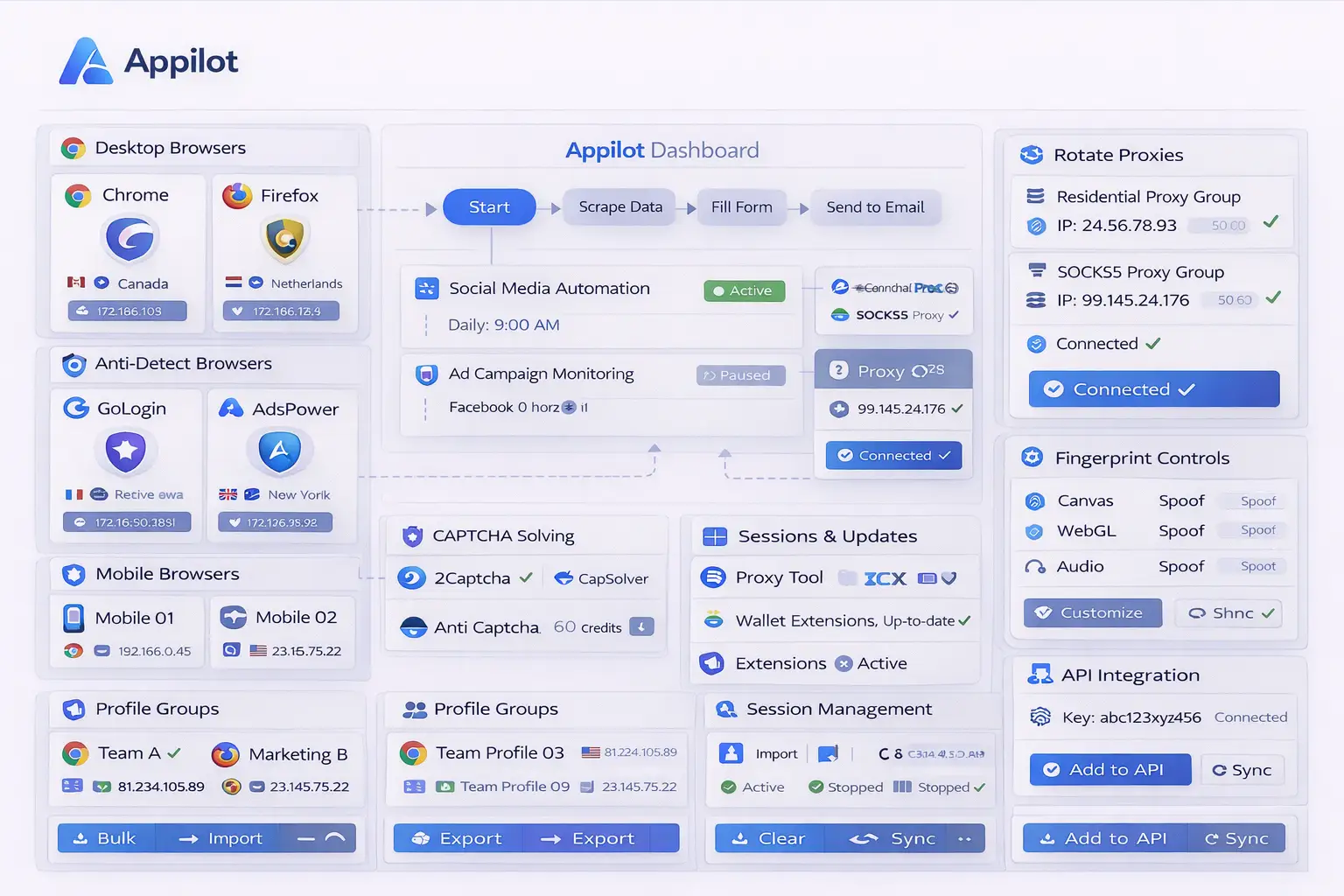
Appilot makes SOCKS5 proxy management easier because it provides one place to organize browser profiles, proxy groups, schedules, and browser assignments.
Instead of updating SOCKS5 settings separately inside every browser platform, you can create SOCKS5 proxy groups inside Appilot and connect them to specific browser profiles.
For example, you may assign one SOCKS5 proxy pool to social media browser profiles, another to affiliate marketing accounts, and another to scraping workflows. This creates stronger separation between browser groups.
Appilot can also help automate SOCKS5 rotation. Instead of keeping the same SOCKS5 proxy active for too long, you can create schedules that rotate IP addresses after a certain number of sessions or at specific times.
Another useful feature is geographic organization. SOCKS5 proxies can be grouped by country, city, or region and matched with browser profiles that use the same time zone, language, and fingerprint settings.
This creates more realistic browser sessions and reduces suspicious mismatches.
Appilot can also help reduce SOCKS5 overlap by limiting how many browser profiles can use the same proxy at one time. This creates better separation between browser sessions.
Best Practices for SOCKS5 Proxy Integration
One of the best practices is matching SOCKS5 proxy regions with browser fingerprint settings. If a browser profile is configured for the United Kingdom, the SOCKS5 proxy should also come from that region.
Another important practice is separating SOCKS5 proxy pools by workflow. Social media accounts, e-commerce stores, affiliate campaigns, scraping tasks, and crypto wallets should not all share the same proxy pool.
You should also reserve high-quality SOCKS5 residential proxies for sensitive accounts while using cheaper datacenter SOCKS5 proxies for lower-risk workflows.
It is also important to avoid assigning too many browser profiles to the same SOCKS5 proxy. Repeated IP activity can still create overlap even if browser fingerprints are different.
You should also monitor SOCKS5 proxy quality regularly because some proxies may become slower, blocked, or unstable over time.
Finally, keeping clear profile naming and proxy grouping makes larger browser operations much easier to manage.
Common Mistakes with SOCKS5 Proxies
One common mistake is assuming that SOCKS5 proxies automatically solve every browser automation problem. SOCKS5 proxies are important, but they should still be combined with browser profile separation, fingerprint management, schedule variation, and browser rotation.
Another mistake is using the same SOCKS5 proxy pool for every browser type and every account category. This creates unnecessary overlap between browser sessions.
Some users also choose the cheapest SOCKS5 proxies available without considering quality. Poor-quality proxies may still be unreliable or already flagged.
Another issue is forgetting to match browser settings with SOCKS5 location. Large mismatches between browser region settings and proxy location can make sessions look suspicious.
Finally, some users forget to review which browser profiles are sharing the same SOCKS5 proxies. Over time, this can lead to repeated IP usage and account overlap.
Frequently Asked Questions
Q1: What is the main advantage of SOCKS5 proxies over HTTP proxies?
SOCKS5 proxies can support more types of traffic, which makes them more flexible for browser automation and application traffic.
Q2: Are SOCKS5 proxies good for antidetect browsers?
Yes. SOCKS5 proxies work well with antidetect browsers because they can route browser traffic, extensions, and supporting tools through the same IP address.
Q3: Can Appilot automate SOCKS5 proxy assignments?
Yes. Appilot can help automate SOCKS5 proxy groups, schedules, browser assignments, and rotation rules.
Q4: Should every browser profile use a different SOCKS5 proxy?
Not always, but high-value accounts often benefit from dedicated proxies to reduce overlap.
Q5: Can SOCKS5 proxies be combined with residential IPs?
Yes. Many providers offer residential SOCKS5 proxies, which combine the flexibility of SOCKS5 with the trust level of residential IP addresses.
Conclusion
SOCKS5 proxies are useful for browser automation because they provide flexible traffic routing and stronger support for mixed browser workflows. They can help keep browser sessions more consistent and reduce repeated IP activity across multiple browser profiles.
Appilot makes SOCKS5 proxy management easier by allowing you to organize browser profiles, proxy groups, schedules, and browser-specific rules from one place. This creates a cleaner workflow and makes it easier to scale browser automation over time.
This blog structure follows the user's requested Appilot blog format with one centered image, paragraph-style sections, no service or product page references, and FAQ formatting preferences.