Substack Newsletter Flagged as Spam? Here’s the Fix (And How to Recover Deliverability)
You hit publish on your latest newsletter inside Substack, expecting opens, replies, and engagement, and instead you notice something strange. Open rates drop suddenly. Replies disappear. Subscribers say they never received your email, or worse, they found it buried in spam.
At first, you assume it is just a bad send. Maybe the subject line was weak, maybe timing was off. Then it happens again. And again.
Now you are dealing with a much bigger problem. Your newsletter is being flagged.
What makes this frustrating is that nothing obvious has changed. Your content is the same. Your audience is the same. Your workflow is the same. Yet your emails are no longer reaching inboxes.
You start searching for answers, but most advice is generic and outdated. “Avoid spam words,” “clean your list,” “improve engagement.” None of it explains why this suddenly started happening.
You are not alone in this. Newsletter deliverability has become significantly stricter, and platforms are constantly updating how they evaluate sender behavior. The issue is rarely a single mistake. It is usually a combination of signals that collectively trigger spam filters.
The good news is that this is fixable. Once you understand why your Substack newsletter is flagged as spam, you can recover your deliverability and prevent it from happening again.
Why Substack Newsletters Get Flagged as Spam
Most creators assume spam filtering is based on content alone, but modern systems look at patterns across multiple layers.
Sudden changes in sending behavior
If your sending frequency changes dramatically, such as going from weekly emails to daily sends, or sending multiple campaigns in a short period, it can trigger spam filters.
From the system’s perspective, this looks like unusual activity, even if your intent is legitimate.
Low engagement signals
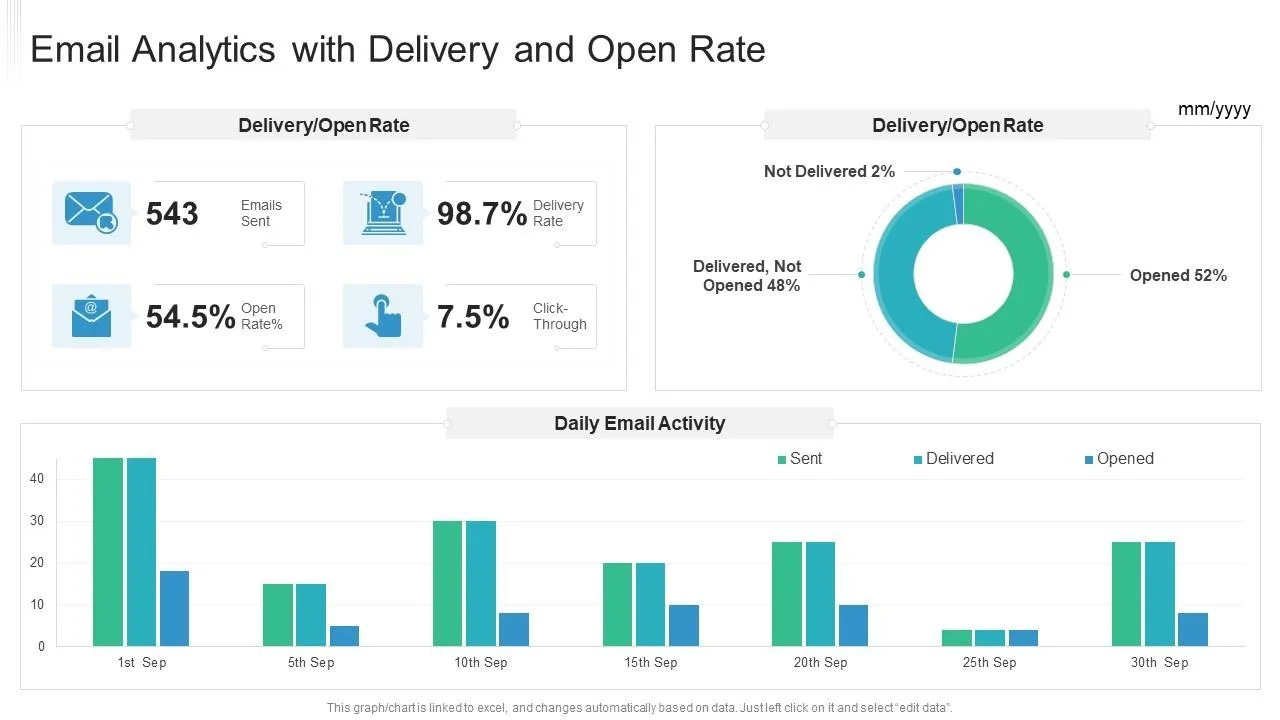
Email providers track how recipients interact with your emails. If open rates drop, links are not clicked, or emails are ignored, it signals that your content may not be relevant.
Over time, this reduces your sender reputation and increases the likelihood of being flagged.
Subscriber quality and list issues
If a portion of your subscribers never engage, bounce frequently, or mark emails as spam, it affects your overall deliverability.
Even if most of your audience is legitimate, a small percentage of low-quality subscribers can impact the entire list.
Content and formatting triggers
Certain formatting styles, excessive links, or aggressive promotional language can trigger spam filters.
It is not just about keywords anymore. It is about how the entire email is structured and how it compares to known spam patterns.
Inconsistent sending environments
If your sending environment changes frequently, such as using different devices, networks, or workflows, it can create inconsistencies that affect deliverability.
Even if Substack handles most of the infrastructure, your behavior still contributes to how your emails are evaluated.
The Hidden Cost of Ignoring Deliverability Issues
When your emails land in spam, the impact goes beyond lower open rates.
Your growth slows down because new subscribers are not receiving your content consistently. Your existing audience becomes less engaged, which further reduces your sender reputation.
Revenue is also affected. Whether you rely on subscriptions, sponsorships, or paid content, reduced visibility directly impacts your earnings.
There is also a compounding effect. The longer your emails remain flagged, the harder it becomes to recover your sender reputation.
The Complete Fix: How to Restore Your Deliverability
Fixing this problem requires addressing multiple factors at once. There is no single switch you can flip.
Step 1: Stabilize your sending pattern
Consistency is critical. Return to a predictable sending schedule and avoid sudden spikes in frequency.
If you have been sending irregularly, gradually normalize your schedule instead of making abrupt changes.
Step 2: Improve engagement signals
Focus on increasing meaningful interactions with your emails. Encourage replies, clicks, and reads.
Even small improvements in engagement can signal to email providers that your content is valuable.
Step 3: Clean your subscriber base
Identify inactive subscribers and remove or segment them. Continuing to send emails to users who never engage can harm your reputation.
This step alone can significantly improve deliverability.
Step 4: Adjust content structure
Review your email formatting. Avoid excessive links, overly promotional language, and layouts that resemble spam patterns.
Focus on clarity, readability, and value.
Step 5: Maintain a consistent environment
Ensure that your sending workflow remains stable. Avoid switching devices, networks, or processes frequently.
Consistency helps build trust with email systems over time.
Why Fixing It Once Is Not Enough
Many creators manage to improve deliverability temporarily, only to see the problem return later.
This happens because the underlying patterns are not maintained. Small inconsistencies in behavior, engagement, or content can gradually degrade your sender reputation again.
Deliverability is not a one-time fix. It is an ongoing system that needs to remain stable.
The Smarter Approach: Build a Stable Sending System
To maintain strong deliverability, your newsletter needs to operate within predictable, natural patterns over time.
This means consistent sending schedules, stable environments, and controlled engagement growth.
As your newsletter grows, maintaining this manually becomes more difficult. Increased volume introduces variability, which can trigger spam filters.
This is where structured workflows can help maintain consistency without introducing risk.
Instead of relying on inconsistent setups or switching environments, you can use systems that ensure your activity remains stable and aligned with natural user behavior.
This is the approach behind Appilot. By running workflows on real Android environments, it helps maintain consistent interaction patterns and reduces irregular signals that can affect deliverability.
The goal is not to automate aggressively, but to create a stable system that supports long-term growth.
How to Prevent Your Newsletter From Being Flagged Again
Once your deliverability improves, prevention becomes your priority.
Maintain a consistent sending schedule and avoid sudden changes in frequency.
Monitor your engagement metrics closely. Early signs of declining opens or clicks can indicate potential issues before they escalate.
Focus on building a high-quality subscriber base rather than chasing rapid growth.
Avoid reactive changes. Gradual adjustments are far less likely to trigger spam filters.
Common Mistakes That Make This Worse
One of the biggest mistakes is trying to fix deliverability by sending more emails. This often makes the problem worse by increasing negative signals.
Another mistake is ignoring engagement quality. High subscriber numbers do not help if most users are inactive.
There is also a tendency to rely on quick fixes or outdated advice, which can create more problems than they solve.
Conclusion: Deliverability Is About Consistency, Not Tricks
When your Substack newsletter is flagged as spam, it can feel like your entire system is broken.
But the issue is not random. It is the result of patterns that can be identified and corrected.
Recovery is possible, but long-term success depends on maintaining consistency across your sending behavior, content, and audience.
If you focus on stability rather than quick fixes, you can rebuild your deliverability and create a newsletter that reaches inboxes reliably.
That shift—from reacting to optimizing—is what separates unstable newsletters from those that grow consistently over time.