Understanding Third-Party Cookies and Tracking

As online tracking has evolved, third-party cookies have become one of the most widely used methods for monitoring user activity across the web. While many users are familiar with cookies in general, third-party cookies operate differently and have a much broader impact on privacy. They enable cross-site tracking, allowing companies to build detailed profiles of user behavior.
Understanding third-party cookies is important because they play a central role in digital advertising, analytics, and user identification. This guide explains how they work and how they affect browser privacy.
What Are Cookies?
Cookies are small pieces of data stored in a user’s browser by websites, where they are used to remember information such as login status, preferences, and session data. Cookies help improve user experience by allowing websites to recognize returning users and maintain continuity across sessions.
What Are Third-Party Cookies?
Third-party cookies are cookies set by a domain different from the one the user is currently visiting, where they are typically created by external services such as advertising networks, analytics providers, or embedded content platforms. Unlike first-party cookies, which are limited to a single website, third-party cookies can track users across multiple sites.
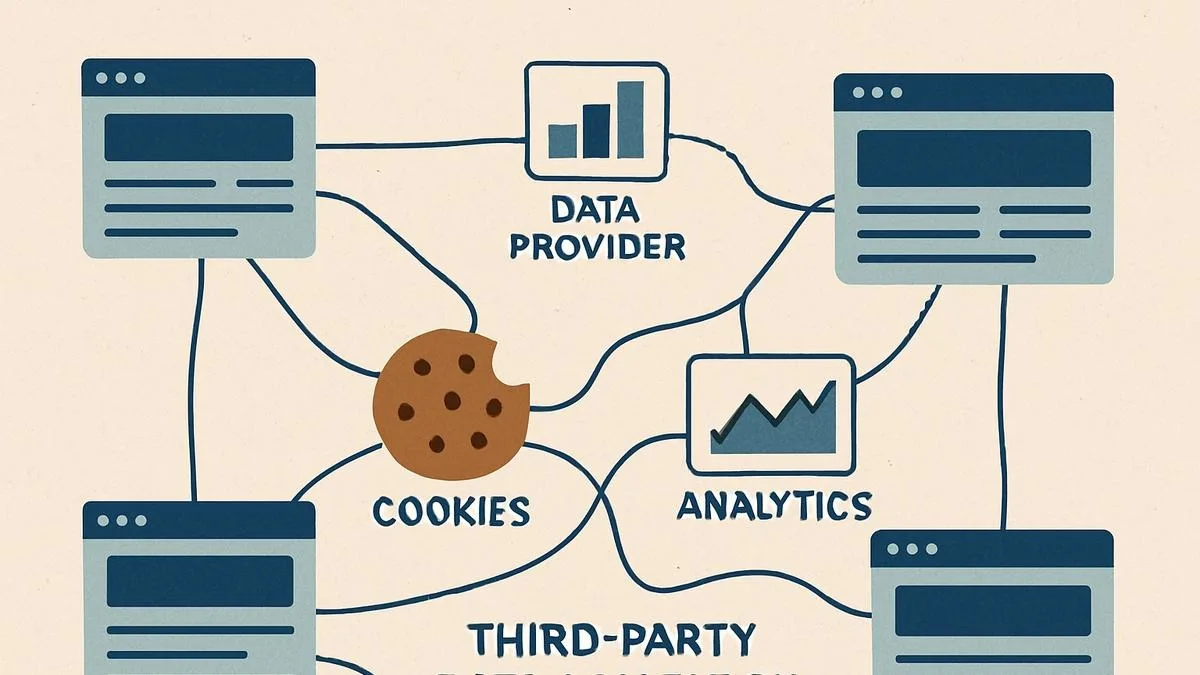
The Core Idea Behind Third-Party Tracking
The core idea behind third-party tracking is cross-site identification, where a single tracking entity can recognize a user as they move between different websites. This is achieved by storing a unique identifier in the user’s browser that is shared across all sites that load resources from the same third-party domain. This allows the tracking entity to build a comprehensive profile of user behavior.
How Third-Party Cookies Work
Third-party cookies work by embedding external resources, such as ads or scripts, into a webpage, where these resources come from a third-party domain. When the browser loads these resources, the third party can set or read cookies associated with its domain, allowing it to recognize the user across different websites.
Why Third-Party Cookies Are Used
Third-party cookies are primarily used for advertising and analytics, where they enable personalized ads, audience targeting, and performance tracking. By understanding user behavior across multiple sites, advertisers can deliver more relevant content and measure the effectiveness of campaigns. They are also used for tracking conversions and user journeys.
Third-Party Cookies vs First-Party Cookies
First-party cookies are created by the website the user is directly visiting and are used for site-specific functionality, while third-party cookies are created by external domains and are used for cross-site tracking. First-party cookies are generally considered less intrusive, while third-party cookies raise more privacy concerns due to their broader scope.
Impact on User Privacy
Third-party cookies have significant implications for user privacy because they enable continuous tracking across multiple websites, where this can lead to detailed profiling of user interests, habits, and behavior. Many users are unaware of how extensively they are tracked, which has led to increased scrutiny and regulatory action.
Browser Restrictions and Changes
Modern browsers have started restricting or blocking third-party cookies to improve privacy, where features such as tracking prevention and cookie blocking limit their effectiveness. These changes are reshaping the online ecosystem, forcing companies to adopt alternative tracking methods such as first-party data and fingerprinting.
Limitations of Third-Party Cookies
Despite their widespread use, third-party cookies have limitations because they can be blocked or deleted by users, where this reduces their reliability for long-term tracking. Additionally, increasing privacy regulations and browser restrictions are making them less effective over time. This has led to a shift toward more advanced tracking techniques.
Third-Party Cookies vs Fingerprinting
While third-party cookies rely on stored identifiers, fingerprinting uses browser and device characteristics to identify users without storing data on their device. Fingerprinting is harder to block but raises similar privacy concerns. As third-party cookies decline, fingerprinting is becoming more prominent.
Third-Party Cookies vs Real-Device Environments
A key distinction in modern tracking and detection is the difference between standard browsing environments and modified setups, where heavy restrictions on cookies can sometimes create unusual patterns that stand out. Real-device environments operate with typical browser configurations where cookie behavior aligns with normal usage, and tools like Appilot follow this approach by running automation on real Android devices, ensuring that tracking signals and behavior remain consistent with real-world conditions. This reduces anomalies while maintaining functionality.
When Third-Party Cookies Matter Most
Third-party cookies are most relevant in advertising, analytics, and cross-site tracking scenarios, where understanding user behavior across multiple websites is important. In these contexts, they provide valuable insights but also raise privacy concerns.
Frequently Asked Questions
Q: What are third-party cookies?
They are cookies set by domains other than the one you are visiting.
Q: How do they track users?
By using a shared identifier across multiple websites.
Q: Why are they controversial?
Because they enable cross-site tracking and profiling.
Q: Are they being phased out?
Yes, many browsers are restricting them.
Q: What replaces them?
Alternatives include first-party data and fingerprinting.
Q: How do real-device solutions compare?
Real-device solutions like Appilot maintain natural cookie behavior, reducing anomalies while preserving functionality.
Key Takeaways
Third-party cookies are a powerful tracking mechanism that allows entities to monitor user activity across multiple websites by storing shared identifiers. While they are widely used for advertising and analytics, they have significant privacy implications and are increasingly being restricted by modern browsers. Understanding how they work is essential for navigating the evolving landscape of online tracking and privacy.